

The Art of Social Media Analytics, Part 2

Summer is the “off-season” for many of us in the arts world. Why not take this time to refresh your social media strategy?

This is part 2 of Tech in the Art’s 3-part series on social media analytics tools. Check out Part 1.

This part of our series is based on a simple question: As of today, what are your options for social media tracking? Let's take a look at some popular analytics tools and how to evaluate them given your organization’s more specific goals.

The Next Level

So let’s say you help determine social media strategy for your organization. If you’re like many organizations, you have Google Analytics, you look at your Weekly Facebook Update, you respond to comments on Facebook and/or Twitter. Your workload is, for the most part, tenable, and your social media presence is flourishing.

First of all, great job!

How can you take it to the next level without spending an inordinate amount of time or money? Get serious about analyzing your efforts and seeing what’s working. Using an analytics tool, you can begin tracking your efforts formally over time, just as you probably have a formalized system of tracking ticket revenue through sales reports. Some analytics tools offer a sort of moment-in-time snapshot. Others track over time as well.

So, as you endeavor to improve your tracking, which tools are for you? Here are a few questions to ask yourself:

1. Exactly how much time per week or month am I able/willing to devote to researching our followers/fans and the analysis of our data?

2. What am I interested in knowing about my social media presence? Examples include:

a) Who are my fans? (donors, members, subscribers, employees, artists, etc)

b) How much of an impact am I having? (Am I reaching key influencers? How far are my posts being shared?)

c) How much of a return I am seeing on my investment of time or money?

4. How much money (if any) am I or my department willing to spend and what do we expect for that money? (See Question 2)

5. On a related note, how much buy-in will you get from senior management/the board? Will data provided by these analytics aid your case in advocating for future social media campaigns?

6. Who will be maintaining a regular schedule of analyzing the data? Yourself? An intern? Someone else?

There are hundreds of tools out on the market, and more emerging everyday. Since there is no way for this list to be comprehensive, here is a list of our favorites at Technology in the Arts. If you know of other useful tools for tracking social media, please comment on this post.

Disclaimer: For the sake of limiting the project in some way, we have included only 3rd party social media sites—that is, mainstream social media sites that are set up for external relations with the general public, like Facebook, YouTube, Twitter and the like. We will not cover basic brand management tools or web analytics tools like Google Alerts, except that in terms of tracking conversions from social media.

Free tools

bit.ly used in conjunction with Google URL Builder/Google Analytics

If you’re already using Google Analytics for your web analytics, one of the smartest things that you can do is track click-thrus from social media to your website. Here at Technology in the Arts, we do this through Google URL Builder and bit.ly. Earlier this year, Tara gave us an in-depth look at Google URL Builder. Basically Google URL Builder equips you with the ability to tag any URL you link to in your social media posts. You specify the campaign, medium (Twitter, Facebook, feed, etc) and a few other details about the link and, voila!, you can track click-thrus from your social media platforms.

Using Bit.ly gives you the added bonus of shortening the links and creating QR codes as well as tracking of any link, even those you’re not tracking through Google, with registration (free).
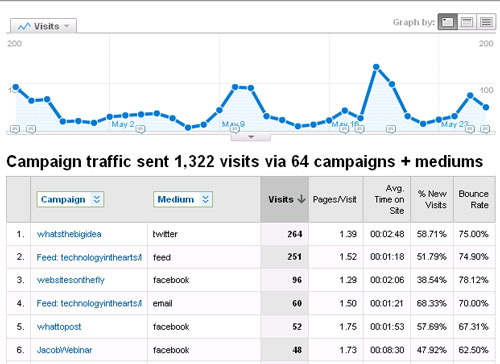
googleanalytics

Think up

This program stores all your posts, tweets, replies, retweets, friends, followers and links on social networks like Twitter and Facebook in a database that you can easily search, allowing you to analyze and export the data.

What’s unique about this is that it puts the data directly in your hands rather than giving you the results of the analysis. This means you can slice and dice any way you like, beyond any restrictions the program might impose upon you.

Flowtown

“If social and email had a baby, it would be called Flowtown.”

- Dylan Boyd, Vice President, eROI

When I first started researching social media analytics, I held a focus group with social media experts, one of which was Devon Smith of the 24 Usable Hours blog. She suggested Flowtown, which she reviewed in detail last fall.

The concept is that it helps you manage your email list in the context of social media. Flowtown is currently renovating the tool; however, you can sign up to be notified when they are accepting new users.
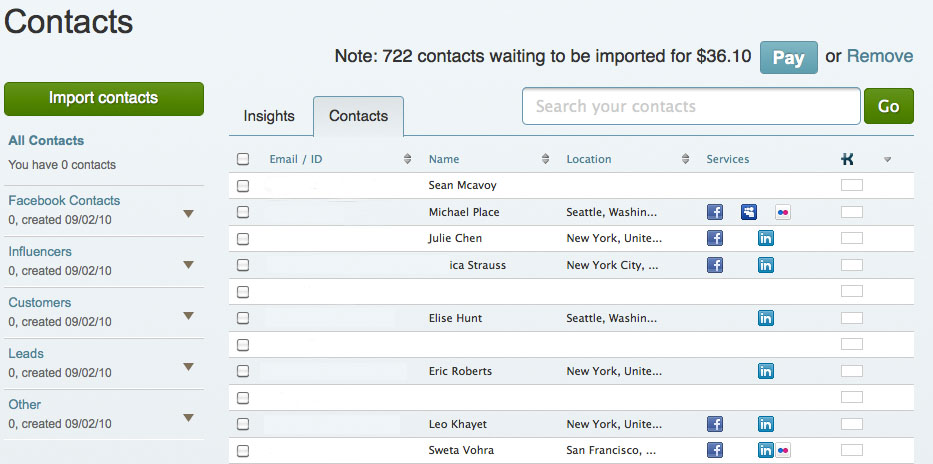
Flowtown-Import-Contacts2

Social Mention

Social Mention analyzes interaction from across the social media universe--Not only Facebook and Twitter, but other social media sites like Digg, StumbleUpon, YouTube. It gives you a snapshot of how your social media presences are faring. One of my favorite features is the focus on sentiment. A common feature for paid tools, you get information on how your brand is perceived—in a positive, negative or neutral way—for free.

Klout.com

Klout is one of the most comprehensive systems for social media analysis. The tools help you track your presence over time, measuring things like influencers, reach, the probability for the message to be amplified (shared), and more, all of which contribute to an all-around Klout score. Another useful feature is the ability to compare yourself with other organizations.

TweetEffect.com

Tweeteffect is helpful in finding out which tweets are most “effective”, specifically by finding out which tweets cause you to lose and gain followers.
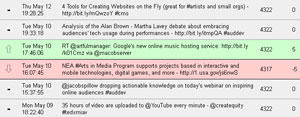
tweeteffect

TweetPsych.com

Tweetpsych is a tool which tells you simply who you are to the people who follow you. The platform describes itself as creating a psychological profile of the twitter account, which is done by comparing how often you tweet about a particular topic in comparison to the “average” Twitter user. For example, techinthearts tweets about work, media, and learning more than the average Twitter user, and about the past, anxiety, and self-referencing tweet less than the average user.
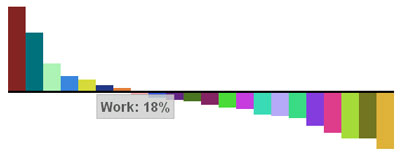
tweetpsychFacebook Analytics

The only consistently good free option for tracking Facebook is the Facebook analytics tools.  The tools are a lot better than they used to be, especially with the recent upgrades that let you see how many impressions each of the items you post on the wall receive from your fans. However, Facebook tools don’t have the same capabilities as the Twitter tools to give an accurate picture of who is being reached.

Paid tools

Radian6 ($500/mo)

Radian6's philosophy is pretty simple: Listen, Measure, and Engage. And by "listen," doesn’t just track Facebook and Twitter—they monitor across blogs, forums, news, and more. You can track topics by keywords, basically listening to the conversation about why your customers come to you in the first place rather than just monitoring your own brand name. So, monitoring internet chat about string quartets and classical music if you are a Chamber Music Society.

Radian6 offers tons of ways to measure all the data you've "listened" to. It allows you to slice and dice data of social media on par with Google analytics and more, such as identifying key influencers and tracking the lifecycle of buzz around your campaign or brand. Another thing they measure is Share of Conversation: how often is your brand (say, MoMA) mentioned in the conversation about the general topic (arts in New York)?

Finally, this tool facilitates engagement with customers with integrated workflow, alerts, and sentiment monitoring. You can assign different people to be the Community Managers for different topics or audiences who respond to those constituents personally. Radian 6 also advocates contributing to the conversation by contributing white papers or other research to the topic.

Coremetrics (price varies)
cop-thumb-img-new

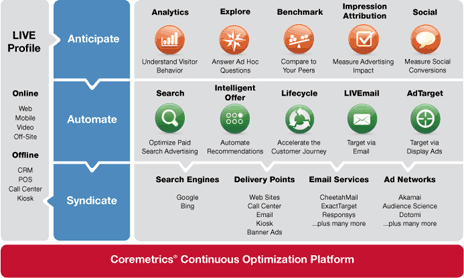
If Radian6 looks at the big picture, Coremetrics (IBM's answer to analytics software) drills down to the individual customer level. Its main strength is that it is a comprehensive marketing system, integrating different channels and even offline information to convert and retain customers online. They also have a three-step philosophy: anticipate what your customers want based on cross-channel historical data, automate an immediate response to customer actions, and syndicate personalized content to the customer via the right channel at the right time.

Coremetrics puts all of your data--social media, CRM database, etc--into one application and measures it with the same metrics. This allows you to segment your customer base according to any and as many characteristics as you want to create the ultimate personalized experience.

BONUS: Coremetrics publishes informative white papers on analytics that you can download in exchange for an email address.

ComScore (price varies)

ComScore is another "360-degree" tool. Like Coremetrics it unites web analytics and social media data. The difference is that ComScore uses a consumer panel of approximately 2 million consumers worldwide to measure people's behavior in the digital environment. ComScore's Social Analytix tool is powered by Radian6, but when combined with ComScore's other tools, you can integrate social media measurement with other analytics tools. ComScore’s analytics toolbox is vast and covers a multitude of different needs, including ad effectiveness, search marketing, mobile, and cross-media measurement.

Twitalyzer ($30/mo)

One of my favorite free tools is now a paid tool, but it is still affordable to many non-profits. At only $30 a month, Twitalyzer not only tells you what is happening with your Twitter account in terms of reach, impact, and the other metrics we’re familiar seeing in association with social media, but it give you concrete recommendations on how to improve your outcomes based on more successful Twitter users. For example, I did a social media analysis for a client last year and Twitalyzer told me that:

If @"ClientName" is interested in having a more measurable impact in Twitter we recommend the following:

●     It is moderately important that you find more followers ●     It is moderately important that you find a few more people to follow yourself ●     It is moderately important that you engage others in conversation more frequently ●     It is very important that you write more frequently

Few tools on the market actually connect the dots by analyzing data and then telling you what you should be doing. If you can afford it, it's a good tool for those starting out as well as those re-orienting their social media strategy.

Next time in Part 3: Basing management decisions on the data you find with these tools (in case you aren't using Twitalyzer), including when it is worth it to pay for an analytics tool and examples from the Smithsonian on the concrete actions their staff has taken based on social media data.

Using Google URL Builder to Track Your Website's Traffic [mini-nar]

Mininar
Mini-nar

Back in November, Tara took a look at Google URL Builder.  Given that some people learn better by watching someone else do it first, we decided that this would be a great topic for a mini-nar.

Here's David to walk you through how to use Google URL Builder to track the traffic being driven to your site through promotional campaigns, social media, e-mail marketing, and more.

Mini-nar - Google URL Builder from Technology in the Arts on Vimeo.

If you have topics that you'd like to see us cover in upcoming mini-nars, post a comment below or send us a message to let us know what you would like us to cover.

Social Media Spotlight: 2amtheatre uses SCVNGR

Mobile gaming is a hot trend with a lot of potential for arts organizations. 2amt's David Loehr experimented with the location-based game SCVNGR at this year's Humana Festival of New American Plays.  Below, I interview him about the logistics of setting it up, the impact it had on the audience, and how games like this can be used as an extension of the art.

What was the 2amt Challenge at this year's Humana Festival of New American Plays?

I sprang it on Actor’s Theater without warning. I just thought, “Hey, we can do this, let’s see if there’s any reaction.” I set it up about 48 hours before I went to the festival- it was that instantaneous. I literally went to SCVNGR.com and set up a very simple set of challenges. You can do up to five things for free on a business account, and one of them counts as your overall trek (so I could only do four actual challenges).  Of course I wanted them threaded together as a trek.

21c-museum-hotel-4

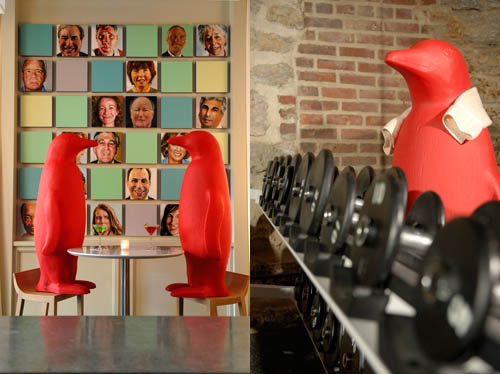
Red Penguins at the 21C Museum Hotel

One of them was to count how many human figures there were on this year’s Humana Festival poster. Another one was to come and find me and take a picture with me to say “Hi! You’re the guy from 2amtheatre, OK”. We had already partnered with Broadcastr.com to celebrate World Theater Day earlier in March. So I made one of the challenges to get the Broadcastr app on your phone and then record a location-based story, saying, “Hi, I’m so-and-so from this theater, and here’s why I’m here, and  what I’m looking for, and what we do at our theater,” just to introduce yourself. And then the last one (this was sort of like the bonus challenge) was to go down Main Street to go to the 21C Museum Hotel and get a picture with one of their giant red penguins. One of the museum’s icons is this series of red penguins, four-foot tall, plastic molded penguins, all identical, standing all around the building and all over the hotel and the restaurant. So it was a lot of fun! And it was interesting to see what would happen.

How did festival goers find out about the challenge, and how were they able to participate in it?

We put a post on the 2amt website explaining what was going on that weekend, what you could do, and how to take part. We didn’t give away exactly what the challenges were, but we said “Get the SCVNGR app, and the Broadcastr app, you’ll want to use them to do these.” Every now and then I would tweet that as well, to say, “Hey, I am already here, and here’s the challenge, and here’s the link to the post.” We might have done a Facebook post, too, but 90% of the promotion was on Twitter, because I was doing it on the fly on my iPhone as I went. And we did have a couple of people participate. It wasn’t huge, because it maybe wasn’t the mobile app crowd that weekend. It was the weekend they call “Professionals Weekend,” so it was all artistic directors, marketing directors, journalists, critics, and all that.

But, as I talked with these people, I’d be talking to an artistic director and someone would just come up to us and say, “Wait! You’re the guy! I have to take your picture!” And then they’d do it, and they’d go away, and the artistic director would look and me and go, “What the hell just happened?” Then I would explain, “Well, we did this game, and it’s this thing,” etc. And they went, “Wow, that’s really cool . . . How do you do that? How much did it cost?”  I said, “Well, if I’m doing it, it’s free.” “Could we do that at our theater?” And I’d reply, “You could!” So it was a lot of fun.

What inspired you to put together a location-based game on mobile devices for a theatre festival?

Curiosity, really. At 2amt we’ve been talking about doing these kinds of things for a long time. This just seemed like a great opportunity because instead of simply one theater company doing a show, here was a festival that was bringing people from theater companies around the country. So we could show this off to all of them at once, and then say, “Yes, you can do it too.” We’ve been talking about using SCVNGR and/or Foursquare to build games around places, and using apps like Layar to do augmented reality, and using all of them as additional types of storytelling. [Note: for more info on Layar, check out Tom’s articles here and here] It’s more than just necessarily being a game. You can make a game or an augmented reality piece that ties in to a specific play or production. I just did a very simple game, I wasn’t tying it to any specific play in the Festival, but you could. One of the plays actually this year was set partly in Louisville (“Bob” by Peter Sinn Nachtrieb), so it would have been easy to say, “Hey, walk two blocks over to the White Castle, get something and do something there, because that’s where our hero was born.” Mainly it was just this was a great opportunity to show mobile gaming off to a wide audience of people who would be interested in doing it elsewhere.

The 2amt Challenge utilizes two online tools - SCVNGR and Broadcastr.  How did you first learn about these tools and what inspired you to use them in conjunction with one another?

Broadcastr App
Broadcastr App

Well, again, that was part of the curiosity. Travis Bedard down in Austin Texas (who is a large part of 2amt behind the scenes) had found out about Broadcastr right off the bat. He signed up on the first day for the Beta testing. [Check out Tom’s interview with Broadcastr co-founder Scott Lindenbaum] He sent me an email that said, “You need to go look at this.” And I said it sounds like audio boom, it sounds like this and that. He said, no, this one has no friction, you just record it. You record it, and it’s there, and that’s it. You don’t have to go through layers and things to set it up, and do this and do that, it’s just boom, you’ve got your location-based story. And I went and looked at it and went, ooh, I like that. So I was in on that from the beginning. Then I think it might have been Devon Smith who pointed us to SCVNGR. And looking into that, just the idea of the game layer over the world, immediately we saw the potential for storytelling. So then it was just a matter of again, finding the right time to do it and the right situation to do it in.

Then, while I was setting up the challenge I thought, “Well, why don’t we tie these together?” Because I would like to know who took part, I would like to know people. How easy is it, instead of trying to type a thing out or talk in person, here’s a way to introduce yourself to everybody all at once, with a Broadcastr story. Looking at a lot of these technologies, there’s so much potential for using them and connecting them all together. As long as you’ve already got all these different apps on your phone, why not? Why not put them together? And it just makes it more fun.

How much time & effort did it take to come up with the challenges and set them up in SCVNGR?

It took maybe about half an hour of sitting there going, well what would I do, and how is this challenge different from that one. Obviously two of them were picture-based challenges and then one of them was go look at the poster and count people- these aren’t heavy ideas.

Setting it up was really easy. The SCVNGR system is so well thought-out, and if you have any questions, it explains what you’re stuck in very simply. So once I had set up the first part, then it was just like, oh, I repeat this, but then I go oh, this is an action challenge, this is a photo challenge. And then it was just typing the descriptions.

So really, it took no time at all. And that was the other thing that would amaze people, it’s not just that we did it in the 48 hours ahead of time; it’s that it was just “Oh! Well let’s do it!” And people would ask, “But how much thought did you put into it, how many people did you have to talk to?“  I just did it, I didn’t need to go through a board.  I just said, eh, there’s a challenge, boom. Go. It was amazingly simple.

What kind of response did you get at the Festival? Who won? Who did you buy the beer for?

Well, I wound up buying a drink for everybody who took part. We had about twelve people altogether, which considering part of that weekend is that it was a marathon sprint, I mean you’re going from one show to the next, to the next mingling, to the next cocktail party, to the awards ceremony, to the after party, it’s just this continuous stream. Not a lot of the people had gotten a chance to read about it until after the fact. But, we had a lot of people there taking part, only one of whom I knew beforehand, but it was funny because I didn’t know she read the website. So yeah, it was a good response for something so instantaneous and done without warning. It’s something that definitely now we’ve got almost a year to try and plan something bigger for next year, just to see what happens. But now everybody who goes is gonna know about it.

Did the 2amt Challenge have an impact on participants' engagement with the Festival?

I think so. Certainly with most of the people that actually came and took pictures with me or started conversations with me were really engaged with what was going on. They wanted to talk more about how the Challenge would work with a festival and then once it got beyond that, it became, “So what do you think of the Festival this year?” It really sparked a lot of conversation that I wouldn’t necessarily have had. There were specific people that I was hoping to meet and talk with, but this was a whole new group of people that I didn’t even know their names beforehand. It was a great icebreaker.

SCVNGR offers analytics for the challenges that are created in the system. Did you find their analytics to be useful?

We didn’t use them for this, because it was just so quick, and I knew that I was going to be working off my iPhone for the whole weekend anyway, and also I figured that it wasn’t going to have a huge response. But knowing that the analytics were there, it was sort of like baby steps for us, too, just to see how hard it might be.  I would absolutely use the analytics for the next challenge.

What lessons did you learn by implementing the 2amt Challenge?  What would you do differently next time?

Well, I learned that you need to get the word out a lot earlier, and to try and be as creative as possible in a challenge. These were very simple challenges. I knew because of that marathon sprint atmosphere that I really should keep them simple. Not “go down to the bar, and get a napkin, and fold it into a little origami swan.” People would be sitting there saying “Talk to me! I’m having a theater conversation with you!” and the other person says “I have to do the challenge, it’s a swan, damnit!” So, keep it simple.

I guess the lesson there would be, know where you’re going to be doing this and what the atmosphere is going to be like. If it’s a more general event, or if it builds out over time surrounding a production, then people who take part will have time to do more baroque challenges, like creating a little flashmob of dancers in the street, or doing origami or things like that. If it is a really fast-paced two day event where there’s not time, keep it simple. Know your event, know your audience, know what kind of challenges you can get away with.

I knew this was going to be an audience that wasn’t necessarily mobile-phone crazy, like we are, so I wanted to keep it simple for that reason, too. It was enough to say, go download SCNVNGR, and then go download Broadcastr.

If you partner with your own theater sponsors, see what you can do with them. See if there’s something that they would suggest. Like if I’m a theater company and I want to send my customers in this game to their bookstore, what can they do in the bookstore that is unique to that spot? What’s going to make them want to go to the bookstore, aside from just completing all of the tasks in this challenge? If you can partner up with several things like that, and create a larger SCVNGR hunt or game around your event, try to give them a reason to go through those doors, beyond just, “Hey, take a picture at Starbucks!”

Do you think this is something that will encourage users to engage with an arts org on a one-time or on a continuing basis?

I would hope that it would be a continuing thing, and that it could evolve. I built in that 21C Hotel part because I know that they are a regular partner of Actors Theater. They actually did one of the Humana shows at the museum last year called “Heist” where you follow people from room to room, it’s all about an art heist. It’s a show that’s got a continuing life and interactive component. As we build more productions and events like that, we can use this technology to let the audience engage, and to engage around the show instead of necessarily during the show.

There are a lot of people who talk about being able to live tweet during the play. That’s fine, I’m not saying don’t do it, but it doesn’t really fit most plays. If I’m sitting there tweeting, I’m going to miss something on the stage, or I’m going to get distracted by whatever else is in my tweet stream. It’s kind of crazy to think that they’re only going to tweet about the show while they have their phone on. If you’ve already said it’s ok to be distracted, they’ll be distracted.

Also, it seems like everything you see tweeted during live shows, could have been said afterwards. I haven’t seen anything that’s really vital to that moment. If you build a show that has that as a component, like the characters are tweeting back and forth during the show, then it makes a little more sense.

So using these kind of technologies, we can create that interactivity around the show and around the event, and then hopefully, that builds more of a sense of, I’m going to come to the next show, because this one was so much fun doing all this stuff. It was more than just sitting down in a seat and staring for two hours.

When we’ve done that kind of interactive thing, audiences have responded, and they’ve wanted to do more.  Even the town I’m in is a tiny little river town in southern Indiana—this is not a hotbed of the arts or technology. Yet in 2008, we had characters tweeting from the show we were doing. Maybe 30 people in our town were even on Twitter, and almost all of them immediately were like “What is this? What’s going on? Oh my god!” And we sold out the show, and everyone wanted to know what happened after the show, and tweeting after that. It shows that even in this little rural town, give the audience something more to do and they’ll do it. They want to do it.

How do you think mobile gaming can ultimately support an org's bottom line?

Depending on how ornate you make this challenges or events, you can do five things for free on SCVNGR. Foursquare, I think, you can do anything for free. You can design a game that just happens to be played with Foursquare check-ins. It doesn’t cost a lot. You can get a larger account at SCVNGR, which does cost money, but work with your sponsors to help support that instead of paying it out of your own account. A sponsor will take a chance on buying a program ad, or sponsoring something specific, but you can go to them and say, here’s an affordable thing that will make people physically walk in to your building. A program ad isn’t going to guarantee that. But if they’re going to go play a game, they’re going to go play a game. You can sell it to them that way—this is people walking through your door. The more sponsors you can build in, the more places you can add to your game, the more support you can get to pay for it.

Something interesting that I hear you saying is that mobile gaming not just a marketing thing- it’s an extension of the artistic product.

That’s the beauty of this, and it’s the key to doing it well. Because nowadays people are so hip to being marketed at. Something like this, especially if you can tie it in to the story of whatever play it is, there’s just so much possibility. With Layar, about a year and a half ago, Travis Bedard and I were walking around Washington, DC at an Arena Stage thing talking about this app, and about how it can have video and audio and text, whatever. And we looked at each other and said, “You can tell a story that way. . . you can have an entire play made up of go to this building and the next . . . you can do the whole play and nobody has to be there! It can just be there forever.”

Because I’m a playwright, I see everything through those eyes, and so when I see Layar, or SCVNGR, I’m thinking of how you can tell a story through that.

I can see that something like this has the potential to become this huge thing: like, we need to meet with these people and these people- it has the potential to become a lot more complicated than it is.

That’s the thing to stress, is that you can’t go crazy with it. You have to keep it as simple and on task as possible.

Part of the reason this game started a conversation is because one of the tasks was to meet up with you.

It’s really interesting to watch people who are scared of [Web 2.0], or don’t know how to use it. I admit, I’m a power user.  But it’s a conversation, and you have to engage.  If you can talk face to face, you can do this.

Twitter as a Performance Art Platform

Creative Time has commissioned a series of Twitter performances that expands the definition of performance art. These pieces, the first commissioned works of their kind, will explore the intersection of real places and in-person interactions with virtual spaces and digital conversations.

The Art of Social Media Analytics, Part 1

Summer is the “off-season” for many of us in the arts world. Why not take this time to refresh your social media strategy? This is part 1 of our three-part series on social media analytics tools.

Brain1
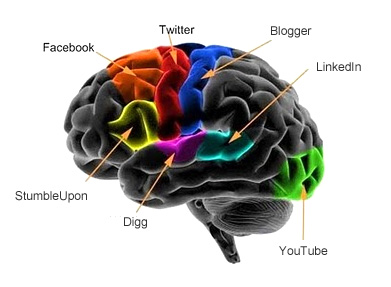
This is your brain on social media. Image from Your Social Move.

Social media marketing is an artistic endeavor as well as a scientific one. We use the right side of our brains to create the perfect message that will engage our audience and the left brain to crunch numbers on views, comments, etc. We know instinctively how to talk to our audiences, but we don’t always know how they are reacting to that message beyond a peripheral “feel” of the importance and sentiment behind the comment or action. There is often not an obvious way to categorize or quantify reactions to gain insights into your audience’s thoughts and feelings and to chart your own impact.

With the economic situation as it is right now, nonprofit employees are under more pressure than ever maximize their productivity and capacity. With technology, and social media in particular, as the most nebulous, mysterious, and constantly shifting elements of an organizations’ marketing/PR operation, it can be frustrating to track social media interactions and to gain resources from management for social media. Often initiatives face “death by delay” or end up being based on assumptions rather than data. At the Center for Arts Management and Technology, it’s one of the issues we talk about most often amongst ourselves and to clients.

It’s not just the arts, though.

In the non-profit arts world, we have the tendency to think that we are insulated and that our problems are due to a lack of time or resources. Some of these questions are ones that the social media field as a whole is trying to answer. While in the Masters of Arts Management program, I participated in a Social Media Analytics class where we had real-life clients. My team was working on the account of a major sportswear manufacturer. At first I thought that the questions that this company would have about social media would be very different than the ones that I worked on at the Center for Arts Management and Technology for our mostly non-profit arts clients. However, the more we worked with our client, the more similarities I noticed in the questions they asked about ROI, tracking, and analysis of social media initiatives.

Throughout the research that I’ve done and the conversations that I’ve had, I’ve heard social media right now described it as “the wild west”. Like web analytics was in its infancy, we are just now building the hallmarks and benchmarks for social media analytics. It’s an exciting time, and an extremely fast-paced one. If you have been keeping up with how businesses are using social media for the last five years or so, you’ve seen Facebook dominate MySpace, then Twitter edge its way in. As we moved to mobile, a slew of geo-location platforms arrived on the scene and now we’re trending toward game-based platforms.

As much as social media trends change, it is imperative to have a social media strategy, not just to spend your marketing dollars most effectively, but also to get to know your audience better. How do you get a social media strategy? You need information first. That’s where analytics come in. There is a wealth of information about your patrons hidden in their interactions on social media—like your own on-going focus group. But (A) how do you get to that information and (B) how do you draw conclusions from it?

A. As of today, what are your options for social media tracking? There are thousands of analytics tools out there and more being developed every day. Nonprofit arts organizations are faced with a dual bottom line: to serve the community and to create, present or preserve great art. Which tools are most useful to a nonprofit arts organization in gauging how they meeting the dual bottom line? In Part 2 of this series, we’ll take a look at some popular analytics tools and how to evaluate the tools out there given your organization’s more specific goals.

B. How can you use analytics data to make management decisions? There are many ways to slice and dice the data you might get from those tools. What are some strategies for using the current tools available? How can you make a confident decision about what is essentially a moving target? Given the tools and tactics in the above questions, when is it worth it to pay for analytic tools? In Part 3, we’ll address the problem of structuring your social media tracking efforts to find information relevant to your day-to-day decisions.

4 Tools for Creating Websites on the Fly

websiteRecently, I’ve been hearing about website creation platforms for artists, musicians, and designers. (They are also great for student portfolios!) These days, many people are starting to focus their efforts on mobile apps or websites, but still more may lack a functional, easy-to-use website in the first place or need a secondary site, like a company intranet or a micro-site for an exhibit or show. I’ve found four that are worth checking out if you’ve been thinking about creating a website. The interfaces for these website creation platforms are very easy to use, with no coding required. If you have all your copy ready and your songs or artwork prepped, you can create a professional-looking website in about an hour, hosted by the site. Many of them are cheap or even free. Here’s a four tools for creating a website on the fly: Wix.com: Individual artists and small organizations
One of the easiest, cheapest (free!) options I’ve seen out there is Wix.com. It produces great looking websites, with hundreds of free templates. Best for individuals or small groups, there are lots of options for photographers, designers, or artists here, and I also saw a few modeling/acting pages and a musician page with a music player for musicians or ensembles.

Wix is really good for people who just need something simple and don’t care too much about the site being particularly flexible. For example, I ran into problems posting lengthy text (like a full resume) in the page of the website, because the page sizes are set. Of course, you always have the option to link to an outside page or a PDF if this happens, but it’s important to be aware of the limitations. For this reason, I would recommend this tool to individual artists/ensembles or smaller organizations who just need something simple that they don’t necessarily want to deal with updating very often.

Another disadvantage is that Wix uses Flash, which means that the site cannot be viewed on iPhone, but for sites that will likely be viewed only on desktop/laptop computers or Android phones, Wix is fast, easy, and free.

Google Sites: A helpful collaboration tool

Google Sites (formerly Google Pages) also has some good options for individual artists, but what really impressed me was the templates built specifically for business collaboration. These sites may be useful for arts managers who are working on projects with outside companies or production managers who are trying to coordinate a design team who are working in 5 different cities in the initial planning phases of a production. Google also emphasizes that many businesses use Google Sites for company intranets or wikis.

There are a number of versatile templates, which you can play around with here.

Maestro WebBuilder: Classical Music Organizations, Ensembles and Artists

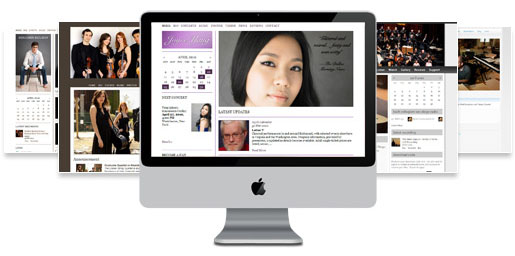
webbuilderFor those of you who are still hung up on the Flash-iPhone compatibility issue, I have two tools for you: InstantEncore’s Maestro WebBuilder and WordPress. Maestro WebBuilder is part of the InstantEncore suite of tools for classical music organizations and musical artists who primarily play classical music. (We had a fascinating interview with the COO of InstantEncore a few months ago--check it out.)

What’s great about Maestro WebBuilder is that, by building your website through InstantEncore, you are already set up to pull all the information into a mobile website or app. Maestro WebBuilder is a paid tool, but it's cheap, and it gives you the flexibility to easily convert content on your site into a mobile platform and makes it extremely easy to streamline all your social media presences into one system.

Wordpress: A tool for nearly everyone and everything

When you think of WordPress, you probably automatically think “blog”, but you can also build a nice-looking and functional website on the platform. Of course, it is the ideal choice if you want to fold a blog into your site. For example, the Technology in the Arts blog is run on WordPress. The front page is the most recent blog articles, of course, but we also have a number of “static” pages or pages that change less frequently with (shameless plug) resources for the arts field, publications we’ve produced, and webinars focused on ways that arts managers can use technology to meet their mission and goals.

With WordPress, there are thousands of templates out there, some of which are cheap and some of which are free. You can find a very professional-looking one without spending a lot of money. Ceci Dadisman of the Operagasm blog is a big advocate of WordPress as a way for arts organizations to save money.

It's also a good option if you are not a web expert, but want to/are willing to learn the basics of content management and HTML. It's easy to set up and maintain a basic site, but there's room to grow if you decide to get fancy. There are the thousands of WordPress plug-ins out there that you can download to jazz it up. For example, look at the top of this post. See the box with the number of times this article has been tweeted? That’s a WordPress plug-in! Scroll down to the comments section. Disqus pulls in comments from Twitter and Facebook. That’s also a WordPress plug-in! You have lots of options to connect your site with the greater community.

Upcoming Webinar – Inspiring Online Audiences: Jacob's Pillow Dance Interactive

The word "engage" gets thrown around a lot. But what does it really mean? Our upcoming webinar takes a look at how arts organizations can inspire their audiences through online platforms by focusing on a case study from Jacob's Pillow, which recently launched their own online exhibit.

Inspiring Online Audiences: Jacob's Pillow Dance Interactive May 9, 2011 2pm-3:30pm Eastern Register today ($25)

How can online engagement with arts audiences be meaningful, inspiring, and ultimately worth all the effort we put into the online space? Jacob's Pillow Dance Festival presents their recently launched online exhibit Dance Interactive, a collection of videos from 1930s dance pioneers to today's most visionary artists. Looking through the lens of crafting "inspiration", this webinar will help you define for your own organization what that catch-all term "engage" really means and the greater challenge of how to measure it.

Panelists:

Connie ChinConnie Chin is General Manager of Jacob’s Pillow, an international dance festival, school, archives, community programs, and National Historic Landmark, which recently was awarded the 2010 National Medal of Arts. At the Pillow, Connie’s special projects have included Virtual Pillow, the Nonprofit Finance Fund's Leading for the Future initiative funded by the Doris Duke Charitable Foundation, and the Wallace Foundation’s Leadership and Excellence in Arts Participation initiative. She has consulted as a Peer Advisor for the Massachusetts Cultural Council, and served on grants panels in Connecticut and Westchester. Prior to the Pillow, she was in brand management at Kraft and Ocean Spray; and has also worked at the San Francisco Ethnic Dance Festival and New York Foundation for the Arts. As a dancer she has performed with Bill T. Jones, Jawole Willa Jo Zollar, Muna Tseng, Sincha Hong, Ze'eva Cohen, and others. Connie holds a B.A. from Harvard College and an M.B.A from Yale School of Management.

th_LisaHeadshotBlueLisa Niedermeyer is an independent consultant currently managing digital projects for Jacob's Pillow, home to America's longest running international dance festival. Lisa also serves on the advisory board of Movement Media, a NYC-based organization that empowers dance artists as curators, creators, and strategists of media. Past project highlights include working with the online marketing team at Soundwalk, an international media firm specializing in sound art and iPhone audio tours, as well as collaborating with Jane Comfort and Company (with whom she performed for 7 years) as digital content director for the company's 30th anniversary rebuild of their website.

Changing Up The Check-in Pt. 2: Recommendation Engines

groupie_bigA few weeks ago I wrote a post on some of the latest updates to Foursquare's specials. To make the platform worthwhile beyond just a fun game for users, Foursquare has overhauled a lot of their services with version 3.0. This went beyond just specials, the location-based social network wanted to make using their platform a useful way for users to discover new places in their surroundings. Boom, new algorithms that form a better recommendation engine for you and me. What does that mean for us non-techies? It means the 'Explore' tab, a new service that takes info from your check-ins, your friends check-ins and presents you with search results of nearby venues that are more relevant to your interests.
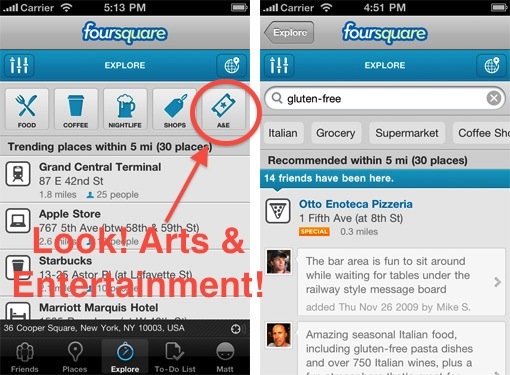
Hit the explore tab, type in something like 'art' or 'mexican food' and Foursquare will take into account all your and your friends past check-ins to come up with the most relevant venue. So not only will it tell you where a venue is, but why you should want to go there. In addition to searching, there are also buttons along the top focused on common venue types people are looking for. You might already be familiar with how recommendation engines work, it is how music sites like Pandora and Last.fm are able to suggest relevant material for their users.

Image via blog.foursquare.com

So why should arts organizations care? Because this may be the simplest of all ways to participate in the location-based game. Claim your venue, add relevant information and start showing up in search results. Claiming a venue is free, gives you control over your brand, and will improve your search and recommendation results not only with Foursquare, but all of the apps and platforms out there using Foursquare's API (programming language and database) like Gowalla and hundreds of others.

While you're staking your claim with Foursquare, you may want to claim your venue on the two other big location-players - Facebook Places and Google Places. Google has some recommendation engines in the works and while Facebook doesn't offer one, claiming your venue there will still make you more visible to a very large group of users.

Claiming your venue on these three platforms is an easy and free way to take advantage of a fast-growing social media form. It's a simple step that may equal a return for your organization that a lot of other social networks can't offer - foot traffic.

  • Learn about claiming venues on Foursquare here.
  • Learn about claiming venues on Facebook Places here.
  • Learn about claiming venues on Google Places here.

What's the Big Idea? 5 Key Takeaways from the Museums and the Web Conference

In this post, I thought I’d try to “connect the dots” regarding some of the threads that seemed to come up frequently over the course of M&W2011.

Aluminum Foil Stage Curtains & Other Oddities

While cruising the net, trying to find the latest and greatest when it comes to arts management and technology, I tend to run across some pretty strange things. They often don't fit into the realm of the arts management focus of our blog, but dang it, they're just too awesome to keep to myself: I

The most stunning stage curtain, ever.

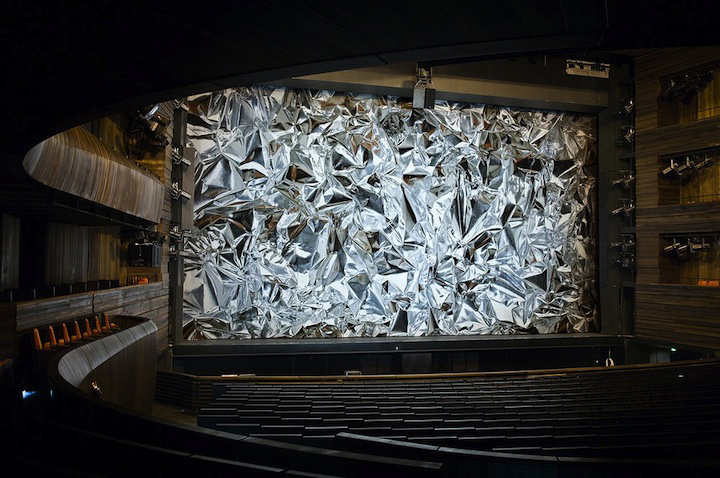
Artist Pae White has created for the Oslo Opera House what could arguably be the craziest main stage curtain to ever grace a stage. White scanned a piece of crumpled aluminum foil and then used a computer aided loom to weave the curtain out of different colors of cotton, wool and polyester. When standing up close, one can see the individual threads, but stand even just a few feet back and well.....well, just look at the picture below:

Image via www.feelguide.com

I went to Barcelona, and all I got was this crappy mini replica of myself.

BlablabLAB's Be Your Own Souvenir is a far cry from some of the cheap junk that you'll find at most souvenir shops. The group hacked a few Kinects, and with the aid of a 3-D printer, gave tourists on Barcelona's La Rambla Street the chance to scan themselves and create their own miniture statuettes. Check out the video below to see some of the results:

I

Theater? We don't need no stinkin' theater!

Ok ok, I'm sure that was not the sentiment that Urbanscreen had when they set out to make WHAT IS UP?, a virtual site-specific theater piece. The piece is a pre-recorded performance, projected onto the wall of a typical dutch dwelling house in Enschede, Netherland. What makes this a projection a site specific piece, also called Lumentecture, is that the projection perfectly lines up with the architecture of the building. Using this technique, Urbanscreen creates an optical illusion of the building's walls giving way to a hidden theater within. Watch the trailer below to get the full effect:

Arts and Technology Round-up: Museums and the Web Edition

Happy Friday everyone! For this arts and technology round-up we decided to try and hone in on a few of the awesome projects that we saw at the Museums and the Web conference last week. Up first are our picks of some of the best and most innovative projects. After that, the winners of the Best of the Web 2011 awards from the conference.

Technology In The Arts Picks

Zooniverse - This group marries together the researching needs of the scientific/historical communities and the power of crowdsourcing. By creating a series of interactive web portals, Zooniverse creates communities of "Citizen Scientists".

PhilaHistory - Philly based GIS firm Azavea worked with the City of Philadelphia to create a platform for linking historical photos of the city to their real world locations using geo-location and augmented reality.

One To One with the Artist: Ai Weiwei - A simple idea with a great effect, this project from the Tate allowed museum visitors to record and upload a video in the gallery and have a video dialogue with the artist Ai Weiwei.

The WALL - The Museum of Copenhagen's giant multi-touch multimedia screen installed in one of the central squares of Copenhagen.

ARTfinder - A new recommendation engine for artwork, this site works very much like Last.fm, taking your current interests and using them to introduce you to new works.

The Collective - Sounding a little bit like a bad 50's sci-fi flick, The Collective is the Denver Art Museum's interactive website/online programming space and a new way of connecting and bringing in the Denver community.

MoMA Learn - An extremely in-depth arts education web portal, the Museum of Modern Art's education department went all out on this one.

ARtours - The Stedelijk Museum's innovative augmented reality program.

The Best of the Web 2011

Education & Best Overall: The ACMI Generator

Mobile: The AB EX NY iPad app

Innovative: Nationnaal Historisch Museum / Museum of National History

Museum Professional & People's Choice: Smithsonian Web and New Media Strategy Wiki

Long-Lived: Exploratorium.org

Research/Online Collection: Portable Antiquities Scheme

Audio/Visual/Podcast: Access All Areas podcast

Project by a Small Institution: ASI: Archaeology Scene Investigations in North County Louth


Choosing a Ticketing System in 5 Easy Steps

The following is extracted from one of our recent reports, the 2011 Ticketing Software Satisfaction Survey. Download the full report here.

Choosing a new ticketing system can be a daunting prospect! There are hundreds of systems out there which offer a variety of functions and features, and it's sometimes difficult to tell which would be best for your organization. In the following article, we have broken down this sometimes arduous process into five "easy" steps, including a list of subject areas to consider when embarking upon a ticketing purchase, as well as sample questions to ask.

2011 Ticketing Software Satisfaction Survey Promo from Technology in the Arts on Vimeo.

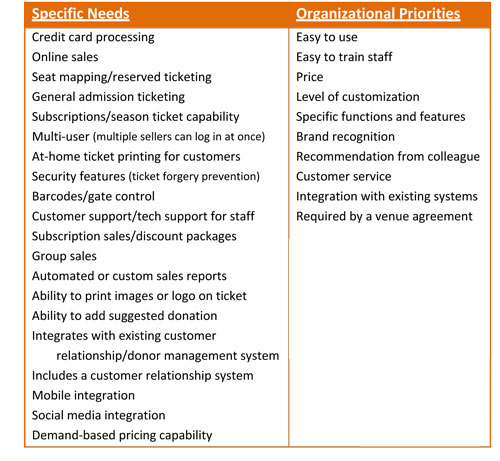
Step 1: Determine needs and priorities Because of the wide range of ticketing solutions available, determining your organization’s needs and priorities is the first step to choosing an appropriate software system. It is a good idea to seek input from every department you expect to use the system—not just ticket agents. The following is a list of common organizational needs and priorities:

Organizational needs and priorities

Step 2: Identify vendors

Your prioritized list of needs will help you begin to identify systems that are more likely to be a good fit your organization. A list of vendors included in this survey is also available on page 41 of the report. Visit their websites and research them to help you narrow your list to a few possibilities.

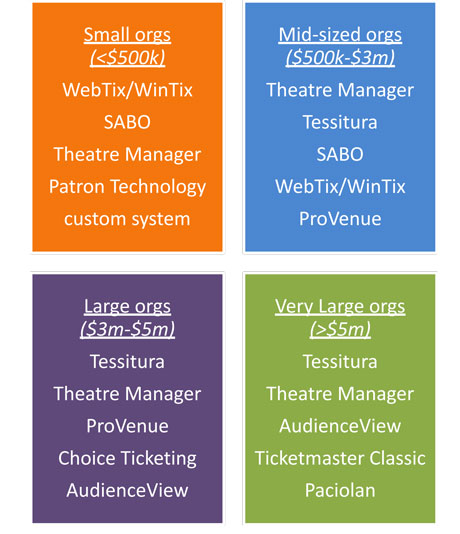
You might also start by looking at the systems commonly used by organizations in your budget category. The following systems were most commonly used by respondents to our survey:

Most-commonly-used

*Because respondents do not represent a true cross-section of the arts and culture community, this list cannot be used to infer market share.

Step 3: Contact vendors

Once you have narrowed your list to a few possible systems, begin to gather first-hand information from the service providers. You might do the following:

  • Ask if there are any hands-on demonstrations that let you experience the system for yourself.
  • Request a list of client references in your discipline and budget size, and ask those references about their experiences.
  • Request a list of client websites to get an idea of the customer’s experience of ticket purchasing and other transactions, such as donating online.

Technology in the Arts has also compiled a two-page list of questions to ask a ticketing software vendor, on subject areas like pricing, data integration, tech support, reports, and more! It's too long to include in this blog post, but see page 38 of the report for nearly every question you may need to ask a vendor before purchasing a ticketing system.

Step 4: Weighing Your Options and Making a Decision

Revisit your list of  priorities and, based on your findings from talking to vendors and organizations who use your system, rank your top choices. You might also seek input again at this point from people who will be using the system to see if your priorities are still in line with theirs.

Keep in mind that price is not always the best indicator of quality.  Even if price is your organization’s primary concern, it is still worth researching and evaluating other aspects of the system before making your final decision.

Step 5: Prepare for installation

Changing a ticket system is a major organizational change, but it doesn’t have to be difficult. Timelines for implementing the new system will vary from organization to organization, but here are some things to consider:

•    How long will it take to transfer your data from the current system to the new system?            •    How many years of data do you want to migrate            from your current system to the new system?            •     Will the data need to be “cleaned” or modified            in any way before transferring it? •    How long will it take to install any software on staff computers? •    How much time will it take to create usernames for staff and adjust their profiles so that they have access to the proper data? •    How long will it take to fully train staff on business-critical functions? •    How close are you to the starting a new season and how long will it take to build a season with the new software?

From these questions, you can determine the best time in your season to install your new system,  migrate any data from your current system, and start to train employees. Remember to inform your patrons of any new features that may interest them, like online subscription sales, choose-your-own-seat functions, or mobile integration.

If you enjoyed this article, you can find more information on ticketing systems in our report. Download the full report here.

Museums and the Web 2011 - Thomas's Recap

logoThe 2011 edition of the international Museums and the Web conference wrapped up this past Saturday and was a 4-day whirlwind of presentations and workshops. Presentations covered many of the exciting new technology projects currently in place and coming up from museums around the world. Topics at the conference ran the gamut from mobile technology to augmented reality to ways of creating interactive communities of constituents online. All of the papers from the conference can be found online at the Museums and the Web’s conference website. Here are just a few of the themes and tidbits that stood out to me from the 4-day conference:

I

Crowdsourcing - Now in 6 delicious flavors!

I attended an unconference session, roundtable talks with topics proposed by conference attendees, that aimed to crowdsource the idea of crowdsourcing. The overall feel I got from the discussion was that many museums are taking crowdsourcing very seriously these days. The talk brought up a lot of cool new projects, ranging from including constituents in collections and archives work to new ways to display crowdsourced material.

Johan Oomen, Head of Research of the Netherlands Institute for Sound and Vision, presented his ideas on how crowdsourcing can now be defined in 6 distinct ways:

  • Correction & Transcription
  • Contextualization (Adding to wikis, telling stories)
  • Complementing the Collection
  • Classification, Tagging
  • Co-Curation
  • Crowdfunding
  • Out of the Museum, into the streets - taking advantage of geo-location

    Geo-location was a popular theme, using GPS and mapping to take information and media from the museum and attach it to a location. Many presentations touched on how this idea could really help visitors build a strong connection to the history and importance of objects and sites of a community.

    Some notable projects included PhilaPlace and the Rock Art Mobile Project.

    I

    Access, access, and more access

    There was a lot of discussion around how to not only get more content on the web, but also make that content easily accessible. The types of content being made available on the web, for free, ranged from things like online collections to projects like online teaching portals. There was a general call to standardize access to this content and data and to use more open systems to encourage data sharing among organizations.

    I

    Intuitive design - What's the point of building it if no one can figure out how to use it?

    The conference featured a variety of opportunities for museum professionals to gain feedback on their projects, one of the most popular being the Mobile Crit Room. A reoccurring theme of these critiques was the emphasis placed on the user experience, how easy was it for someone to use your mobile app/website? The Rock Art Mobile Project led the charge, along with a few others, in insisting that any project's user experience needs to be designed in a way that is both intuitive and immediately easy to use. Building around this concept will ensure that users of all ages and skill levels can take part in a project, not just the tech-savvy ones.

    Check out the range of mobile projects from the conference’s Mobile Parade.

    IIII

    So now you want to build an mobile program? Better be up on some of the new business models.

    One of the most informative presentations I attended was the “Getting on (not under) the Mobile 2.0 bus”. This talk featured case studies by MoMA, SFMOMA, Balboa Park and the Smithsonian on the new business models that now exist for developing a mobile program.

    Some of the subjects from the presentation included: Digital retail (app/download sales), Donations (e.g. by text message), Sponsorship and ad-supported content, Monetizing data from mobile social media and Using mobile to support membership and other revenue channels. The full paper is available here.

    I

    The Rise of the Mobile Internet

    Kristen Purcell, from the Pew Research Center Internet and American Life Project, gave the opening plenary of the conference. Kristen presented on some of the changes in technology from 2000 to 2011. Some pretty surprising stats were thrown up during the presentation. Among them:

    • 1 in 3 adults do not have broadband Internet access.
    • 69% of Internet users watch online video content, 14% of Internet users upload/create video content.
    • 85% of adults will own a cell phone by 2011, making 2011 really the Year of the Mobile. (Purcell stated respondents had difficulty being able to distinguish between what was and was not a smartphone, so that statistic was not available)
    • Mobile usage varied among different ethnic groups, Latinos and African Americans were shown to be in the highest percentage of users actively engaging with mobile content.
    • 11% of mobile users use their phones to make charitable donations. (These numbers may be skewed by mobile donation drives for large natural disasters like Hurricane Katrina and the recent earthquakes in Japan)
    • 35% of adult mobile users have apps on their phones, but only 24% use them.
    • The 90:9:1 rule for understanding the level of engagement on social media. It states that 90% of social media users are lurkers, just observing content and never really interacting or contributing. 9% are regular contributors, the ones who often like, retweet or comment on online content. 1% are the super users - always online, always engaged.

    These were just a few highlights, for me, of the conference. Coming up, Molly will do her recap on what she found interesting at Museums & the Web 2011. Definitely go to the Museums & the Web conference site to check out all of the presented papers from the conference.

    QR Codes: What are they and how do you make one? [mini-nar]

    minanar
    Mini-nar

    So, what is a QR code and how do you make one? Wonder no more. After watching this mini-nar (mini+webinar), you will have all the know-how you need to create a QR code and stick it... well, wherever you want, really.

    Plus, it is explained to you by Tom... in pirate garb.

    Technology in the Arts Mini-nar: QR Codes from Technology in the Arts on Vimeo.

    Links from this Mini-nar:

    bit.ly-bit.ly will not only create a QR code for you, but will also track it. (Note: You have to create an account to track QR codes.)

    kaywa.com-kaywa.com will create a QR code not only for a URL, but also for text, a phone number, or for an SMS text message.

    We are also looking for ideas for future mini-nars! If you have an idea for a subject that we could cover in about 5-10 minutes, please comment below or suggest one any time via Facebook or Twitter.

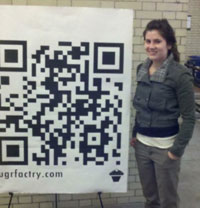
    Update: For those of you wondering what the giant QR code that Tom referred to looked like, here it is: qrcode-croppedw

    The Coming of the Mininar! (Mini + Webinar)

    Technology in the Arts is proud to announce that we are starting a series of "mini-nars", short videos that tell you not only the basics on new tech trends, but also how to actually implement them yourself! Hear more about mini-nars here:

    Mininar Preview from Technology in the Arts on Vimeo.

    The first mini-nar will be released soon with info on what the heck a QR code is, how to make one, and how to track one. With screenshots! And costumes. Get excited.

    We are looking for ideas for future mini-nars! If you have an idea for a subject that we could cover in about 5-10 minutes, please comment below or suggest one any time via Facebook or Twitter.

    New Questionnaire: Living Social, Groupon and the Arts

    SurveyPhotoThe Living Social, Groupon and the Arts Questionnaire is now live! Has your organization offered deals through group discount sites like Groupon and Living Social?  Have you ever wondered about how other arts organizations are using online group discount services, and the successes and challenges they've faced along the way?

    We were wondering, too.  So, we put together a short questionnaire to find out.

    Please take a moment to fill out the Living Social, Groupon and the Arts Questionnaire and let us know about your own experience with either of these sites.  It will only take a few minutes and your answers will remain anonymous, unless you specifically tell us otherwise. The questionnaire closes on April 15, so click through and fill it out before you forget!

    And as always, we'll share the results with all of you here on the blog.  Fill out the questionnaire today!

    Need a new ticketing system?

    Some folks have had difficulty opening the report within the Firefox browser. We are working to resolve the situation. In the meantime, you can right-click on the link and select "Save Link As" to download the report to your computer.  You can view the report without issue via Chrome, Safari or Internet Explorer. Thank you for your patience.

    Click to access the 2011 Ticketing Software Survey.

    Click here to download the survey report. Photo: Gyorgy Kovacs via Flickr.

    The 2011 Ticketing Software Satisfaction Survey Report is now available! In it you can find information on the most popular ticketing systems for organizations of your size, rankings of popular features and functions, and a 5-step guide to choosing a ticketing system, complete with questions to ask vendors.

    Based on feedback from last year's survey, we added several questions to this year's survey:

    • questions regarding new technological features, like mobile and social media integration
    • questions differentiating web-based vs. desktop software (hosted on the client’s computer or server)
    • question about ticket consortiums and outsourcing

    Key Findings: There were several findings of interest that resulted from the study:

    • Universally, organizations choose online sales (91% of respondents) and credit card processing (90% of respondents) as the most critical ticketing system functions.
    • Approximately 1/3 of ticketing software users indicated that they had inherited their current ticketing system from a previous employee--they had no role in choosing the system they are using now.
    • About 30% of organizations outsourced or shared in a consortium at least one aspect of their box office operations, either for online sales, phone orders, walk-up sales, or discounts.
    • Organizations classified as "small" and "mid-sized" (budgets under $3 million) indicated the most important factors in their software choice were price and user-friendliness, while "large" and "very large" (budgets over $3 million) prioritized customization and specific functions and features.

    If you are a ticket vendor, box office manager or staff member, house manager, business manager, executive director, board member, marketing staff, or anyone else who has contact with a box office ticketing software system, then this report is for you.

    Download the survey report today!

    And please share with colleagues by clicking the "ShareThis" icon below.

    Social Media Spotlight: Telling Your Story With Broadcastr

    Welcome to the seventh installment of the Social Media Spotlight, our monthly feature focusing on arts organizations’ social media strategies.

    Broadcastr co-founder Scott Lindenbaum

    So having some tie to location seemed like a good idea. If you think about the way that media works on the internet and has worked historically, you’ve got three major things: you’ve got content, you’ve got connectivity, and now suddenly you have context.

    So content we know, content is the things we make and connectivity is a massive part of our lives now, whether that be through Twitter or Facebook or anything else. But context is brand new, because context not only means what content you’re consuming and how you are consuming it, but where you are when you consume it. Then it seemed to make sense, because good stories are married inherently to place and always have been. Whether you look in religion where you have holy spaces and the idea of a trace that was left behind by someone that was once there or an experience that once happened in a certain location.

    It made sense, then, to have stories that were indexed by place and once we had that, we had the foundation for what became Broadcastr. Which is a simple way for anyone to record a story and pin it to a location, so that anyone in the world can hear that story, understand that place, and have a deeper and more meaningful connection with another person.

    I

    I

    I

    So how does Broadcastr tie a story to a location? Do I need to be on a mobile phone in order for my audio to be pinned to that location?

    Broadcastr is a way for anyone to tell their story, on any platform, web, android and iPhone, and then index it by location and category. You don’t have to be in a specific location in order to do that. So whether you tell your story into your phone or into your computer’s on-board microphone, you can place that story where it’s referencing in the world.

    So for instance, if I told the story about going and getting my MFA in Brooklyn and studying with Michael Cunningham and that’s where I met Andy (Co-Founder of Broadcastr), I can then tell that story on any platform and actually pin it to Flatbush Avenue at Brooklyn College. It doesn’t have to be pinned at that exact moment.

    And you may ask yourself, who is David Byrne? Image via cyclostat.bostonbiker.org

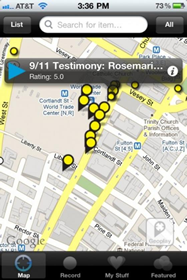
    So we teamed up with them in order to take the aural remembrances from cops, fire fighters, and families of victims, first responders and residents of downtown Manhattan. We actually took those testimonies and put them back into the World Trade Center site and we’re doing that of course through Broadcastr. So that on the ten year anniversary of 9/11, when you go to the WTC site downtown, you’re going to be able to actually walk through the memorial and Broadcastr will be an invisible layer that is part of the memorial. You’ll be hearing these voices that connect you to the real experience and the history the way that the people who were there remember it.

    What we’re hoping is that it will do a couple of things. One, it’s very powerful, I mean when we test this thing and walk around the site now it’s incredible because instead of looking at a hole in the ground and thinking “ I remember when that happened.” It’s tough to grasp what the tone of the country really was then, but I remember it was a very, very moving moment. Instead, you can be brought right there so that the people who had the most powerful experience that day are going to be talking to you about it.

    That does two things: One, it brings that space to life for people. But two, it creates a precedent for how we can start talking about these things in a public social space. Then of course, because Broadcastr is a two-way street, if you hear a story about 9/11 it will prompt you to remember your own story. You can immediately add that to the aural history that is growing in that site. You can just take your phone, click record and record your story right there on the spot. Over time what we are going to be doing is building this collective kind of rememberance at sites.

    And we’re doing that all over the world with different organizations. So for instance, at Auschwitz you can do the exact same thing since we are working with the Shoah foundation. So you’ll be able to walk through Orca now, which was a death camp and instead of seeing a field, you’re going to be actually hearing the Holocaust survivors that escaped 60 years before. And that’s going to be a massive, massive change in experience for people that are younger and too young to be connected to events like that. Also for people that are really interested in how events are represented and who gets to tell the story, which I think is a very important change that’s happened with the advent of social media. The story no longer comes from the top down; the story can now come from the bottom up. The telling of this story and the agency to tell can be put back in the hands of the people that have had the experiences.

    I

    I

    I

    In addition to listening to story as a user and contributing to Broadcastr as a storyteller, what are some of the additional ways that people can interact with audio posts?

    Yeah, so you don’t have to be a passive listener or a active content creator in order to participate. You can actually be a curator or an aggregator of content. So for instance, let’s say you live in Milwaukee and there are 500 stories say right now in Milwaukee. And you’re like “Ok, these stories are pretty good, but you know what? There are ten of them that to me, really represent Milwaukee perfectly or represent my version of Milwaukee.”

    You can take those ten stories, aggregate them into a separate playlist and I can share that playlist. So you can call from the collective, kind of dig in to the collective consciousness and pull out the little bits that you best feel represent some theme or some place. Then you can group those as a playlist and share that version of that place.  So you can imagine people creating definitive versions of different places by going through this aural record that we’re creating in real time.

    broadcastr
    Screenshot of the Broadcastr map and media player. Image via blog.bryantpark.org

    Additionally you can share any item on Facebook and on Twitter and you can share it via e-mail. And you are going to be able in one week to embed it in a separate website, either as an individual item or as a little mini map that would be a subset collection of items. So  imagine, for instance, you’re writing a blog post about foreclosures in New Jersey. You can find five stories about people that have been foreclosed upon and actually embed their real voices into the blog post, just the same way you would embed a video from YouTube.

    I

    I

    I

    When a lot of other social media platforms started to take off, some organizations were hesitant to adopt them out of fear of inappropriate, negative or even copyrighted content being recorded and attached to their organization is a public way. What are some of the ways they would approach a problem like this if they wanted to start using Broadcastr?

    There are a number of things: One, just like on Facebook or on Twitter or on YouTube, you control your own username. So no one else is ever going to be able to upload content under your specific username, just like your Twitter feed is your own to curate.

    That said, people can be uploading things and be talking about your organization for sure. Something that someone said to me recently in Austin, Texas at South by SouthWest is probably relevant here. When you go to talk to an organization and you ask them if they are on Twitter and they say “No, no, we’re not on Twitter. We’re not sure how to approach that, so we’re not there, we don’t have a presence there. We don’t think we have to be.”

    Well, all you have to say to that organization is to go to Twitter right now and search the name of your organization. Because you think you’re not on Twitter, but I promise you, you are in some form. As soon as they’ll put in the name of their organization, what they’ll find is hundreds, if not thousands, of individual pieces of opinion that are part of, right now, a one-sided conversation about their organization. So just because the organization wasn’t there to engage, it doesn’t mean no one is talking about them on these platforms, they absolutely are. To me, it seems that an organization needs to embrace the place where people concerned with their organization are having the conversation and get involved.

    That’s kind of the high level answer, the particular answer is that you can flag content on Broadcastr. So if something is actually slanderous, or would be considered something like slander or libel or hate speech or pornography, it’s up to you the community to police your space. So if you think those things don’t accurately represent your neighborhood or your place on the map, then you should flag them. And if they haven’t been rated by anyone and they’re been flagged, they’ll automatically be pulled from the service. So that allows for a level of self-policing.

    Now additionally, items can be rated on Broadcastr. So if you’re engaged in the conversation and you’re creating great content and promoting that content, then hopefully other users will feel the same way and will rate your items very well. On Broadcastr you’re always seeing the highest rated items first for any given place. So it’s kind of up to those organizations to get involved and create content that basically best represents them and is the kind of content that their audience wants to engage with. That content will flow to the top, if in fact their assumptions are correct. I think it is important to engage in that way and to be part of the conversation and to respond as opposed to ignoring the crowd and the community and the opinions of the community.

    There are other things too, such as if organizations are interested in embedding content in their own website, that’s a way that they can have a custom curated space. They can embed only a selection of content that they feel best represents them and that is a way to use Broadcastr to create a multimedia community-driven experience on another website that is more curated and in a way more restricted.

    It’s tough to answer that question, because I was at an Ivy league school recently and their social media guy said that the school would not let them make a official Facebook page for this institution. He said the irony of that is that there are twenty unofficial Facebook pages for that school. All of those Facebook pages are putting out fallacious information about the school. So just because there is no official page and because there is 750 million users on Facebook, there is more ways for those 750 users to get that information within the Facebook community. So there is something a little bit backwards about the thinking there.

    I

    I

    I

    On a more positive note, what are some of your favorite stories that have already been uploaded?

    There is a bunch of great stuff. One of my favorite projects that we’ve been involved with is the Neo Futurists, which are a theatre performance troupe that originated in Chicago and now have a New York chapter. They have a show called Too Much Light Makes the Baby Go Blind and the show is 30 plays that get performed in 60 minutes. Every week they re-write a good portion of the show, so its been changing for however many the past few years that they have been doing it, but it always keeps the same format.

    Image via waterdogmusic.com
    Image via waterdogmusic.com

    They came to us early and said “We would love to do 30 plays in 30 blocks.” And Broadcastr, because it’s short form – a three minute maximum for most stories – is the perfect way for them to take their theater performance and use the world as their stage, as the saying goes. So if you go to second avenue in Manhattan, you can walk from Houston Street to 29th Street and experience 30 location specific, audio, interactive, pieces of content. Some of them are directing you to do things, some of them are little songs, some of them are plays with multiple voices, some of them reference the location very directly, some more overtly. But it’s a curated experience that happens out in the world. So that’s been very exciting to work with them.

    Broadcastr is a fantastic way to make literal this idea that you hear all the time, especially when talking with mission and message driven organizations, of giving the community a voice. People talk about that abstractly a lot, like “How do we give the community a voice?” or “What is the voice of the community?”

    In this instance, as long as the members of that community can get to a computer or to a phone, and that computer might be at the public library, it doesn’t have to be a computer at home. But as long as they can get access, they can actually put their voice back into their community, in a very literal way. I think that’s very powerful because in a sense, by publishing your opinion and your memories and your reflections to Broadcastr, you publishing those things for the whole world to be able to hear. You’re representing not just your social circle, as you do when you talk on Facebook, but you’re actually representing a physical place.

    I think that if Broadcastr succeeds, what it’s going to do is it’s going to show a person that in this age of social media and mobile computing, place is just as important as people.