



Google+

googleplusGoogle+, the search engine giant’s new social networking site with 20 million users, has been getting a lot of press lately. There’s already some good advice out there for art nonprofits from the usual suspects (Devon Smith, Heather Mansfield). And artists are already exploring this new way of sharing their music and visual pieces. With technology this new, there is always a lot of experimentation by the early adopters, speculation by the commentators, and caution from the silent majority. But even at this early point in time, when the fate of Google+ is up in the air, there is one thing that I am certain of: that is that Google + represents a revolution in the integration of digital activity and the way we interact with the world around us. In this article, we’ll talk about what sets Google + apart, how it is integrated with other Google products, and what implications it holds for business in general and the arts in particular.

What is Google+?

Check out the Google+ intro video if you haven’t already:

There’s a lot of chatter in the blogosphere right now around the idea that Google+ is the ultimate content-sharing platform. The reasons given for this range from enhanced privacy controls making people more comfortable with sharing to the Sparks feature which allows users to find and share content without leaving the platform.

  • Circles

One of the biggest things separating Google+ from the rest of the social media pack is its Circles. Instead of all of your contacts either being a friend/follower or not being one, they can be put into different Circles- friends, family, colleagues, etc. Then- and this is the kicker- you can choose who will view which posts. No more work colleagues or family members seeing your expletive-filled posts or pictures from that party.

Sure, Facebook has groups. But in a Facebook group, users choose to join the group--on Google+, you choose the names of your circles and assign who is in them. In Facebook groups, you can post on the group’s wall (which involves first going to the group page), but anyone who visits the page can see what you posted. With Google+, you can choose to share content only with certain circles, adding an extra layer of privacy.

  • Enhanced Privacy Controls

Chris Brogan covers this pretty well in this short video. Privacy controls are more transparent and easy to find compared to Facebook.

  • Sparks

Google is still primarily a search engine, so it’s no coincidence that they have an integrated search feature in the network. “Sparks” allows you to enter a topic you’re interested in (say, nonprofits), and every time you login, you can click that word to find many articles on the topic that you can then share with as many or as few Circles as you like.

  • +1 and Search Engine Optimization integration

plusoneEven if you haven’t made a Google+ account yet, you’ve probably seen the little “+1” icons around the Web. It’s Google’s version of a “like” button. Unlike Facebook’s button, whose data Google doesn’t have access to, a +1 actually impacts search rankings. So, the more +1s a website, article, or video has, the higher it appears in searches, and the more likely people will find it and share it, etc.

If you want to learn more about the nuts and bolts, check out Mashable’s guide to G+.

While all these features may pave the way for Google+ to become the content capital of the interwebs, right now, companies, organizations and brands can’t directly participate in this content-sharing utopia.

Currently, the only way for brands to get their content onto G+ is through “real people’s” accounts- employees, constituents, secret admirers, etc. This makes it even more important that your organization has something interesting to say and compelling to share.

Integration

Imagine a world where the offers you receive are based on data not only from your activities, but your friends’ activities . . . where place-based businesses target customers not only by email and postal mail within certain zip codes, but by what street you are walking down, or which restaurant your friends have gathered at . . . This world, where social networking merges with mobile-based services and retail, is closer than ever to being a reality with Google+.

Already, Google Offers has been launched in New York and San Francisco, beaming coupons to customers based on their location and preferences. According to Stephanie Tilenius, Google’s VP of Commerce, Google Offers and Google Wallet (the company’s payment system) will be integrated into G+ as well as other Google properties such as Maps.

Edd Dumbill at O’Reilly Radar is calling this integration of social networks with other web-based applications a “social backbone” to our entire web experience, as opposed to the “walled garden” of existing social networks.

. . . social features will become pervasive, and fundamental to our interaction with networked services. Collaboration from within applications will be as natural to us as searching for answers on the web it today . . . Search removed the need to remember domain names and URLs . . . . The social backbone will relieve our need to manage email addresses and save us laborious ‘friending’ and permission granting activity . . .

All this integration, says Dumbill, will help computers better serve users.

Where does this leave business?

So the world may be changing. How should you prepare for that? Below are some tips from some smart guys at Social Media Explorer.

Jason Falls “Stay the course with what you’re doing. Wait for the brand-permissions and guidelines to come from Google on the Plus platform. Experiment with it for yourself to know how it works and how non-linear you have to be thinking to optimize the use of Circles.”

Mark Ivey Five questions to ask for starters, and to make sure you’re positioned for the G+ world:

  • Are you in the game? Do you have a presence across paid (search, broadcast, etc), earned (events) and owned (Facebook, Twitter, blogs, and now G+) media? These are your marketing beachheads, and you’ll need to work across the board to make sure you’re connecting with customers with your messages.
  • Do you have a clear content marketing strategy? If so, you’re already using listening tools and engaging in related conversations. Adjust your strategy for G+-and stick to it. If not, better get one in order fast-I just met with two companies last week, neither had a content strategy, both are scrambling in catch-up mode.
  • Is your content relevant? If you’re unclear on the role and importance of relevant content, read Michael Brito’s nice analysis piece on SME. Conduct a content audit, compare it to industry conversations, and judge for yourself. Is your content hitting the target? Are you involved and influencing industry conversations? What is your share of voice around key topics?
  • Do you have a content engine and systematic publishing process? Then you should have apublishing model and be systematically chunking out content, carefully targeted to your key audiences. Run it like a publisher, with clear editorial direction, calendars, and hire editors to help you drive it- more tips here
  • Do you have control over your destiny? Putting all of your eggs into one basket you don’t control is stupid. Why put all your resources into building Facebook Pages when you don’t own that real estate (No one knows how G+ will affect FB yet but the risk is obvious)? The same is true of Google+-it’s a marketing outpost, not your home base. Better to build your own blogs, communities and following, and diversify your investments across several platforms, along with following a carefully crafted plan. Build a defensible program that can weather any storm, since no one knows how this will play out (who would predict G+’s amazing launch?)

This is a great opportunity to step back, take a deep breath and assess your overall strategy and social media program. There’s no reason to panic.

Where does this leave the arts?

Ah- now THAT’S the interesting question, and it’s one our industry will probably be talking about for, oh, the next year or so. With G+’s emphasis on content and people (not brands), two conclusions jump out:

- Producing art that resonates with our audiences is vital, and

- People are our most valuable asset.

To be sure, these aren’t new ideas. What’s new, though, is that what our audience tells each other about our work now has as much or more digital presence than what we tell our audience about our work. The level of content-sharing that Google+ enables means that it is becoming easier for friends to share opinions about articles, art, politics, entertainment, etc at any time. Additionally, the more something is shared, the higher its search ranking. So getting people to talk about art online is more important than ever. Do you ask your audience what they think of your art? Do you encourage them to talk to their friends about it online, continuing the conversation long after they’ve left the building? Do you reward your super-fans who already post about your organization to their social networks? What about tying in the art you present or produce with trending topics?

A new social layer to the web means it’s all about giving ‘em something to talk about.

More cool articles on G+: The Social Layer: Six Thoughts On Where Google Plus Is Going Three Key Things Google Is Doing While We Focus on Google+ What the Circles Illustrate About Influence List of important updates coming soon in Google Plus


Developing Jazz and Classical Audiences with Technology

Technology in the Arts is pleased to present our new white paper Online Audience Engagement: Strategies for Developing Jazz and Classical Audiences, spearheaded by writer Tara George.

Many of you may remember critic Terry Teachout’s controversial Wall Street Journal article that asked if jazz could “be saved?” Teachout’s article, in response to the NEA’s 2008 Survey of Public Participation in the Arts, prompted a variety of reactions across the field. Despite much of the hostility directed at Teachout, his question and concerns seemed to be valid and worth exploring, especially since the survey indicatedthat audiences (particularly for jazz, classical and opera music) were shrinking and growing older at an alarming rate. An interesting twist came in 2010 with the release of the NEA’s Audience 2.0 survey. A key finding in this survey was that Americans who participate in the arts through technology and electronic media (television, Internet, handheld devices) were three times more likely to attend a live arts event. Much like Teachout’s initial article, this survey also prompted a round of discussion about correlation and causation. Despite the controversy and debate, it is undeniable that technology is one of the most promising tools that organizations can use to build a younger fan base.

This white paper explores the role that digital marketing is now playing in building audiences in the jazz and classical music realm. This report also highlights the work of several artists and organizations at the forefront of reaching and developing new audiences online. It’s important to note, however, that most of the organizations and artists here would classify their work and the music they present as a hybrid of multiple genres. Though that distinction falls outside the scope of this report, it’s an important trend to take note of that can have a direct impact on digital marketing. Finally, we have provided a concise 4-step guide as an example of how many organizations actually implement best practices.

Organizations Highlighted:

We hope that you find each case study in this report to be encouraging and inspiring! Here were a few of the organizations we featured:

  • Mobtown Modern: was founded by Brian Sacawa in 2008. This organization fills a void in Baltimore’s vibrant music scene and serves as a catalyst for musical innovation and the creation and presentation of the new music of our time.
  • New Amsterdam Records and New Amsterdam Presents: New Amsterdam Records is the for-profit record label subsidiary of New Amsterdam Presents, a presenting and artists’ service organization that supports the public’s engagement with new music by composers and performers whose work grows from the fertile ground between genres.
  • Revive Music Group: serves as New York’s leader in conceptual and never-before-experienced live music productions—for a jazz and hip-hop celebration giving a unique aural exhibition of the undercurrents connecting the genres and ultimately fans of multiple generations.
  • Search and Restore: is a New York-based organization dedicated to uniting and developing the audience for new jazz music.

Download this report today!

And please share with colleagues by clicking the "ShareThis" icon below.

Making Facebook Ads and Diving in to Analytics [mini-nar]

Mininar
Mini-nar

We talk a lot about the free ways to use Facebook on this site, but this time Crystal will walk us through a paid service- Facebook Ads. You'll see how you can use them, how to target them to different demographics, and what you can learn from them.

Mini-nar - Facebook Ads from Technology in the Arts on Vimeo.

If you want to learn more about testing and Facebook, check out Podcast Episode #76 – Virtual Lobbies, Facebook Advertising Strategy, and Online Marketing Hits and Misses, as well as our webinar How to Make the Most of Your Facebook Page.

We are also looking for ideas for future mini-nars! If you have an idea for a subject that we could cover in about 5-10 minutes, please comment below or suggest one any time via Facebook or Twitter.

Social Media Spotlight: Philip Mann and the Arkansas Symphony Orchestra

In Performing Arts 2.0, we took a brief look at the Arkansas Symphony Orchestra’s efforts to engage the audience in the creative process. I recently had a chance to talk with Philip Mann, the orchestra’s Music Director, about these new initiatives. He spoke about the relationship between the orchestra and the audience (and how that is changing with social media), the logistical challenges that had to be met, and the type of environment that enabled this relatively small orchestra to take on big changes in the way classical music is presented.

Philip Mann, Music Director of the Arkansas Symphony Orchestra.
Philip Mann, Music Director of the Arkansas Symphony Orchestra

This past July 4, the ASO along with the Arkansas Democrat-Gazette (the concert’s sponsor) hosted the second annual “Oh Say! Can You Sing?” contest. People from all over the state were encouraged to upload YouTube videos of themselves singing that were then voted on by both the public and a panel of judges. Six finalists rehearsed with the orchestra, and the winner (this year, The Four Reps from Cabot, AR) performed at the annual outdoor concert. “People really enjoyed getting a chance to hear one of their own singing with the symphony,” reports Mann, who conducted the concert for the first time this year. “I heard a lot of positive responses from the orchestra about the quality of the people that were singing.” Mann says that what is especially interesting to him about this concert is that not only was it their biggest one (30,000 people usually attend), but through the “Oh Say! Can You Sing?” competition, it united those people together behind a musical idea. He says that “people are being engaged through technology to not just listen, in the way that you might listen to something passively on the radio, but they’re being encouraged to listen actively, creatively, and critically- in a way that they’re not used to listening in their normal life.” One of the great challenges of classical music, he says, is how to actively engage the audience in a way that a concert becomes a participatory event, where “the audience is not just sitting and allowing the music to reach them, but . . . they’re thinking about it, they’re creatively listening, they’re engaging their critical faculties.”

Remember “choose your own adventure” books? So does Mann. He created a family concert based on the same idea, premiering it with the San Diego Symphony, and continuing it with the ASO in the coming season. “The concept was that there would be a story, a narrative, that would play out over the course of the concert,” he says. “And the music would be tied to the story. So during the performance, the narrative of the story would reach certain points in the action where the protagonist would have to make decisions, and the audience would make those decisions by voting.” Originally they were going to use text messaging to vote, but when the symphony learned that it would be too expensive to do that, the decision was made to use a show of hands in combination with cameras and a jumbotron instead. “It was fantastically successful,” says Mann of the concert in San Diego. “They felt like they were choosing the music and choosing the direction of the story.”

An older technology that has yet to be widely adopted by orchestras is IMAG, or image magnification, which Mann used in San Diego and is hoping to bring to the ASO. “It’s something we all expect to see at rock concerts now, or any kind of big public event like a football game,” says Mann. It’s basically cameras around the hall or auditorium “picking up action whether it’s on stage or elsewhere and projecting it onto the screen, increasing the amount of information and the quality of the visual information that people are getting in the space. So if you’re sitting in the back of the hall you actually can see the expression on the drummer’s face in the middle of a big solo.” Mann says that the audience reports through feedback that they feel like this technology gives them an extra access to things on the stage and it adds to their experience. Although he’s hoping to bring IMAG to the ASO, he acknowledges that the considerable expense is always a budgeting issue for any orchestra.

This season, the ASO will be performing a concert unlike any it has had before- a People’s Choice Concert.  Right now, says Mann, staff is compiling a list of repertoire that they will submit for the people’s consideration.  Voting will occur throughout the season through social media, text messaging, email, and the organization’s website for the first half of the program. The second half will be determined that night primarily through texting, with audience members voting before, during, and after the first half. “The only way that we are able to accomplish this (at least conceptually at this point) is by including technology. . . . [it] allows us to do something that we would not have even considered in the past,” reports Mann. He acknowledges that some audience members will be more comfortable with voting using mobile devices than others, and some may not even have cell phones. But he explains that “they’re going to be encouraged to communicate and engage with the people around them that do have [mobile devices]. . . So in a way, I’m really intrigued by the conversations and interactions that are going to happen in our audience between our audience members.”

Mann describes technology as “one more tool in our toolbox” to an end of engaging audiences on a deeper and more substantial level. “Typing things by text message, voting online on a blog, or if they’re watching a YouTube video and then voting or making a comment on the video, those are ways in which [our audience is] further engaging with us. That’s a topic that all nonprofits in the performing arts are always talking about: how can we constantly reach another level of engagement, have more time with people and more interaction?” He is excited to shake up the traditional way of presenting classical music. “People have become so comfortable now with technology, that even in one of the last bastions of a technology-free environment (the concert hall), I think that people aren’t even afraid of it entering there now anymore.”

When Mann first suggested the idea of the audience choosing what the orchestra would play on the fly, he didn’t get negative reactions, but he did get some resistance based on logistics- people didn’t know how it would work. “Performing arts groups have a healthy philosophy to control very carefully everything that they’re doing in the space, because the idea of putting on an excellent, high quality performance goes without saying, that’s why we exist,” he explains. Musicians wanted to know how they would know what to play. They wanted to avoid “visions of the percussion scrambling around, oh we thought we were going to do Gershwin but now we have to get set up for Beethoven. . . . We really had to re-think in how we communicated with each other, especially during the performance.” Mann describes a storyboard-like run sheet he designed for the orchestra so that “their eyes could actually follow the narrative” (for the “choose your own adventure” concert).  He adds that there will likely be creative staging so musicians don’t have to move around too much and game plans for how to set up for multiple pieces. It will still require improvisation, and a conductor who is comfortable “riffing” with the audience.

But aren’t artists supposed to grow their audience’s artistic sensibilities instead of just giving them what they want? It’s a fine line, says Mann. “Do you just provide what the people want to hear? In effect, that would almost commercialize what you’re doing. . . . if you only provide people with things they’re already familiar with, then very quickly your art form ceases to be a living, breathing thing.” He continues, “I think we have to be very cognizant of the fact that while it’s very important and an incredible opportunity now to find out in real time what our audiences are listening to and what they want, there’s still a huge responsibility on behalf of artists to keep creating art and to keep thinking about art from the artist’s perspective, and not just giving our audiences what they already know they want, but giving our audience things that we feel passionately about and we think that they will want once they’ve heard it.”

So you may be wondering- how is it that a symphony in Arkansas is becoming a pioneer in audience interaction through technology? “One of the great things about the Arkansas Symphony is that we are known for great quality, but we’re not known as one of the largest orchestras in the country,” explains Mann. “We’re not in that very large budget area where you have institutional cultures of ‘this is the way we have always done things’ and it’s too big of a ship to steer quickly.” This combination of being small and agile, yet having a high artistic quality, opens up great possibilities and opportunities, he says. “The organization is a young and creative organization in terms of its staff, and our board has a great deal of expertise and engagement. Our board is quite comfortable with leading-edge business ideas and technology.” Mann states that in Little Rock industries like healthcare, banking, and finance, a business can only succeed and survive if it is on the cutting edge of its field. “It seems apropos that the symphony reflects that as well,” he says.

This young music director is clearly excited about the year ahead. “I just can’t wait to find out what the response during the process is. This is a tremendous learning tool for arts organizations to learn about what people really want to hear.” Mann continues, “There are things for us to learn about what they say and what they don’t say. If they don’t ask for something we think they should ask for, that might identify an opportunity of introducing people to something we think they should know. It may lead us in directions that we haven’t even considered yet.  And that’s a wonderful thing for any organization to face.”

Center for Arts Management and Technology Update

Some of you may have heard that the Center for Arts Management and Technology is undergoing a restructuring process. David Dombrosky, CAMT's former executive director, recently resigned from Carnegie Mellon University. Everyone involved with CAMT thanks him for his service and support these last four years, and we wish him the best as he starts a new chapter in his life. Many of you may know me from my years with CAMT (2004-2009) and my involvement in the founding of its Technology in the Arts resource line. I will be assisting Dan Martin in the restructuring of CAMT to integrate all of its products and services under Technology in the Arts. CAMT is currently not accepting new software clients, but we're continuing to support existing clients during this restructuring process.

Please continue to take advantage of the Technology in the Arts resources, and we look forward to bringing you an even stronger arts and technology service line in the very near future.

If you have any questions, please contact Brad Stephenson at bstephenson@cmu.edu.

Performing Arts 2.0

So there’s a lot that’s been written about Museums 2.0. But what about Performing Arts 2.0? Are there theaters, symphonies, or dance companies out there that are using technology to encourage creative audience participation? Is anyone going beyond tweeting during performances (which is really commentary) to actually getting audiences’ input into the resulting artistic product, or encouraging audiences to create something of their own? Well, it took some of digging, but I found some. And they are way cool. Performing arts organizations- take note!

The Twitter Opera- Royal Opera House

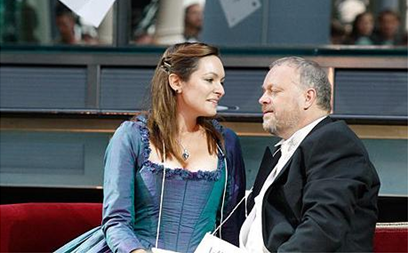
Hannah Pedley and Andrew Slater perform. Photo by Andrew Crowley.

Some of you may remember Twitterdammerung, the world’s first Twitter opera that premiered last year in the lobby of the Royal Opera House.  Over 900 people contributed to the opera’s plot and dialogue in less than 140 characters at a time.   The tweets were abridged and compiled into a libretto by John Lloyd Davies, Director of Opera Development, and Helen Porter and Mark Teitler wrote the score in three days. Although the plot had “little rhyme or reason,” it was surprisingly not lambasted by the critics, one of whom called it a “decent operatic sketch show.” The audience enjoyed the humor and operatic references; although Davies points out that nothing this frivolous would ever be on the main stage.

VirtuARTsity- the Appel Farm

Here is a description of the program from their press release:

VirtuARTSity.org is a unique website . . . created with the goal of creating a forum for people with artistic interests to post their own work, view other work being done by artists from across the region, and join a community of like-minded people for dialogue and knowledge-sharing. Once a person registers on VirtuARTSity.org they can create their own interest-based group and invite friends, or join a discussion. Posting videos, blogs and audio files are more ways for people to connect as artists, and to have an outlet for their work. . . .

This site has excellent potential but still seems to be on training wheels- there’s not a whole lot of content yet and I don’t see a space for users to interact directly with sponsored artists. But there are some amazing user-uploaded pieces of art there, and it will be exciting to see what this turns into once it gets going.

Singing Contest, Choose Your Own Adventure Concert, and People’s Choice Concert- Arkansas Symphony Orchestra

This little orchestra has big ideas for transforming the audience’s experience at the symphony. On July 4, selected singers chosen by audience vote and a panel of judges will compete in front of a live audience to sing the National Anthem with the ASO as a part of the Oh Say Can You Sing competition. Anyone can upload a youtube video of themselves singing the anthem to the contest website—the local newspaper even sponsored a day at a mall where those without cameras could come and get filmed. Music Director Philip Mann reports that the competition was extremely popular last year and that continuing it this year was a high priority.

Oh Say Can You Sing?
Oh Say Can You Sing? is sponsored by the Arkansas Democrat-Gazette

This year, kids in attendance for the annual children’s concert will get to choose their own concert live. The concert will be based on a character’s adventures, and the kids will vote by show of hands what the character should do next, with different pieces resulting for the different resulting adventure. Mann says that he tried this first at the San Diego Symphony, where jumbotrons and cameras made the experience more similar to a rock concert than the traditional symphony concert.

And last but not least- a People’s Choice concert. Audiences will get to choose from a list of pieces and vote throughout the year via social media, email, and text messaging, up until intermission of that night’s concert.

Virtual Choir- Eric Whitacre

Now, I know Eric Whitacre is not a performing arts organization in and of himself, but his Virtual Choir can’t get any more 2.0. Inspired by a young woman who posted a YouTube video of herself singing the soprano part to one of his works, Whitacre sent out a request for videos of all the parts to his piece “Lux Aurumque.” With a video of him conducting to keep everyone together, hundreds of singers from around the world sent in their submissions. There was even an audition for a solo part. The result, edited together by Scott Haines, is beautiful. There was a sequel this year, a performance of Whitacre’s “Sleep” with even cooler graphics, more singers, and subtitles.

Hot City Theatre and Lia Romeo

Recently, Hot City Theatre announced that thanks to a grant from PNC Arts Alive (who also funded VirtuARTsity, above), they were commissioning a play from Lia Romeo that will integrate social media into the play. The play is still being written, but a statement from Romeo suggests that it will incorporate input from the audience.

To me, one of the most interesting things about the rise of social media . . . is the way it has turned the communication of information from a one-way into a multi-way conversation. It struck me as interesting that most theater is still a one-way conversation, and I started thinking about ways to get the audience actively involved in commenting on or even shaping the direction of a piece of theater in real time, as it was going on.

It’s going to be interesting to see how performing arts organizations use (or resist) new technology and new ways of thinking about and interacting with art. Do you know of anyone using technology to engage audiences in creating art? Share your examples below!

The Art of Participatory Culture - Learning to Play WITH Our Audiences

This article was originally a speech for TEDxMichiganAve delivered by David Dombrosky on May 7, 2011 in Chicago, Illinois.

One of my favorite quotes comes from Confucius. He said, “Tell me, and I will forget. Show me, and I may remember. Involve me, and I will understand.” This quote has become one of my touchstones because it reminds me that: life is experiential, and the most resonant experiences in my life were ones in which I was an active participant. The first time I sang a solo for a public audience. Writing and performing a solo theatrical performance in college. Learning how to tango earlier this year.

If the arts community agrees that we want audiences to have deeply resonant experiences with the arts, then the question arises, “How can artists and arts organizations go beyond telling their audiences about the work or showing the work to patrons and actually INVOLVE them in the work?”

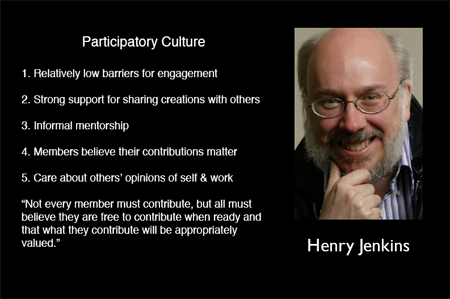
Technological advances over the past decade have propelled us into a highly participatory culture, wherein individuals no longer simply consume culture, but they now actively produce and contribute to culture. In 2006, media scholar Henry Jenkins and his colleagues published a white paper entitled Confronting the Challenges of a Participatory Culture in which they described five defining elements for participatory culture.

Jenkin's 5 Traits of Participatory Culture. Image from OpenParenthesis.org

With this article, I would like to address the question of how artists and arts organizations can involve audiences in their work by highlighting how a number of artists and organizations exemplify the defining elements of participatory culture.

#1 – “A participatory culture has relatively low barriers to artistic expression and civic engagement.”

We see evidence of this every day. The number of free web tools and mobile apps that have been released over the past decade is astronomical. With each successive release, the barrier to artistic expression and engagement is lowered that much more.

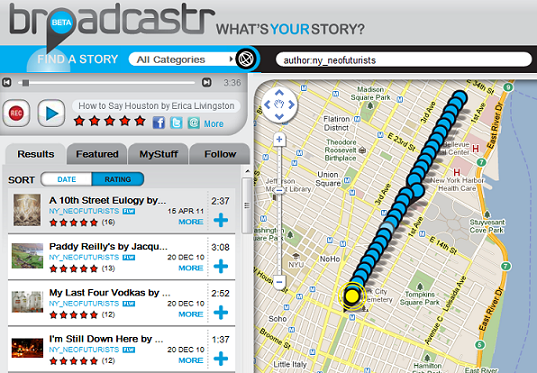
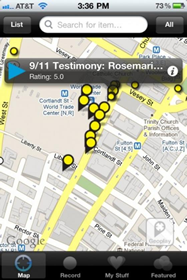
One recently released, free tool called Broadcastr allows people to record 3-minute audio segments and pin them to specific locations on a map that is available on their website as well as through their mobile application.

30 Plays in 30 Blocks from the Neo-Futurists

Many of you may know the Neo-Futurists, a theatre performance group originally established here in Chicago. Their New York City chapter has a show called Too Much Light Makes the Baby Go Blind which contains 30 plays performed in 60 minutes. Earlier this year, they used Broadcastr to create 30 plays in 30 blocks. So if you go to Second Avenue in Manhattan, you can walk from Houston Street to 29th Street and experience 30 location-specific, interactive pieces of audio content. Some of them direct you to do things, some of them are little songs, some of them are plays with multiple voices, and some of them reference their locations very directly.

The technology required to do this? Either a computer with speakers and a microphone OR a smartphone. That’s it.

#2 - A participatory culture has strong support for creating and sharing one’s creations with others

Over the past two years, choral composer Eric Whitacre has worked with singers from around the world to create “virtual choirs” for the performance of his compositions. Participating singers download a PDF version of the sheet music for their vocal part. They watch a YouTube video of Whitacre conducting the music, record their vocal tracks, then send the tracks to Whitacre for final editing. Whitacre and his producer then combine all of the vocal tracks together into a single audio composition and syncs it with a video featuring a virtual riser with the floating faces of each of the singers performing the piece.

His most recent virtual choir composition entitled “Sleep” features 2052 singers from 58 different countries. As of today, the video has been viewed nearly 500,000 times on YouTube. His 2009 virtual choir composition “Lux Aurumque” has had over 2.4 million views.

#3 - A participatory culture has some type of informal mentorship whereby what is known by the most experienced is passed along to novices

One organization which exemplifies this element is the San Francisco Symphony. With their Community of Music Makers program, the symphony serves amateur adult musicians and promotes active participation in music-making and lifelong learning. Community of Music Makers includes workshops and events for amateur vocalists and instrumentalists in symphony’s performance hall, where participants are able to improve their skills. They also receive live and online coaching sessions from the symphony’s musicians and artistic staff. A chamber music convening service serves as a clearinghouse to help individual players and ensembles connect each other and identify performance opportunities in the local community.

The lesson here? Learn to love amateurs as they are likely to be a strong core from which to further develop your audience.

#4 – In a participatory culture, members believe that their contributions matter.

The Brooklyn Museum pioneered crowd-curation in 2008 with its photography exhibition Click! First launched through an open call for artists to submit photos related to the theme of “The Changing Faces of Brooklyn,” the artwork was then made available online for anyone to curate. This year, they are taking another spin on this concept with the exhibition Split Second: Indian Paintings, which invited the Brooklyn Museum’s online community to participate in a project that will result in a small installation of Indian paintings from the Museum’s permanent collection in July 2011.

The first stage of the project explores split-second reactions: in a timed trial, participants were asked to select which painting they prefer from a randomly generated pair of images. Next, participants were asked to write in their own words about a painting before rating its appeal on a scale. In the final stage, participants were asked to rate a work of art after being given unlimited time to view it alongside typical interpretive text. Each part of the exercise aims to examine how a different type of information—or a lack thereof—might affect a person's reaction to a work of art.

Once the exhibit opens in July 2011, visitors will be able to view a small selection of the paintings that generated the most controversial and dynamic responses during the evaluation process, accompanied by a visualization and analysis of the data collected.

With both of these experiments from the museum, the online participants had a clear understanding of how their contributions would matter to the overall project.

In April of this year, choreographer Jonah Boaker debuted FILTER at the Ferst Center for the Performing Arts at Georgia Tech University in Atlanta. FILTER explores how the audience can serve as a collaborative filter for the performance through the use of a mobile application.

Interview eith Jonah Bokaer about FILTER.

Boaker worked closely with students from the university’s Music Technology Program to develop MassMobile, a smartphone app that acts as an interactive platform for audience members to participate by affecting the stage in different ways. Boaker’s approach to participation actually allows the audience to co-create the artistic experience in real-time.

#5 - In a participatory culture, members feel some degree of social connection with one another

Okay, so my absolute favorite exemplar of this element is the MP3 Experiment created and hosted by Improv Everywhere in New York City. Begun in 2003, the concept is quite simple. Improv Everywhere puts an original mp3 file online (usually around 45 minutes long) that people download and transfer to their iPods. Participants then: synchronize their watches to a clock on the organization's website, venture out to the same public location, and blend in with the crowd. At the predetermined time, everyone presses play. Participants then carry out coordinated instructions delivered to their headphones via narrator “Steve,” and everyone around them tries to figure out what in the world is going on.

In 2010, over 3,000 people participated in a MP3 Experiment in Midtown Manhattan. The event started in retail stores and progressed to Bryant Park for the narrator’s surprise birthday. The event ended with a massive toilet-paper-mummy dance party.

The next Mp3 Experiment in New York is scheduled for July 16, 2011. Stay tuned to the Improv Everywhere site if you're in New York and wish to participate.

Something to consider about all of the artists and arts organizations that I’ve mentioned here is that they all invite the audience to play.

As an industry, we have spent so much of our time playing FOR the audience or playing TO the audience. In order for our sector to thrive in this participatory culture, we must now invest a significant amount of time and energy exploring ways to play WITH the audience.

Peer to Peer Fundraising in the Digital Age

Back in the day, peer-to-peer fundraising was done with phone calls, letter-writing campaigns, and in-person visits. Now we have a whole new universe of not only digital communication, but digital relationships. Recently, I came across a cool infographic from Blackbaud that illustrated the power of harnessing online social networks to raise money for charity. It got me thinking- what are organizations doing to take advantage of this?

Peer to Peer Products

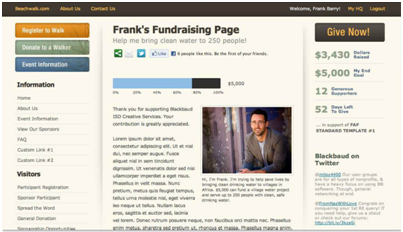
Peer to peer fundraising tools offered by Blackbaud (Friends Asking Friends) and Convio (Team Raiser) enable team members and participants to set personal fundraising goals and then go about asking friends and family for donations, the deadline for raising funds usually being an organizational event (primarily races to cure diseases). In fact, according to the Chronicle of Philanthropy, all of the top five P2P Giving organizations in 2010 were health organizations (for the top 25 online giving orgs of 2010 view slide 8 here).

Convio's  Team Raiser
Convio's Team Raiser

Blackbaud’s Friends Asking Friends
BlackBaud's Friends Asking Friends- thanks Frank Barry!

If you put on these participant-heavy events, here’s a post about 3 ways to add new event participants.  But according to a webinar by Blackbaud on Tuesday, you don’t have to have an event in order to use these tools. Organizations are using them both with ongoing fundraising and with virtual or digital events as well.

Website Tools

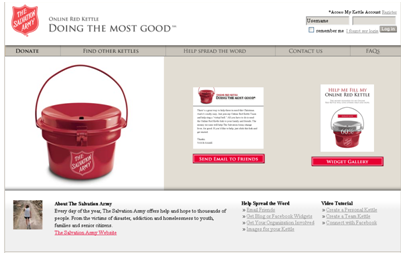
Both the Salvation Army and the World Wildlife Federation have cool things that are like the peer to peer tools above, but are designed for ongoing fundraising. The Salvation Army has an “Online Red Kettle”. You can either start your own red kettle, donate to an existing one, or send an eCard to your friends (via email) urging them to support one. If you set up your own, you can have your own fundraising meter, banner ad, or Facebook app.

Online Red Kettle
Online Red Kettle

On the WWF’s site, you can search for or make a super-cute Panda Page (it can be for any animal), then email it to your friends and family. As of right now there weren’t any social media plug-ins on the page.

World Wildlife Federation Panda Page

Another way to configure your website to encourage peer-to-peer fundraising (also suggested by Frank Barry and Steve MacLaughlin of Blackbaud) is to immediately prompt online donors to share with their social networks when they make a gift, instead of only receiving a regular confirmation page or email. Use Facebook and Twitter plug-ins (like and share buttons, retweets etc) to make it simple for them to share with their networks.

You can also embed those same plug-ins in different areas of your website. Enable somebody to “like” a concert, or retweet a story about your outreach program.

Facebook Causes

Causes has alternately been held up as a model for success and derided for not delivering on its promises.  The basic idea is that it allows anyone to create an advocacy group, or “cause”. This cause can then raise funds to donate to a charity. One of the most successful causes is The Nature Conservancy, which has raised over $400,000. An arts success story is Keep the Arts in Public Schools, created by Americans for the Arts, which has raised almost $50,000. People can become members of the cause, donate, tell friends, and “give a minute” by watching and participating in ads that earn money for the cause.

Aaron Hurst of Taproot has been a critic of Facebook Causes since his organization devoted $3,000 of staff time to creating their Cause shortly after Facebook launched the feature.  They have received only $60 in return to date. Is Causes a rip-off or a revolution in fundraising? The jury’s still out, but it’s my guess that the different results are due to a combination of knowing how to facilitate peer-to-peer fundraising well, an organization’s existing fan base, and the type of cause. It’s interesting to note that at the Nature Conservancy, social networking was never primarily about raising money- it was “first and foremost a tool for brand and reputation,” said an organizational representative in this 2009 Washington Post article.

Kickstarter

Much has been written about Kickstarter and its cousins, IndieGoGo and RocketHub (among others- check out Pat’s article from last year). And certainly anyone using these tools knows that it’s all about mobilizing your social network. It’s really better suited to specific projects than ongoing fundraising, however. And unless you are able to get your supporters to in turn appeal to their own friends, you are probably going to be asking the same people you always ask anyway.

According to a recent article from NPR, Kickstarter has raised over $50M for creative projects since launching in 2009 and currently attracts $2M in pledges each week for projects.

Check out this Mashable article on other social fundraising alternatives.

The philosophical side

There’s a lot more to this than just raising more money. It’s also about building donors of the future, and increasing not just donations but engagement that will later lead to donations.

On Wednesday, the Case Foundation hosted the Millennial Donors Summit to talk about millennials’ approach to charitable giving. A lot of the points that were made apply not only to millennials, but also to peer-to-peer and social media fundraising. The following is excerpted from Katya’s Non-Profit Marketing Blog:

  • It’s not about telling millennials to support you; it’s about creating a vested interest in what you are doing with joint ownership. Let millennials manage your community, design your logo or otherwise be an active partner in what you seek to accomplish.
  • At some point, you have to build an army. You can only sell something yourself so many times—you need your community doing it for you, performing the heavy lifting. So give them ownership.
  • To be trusted on the web, be an individual, not an organization.
  • Look for the small yes.

Something that Frank and Steve mentioned in their webinar this week is that it’s more important to tell a compelling story than it is to make the ask when using social media to fundraise.  They gave examples of YouTube videos where the ask was a subtitle.  The story is what gets people interested.

Also, give them something to do besides donate. Encourage them to like your page, share the link or video, comment, or even answer a question (like at Free Rice) or send mom a card.

Many of these examples are from very large organizations that have teams of people to create these web tools. But these ideas can be applied on a smaller scale. How have you empowered your constituents to raise money and awareness for you? Do you know of arts organizations who are doing it successfully?

Tech tools for your arts job search

amelia-gradAfter two years writing for Technology in the Arts, I am leaving the Center for Arts Management and Technology. The unfortunate part about being a graduate student is that you will have to leave a place you love after a certain number of years, and my number is up! Special thanks to David and the rest of the CAMT staff for making the last two years amazing, educational, and memorable. I am very excited about my new position with the data-driven arts and entertainment consulting firm TRG Arts. I have been hired as the Strategic Communications Specialist, which means I will serve as a writer and editor for the firm’s consulting projects, Data Lab research and analytics projects, and a contributor to TRG’s knowledge center online.

Before I leave Technology in the Arts, I wanted to share some of the secrets I learned during the last few months of looking for arts jobs, mainly at non-profit organizations. Because nonprofits usually begin their fiscal year in July, new positions at these organizations are often posted in the summer. That means now is the prime time for you to find your new dream job in the arts.

Here are my favorite tech tools to help you find that job:

Changedetection.com

Arts jobs often need to be filled quickly, which also means the time you have to apply is limited. We’ve all had the experience of finding a great—no, perfect—job and finding out that the “apply by” date has passed or being informed after you’ve submitted your resume that the company had already extended an offer to someone.

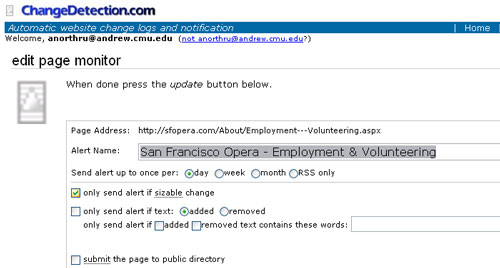
Changedetection.com comes in handy when you know that there is a company (or companies) you’d love to work for. Obviously you aren’t going to check in on the employment page of their website every day. Better that you just be notified when they post a job, right? Well, through the magic of technology, you can find out when that employment page changes. Changedetection checks the page every day, week or month (you specify which) and sends you an email when there has been a change.

changedetection

If there is a specific geographic location you know you’d like to work in, changedetection can help too. For example, I was looking for jobs in Portland at the beginning of my search. I looked on the arts council website and there wasn’t a job board, but I wasn’t going to let a silly little thing like that stop me! What the arts council site DID have was a listing of all the arts orgs in Portland. I put a changedetection on the employment page of each organization I was interested in and got on with my search.

The downside of tracking all these pages is that you might have to sort through some jobs that aren’t for you. For example, I looked mainly at full-time marketing jobs, but I was notified for ANY job at those companies, including development and box office jobs, and in some cases, internships. However, you can take this as an opportunity to build networks. If you see a great job in finance, maybe you have a friend who looking who also happens to be a finance whiz. Forward the job to her and not only have you strengthened your friendship, but also she may want to return the favor if she comes across a job that fits you.

I would recommend setting these up relatively early in your job search and keep adding as you find companies that are of interest to you. This way, you will also see which jobs come up and how frequently as well as important information like salary ranges and organizational structure information. (For example, will you be working for someone who is a new hire herself/himself? Is there a new Executive Director at the org?)

changedetection2

The interface for monitoring a page on ChangeDetection.com

LinkedIn

LinkedIn has attempted to tout itself as a job-finding service. However, at the early-career/emerging leader level, I find that is less helpful for finding jobs and more helpful for simply networking. There’s not that many headhunters out there for arts jobs, except in the executive level and maybe for IT people.

Anyway, how many times have we heard that the arts world is a small world? I use LinkedIn to see if there’s anyone I know who may know someone at the company I am applying to. If your relationship is good with that person, ask them to put in a good word for you.

Sometimes LinkedIn groups will have job postings; I haven’t found this to be true for most of the arts admin/management groups though. Please comment below if you know of a good group for this.

PrintGuideStar

For non-profit organizations, it’s essential to check out the company on GuideStar. GuideStar is a free service that gathers and publicizes information about nonprofit organizations. Much of the information is geared toward donors and foundations, but there is a lot of useful information on it for the job seeker.

Once you register (free), you have access to almost any arts organization’s 990 tax forms, which means you can see what the organization’s budget size is and how they are doing financially. Note that for many organizations, the most recent year might be 2008 or 2009, so the information could be slightly dated or influenced by the recession—which is still important to know. The 990 serves not only as a way to see if the org has a record of keeping a balanced budget, but also as a historical snapshot of the organization, in terms of grants received, senior staff turnover, and capital campaigns and similar projects, among other things.

GuideStar is also extremely helpful to estimate salaries, especially if you are applying to a director-level position. The IRS requires non-profits to list the salaries of their five highest-paid employees. This is pretty valuable information, as the size of most non-profit arts organizations means that you aren’t likely to find very accurate information on that exact job at that exact organization.

Arts Jobs Sites

One of my friends posted a status update recently “wondering if CareerBuilder is really a builder”. I replied that all it had “built” for me was piles of emails in my spam folder. Personally, I’ve had a lot more luck overall with industry-specific sites, some of which can be used in conjunction with changedetection, as discussed above. (Bonus: The industry-specific sites manage to present you with jobs without asking if you want information from University of Phoenix every other time you go to look at a job. Just saying.)  Here are my favorites:

General:

By discipline:

State and local arts councils may have a good job posting site, depending on where you’re looking to find a job. For example:

Lastly, if you have an interest in development or program management, heads up! There are a few sites/ email alerts that I’ve found especially useful:

Philanthropy News Digest (A service of Foundationcenter.org)

PND has created a job alert system that will email you a daily summary of recent jobs in your area of interest. I cast my net wide by checking a lot of states and position types (communications, development, program management, etc) when I signed up for the alerts. I now get about 15 job postings a day. The fields of the organizations are quite diverse too. A recent email contained jobs from Napa Valley Opera House, University of Chicago, the Rainforest Alliance, and Vera Institute of Justice.

Chronicle of Philanthropy

Chronicle of Philanthropy posts mostly development jobs, which, like PND, you can sort by location, position type, and the field of the organization (education, health, museum, etc).

DotOrgJobs

It’s also worth mentioning that DotOrgJobs is good for fundraising jobs and other nonprofit jobs; however, I have not seen a lot of arts-specific jobs from them. You can subscribe via email or RSS feed.

On organizing email alerts:

You might be saying to yourself, “That’s a lot of email alerts to deal with.” I use gmail and have set a rule to have these emails automatically labeled “job search” and archived so that they don’t clutter up my inbox. Then I set an alert on Google Calendar reminding me to go through them once a week, so that I actually read them! This can also easily be done with Outlook.

Do you know of any other good sources for arts jobs? If so, please post them below!  Happy hunting!

On Volunteer Management Software – Part 2

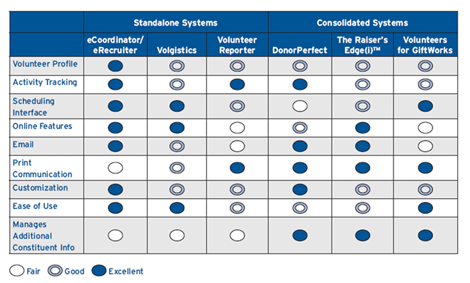
Techsoup and Idealware recently released  “A Consumer’s Guide to Software for Volunteer Management,” a review of commonly used systems. Part 1 of this series provided a brief summary of the report.  In Part 2, we provide a supplement to this report specifically for arts organizations.

How is volunteer management at arts organizations different from volunteer management across the non-profit sector? The arts sector is extremely diverse, just like the non-profit sector. Budget size, mission, discipline, resources, and the ways in which volunteers are involved in the organization vary widely. I think the main thing that sets us apart, however, is that our volunteers wear many hats, including artist, freelance employee, board member, or other constituent. It’s very hard to put our volunteers in a box, especially with small organizations whose volunteers do everything.

With that said, I think that for many arts organizations, consolidated systems (systems that work with the wider Constituent Relationship Management database) are the best bet, especially since so many have a CRM in place already. Part 1 touched on the strong and weak points of DonorPerfect, The Raiser’s Edge, and Volunteers for GiftWorks, which according to the NTEN 2008 Donor Management Software Satisfaction Survey together handle the donor management needs of 31.8% of non-profits in the country. However, if you’re one of the 6% or so who use a custom-built CMS based on Excel or Access, don’t feel pressured to upgrade. If you don’t ask your volunteers to do anything more complicated than usher, stuff programs, or do occasional filing in the office, you probably don’t need the bells and whistles offered by donor and constituent systems.

When should you think about upgrading to using a volunteer management system, either consolidated or standalone?

  • If you have a large number of volunteers (say, over 300)
  • If you have many different jobs that you need volunteers to do
  • If the jobs require training
  • If the jobs require specialized knowledge
  • If the jobs require artistic ability
  • If your organization requires background or reference checks for volunteers

Let’s take a look at some different types of arts organizations that use both standalone and consolidated volunteer management systems.

Festivals

Sausalito Art Festival

For festivals that happen once a year, a large number of volunteers sign up in a short amount of time, and the scheduling can get complicated with all the different roles and shifts. The Sausalito Art Festival Foundation in California uses the stand-alone system Volunteer Hub so that volunteers can sign up, register, and update their contact information on their own, as well as browse specific events that need volunteers. The system automatically puts volunteers on a waitlist once enough that have signed up.

Volunteer Hub is cloud-based, and the price depends on the number of volunteers. The system seems to be a great fit for an arts festival, especially one that isn’t run by a large organization with the staff to devote to volunteer management.

Performing Arts Centers

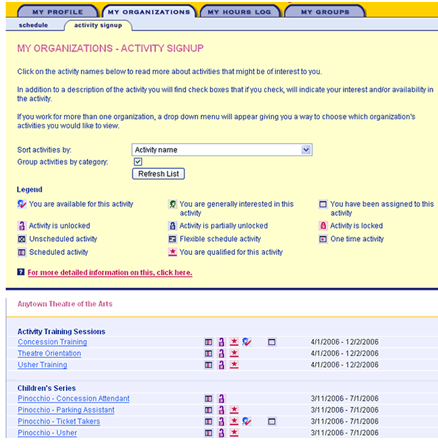
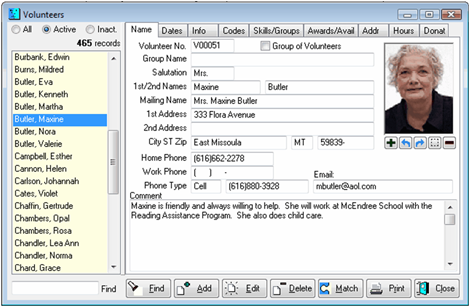
A stand-alone software that seems to be popular among performing arts centers is Theatre Volunteer Software out of Ontario. It’s a comprehensive system that has both a volunteer web portal (MyVolunteerPage.com) and a manager interface (Volunteer Impact). There’s really not much that this system can’t do. On MyVolunteerPage.com, a volunteer can:

  • fill out an application
  • enter and update their contact information
  • search and sign up for jobs
  • view and confirm schedules (they can choose between “not sure yet”, “confirm”, and “decline”)
  • log hours worked and view hours reports
  • answer any question you want to ask them: why they are interested in volunteering, interests, availability

On the other side of the system, through Volunteer Impact, a manager can:

  • receive alerts about new applications and confirmations
  • view a dashboard that includes analytics on click-throughs from the volunteer portal to a sponsor’s website
  • set minimum qualifications for a job
  • set a cap on how many volunteers can sign up for a job
  • do all sorts of queries to find volunteers
  • send personalized emails as well as direct mail to volunteers found through queries
  • create phone lists
  • create an automatic welcome email that is sent once a volunteer applies
  • create and view all sorts of customizable reports

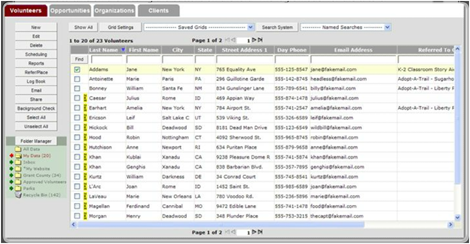
Screenshot from Theatre Management Software

The price for this Canadian creation is just under $1000 for the set up and then an annual fee of approximately $1 per volunteer. It’s used by the Cincinnati Arts Association, and another client says “it’s like having a 24/7 employee.”

Museums

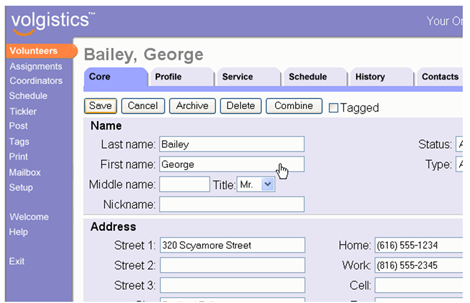
Museums have some of the most diverse volunteer needs. Between docents, children’s activities, greeters, data entry, surveyors, and summer camps, museums typically have a relatively large army of volunteers of varying skill levels. From limited internet research, it seems that many use Volunteer Works (or its updated version Volgistics) or some other large consolidated system covered in Part 1.

Another system that seems to be popular (especially to our neighbors to the north) is Wild Apricot, although this system seems to be more geared toward membership and donor management than volunteer management. However, starting at $25 a month with an easy to understand interface, it may be just the ticket for a smaller organization.

Room for Research

There is a lot of room for research on volunteer management at arts organizations. There are so many questions that haven't been answered in a quantitative way, such as:

  • What kinds of jobs do volunteers do for arts organizations?
  • What kinds of systems do organizations currently use to manage their volunteers?
  • What are the needs of arts organizations regarding volunteer management? What are the day-to-day needs, and what would be nice to have?
  • What kinds of CRM software do arts organizations use, and can their volunteer management needs be met by their existing software?
  • What kinds of arts organizations use standalone volunteer management software, and what software do they use?

Then there is the topic of using technology to enable organizations to move beyond the nuts and bolts of getting things done to embracing emerging and best practices like volunteer feedback, getting current volunteers to recruit new volunteers, communicating and celebrating volunteers’ contributions, and informing volunteers of organizational developments and news.  There’s a great article from NTEN about using Facebook to engage volunteers that is a great start in this area. But there is a lot of room for more research to help our volunteers help us.

You can help start the research by filling out our poll below!

[polldaddy poll=5142935]

10 Takeaways From the 2011 Emerging Practice Seminar

CultureLab, a partnership between an informal consortium of arts consultants and the Cultural Policy Center (CPC) at the University of Chicago, recently held an 'Emerging Practice Seminar' in April. The organization was formed to break down the silos of research, policy and practice, and create a new capacity and approach to tackling challenging issues. The topics at this year's seminar were:

  • Uses of technology in audience engagement
  • Revenue management and dynamic pricing

The seminar's website features all of the speakers' presentations (both videos and slides) and is an extremely helpful resource!

Here were my top 10 takeaways from the 'Use of Technology in Audience Engagement' portion of the seminar.

1. Embrace technological innovation, there's nothing to fear! Tim Roberts of ARTS Australia provided an introduction to the day's topics. Tim's introduction called attention to the unfortunate fact that any arts managers and organizations still view technology as something they are fighting against. He quoted NEA chairmen Rocco Landsman as saying "the arts are battling the technology invasion". Roberts argues that many also believed cable television to be the death of television and photography to be the death of painting and that technical innovation has not caused the death of an artform but has contributed to its spread and created new audiences.

Uses of Technology in Audience Engagement - Tim Roberts from Cultural Policy Center on Vimeo.

2. Engagement is an ongoing process: Technology is least effective when it's not used in a proper context of engagement. This process of engagement often begins prior to the audience coming through the doors. Likewise, the process shouldn't end after the performance or visit ends. Technology can help to provide context to a piece of art or performance, personalize the experience and even augment the experience. There are many options when it comes to sustaining a deeper level of audience engagement.

3. Layered Arts Experiences are cool! This type of technology has been extremely underutilized in the performing arts sector. Layered Arts Experiences offer audiences options for real-time assistance imperative during arts programs. They can come in the form of supertitles for opera and dance performances. The Columbus Symphony Orchestra had a device called the 'Concert Companion' which enabled patrons to read something about the piece they were hearing as they listened to the concert.

4. Museums continue to lead the way when it comes to adapting technology: Another common theme during the seminar was the overwhelming lack of technological innovation in performing arts organizations. Even though there were examples of organizations using layered arts experience tools and mobile interactions, it seemed as though they were few and far between and many had even stopped using these tools.

5. The verdict is still out on Tweet Seats: A 'Tweet Seat' is simply a seat reserved in a theater for Twitter users. Tweet Seats have many benefits, including: encouraging a younger audience demographic to get involved in the performance, having this demographic spread the word about the performance to their Twitter followers, and cutting down on distracting other audience members by blocking off a section for Twitter users. The question, however, remains whether or not people can truly become immersed in a performance if they are multi-tasking with other technological devices.

6. Mobile Interaction isn't just limited to QR Codes in Museums Ron Evans of Group of Minds had some great ideas about ways to engage audiences via mobile devices. Evans suggested placing a QR Code on tickets for previews of the show. Evans also suggested distributing digital keepsakes after shows. He also discussed the importance of using these mobile technologies in the proper context of audience engagement. Unfortunately, most technology has focused on the pre-performance and pre-sale with the sole intention of making the sale and increasing attendance. Engaging audiences should also involve increasing their understanding and appreciation of an artform. The 'during' and 'after' is just as important to leading people to the next experience.

Mobile Interaction: adding content and context - Ron Evans from Cultural Policy Center on Vimeo.

7. Location Based Servies has a long way to go: Devon Smith presented the findings of a research study she conducted on arts organizations using location based services. Location Based Service is simply a service that uses the geographical position of a mobile device (Foursquare, Yelp, Google Maps). Applications like Foursquare can be useful in providing real-time analytics on the demographic of those who are "checking in" to a venue. Smith's study found that only 36% of the 76 nonprofit theatres she tracked, had properly claimed their venues on Foursquare, yet 97% of the venues had a mayor. Even though claimed venues had 3% more activity, the real-time analytic information could be very useful to any organization.

8. Blogging Isn't Dead!: Thomas Wickell of Malmo Opera shared one of the most interesting case studies of the day. Wickell emphasized the importance of viewing the stage from the audience's perspective as opposed to looking out at the audience from the stage. With this key distinction in mind, Wickell and his team found that the audience they wanted to attract was not responsive to traditional channels of advertisement (newspapers, television, etc). Since most of their target audience were highly engaged online, the team created a blog that was centered around the life of a character in an upcoming opera. The blog became so popular, at one point in time, traffic to the blog surpassed that of the company's main website! The staff even invited readers to a ceremony for the character (since she does not survive) and over 100 people came to pay tribute to her life. The blog can still be found here!

9. Technological Innovation Often Requires a Culture Change Within an Organization : Linda Garrison and Thomas Weitz at Steppenwolf Theatre gave an overview of helpful practices for creating video content. An important theme during this presentation was the importance of finding allies when seeking to implement any changes. Whether designing a new video campaign or placing QR codes on marketing material, implementing new technology can often mean a culture change within an organization. Finding out who your champions, advocates and contributors are beforehand can make a world of difference when proposing any sort of change. It's also well worth your time to watch the Steppenwolf videos here.

10. Know Your Target! The Steppenwolf and Malmo case studies highlighted the importance of understanding who the target audience is prior to implementing any of the strategies and tools listed above. Steppenwolf researched and found their audience tended to be highly educated, comfortable with direct marketing and confined to a very specific geographic location. As a result, Steppenwolf decided that an online video campaign could be effective in engaging their audience. The Malmo Opera worked backward and began by envisioning what type of audience they wanted to attract. Either way, this process is extremely effective when the target audience is clearly defined.

The Art of Social Media Analytics, Part 3

Summer is the “off-season” for many of us in the arts world. Why not take this time to refresh your social media strategy? This is part 3 of our 3-part series on social media analytics tools. Check out Part 1 and Part 2.

blue_dataThe last part of our series concerns making management decisions based on data. Once you have the data, what do you do with it? As we come up with more sophisticated methods to track social media sentiment and reach, it becomes possible to track more accurately how people are responding to social media. This is especially important because social media can be a valuable part of your market research. It is like a 24-hour focus group, answering many of the questions you may have about your audience as well as the questions you didn’t think to ask.

As mentioned in Part 2, there are a variety of questions that you may have about your audience and a variety of tools that track different measures of success. Some tools are narrowly focused on one measure, while others give you a conglomeration of these measures. Some examples of the measurements of success include:

  • Sentiment: Are social media users referring to my organization positively, negatively, or neutrally?
  • Conversions: How many and which fans are buying online (or offline)?
  • Spikes in activity or “buzz”: How are social media users responding online to campaigns?
  • Impact: How many people is the message reaching and how much influence does the organization have? How many people are sharing posts?

When thinking about measurement tools and management decisions, the first question is often, when is it worth it to pay for analytic tools? As technology evolves to be able to track more specific and more valuable information, more paid analytics tools have come on to the market.  There are two basic instances where it’s worth it:

1) when you have a large customer base

2) when you need enterprise-level social media analytics

Firstly, if you have a large customer base or a large social media base (no hard and fast rule, but larger than 100,000) and you are literally having trouble monitoring comments on your brand, you need a tool that takes more of a summary view. Secondly, most paid tools are enterprise-level tools--tools that more than one person can manage or assign tasks to others and have other special features. If you feel you need this type of functionality, then paying for an analytics may be worth it.

Besides those two factors, a company should also consider the elusive “Holy Grail of Social Media,” return on investment, or ROI. Many organizations have found a “chicken and the egg” scenario of needing time and resources to show results (often, revenue), but needing results to convince upper management to spare the time and resources to devote to social media. This situation can be difficult; you might try proposing a pilot program or experiment with a cheap or free tool before proposing a larger investment.

One institution that has made a practice of using data to make decisions in social media (as well as investing in technology—check out their web and new media strategy) is the Smithsonian, under the guidance of tech guru Nancy Proctor. As one employee put it “why would you change anything without metrics and feedback?”

Once a company has the analytics tools in place it’s easy to observe your numbers of fans, interactions, and gauge the quality of those interactions. What’s more difficult is translating your observations into actionable decisions.

A simple example is that of David Horgan’s, eMarketing Specialist for Smithsonian Folkways Recordings. David had experimented with linking ads to their Facebook page and their homepage. “We found that the ads that direct people to our Facebook page (rather than to our homepage) were about 3x more effective on a cost per click basis.” Management Decision: Direct more ads to the Facebook page than the homepage.

Another example is the blogathon on the Smithsonian Collections Blog that Rachael Cristine Woody worked on for American Archives Month. According to Rachel:

Until that time we had almost solely focused on collections content.  In October we shifted to also cover our profession and offer a more behind-the-scenes look at what we do/deal with, every day.  These posts became the most popular posts we’ve published so far, numbering in the thousands for direct hits, and to this day still receive at least 100 hits a week.  It was at that time that I think the blog truly found its most invested and engaged audience, and it helped to call attention to us that we should be covering more on our profession.  Management Decision: In addition to giving the collections exposure, engage and influence the professional community by providing transparency, advice, and support.

The National Museum of American History combined traditional survey techniques with data from analytics tools (Google Analytics and WebTrends data, click metrics from HootSuite, etc.), comparing the results of four closely-related surveys on each of four major communication channels (their blog, email newsletter, Facebook page, and Twitter feed). Although more complex, the results allowed Dana Allen-Greil to make decisions regarding how the Smithsonian communicated with patrons:

At the National Museum of American History, we’ve long had a hunch that our Twitter feed should focus on conversational and educational content, rather than marketing in-person events. If our followers aren’t local, do they really want to hear about events they can’t come too? Click metrics from HootSuite plus data from a survey of our Twitter followers gave us solid footing to make the case against Twitter as a platform for driving foot traffic to the museum.  Less than 25% of responders reported planning a visit to the museum after seeing a message from us—this is compared with over 55% of email subscribers who said they did.  Even more to the point, less than 10% of Twitter followers reported attending an event compared with over 30% of our email readers.  We discovered a similar trend with our Facebook fans and have altered our content strategy accordingly. Management Decision: Use Email (not Twitter) to Promote Synchronous, Location-Specific Events.

More info on Dana's Twitter content strategy can be found here.

So there you have it. As much as social media can seem nebulous, there are specific things to measure, to think about and analyze, and then to make decisions that you can feel confident about. When you develop your social media strategy for your next season, mix things up a bit with some new questions about your audience, new tools, and a new perspective on the art of social media analytics.

Special Thanks to the following people for their contributions to this series: Michael Edson, Brian Hinrichs, Maggie Johnson, Katryn Geane, Kristin Garbarino, Devon Smith, Lindsay O’Leary, and Crystal Wallis.

The Dynamic Box Office

Modern Box Office Airlines have been doing it for years. Ticketmaster (in its latest incarnation) recently jumped on the bandwagon.

Dynamic or variable ticket pricing is the strategy of altering ticket prices based on different variables.  (As noted in the comments below, "Variable pricing is setting BASE prices according to differences in performances' time of day, day of week, etc as in paragraph 2 (a midweek evening may be less expensive than a Sunday matinee, for instance). Dynamic pricing, on the other hand, changes prices after the initial on-sale in response to changes in demand over the sales cycle."  I use the term "dynamic pricing" in this article to discuss changes made to prices once the tickets have already gone on sale, altering FROM the base price.  Thank you for pointing this out, Kara!) These can include everything from the number of seats already sold at the time of purchase, the proximity of the show date, alternative entertainment options on the show date, anticipated weather, and any number of factors that the host deems as having an impact on ticket prices. It is perhaps a more realistic and “fair” way to price tickets, allowing the cost of tickets to reflect the actual supply and demand of the market. This should result in minimized dead-weight loss, which benefits but the consumer and the supplier. For performing arts organizations, grappling with decreasing advance-ticket sales and discounting options that gouge profit margins, dynamic pricing might be “just the ticket.”

Unlike regular discounting or promotional pricing, the dynamic ticket model would enable organizations to price each production—and even each performance--strategically and, perhaps, more realistically. Instead of offering incentive discounts, both the organization and the audience would be able to gauge expectations for a show based on the ticket prices. Declining ticket sales and decreased subscription renewals lead marketers to worry and wonder about the most effective way to promote ticket sales. A common “solution” is discounting, which leads to a host of other problems. Ron wrote this piece for Group of Minds outlining what the major drawbacks to discounting. Rather than reiterate what he has already presented so well, I will simply say that I agree with his concerns about this eagerness to discount in order to get butts in seats.  Considering these issues may make dynamic pricing a more attractive option for some.

A great example of the potential for dynamic ticketing is its recent use outside of the airline industry-- the newest Ticketmaster/LiveNation partnership is exploring the efficacy of dynamic pricing for sporting events. Last year, an article in Sports Business Journal did a great job outlining the way that dynamic pricing works at the San Francisco Giants’ AT&T Park.

There are a couple of key sentences in this article that I wish to address as they pertain to the performing arts industry:

  • “Advanced software analyzes market conditions and determines a pricing recommendation that team executives can either accept, deny outright or tweak.” That’s the kicker: advanced software. I know that the biggest question is always: how can my organization do this? Non-profit performing arts organizations already face challenges being short on staff; the responsibility and complication of daily ticket price changes could be a full-time job in and of itself.

Analyzing the results of the 2011 Ticketing Software Satisfaction Survey, most respondents indicate that box office systems are either custom-built, cobbled together, or some of the solid, inexpensive options available to organizations. I went through and sent inquiries to the organizations listed in Amelia’s overview of the ticketing software survey results, as well as some others that respondents are using.

Unfortunately, at this time, nobody seems to have an easy-to-use “dynamic!” function in their software that makes it easy for an organization to alter prices without sending an actual staff member in to change them by hand each day. But the conversation is building in volume, and a few companies expressed that they can either design such a component for their clients, are looking into offering dynamic pricing in the future, or would like to know more about the demand for this function before they pursue including it in their products. (Just before posting this, I received the following from ProVenue: “We have no dynamic pricing customers in the UK as yet, however we do in the US. Please click on (this link) for details. We are looking to release in the UK sometime in the new year.” (I learned that ProVenue is part of the company that provides this model to the Giants. How accessible this component is for budgets that may be more modest than those of the Giants, however, is a question that I have yet to get a response to.)

  • “(S)hould a game get rained out, standard refund and exchange policies would apply. But if a fan pays a premium price to see a particular player, such as a starting pitcher, and that player doesn’t play, there is no refund.” This quotation makes me smile, because in the performing arts, understudies are just part of the game. It does beg the question, however: what if someone paid a price bump because of a certain headliner, and that artist’s understudy performs that night? Does the ticketholder get a refund of the difference? We are all familiar with understudies and what that can mean.
  • Perhaps the most universally applicable part of this article is the section “What’s the payoff?” As it outlines, “Dynamic pricing structures can provide significant cost savings for fans over original list prices for lower-demand games, and for teams, provide another means to help fill seats, generate additional concession revenue and potentially upsell that fan into a larger, future purchase. And for higher-demand games, dynamic pricing provides teams a revenue maximization tool to capitalize better on that heightened fan interest.” So actually, dynamic pricing could give us in the performing arts a real understanding of how our work is valued. We make a lot of guesses, some educated, some not, to try and figure out what the “best” price is for the work that we produce. Could dynamic pricing remove some of the mystery, and help us maximize both the number of tickets sold and the revenue generated?

Some may balk at the idea, as Diane Ragsdale does in this article on dynamic pricing in the non-profit sector. She quips, “Let’s call a spade a spade. Dynamic pricing is a method for maximizing profits….Suddenly increasing ticket prices in response to high demand, and selling ‘premium’ seats priced as high as people are willing to pay, strike me as questionable practices in a nonprofit organization.” What will it take for people to stop associating “non-profit” with “NO profit”? She likens dynamic pricing in the non-profit performing arts sector to soup kitchens charging for certain perks. What an unfortunate and offensive comparison. Non-profit arts organizations are businesses, regardless of their tax status or their primary sources of funding, and selling tickets is a fundamental component of what they do. Certainly, there are organizations whose missions might preclude them from dynamically pricing their tickets (e.g. “free art for all”), but there are others for which dynamic pricing could help generate more revenue (not a bad thing) and bring in more audience. As Lori Kleinerman of the Goodman Theatre remarks in her compelling talk on the Goodman’s use of variable and dynamic pricing, “We are aware of our civic responsibilities as a not-for-profit institution, so it’s important that we are accessible while still optimizing our income.”

There are many ways to apply dynamic pricing within the performing arts sector, and with more use some things may become evident.  It is possible that it is a practice best suited for venues that do not scale their houses, or best applied to the “nose-bleed” sections, or only effective for the blockbuster shows. Of course, the key word there is “possible.” As we lament the decline of ticket sales, the loss of revenue when we discount with programs like Groupon and LivingSocial, and the oh-so-onerous epidemic of last-minute-ticket-buyers, why not consider dynamic pricing as an alternative model for revenue generation?  After all, we may be “non-profits,” but that doesn’t mean that we aren’t subject to the supply and demand curves that drive for-profit business economics.

On Volunteer Management Software - Part 1

Techsoup and Idealware recently released  “A Consumer’s Guide to Software for Volunteer Management,” a review of commonly used systems. In Part 1 of this two-part look at volunteer management systems, we provide a brief summary of the report.  In Part 2, we will provide a supplement to this report specifically for arts organizations.

In "A Consumer's Guide to Software for Volunteer Management," volunteer management software is divided into two groups:  standalone systems and consolidated systems that work with a Constituent Relationship Management (CRM) database.

Comparison chart from A Consumer's Guide to Software for Volunteer Management

Standalone Systems

The main advantage of a standalone system is scheduling—connecting volunteers with the right job at the right time.  If you have many different types of jobs requiring differing skills or levels of skills, a standalone system may be really useful to you.

eCoordinator
Screenshot from eCoordinator/eRecruiter

eCoordinator/eRecruiter Cost: $5,500 for the first year, $2,500 for subsequent years Cool Stuff: Online volunteer interface that blends seamlessly with your website. Volunteers can edit their own personal profiles. Integrated criminal background check with online application. Great email functionality with templates. Web-based. Social Media integration- volunteers can post opportunities to Facebook, MySpace, Twitter, and other common sites, and use those credentials to log in. Lame Stuff: Less than great print functionality (for direct mail pieces). Expensive.

Volgistics
Screenshot from Volgistics

Volgistics Cost: scalable- $53/yr for 1,000 records or less, online module (VicNet) $636/yr (click here for an interactive form with more information on pricing) Cool Stuff:  You can search for a volunteer with a “name sounds like” feature. Calendar allows scheduling. “Kiosk” station available for volunteers to check in and out. Online application and job registry. Lame Stuff: Limited email functions. No social media integration. Tech Support is email only supplemented by a database and video demos.

Volunteer Reporter
Screenshot from Volunteer Reporter

Volunteer Reporter

Cost: $700, Web Assistant $360/yr + tech support costs. Unlimited phone support is $300/yr, first year free. Cool Stuff: Strong printing functionality.  Customizable profile fields. Premade reports and lists of skills make set up go faster. Strong for tracking reimbursable expenses. Online component for volunteers (Web Assistant) available for additional cost. Demo videos on website. There’s a great tour of the program here. Lame Stuff: Web Assistant pages can’t be customized very much and require knowledge of HTML to implement. Limited email functionality.

Consolidated Systems

With a consolidated system, you have all your data about donors and volunteers in one place. Plus, if you already have one of these systems, there are little to no additional costs to worry about.

DonorPerfect

Cost: up to 1000 constituents is $48/month, pricing goes up to $403/month Cool Stuff: Email integration with Constant Contact (pay for CC separately). Robust reporting and querying. Customizable alerts. Custom fields on most screens. Weblink feature lets you have volunteers fill out customizable and brand-able forms online. Lame Stuff: No real scheduling system—you’ll have to find volunteers by query to match interests, skills, and/or availability. Volunteers can’t schedule themselves.

The Raiser’s Edge(i)TM by Blackbaud- Volunteer optional module

Cost: $5,500 start up and $1,300 per year per user Cool Stuff: Strong tracking functionality (hours worked, skills, and interests). Create and manage multiple projects and job sites. Ability for volunteers to enter their information online (automatically reflected in the database), including hours worked. Online component is customizable using a WYSIWYG editor. Strong email and print functionality. Prospect research tool “The Giving Score” evaluates each record according to likelihood and capacity to give. Lame Stuff: Expensive. Custom fields show up on a separate tab (“attributes”). Takes a while to learn.

Volunteers for GiftWorks

Cost: module $199 for one license, GiftWorks $499 for one license Cool Stuff: Robust scheduling functionality as good as standalone systems. Easy to use interface. Fast to set up. Web component customizable through HTML. Lame Stuff: Must enter all volunteers as “donors.” Limited email functionality. Can’t track geographic locations. Web Collect component only lets volunteers enter about 10 fields of info.

Methodology

I was pretty surprised when I got to the “methods” section of the report and found that majority of the research was based on five phone interviews, and that there was no quantitative component to the research at all.  I think the report would carry more weight and be more able to speak directly to nonprofits’ needs if some kind of field survey had been conducted.

The other thing I noticed was that the report started with the capabilities of the systems instead of the needs of the nonprofit organizations.  Taking a good look at what you need technology to do for you before you go shopping and get distracted by bells and whistles is essential in any IT strategy.

In Part 2, I’ll talk about volunteer management software specifically designed for arts organizations, as well as other software systems currently used by museums, theaters, and festivals.

The Art of Social Media Analytics, Part 2

Summer is the “off-season” for many of us in the arts world. Why not take this time to refresh your social media strategy?

This is part 2 of Tech in the Art’s 3-part series on social media analytics tools. Check out Part 1.

This part of our series is based on a simple question: As of today, what are your options for social media tracking? Let's take a look at some popular analytics tools and how to evaluate them given your organization’s more specific goals.

The Next Level

So let’s say you help determine social media strategy for your organization. If you’re like many organizations, you have Google Analytics, you look at your Weekly Facebook Update, you respond to comments on Facebook and/or Twitter. Your workload is, for the most part, tenable, and your social media presence is flourishing.

First of all, great job!

How can you take it to the next level without spending an inordinate amount of time or money? Get serious about analyzing your efforts and seeing what’s working. Using an analytics tool, you can begin tracking your efforts formally over time, just as you probably have a formalized system of tracking ticket revenue through sales reports. Some analytics tools offer a sort of moment-in-time snapshot. Others track over time as well.

So, as you endeavor to improve your tracking, which tools are for you? Here are a few questions to ask yourself:

1. Exactly how much time per week or month am I able/willing to devote to researching our followers/fans and the analysis of our data?

2. What am I interested in knowing about my social media presence? Examples include:

a) Who are my fans? (donors, members, subscribers, employees, artists, etc)

b) How much of an impact am I having? (Am I reaching key influencers? How far are my posts being shared?)

c) How much of a return I am seeing on my investment of time or money?

4. How much money (if any) am I or my department willing to spend and what do we expect for that money? (See Question 2)

5. On a related note, how much buy-in will you get from senior management/the board? Will data provided by these analytics aid your case in advocating for future social media campaigns?

6. Who will be maintaining a regular schedule of analyzing the data? Yourself? An intern? Someone else?

There are hundreds of tools out on the market, and more emerging everyday. Since there is no way for this list to be comprehensive, here is a list of our favorites at Technology in the Arts. If you know of other useful tools for tracking social media, please comment on this post.

Disclaimer: For the sake of limiting the project in some way, we have included only 3rd party social media sites—that is, mainstream social media sites that are set up for external relations with the general public, like Facebook, YouTube, Twitter and the like. We will not cover basic brand management tools or web analytics tools like Google Alerts, except that in terms of tracking conversions from social media.

Free tools

bit.ly used in conjunction with Google URL Builder/Google Analytics

If you’re already using Google Analytics for your web analytics, one of the smartest things that you can do is track click-thrus from social media to your website. Here at Technology in the Arts, we do this through Google URL Builder and bit.ly. Earlier this year, Tara gave us an in-depth look at Google URL Builder. Basically Google URL Builder equips you with the ability to tag any URL you link to in your social media posts. You specify the campaign, medium (Twitter, Facebook, feed, etc) and a few other details about the link and, voila!, you can track click-thrus from your social media platforms.

Using Bit.ly gives you the added bonus of shortening the links and creating QR codes as well as tracking of any link, even those you’re not tracking through Google, with registration (free).

googleanalytics

Think up

This program stores all your posts, tweets, replies, retweets, friends, followers and links on social networks like Twitter and Facebook in a database that you can easily search, allowing you to analyze and export the data.

What’s unique about this is that it puts the data directly in your hands rather than giving you the results of the analysis. This means you can slice and dice any way you like, beyond any restrictions the program might impose upon you.

Flowtown

“If social and email had a baby, it would be called Flowtown.”

- Dylan Boyd, Vice President, eROI

When I first started researching social media analytics, I held a focus group with social media experts, one of which was Devon Smith of the 24 Usable Hours blog. She suggested Flowtown, which she reviewed in detail last fall.

The concept is that it helps you manage your email list in the context of social media. Flowtown is currently renovating the tool; however, you can sign up to be notified when they are accepting new users.

Flowtown-Import-Contacts2

Social Mention

Social Mention analyzes interaction from across the social media universe--Not only Facebook and Twitter, but other social media sites like Digg, StumbleUpon, YouTube. It gives you a snapshot of how your social media presences are faring. One of my favorite features is the focus on sentiment. A common feature for paid tools, you get information on how your brand is perceived—in a positive, negative or neutral way—for free.

Klout.com

Klout is one of the most comprehensive systems for social media analysis. The tools help you track your presence over time, measuring things like influencers, reach, the probability for the message to be amplified (shared), and more, all of which contribute to an all-around Klout score. Another useful feature is the ability to compare yourself with other organizations.

TweetEffect.com

Tweeteffect is helpful in finding out which tweets are most “effective”, specifically by finding out which tweets cause you to lose and gain followers.

tweeteffect

TweetPsych.com

Tweetpsych is a tool which tells you simply who you are to the people who follow you. The platform describes itself as creating a psychological profile of the twitter account, which is done by comparing how often you tweet about a particular topic in comparison to the “average” Twitter user. For example, techinthearts tweets about work, media, and learning more than the average Twitter user, and about the past, anxiety, and self-referencing tweet less than the average user.

tweetpsychFacebook Analytics

The only consistently good free option for tracking Facebook is the Facebook analytics tools.  The tools are a lot better than they used to be, especially with the recent upgrades that let you see how many impressions each of the items you post on the wall receive from your fans. However, Facebook tools don’t have the same capabilities as the Twitter tools to give an accurate picture of who is being reached.

Paid tools

Radian6 ($500/mo)

Radian6's philosophy is pretty simple: Listen, Measure, and Engage. And by "listen," doesn’t just track Facebook and Twitter—they monitor across blogs, forums, news, and more. You can track topics by keywords, basically listening to the conversation about why your customers come to you in the first place rather than just monitoring your own brand name. So, monitoring internet chat about string quartets and classical music if you are a Chamber Music Society.

Radian6 offers tons of ways to measure all the data you've "listened" to. It allows you to slice and dice data of social media on par with Google analytics and more, such as identifying key influencers and tracking the lifecycle of buzz around your campaign or brand. Another thing they measure is Share of Conversation: how often is your brand (say, MoMA) mentioned in the conversation about the general topic (arts in New York)?

Finally, this tool facilitates engagement with customers with integrated workflow, alerts, and sentiment monitoring. You can assign different people to be the Community Managers for different topics or audiences who respond to those constituents personally. Radian 6 also advocates contributing to the conversation by contributing white papers or other research to the topic.

Coremetrics (price varies)

cop-thumb-img-new

If Radian6 looks at the big picture, Coremetrics (IBM's answer to analytics software) drills down to the individual customer level. Its main strength is that it is a comprehensive marketing system, integrating different channels and even offline information to convert and retain customers online. They also have a three-step philosophy: anticipate what your customers want based on cross-channel historical data, automate an immediate response to customer actions, and syndicate personalized content to the customer via the right channel at the right time.

Coremetrics puts all of your data--social media, CRM database, etc--into one application and measures it with the same metrics. This allows you to segment your customer base according to any and as many characteristics as you want to create the ultimate personalized experience.

BONUS: Coremetrics publishes informative white papers on analytics that you can download in exchange for an email address.

ComScore (price varies)

ComScore is another "360-degree" tool. Like Coremetrics it unites web analytics and social media data. The difference is that ComScore uses a consumer panel of approximately 2 million consumers worldwide to measure people's behavior in the digital environment. ComScore's Social Analytix tool is powered by Radian6, but when combined with ComScore's other tools, you can integrate social media measurement with other analytics tools. ComScore’s analytics toolbox is vast and covers a multitude of different needs, including ad effectiveness, search marketing, mobile, and cross-media measurement.

Twitalyzer ($30/mo)

One of my favorite free tools is now a paid tool, but it is still affordable to many non-profits. At only $30 a month, Twitalyzer not only tells you what is happening with your Twitter account in terms of reach, impact, and the other metrics we’re familiar seeing in association with social media, but it give you concrete recommendations on how to improve your outcomes based on more successful Twitter users. For example, I did a social media analysis for a client last year and Twitalyzer told me that:

If @"ClientName" is interested in having a more measurable impact in Twitter we recommend the following:

●     It is moderately important that you find more followers ●     It is moderately important that you find a few more people to follow yourself ●     It is moderately important that you engage others in conversation more frequently ●     It is very important that you write more frequently

Few tools on the market actually connect the dots by analyzing data and then telling you what you should be doing. If you can afford it, it's a good tool for those starting out as well as those re-orienting their social media strategy.

Next time in Part 3: Basing management decisions on the data you find with these tools (in case you aren't using Twitalyzer), including when it is worth it to pay for an analytics tool and examples from the Smithsonian on the concrete actions their staff has taken based on social media data.

Using Google URL Builder to Track Your Website's Traffic [mini-nar]

Mininar
Mini-nar

Back in November, Tara took a look at Google URL Builder.  Given that some people learn better by watching someone else do it first, we decided that this would be a great topic for a mini-nar.

Here's David to walk you through how to use Google URL Builder to track the traffic being driven to your site through promotional campaigns, social media, e-mail marketing, and more.

Mini-nar - Google URL Builder from Technology in the Arts on Vimeo.

If you have topics that you'd like to see us cover in upcoming mini-nars, post a comment below or send us a message to let us know what you would like us to cover.

Social Media Spotlight: 2amtheatre uses SCVNGR

Mobile gaming is a hot trend with a lot of potential for arts organizations. 2amt's David Loehr experimented with the location-based game SCVNGR at this year's Humana Festival of New American Plays.  Below, I interview him about the logistics of setting it up, the impact it had on the audience, and how games like this can be used as an extension of the art.

What was the 2amt Challenge at this year's Humana Festival of New American Plays?

I sprang it on Actor’s Theater without warning. I just thought, “Hey, we can do this, let’s see if there’s any reaction.” I set it up about 48 hours before I went to the festival- it was that instantaneous. I literally went to SCVNGR.com and set up a very simple set of challenges. You can do up to five things for free on a business account, and one of them counts as your overall trek (so I could only do four actual challenges).  Of course I wanted them threaded together as a trek.

21c-museum-hotel-4

Red Penguins at the 21C Museum Hotel

One of them was to count how many human figures there were on this year’s Humana Festival poster. Another one was to come and find me and take a picture with me to say “Hi! You’re the guy from 2amtheatre, OK”. We had already partnered with Broadcastr.com to celebrate World Theater Day earlier in March. So I made one of the challenges to get the Broadcastr app on your phone and then record a location-based story, saying, “Hi, I’m so-and-so from this theater, and here’s why I’m here, and  what I’m looking for, and what we do at our theater,” just to introduce yourself. And then the last one (this was sort of like the bonus challenge) was to go down Main Street to go to the 21C Museum Hotel and get a picture with one of their giant red penguins. One of the museum’s icons is this series of red penguins, four-foot tall, plastic molded penguins, all identical, standing all around the building and all over the hotel and the restaurant. So it was a lot of fun! And it was interesting to see what would happen.

How did festival goers find out about the challenge, and how were they able to participate in it?

We put a post on the 2amt website explaining what was going on that weekend, what you could do, and how to take part. We didn’t give away exactly what the challenges were, but we said “Get the SCVNGR app, and the Broadcastr app, you’ll want to use them to do these.” Every now and then I would tweet that as well, to say, “Hey, I am already here, and here’s the challenge, and here’s the link to the post.” We might have done a Facebook post, too, but 90% of the promotion was on Twitter, because I was doing it on the fly on my iPhone as I went. And we did have a couple of people participate. It wasn’t huge, because it maybe wasn’t the mobile app crowd that weekend. It was the weekend they call “Professionals Weekend,” so it was all artistic directors, marketing directors, journalists, critics, and all that.

But, as I talked with these people, I’d be talking to an artistic director and someone would just come up to us and say, “Wait! You’re the guy! I have to take your picture!” And then they’d do it, and they’d go away, and the artistic director would look and me and go, “What the hell just happened?” Then I would explain, “Well, we did this game, and it’s this thing,” etc. And they went, “Wow, that’s really cool . . . How do you do that? How much did it cost?”  I said, “Well, if I’m doing it, it’s free.” “Could we do that at our theater?” And I’d reply, “You could!” So it was a lot of fun.

What inspired you to put together a location-based game on mobile devices for a theatre festival?

Curiosity, really. At 2amt we’ve been talking about doing these kinds of things for a long time. This just seemed like a great opportunity because instead of simply one theater company doing a show, here was a festival that was bringing people from theater companies around the country. So we could show this off to all of them at once, and then say, “Yes, you can do it too.” We’ve been talking about using SCVNGR and/or Foursquare to build games around places, and using apps like Layar to do augmented reality, and using all of them as additional types of storytelling. [Note: for more info on Layar, check out Tom’s articles here and here] It’s more than just necessarily being a game. You can make a game or an augmented reality piece that ties in to a specific play or production. I just did a very simple game, I wasn’t tying it to any specific play in the Festival, but you could. One of the plays actually this year was set partly in Louisville (“Bob” by Peter Sinn Nachtrieb), so it would have been easy to say, “Hey, walk two blocks over to the White Castle, get something and do something there, because that’s where our hero was born.” Mainly it was just this was a great opportunity to show mobile gaming off to a wide audience of people who would be interested in doing it elsewhere.

The 2amt Challenge utilizes two online tools - SCVNGR and Broadcastr.  How did you first learn about these tools and what inspired you to use them in conjunction with one another?

Broadcastr App
Broadcastr App

Well, again, that was part of the curiosity. Travis Bedard down in Austin Texas (who is a large part of 2amt behind the scenes) had found out about Broadcastr right off the bat. He signed up on the first day for the Beta testing. [Check out Tom’s interview with Broadcastr co-founder Scott Lindenbaum] He sent me an email that said, “You need to go look at this.” And I said it sounds like audio boom, it sounds like this and that. He said, no, this one has no friction, you just record it. You record it, and it’s there, and that’s it. You don’t have to go through layers and things to set it up, and do this and do that, it’s just boom, you’ve got your location-based story. And I went and looked at it and went, ooh, I like that. So I was in on that from the beginning. Then I think it might have been Devon Smith who pointed us to SCVNGR. And looking into that, just the idea of the game layer over the world, immediately we saw the potential for storytelling. So then it was just a matter of again, finding the right time to do it and the right situation to do it in.

Then, while I was setting up the challenge I thought, “Well, why don’t we tie these together?” Because I would like to know who took part, I would like to know people. How easy is it, instead of trying to type a thing out or talk in person, here’s a way to introduce yourself to everybody all at once, with a Broadcastr story. Looking at a lot of these technologies, there’s so much potential for using them and connecting them all together. As long as you’ve already got all these different apps on your phone, why not? Why not put them together? And it just makes it more fun.

How much time & effort did it take to come up with the challenges and set them up in SCVNGR?

It took maybe about half an hour of sitting there going, well what would I do, and how is this challenge different from that one. Obviously two of them were picture-based challenges and then one of them was go look at the poster and count people- these aren’t heavy ideas.

Setting it up was really easy. The SCVNGR system is so well thought-out, and if you have any questions, it explains what you’re stuck in very simply. So once I had set up the first part, then it was just like, oh, I repeat this, but then I go oh, this is an action challenge, this is a photo challenge. And then it was just typing the descriptions.

So really, it took no time at all. And that was the other thing that would amaze people, it’s not just that we did it in the 48 hours ahead of time; it’s that it was just “Oh! Well let’s do it!” And people would ask, “But how much thought did you put into it, how many people did you have to talk to?“  I just did it, I didn’t need to go through a board.  I just said, eh, there’s a challenge, boom. Go. It was amazingly simple.

What kind of response did you get at the Festival? Who won? Who did you buy the beer for?

Well, I wound up buying a drink for everybody who took part. We had about twelve people altogether, which considering part of that weekend is that it was a marathon sprint, I mean you’re going from one show to the next, to the next mingling, to the next cocktail party, to the awards ceremony, to the after party, it’s just this continuous stream. Not a lot of the people had gotten a chance to read about it until after the fact. But, we had a lot of people there taking part, only one of whom I knew beforehand, but it was funny because I didn’t know she read the website. So yeah, it was a good response for something so instantaneous and done without warning. It’s something that definitely now we’ve got almost a year to try and plan something bigger for next year, just to see what happens. But now everybody who goes is gonna know about it.

Did the 2amt Challenge have an impact on participants' engagement with the Festival?

I think so. Certainly with most of the people that actually came and took pictures with me or started conversations with me were really engaged with what was going on. They wanted to talk more about how the Challenge would work with a festival and then once it got beyond that, it became, “So what do you think of the Festival this year?” It really sparked a lot of conversation that I wouldn’t necessarily have had. There were specific people that I was hoping to meet and talk with, but this was a whole new group of people that I didn’t even know their names beforehand. It was a great icebreaker.

SCVNGR offers analytics for the challenges that are created in the system. Did you find their analytics to be useful?

We didn’t use them for this, because it was just so quick, and I knew that I was going to be working off my iPhone for the whole weekend anyway, and also I figured that it wasn’t going to have a huge response. But knowing that the analytics were there, it was sort of like baby steps for us, too, just to see how hard it might be.  I would absolutely use the analytics for the next challenge.

What lessons did you learn by implementing the 2amt Challenge?  What would you do differently next time?

Well, I learned that you need to get the word out a lot earlier, and to try and be as creative as possible in a challenge. These were very simple challenges. I knew because of that marathon sprint atmosphere that I really should keep them simple. Not “go down to the bar, and get a napkin, and fold it into a little origami swan.” People would be sitting there saying “Talk to me! I’m having a theater conversation with you!” and the other person says “I have to do the challenge, it’s a swan, damnit!” So, keep it simple.

I guess the lesson there would be, know where you’re going to be doing this and what the atmosphere is going to be like. If it’s a more general event, or if it builds out over time surrounding a production, then people who take part will have time to do more baroque challenges, like creating a little flashmob of dancers in the street, or doing origami or things like that. If it is a really fast-paced two day event where there’s not time, keep it simple. Know your event, know your audience, know what kind of challenges you can get away with.

I knew this was going to be an audience that wasn’t necessarily mobile-phone crazy, like we are, so I wanted to keep it simple for that reason, too. It was enough to say, go download SCNVNGR, and then go download Broadcastr.

If you partner with your own theater sponsors, see what you can do with them. See if there’s something that they would suggest. Like if I’m a theater company and I want to send my customers in this game to their bookstore, what can they do in the bookstore that is unique to that spot? What’s going to make them want to go to the bookstore, aside from just completing all of the tasks in this challenge? If you can partner up with several things like that, and create a larger SCVNGR hunt or game around your event, try to give them a reason to go through those doors, beyond just, “Hey, take a picture at Starbucks!”

Do you think this is something that will encourage users to engage with an arts org on a one-time or on a continuing basis?

I would hope that it would be a continuing thing, and that it could evolve. I built in that 21C Hotel part because I know that they are a regular partner of Actors Theater. They actually did one of the Humana shows at the museum last year called “Heist” where you follow people from room to room, it’s all about an art heist. It’s a show that’s got a continuing life and interactive component. As we build more productions and events like that, we can use this technology to let the audience engage, and to engage around the show instead of necessarily during the show.

There are a lot of people who talk about being able to live tweet during the play. That’s fine, I’m not saying don’t do it, but it doesn’t really fit most plays. If I’m sitting there tweeting, I’m going to miss something on the stage, or I’m going to get distracted by whatever else is in my tweet stream. It’s kind of crazy to think that they’re only going to tweet about the show while they have their phone on. If you’ve already said it’s ok to be distracted, they’ll be distracted.

Also, it seems like everything you see tweeted during live shows, could have been said afterwards. I haven’t seen anything that’s really vital to that moment. If you build a show that has that as a component, like the characters are tweeting back and forth during the show, then it makes a little more sense.

So using these kind of technologies, we can create that interactivity around the show and around the event, and then hopefully, that builds more of a sense of, I’m going to come to the next show, because this one was so much fun doing all this stuff. It was more than just sitting down in a seat and staring for two hours.

When we’ve done that kind of interactive thing, audiences have responded, and they’ve wanted to do more.  Even the town I’m in is a tiny little river town in southern Indiana—this is not a hotbed of the arts or technology. Yet in 2008, we had characters tweeting from the show we were doing. Maybe 30 people in our town were even on Twitter, and almost all of them immediately were like “What is this? What’s going on? Oh my god!” And we sold out the show, and everyone wanted to know what happened after the show, and tweeting after that. It shows that even in this little rural town, give the audience something more to do and they’ll do it. They want to do it.

How do you think mobile gaming can ultimately support an org's bottom line?

Depending on how ornate you make this challenges or events, you can do five things for free on SCVNGR. Foursquare, I think, you can do anything for free. You can design a game that just happens to be played with Foursquare check-ins. It doesn’t cost a lot. You can get a larger account at SCVNGR, which does cost money, but work with your sponsors to help support that instead of paying it out of your own account. A sponsor will take a chance on buying a program ad, or sponsoring something specific, but you can go to them and say, here’s an affordable thing that will make people physically walk in to your building. A program ad isn’t going to guarantee that. But if they’re going to go play a game, they’re going to go play a game. You can sell it to them that way—this is people walking through your door. The more sponsors you can build in, the more places you can add to your game, the more support you can get to pay for it.

Something interesting that I hear you saying is that mobile gaming not just a marketing thing- it’s an extension of the artistic product.

That’s the beauty of this, and it’s the key to doing it well. Because nowadays people are so hip to being marketed at. Something like this, especially if you can tie it in to the story of whatever play it is, there’s just so much possibility. With Layar, about a year and a half ago, Travis Bedard and I were walking around Washington, DC at an Arena Stage thing talking about this app, and about how it can have video and audio and text, whatever. And we looked at each other and said, “You can tell a story that way. . . you can have an entire play made up of go to this building and the next . . . you can do the whole play and nobody has to be there! It can just be there forever.”

Because I’m a playwright, I see everything through those eyes, and so when I see Layar, or SCVNGR, I’m thinking of how you can tell a story through that.

I can see that something like this has the potential to become this huge thing: like, we need to meet with these people and these people- it has the potential to become a lot more complicated than it is.

That’s the thing to stress, is that you can’t go crazy with it. You have to keep it as simple and on task as possible.

Part of the reason this game started a conversation is because one of the tasks was to meet up with you.

It’s really interesting to watch people who are scared of [Web 2.0], or don’t know how to use it. I admit, I’m a power user.  But it’s a conversation, and you have to engage.  If you can talk face to face, you can do this.

Twitter as a Performance Art Platform

Creative Time has commissioned a series of Twitter performances that expands the definition of performance art. These pieces, the first commissioned works of their kind, will explore the intersection of real places and in-person interactions with virtual spaces and digital conversations.

The Art of Social Media Analytics, Part 1

Summer is the “off-season” for many of us in the arts world. Why not take this time to refresh your social media strategy? This is part 1 of our three-part series on social media analytics tools.

Brain1
This is your brain on social media. Image from Your Social Move.

Social media marketing is an artistic endeavor as well as a scientific one. We use the right side of our brains to create the perfect message that will engage our audience and the left brain to crunch numbers on views, comments, etc. We know instinctively how to talk to our audiences, but we don’t always know how they are reacting to that message beyond a peripheral “feel” of the importance and sentiment behind the comment or action. There is often not an obvious way to categorize or quantify reactions to gain insights into your audience’s thoughts and feelings and to chart your own impact.

With the economic situation as it is right now, nonprofit employees are under more pressure than ever maximize their productivity and capacity. With technology, and social media in particular, as the most nebulous, mysterious, and constantly shifting elements of an organizations’ marketing/PR operation, it can be frustrating to track social media interactions and to gain resources from management for social media. Often initiatives face “death by delay” or end up being based on assumptions rather than data. At the Center for Arts Management and Technology, it’s one of the issues we talk about most often amongst ourselves and to clients.

It’s not just the arts, though.

In the non-profit arts world, we have the tendency to think that we are insulated and that our problems are due to a lack of time or resources. Some of these questions are ones that the social media field as a whole is trying to answer. While in the Masters of Arts Management program, I participated in a Social Media Analytics class where we had real-life clients. My team was working on the account of a major sportswear manufacturer. At first I thought that the questions that this company would have about social media would be very different than the ones that I worked on at the Center for Arts Management and Technology for our mostly non-profit arts clients. However, the more we worked with our client, the more similarities I noticed in the questions they asked about ROI, tracking, and analysis of social media initiatives.

Throughout the research that I’ve done and the conversations that I’ve had, I’ve heard social media right now described it as “the wild west”. Like web analytics was in its infancy, we are just now building the hallmarks and benchmarks for social media analytics. It’s an exciting time, and an extremely fast-paced one. If you have been keeping up with how businesses are using social media for the last five years or so, you’ve seen Facebook dominate MySpace, then Twitter edge its way in. As we moved to mobile, a slew of geo-location platforms arrived on the scene and now we’re trending toward game-based platforms.

As much as social media trends change, it is imperative to have a social media strategy, not just to spend your marketing dollars most effectively, but also to get to know your audience better. How do you get a social media strategy? You need information first. That’s where analytics come in. There is a wealth of information about your patrons hidden in their interactions on social media—like your own on-going focus group. But (A) how do you get to that information and (B) how do you draw conclusions from it?

A. As of today, what are your options for social media tracking? There are thousands of analytics tools out there and more being developed every day. Nonprofit arts organizations are faced with a dual bottom line: to serve the community and to create, present or preserve great art. Which tools are most useful to a nonprofit arts organization in gauging how they meeting the dual bottom line? In Part 2 of this series, we’ll take a look at some popular analytics tools and how to evaluate the tools out there given your organization’s more specific goals.

B. How can you use analytics data to make management decisions? There are many ways to slice and dice the data you might get from those tools. What are some strategies for using the current tools available? How can you make a confident decision about what is essentially a moving target? Given the tools and tactics in the above questions, when is it worth it to pay for analytic tools? In Part 3, we’ll address the problem of structuring your social media tracking efforts to find information relevant to your day-to-day decisions.