Management

Research Update 1: How Technology Supports Collaborative Artistic Projects

Research Update 1: How Technology Supports Collaborative Artistic Projects

Picture a producer preparing for the upcoming world premiere Contemporary Color“a pep rally pop music mashup.” Conceived by David Byrne and commissioned by Luminato Festival and Brooklyn Academy of Music, Contemporary Color will bring together artists such as Nelly Furtado, St. Vincent, and Ira Glass, 350 performers, and a 15 piece band for its world-premiere performance in Toronto this summer. Not only are the artists, performers, and musicians all located in different cities across North America, great distances also separate the designers, technicians, and other producers. To coordinate the project across these distances, the producer relies on online collaborative tools to orchestrate the project from pre-production to post-production.

How Museums Are Dealing With New Media Art: Part 1

How Museums Are Dealing With New Media Art: Part 1

When talking about new media art, there is no single definition. According to a 2001 research study by the Rockefeller Foundation, media artworks can be defined according to nine common elements: fluidity, intangibility, liveness, variability, replicability, connectivity, interactivity, computability, and chance. New media art is a very general and broad category and includes many subcategories. Among these, net art, digital art and plurimedia art are the most common within the visual art field. Nevertheless, the meaning of new media is constantly evolving.

A Case for Using Google Analytics’ Dashboards

A Case for Using Google Analytics’ Dashboards

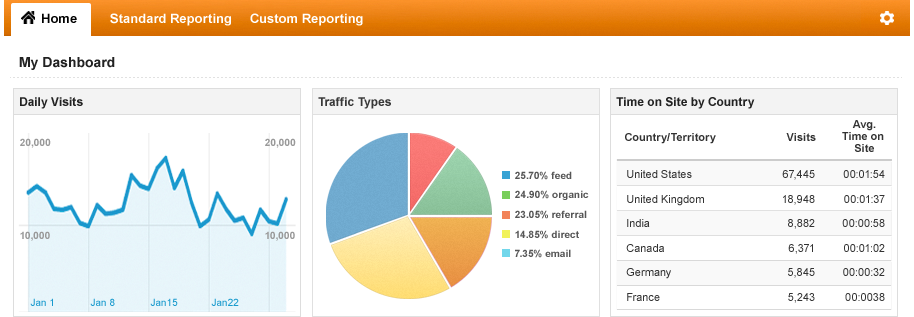
Google Analytics dashboards help users efficiently review important metrics and dimensions, like traffic sources or social media shares, quickly generate reporting tools, and create data-friendly cultures through easy sharing and visually storytelling. Learn about how dashboards can not only help managers process website information, but also how they can effectively communicate that information to a broader audience. 

Tips for Choosing a Grants Management System: Part 2

Tips for Choosing a Grants Management System: Part 2

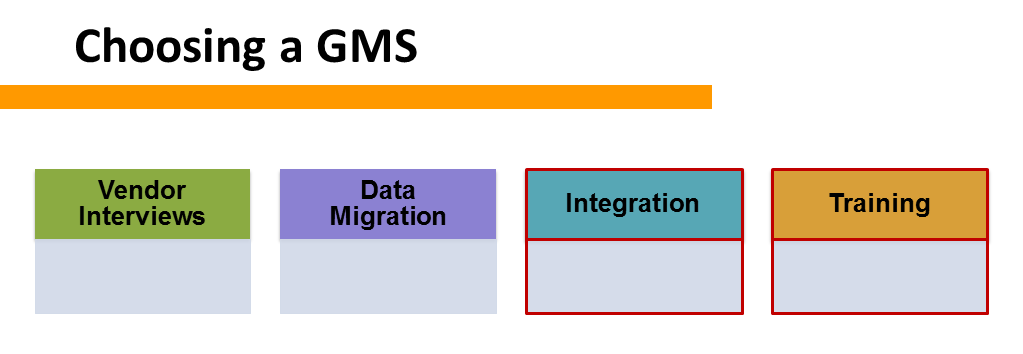
Throughout the process of selecting and implementing a grants management system (GMS), an arts organization must consider many factors in order to ensure positive results. These factors fall into four main categories: vendor interviews, data migration, integration, and training. All of equal importance, these categories must be weighed to find the optimum balance of system features and vendor characteristics.

Today we focus on the last two categories—integration and training. To read the first part of this two-part series, click here.

Tips for Choosing a Grants Management System: Part 1

Tips for Choosing a Grants Management System: Part 1

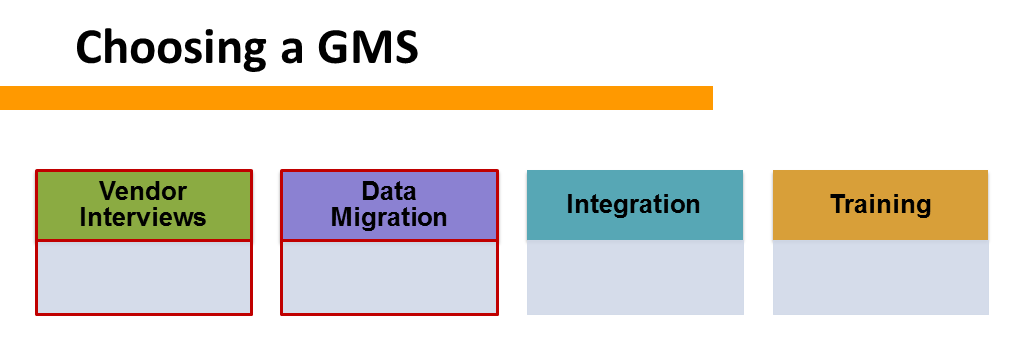
Throughout the process of selecting and implementing a grants management system (GMS), an arts organization must consider many factors in order to ensure positive results. These factors fall into four main categories: vendor interviews, data migration, integration, and training. All of equal importance, these categories must be weighed to find the optimum balance of system features and vendor characteristics.

Today we focus on the first two categories—vendor interviews and data migration.

The Importance of Change Management

The Importance of Change Management

When implementing new technology, such as a new CRM system, many organizations have learned the basics of how to select a product or vendor. But what about after the technology is selected? It can be overwhelming to consider the unpredictable changes that will occur among the flow or your organization’s work and even among its culture. However, by taking steps to manage the change, new technology can be integrated into an organization much more smoothly.

National Satisfaction with GMS Software

National Satisfaction with GMS Software

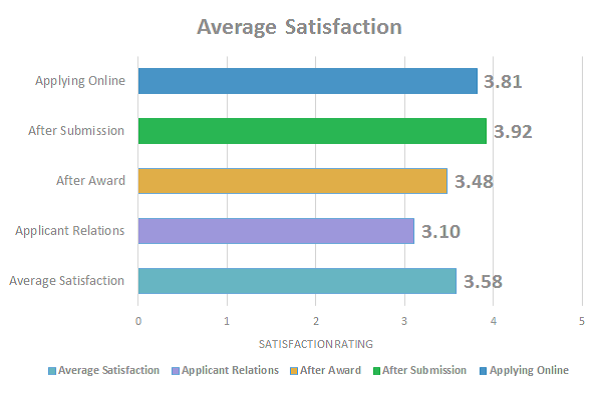
Today, an administrator has the ability to manage the entire granting lifecycle through a grants management system (GMS), including applicant relations, panelist reviews, and fund distributions. Online storage available through cloud computing and software with fewer hardware requirements have increased GMS product capabilities. And the ability for a GMS to interact with other systems, such as payment portals and accounting systems, has further made management of the grant lifecycle within a GMS easier. For many of today’s grant-making organizations, GMS software is an essential tool in day-to-day activities.

Innovation in Hindsight

Innovation in Hindsight

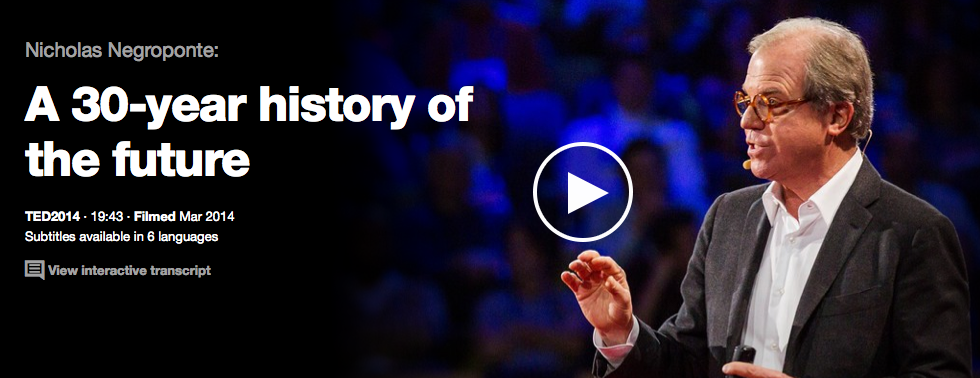
One of the too-many-hats I wear is that of historian. We can learn so much about the future if we look back (short-term or long-term) and reflect. Trite but true, we are our history. So listening to MIT's Media Lab founder Nicholas Negroponte's Ted Talk was a unique happy moment, as he eloquently reveals how predicting the future comes out of an extension of knowledge of the past.

Grants Management Systems: Primer for Best Practices, Part 4

Grants Management Systems: Primer for Best Practices, Part 4

State arts agencies need to report not only to NASAA and the NEA, but also to other entities, such as state legislatures and the general public. These reports communicate impact to all stakeholders within the agency and across its jurisdiction. A GMS’s querying and reporting capabilities impact how this information is accessed and, ultimately, understood.

Grants Management Systems: Primer for Best Practices, Part 3

Grants Management Systems: Primer for Best Practices, Part 3

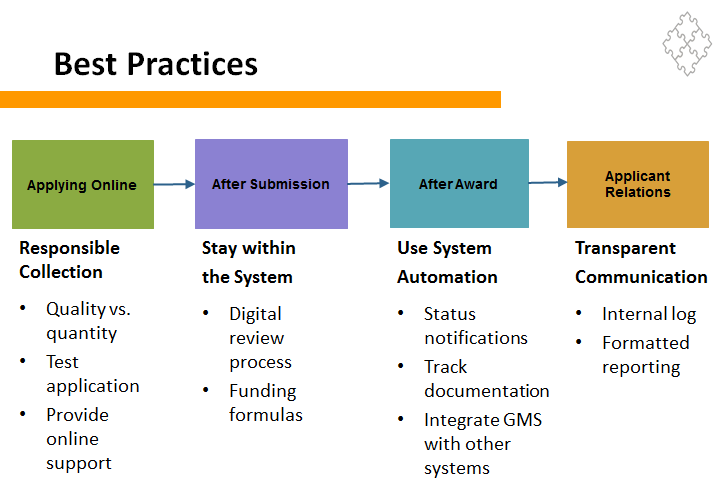
With grants management systems, the whole application process can be done online. To accommodate the needs of a diverse pool of reviewers, the system should allow them to view each application online and to access and download each application in a printer-friendly format. Grants managers should take full advantage of GMS panel review features by incorporating funding formulas (weight and average calculations) to the evaluation forms that reviewers fill out and then having reviewers input their final scores into the system.

Grants Management Systems: Primer for Best Practices, Part 2

Grants Management Systems: Primer for Best Practices, Part 2

As data becomes increasingly necessary for art agency reporting requirements, great pressure exists among staff members to collect as much as possible, and as soon as possible. But collecting data without a clear purpose places a burden on the applicants that have to gather it and grant managers who need to interpret it.

Grants Management Systems: Primer for Best Practices, Part 1

Grants Management Systems: Primer for Best Practices, Part 1

In 2012, the nation’s 62 state and regional arts agencies distributed approximately $215 million in grant monies. Compare those figures to the nearly 82,000 grant-making foundations in the United States, which collectively distribute over $49 billion annually.

Assisting these arts agencies, foundations, and other money distributing bodies are grants management systems—automated systems that track a grant through its entire lifecycle, as well as store data for relationship management between the grantor and an applicant. Recognizing the complexity of grants management systems (GMS) and the relative lack of resources in the arts sector, best practices must be followed to achieve the maximum value of each dollar spent on a GMS.

Technologies to Deepen and Grow Board Engagement

Technologies to Deepen and Grow Board Engagement

As arts organizations grapple with how to keep board members active and engaged, computer software and online technologies provide affordable means to address common governance challenges. From conflicting communication styles to assessment of board performance, these tools enable organizations of all sizes to improve the efficacy and efficiency of their board members, ultimately leading to increased engagement. AMTLab's newest publication, Computer Software and Online Technologies to Deepen and Grow Board Engagement, explores options for cloud-based document management, private social networking, integrated calendars, and online assessment, discussing how each can be used to resolve common issues facing boards of nonprofit arts organizations.

Performing Arts in the Wearable Age

Performing Arts in the Wearable Age

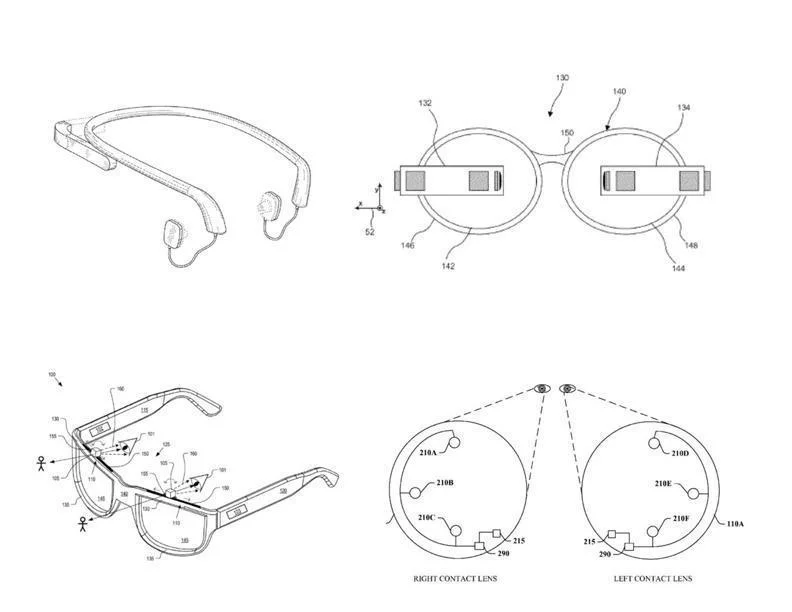
Wearable computing devices--including smartwatches, fitness and health tracking devices, and smartglasses--are projected to quadruple between now and 2018. What does their increased use mean for the performing arts? In their follow-up paper to "Through The Looking Glass: How Google Glass Will Change the Performing Arts," guest correspondents Thomas Rhodes and Samuel Allen explain wearable technology, provide an overview of current experiments with these devices among performing arts professionals, and discuss potential implications and challenges for the field.

Navigating the Cloud: A Practical Guide for Arts Organizations

Navigating the Cloud: A Practical Guide for Arts Organizations

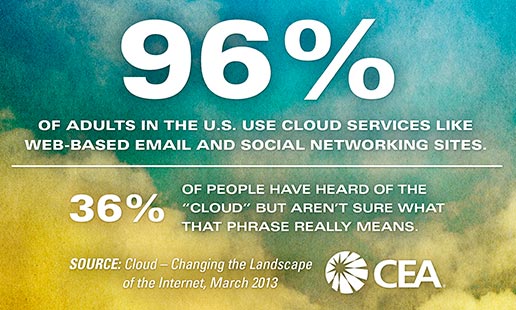
Just what is the cloud and what benefits might it hold for arts organizations? What makes a transition to cloud services worthwhile? And what cautions should be heeded when considering such a transition? This report from AMTLab contributor Stewart Urist introduces the basic categories of cloud services and discusses the potential benefits and risks they hold for arts organizations of various sizes. It's available now in AMTLab Publications.

Online Tools for Artists & Audiences: A Case Study of the Pittsburgh Artist Registry and Pittsburgh Art Places

Online Tools for Artists & Audiences: A Case Study of the Pittsburgh Artist Registry and Pittsburgh Art Places

2013 was a busy year for the Office of Public Art (OPA) here in Pittsburgh. Along with its regular duties of programming public art walking tours, organizing calls for entries, and facilitating webinars and artist lectures, OPA also re-edited its book Pittsburgh Art in Public Places, revamped the Pittsburgh Artist Registry, and created the Pittsburgh Art Places website.

The following article analyzes how this organization, a public-private partnership between the Greater Pittsburgh Arts Council and the City of Pittsburgh Department of City Planning, made management decisions that led to the update of the online artist registry and creation of Pittsburgh Art Places.


Implementing a New Collection Management Application: Colección FEMSA

Implementing a New Collection Management Application: Colección FEMSA

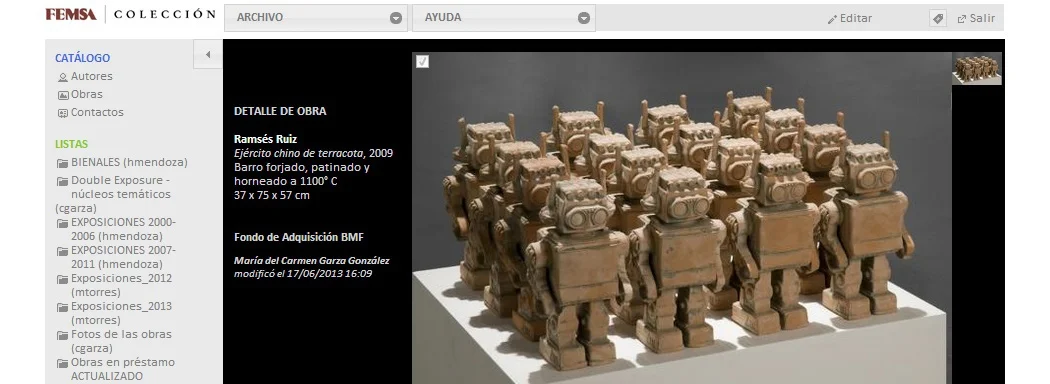
Colección FEMSA specializes in travelling exhibitions for Mexican and international institutions. A nine-person team manages all aspects of planning, from building crates and preventive conservation to facilitating partnerships with museums and other cultural organizations, culminating in up to twelve different shows each year. While a relatively small collection, the management challenge for this organization is having artwork constantly on the move. This case study concentrates on how Colección FEMSA meets this challenge through the help of a collection management application, Spaces for Art.

Planning for When Things Fail

A recent article in Wired magazine by Robert Clapps focused on failure of things:  helicopter parts to car tires.  It is a good read and carries with it lessons.  One of which is very important to the arts:  failure can be costly and dangerous. Every physical thing in an arts organization from the stage lights to the copier machine to the building itself will eventually fail or need maintenance.  As technology is frequently outdated, technological failures can happen through breakage but also through communication incompatibilities, discontinuation of support from the manufacturer or author, and through failure of a connected system that enables the technology.  There are several different aspects to failure and avoiding additional loss when it happens, indeed many large corporations have entire departments dedicated to failure and maintenance analysis, risk assessment, loss mitigation, and analysis of these issues.

Whether you are looking at a minor failure causing inconvenience or a major failure that endangers lives it is incumbent upon arts managers to minimize risk proportionate to the danger to people, operations, and physical collateral.  Most of the arts sector has a replace it as we go mentality with a budget for facilities and equipment maintenance and replacement.  Some organizations also rely on insurance to mitigate against catastrophic equipment failures.  There are sometimes even departmental or organizational plans and schedules.

If not present already, incorporation of a regular organization-wide facility, technology, and equipment assessment should be a high priority for organizations of any size.  These assessments can then be used to accurately determine how much risk and what type of risk is present and how likely failure will be to happen.  Risk assessment should be given a monetary value that reflects the type and severity of the nature of the potential failure and assigned proportionate weight in budgets.  For instance, a technological failure resulting in a breach of network security can lead to personal information of patrons being compromised and not only effect the finances of your organization but also those of your patrons.

It is not enough to rely on a vendor to determine risk in many situations.  Software companies of all sizes test for security but it is notable how often failures occur.  Vendors are frequently the authors of software, the testers for the products, as well as the salespeople and support staff.  As such it can be difficult to get an unvarnished assessment of the true strength of software from vendor.

To combat this you need to do your research.  When reviewing any new or existing piece of technology, hardware or software it is wise to take a multi-format approach.  Read reviews and talk to colleagues in both your field who are using the product but also those in the software field.  Often times there are chat boards that can also offer illuminating insight as to the strength of software based on or interfacing with another piece of software (such as Apache for databases).  Any system is only as strong as its weakest component and, at an application level, you will be looking at not only the strength of the application but also the operating system that it was written for, their age, and their compatibility with other applications (including operating system based security, application based security, and network security.)

Finding a balance between planning for the future and available money can be a challenge but on the other hand planning for the future can also save your organization money, heartache, and increase efficiency over time.  Nonprofit Technology Network and Idealware both have resources and education for technology planning and can help get you started.  If you have additional resources that you would like for your colleagues to be aware of, please post them in the comments!

 

Adapting to Changes in Technologies

As new technologies and software are released and older versions become antiquated or obsolete, it puts pressure on arts organizations to keep up.  Adapting to these changes and pressures isn't only a matter of finding the  budget to buy the most recent upgrade of a productivity suite, sometimes it is about fostering the change through your organization and making sure that the new technology is successful.  It also involves thinking strategically and tactically. The culture in any organization is a living thing.  To keep it healthy you have to be cognizant of what is happening:  is communication good/open?  Are new ideas welcomed?  Are concerns being addressed appropriately?  How is morale?  Understanding the health of your organization and working towards making it healthier can be intrinsic to having an efficient and productive organization.

Before approaching any technological implementation, first step back and ask the question:  "What does success look like?" Define the improvements in efficiency, accuracy, and outputted product at the outset and then set these expectations against real data.  If you know of another organization that adopted this technology, ask them what their expectations, roadblocks, and successes were.  Do research, look for reviews of the product and testimonials on both the positive and negative side and use these to help you form your expectations as well.

If you want the people who will be using the software to become adept at it, then it would be wise to ask them how they feel about the change, what questions they have, and if they have any concerns that can be addressed.  Talking with people is your second step after defining your picture of success.  Find out who is enthusiastic about the new tech and who is resistant.  Put the enthusiastic person to work as your champion and keep tabs on the resistor.  Your job is to convince the people who are neither enthusiastic nor resistant that adoption of the new tech is a good idea.

Addressing needs as they arise becomes important as the new technology is being implemented.  Frequently software does many of the tasks at your organization better and a couple of them worse.  Being aware of these eventualities and having handy work arounds or other ways to mitigate the pain will be essential for evangelizing individuals and departments that have minor doubts.  Further being able to show the benefits in other areas may help towards this end as well.

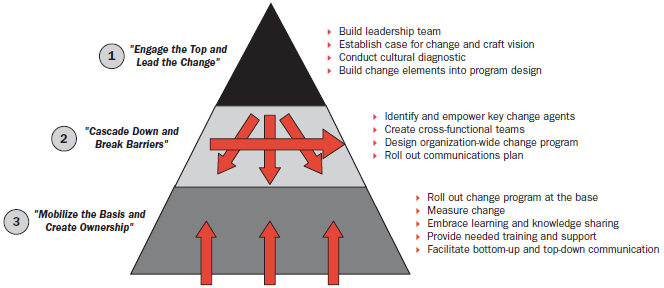
Change management is a good idea for large changes in an organization (migrating to a Customer Relationship Management System from several disparate systems is an example).  There have been extensive writings about organizational change.  A good one is from John Kotter, a professor at Harvard Business School, who put forward the eight-step idea around change management in his book "Leading Change."  Here are his eight steps below:

1)  Create Urgency

2)  Form a Powerful Coalition

3)  Create a vision for change

4)  Communicate the vision

5)  Remove Obstacles

6)  Create Short-term Wins

7)  Build on the change

8)  Anchor the changes in Culture