Social Media as Alternative Exhibiton Space

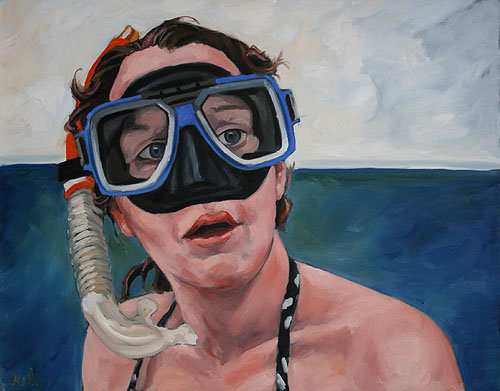
Elis Wooten by Matt Held Myspace has long been a mecca for musicians who are looking to get the word out and start a following,  but until recently visual artists have not capitalized on the aspects social networking with the same fervor.

This is beginning to change as visual artists are now using this new medium as a way around established gatekeepers, creating open alternative arts spaces online. Ever since discovering Miranda July's Learning to Love You More in undergrad I've been interested in crowd sourced art projects, and with new social mediums like Facebook and Twitter, artists are now able to easily create a community that is interested and involved in their artwork.

Matt Held, a Brooklyn based painter, started a Facebook group in order to create a pool of images to paint from by utilizing his friends' profile pictures.  His Facebook group, "I'll have my Facebook portrait painted by Matt Held" has sense grown exponentially.

Matt explained, "I have always painted from photos and was having a complete painters block. I needed an exercise in skin tone and did one of my wife from her profile. We put the group up and I thought maybe if 50 people joined, I would be able to work through the block. People liked it and as I said, this quick communication has proved true, there are nearly 3,400 people in the group now. It's been a really great tool, really great!"

Matt has recently completed his 37th portrait in the four months since beginning this project, and is looking forward to exhibiting all 200.  Social media is quickly creating a rich creative playground for visual artists to explore, and Matt is realizing how large the demand is for creative projects online.

"It's a perfect vehicle to combine mediums with technology and connect with other artists, gallery owners, curators, critics, editors, etc. very quickly. Facebook is set up so perfectly for that and now as other sites like Twitter broaden their user base, this level of instant communication with people around the world - not via the news, but from the mouths of people - it's just an inexhaustible resource."


baplogomas-logo

Outside of the standard Facebook/Myspace/Twitter sites, artists are creating their own networks.   Myartspace and the Brooklyn Arts Project are both new social networks for creative artists that capitalize on the accessability of the internet, and the networking opportunities that can be created for artists.

These sites both have an ongoing blog of current events, as well as user submitted blogs.  Curators are invited to post calls for artists, and on the Brooklyn Arts Project site there is an online store where you can purchase framed art prints of featured artwork. These cites are creating a depth of relevant content as well as a definitive sense of community that is important to any group of artists.

Some galleries are also using their websites as interesting alternative exhibition spaces.  20X200 is a small gallery space on Manhattan's Lower East Side that releases limited edition art prints at incredibly low prices.  Jen Bekman has made a name for herself by making art available to everyone.

(limited editions × low prices) + the internet = art for everyone

The site introduces two new artworks every week, one photograph and one work on paper.  They are available in three sizes that vary in price from $20 for a small print, to $200 for the largest size.

In the days/weeks/years to come, visual artists will continue to find new ways of utilizing the web to create interactive and crowd sourced projects as well as to venture beyond the pristine white walls of the gallery and create new avenues for audience engagement.

I agree with Matt Held when he said "One of the things I have noticed in the past few weeks are more and more artists doing different things. One artist updated her status every 60 seconds for 16 hours as a means of opening dialogue about self exposure, narcissism, social controls, etc. Another is trying to put together a large group, 500 people, to do a massive tweet at the same time with super secret instructions. I am quite certain that we are just seeing the beginnings of the exploration on the creative use of social networks as an artistic platform."

Going Facebook Crazy

modern-times If you haven’t noticed, Facebook has changed its homepage layout, and a lot of the features available to user profiles are now also available for Pages.

I've spent the better part of this week fooling around with the new layout and features that Facebook has made available on their Pages, and trying to make heads or tails out of what is being communicated to our "fans," when it is being communicated, and how. The biggest change to Pages has been the new Wall and Stream tabs as well as the ability to send Status Updates from your page.

So, Yay for all the new toys…now what do we do with them?

The Wall allows users to post comments, just like on a profile, and ends up being the home for a large portion of user generated content for your Page.  The Stream tab similarly aggregates any changes that you've made to the page such as adding blog postings, links, events, etc..  Fans of your page are then notified when you update or change anything on the profile automatically.  There in lies a problem.  It's not THE problem, but it's one of them.  I understand that it is good to update fans when changes are made to the Page, it has the potential to create a lot more active discussion and real-time interaction, but it also has the ability to overwhelmingly spam users about our Page.  Will users really want to know about every single time we upload a new picture, or post an interesting link?

Some of the same issues arise when it comes to the Status Update feature.  In a lot of ways the Status Update is similar to a Twitter feed, so how do we keep the communication relevant and engaging without being perceived as a pest?  Since updates are being shared real-time with users, it is becoming more and more important to keep the communication on a level that creates interest without turning fans off with too much information.

The new tabbed layout also presents some interesting questions.  The tabs generally consist of the wall, an info tab, a discussion tab, and a Boxes tab, but the Boxes tab seems to be a catch all for applications that don't seem to fit anywhere else, it could very easily be called "other" or "stuff."  Even in Facebook's example page of their product guide, the Boxes tab doesn't seem to be fleshed out.  So this leaves me wondering how to best use available applications to relate to our users, or if this tab will end up being the neglected big box of stuff that nobody cares about tab.

Because these changes are new, it is still uncertain how either organizations or fans will react and start to use these new tools to communicate.  It seems that no matter what, facebook will continue to occupy way too much of my time online.  And now I need to hunt down a decent podcast application for facebook to fill up that Boxes tab.

All the news that's fit to Tweet

It seems that over the past week Twitter has made it into the headlines for both being an amazing new communication tool, and how ridiculously it is being used.  This past Monday on the Daily Show John Stewart pointed out some of the effects that Twitter has on our perception of both the news media and congress.  While many members of Congress were Twittering through Obama’s most recent speech, the inane messages seemed to detract from the gravity of the event. As John Stewart said, “..these messages don’t enlighten or inform, it’s a gimmick that actually lessens the credibility of institutions in desperate need of authority." Regardless of the method of communication, why should we care unless you have something meaningful to say. Both the London Times and The Washington Post have tried to address the question as to why we twitter, only to come to the conclusion that we have a terribly underdeveloped sense of self and need to be reassured that we exist. From the London Times...

The clinical psychologist Oliver James has his reservations. "Twittering stems from a lack of identity. It's a constant update of who you are, what you are, where you are. Nobody would Twitter if they had a strong sense of identity."

"We are the most narcissistic age ever," agrees Dr David Lewis, a cognitive neuropsychologist and director of research based at the University of Sussex. "Using Twitter suggests a level of insecurity whereby, unless people recognise you, you cease to exist. It may stave off insecurity in the short term, but it won't cure it."

This is generally why I can't stand most Twitter feeds.  Yes it is a new and powerful means of communication, but it seems to me that right now it is primarily being used as a posturing mechanism to help aging organizations appear youthful and with it.  The majority of the Twitter feeds out there are either devoid of content, incredibly trivial or mundane.  They only communicate that someone exists and not much more.

That being said, there are some really amazing ways that Twitter is being used.  Organizations that understand the importance of real time communication with their audiences are pushing the boundaries with Twitter and capitalizing on the unique ways that they can receive audience feedback.

The Twitter Art feed at the Brooklyn Museum is part their new 1stfans program, and allows members access to tweets by contemporary artists every month, and has featured works by artists such as Mary Temple and An Xiao that utilize the social feedback aspect of Twitter.   An Xiao's piece was about Morse code and the history of instant communication in which 1st fans were asked to feed to tweet using Morse code, while Mary Temple's piece Currency provides a daily link to a drawing made from current news articles about important world leaders in the media.

Conferences are also beginning to utilize Twitter Back Channels to allow their audiences to discuss the content of a presentation in real time without disrupting the event.  This is in essence what we tend to get scolded for in school, passing notes, making fun of a presenter's overuse of the word "nascent," and whispering to a neighbor about the content of the presentation.  More often than not, these conversations are being spurred on by the speaker, and Twitter is creating a real-time avenue for discussion that is centered around the speaker's presentation.  This is creating a non-invasive avenue for audience participation and places the focus of these events back on the community of people attending instead of just sitting at the feet of the keynote speaker.

These organizations are utilizing Twitter feeds for audience engagement and a way for inducing a flattened level of communication.   The Brooklyn Museum also seems to be using the Twitter feed as an interesting source of revenue, as 1stfans membership costs $20 a year.

I can't help to think that it might be useful way to get instant feedback on the progress of projects and tasks at work, especially if certain employees are telecommuting or out of the office.  And the fact that updates can be sent by phone, allows updates to happen when access to a computer is limited.

Share what you think about Twitter, and some of the possible real world applications of using Twitter for audience (or employee) engagement in the comments below.

TITA's Back With New Blood

"Boxhead Mea Culpa" from Mr. Boxhead on Flickr.comOkay, okay...I have to start by apologizing.  Brad transitioned into his new position at the end of January, and Technology in the Arts went silent for many weeks. What happened?  I think if we are honest with ourselves, then we have to admit that we had come to rely on Brad to carry the social media torch for TITA - blogging, podcasting, Twitter, Facebook, etc.  During his transition, many of his responsibilities were re-distributed to other staff members (oh, the joys of a hiring freeze) - but the social media fell by the wayside.

No more!  We're back, and we've brought new blood with us. Starting tomorrow, Social Media Assistant Thomas Vannatter will be coming at you twice a week with bloggy insights. Apparently, he has a major hate-on for Twitter, so this could get interesting!

Thomas will also be working with us to manage and refine our content strategies for the various social media tools we use. We will be working through questions like:

  • Should we be discussing/sharing different content on our Facebook Page than we do with our LinkedIn Group?  If so, what factors should influence the decision regarding where to share which types of content?
  • If we share an RSS feed that grabs the best articles on the net regarding technology in the arts, then what content should we be sharing through our Twitter feeds?
  • How should the social media strategies for service organizations differ from producing, presenting and other types of arts organizations?

So over the next two months, you will see a new, evolving strategy for Technology in the Arts.  Please, let us know what you think as we move forward.

By the way, Brad is not dead to us.  He and Jason Hansen will continue to produce the Technology in the Arts podcast on a monthly basis - so stay tuned!

No Comment - Bloggers Should Let Their Readers Respond

The other day, a colleague shared with me a link to a post on Lee Rosenbaum's CultureGrrl blog speaking out against the recent the call for a U.S. "culture czar."  While I see where she is coming from, I wanted to share with her and my fellow readers some thoughts regarding the issue.  Imagine my surprise when I discovered that there is no place to post a comment.  The only option is to engage Ms. Rosenbaum in private discourse via e-mail.  Here is an entire blog post devoted to providing a counterpoint to other online voices, and yet the author provides no opportunity for her readers to engage her and her readers in a public discussion. As my fellow texters might scribe, "WTF?" Okay, I'm gonna get up on my soapbox here for minute.  We've all heard about Web 2.0 and the cuture of sharing, etc.  We drank the Kool-Aid and started blogging, podcasting, social networking, posting social media, creating wikis - experimenting with a variety of forms for sharing content with each other.  For many of us, there is an understanding that this online sharing is of a reciprocal nature.  If you throw your content out into the universe, then you cannot truly engage with anyone until you allow them to respond.  And for the record, a private e-mail doesn't cut it.

What if someone doesn't agree with you? That's okay. We frequently encounter people who do not agree with us, but that doesn't stop us from engaging in conversation. In fact, disagreement is not necessarily a negative thing. When approached from an inquisitive stance, disagreement may lead to clarification, exploration, and possible consensus.

And if someone out there on the Web responds to you in an insulting or derisive manner, you have three options: 1. Respond to them. 2. Take the "high road," and let your readers respond to them. 3. Delete the comment.

Now, I am not saying that Ms. Rosenbaum deliberately does not want her readers to engage her and each other in public discussion of her ideas. Maybe she never considered the implications of not allowing comments to her blog.

Ironically, there is a "Share This" icon at the bottom of the posting - so that you can share the author's thoughts with all of your friends and colleagues. Wouldn't it be nice if she returned the favor?

More Proof - "Free" Can Have Value

11816532_5ca1075282_bI've stated on our blog and podcast many times that you can offer your content for free without devaluing that content. Frequent followers will recall two interviews with independent musician Jonathan Coulton (podcasts #38 and #55), who has given most of his music away and still manages to make a decent living. (I cannot define "decent" exactly, but I imagine he does quite well for himself.)

Well, thanks to Amazon's 2008 best-selling albums list, I have even more proof that free does not equal worthless. According to ReadWriteWeb, the best-selling album in Amazon's MP3 store for 2008 was Ghosts I-IV by Nine Inch Nails. Interestingly, that same album was available for free (and legally!) in March via BitTorrent under the Creative Commons Attribution-Noncommercial-Share Alike license.

This means that either: A) People ignored the fact that the album was available for free and opted to pay, or B) people downloaded the album for free and paid after listening because they felt it was worth the money. A third option, of course, is that people were just too dumb or lazy to figure out how to use BitTorrent. This, however, is unlikely. After all, this is the fan base for Nine Inch Nails we're talking about here... not Frankie Valli and the Four Seasons.

This is not to say that opera companies should start giving away tickets. I'm simply saying that arts organizations might consider lightening up a bit when it comes to offering content online.

("Free LSD" photo courtesy of corypina's Flickr stream.)

2009 MUSE Awards Call for Entries

The AAM Media and Technology Committee announces the 20th annual MUSE awards competition. Presented to institutions or independent producers which use digital media to enhance the museum experience and engage new audiences, the MUSE awards celebrate scholarship, innovation, creativity and inclusivity. Projects must be produced by or for a museum, including websites, podcasts, multimedia installations, interactive kiosks in the museum, cell phone audio tours in a garden, etc. Winning projects for each category are chosen by an international group of museum media professionals and the awards will be presented at the AAM annual conference in Philadelphia, PA from April 30-May 4, 2009. museawardslogo

Online applications must be submitted January 31, 2009.  If you have any questions please contact Sarah Marcotte, MUSE Awards Chair.

Leaving CAMT

hulkAfter three years with CAMT, I will be stepping down as director of projects and marketing to begin the next phase of my career. On January 19, 2009, I will become the Web Content Manager for Carnegie Mellon's Heinz College. I'll be in the same building as CAMT, but it saddens me deeply that I will no longer be working with our many great clients and partners. Connecting with so many amazing people is just one of the numerous reasons I have thoroughly enjoyed my experience with CAMT.
Through January 9, 2009, I will continue to be the CAMT contact for new projects. After January 9, 2009, Josh Futrell will be your contact for both project and support issues. You can reach him at support@camt-hosting.org (support items) and camt@artsnet.org (project items).

For the time being, I will continue to post on the Technology in the Arts blog and host our bi-weekly podcast. So please continue to contact me at podcast@technologyinthearts.org with questions and tech updates.

(NOTE: The image above is from the late 70s TV version of The Incredible Hulk. To add to the sad departure atmosphere, click below to listen to the walking away song from the show.)

[display_podcast]

Call for Session Proposals - 2009 Technology in the Arts: Canada

Proposals for sessions and workshops are currently being accepted for the 2009 Technology in the Arts: Canada Conference to be held in Waterloo & Stratford, Ontario from May 10-12, 2009. This year's conference is being held in conjunction with the Canada 3.0: Defining Canada's Digital Future Conference. The deadline for submitting your proposal is Monday, January 19, 2009.

The conference has two primary types of programming - Hands-On Training Workshops and Breakout Sessions.

  • Hands-On Training Workshops: Sunday, May 10th: Held in a computer lab environment on the University of Waterloo campus, Waterloo, Ontario, these workshops will provide "nuts & bolts" instruction to guide participants through technical processes toward concrete solutions to work-place challenges. Each hands-on workshop will last 2 hours and 30 minutes. Workshop leaders should anticipate using 25% of the time for informational lecture and the remaining 75% of the time for hands-on instruction.
  • Breakout Sessions: Monday, May 11th & Tuesday, May 12th: Held in breakout rooms at the Stratford Rotary Complex, Stratford, Ontario, conference sessions may use a number of possible formats to cover relevant issues relating to the use (or potential use) of technology in arts, heritage or cultural management and/or production. Breakout sessions will last 1 hour and 15 minutes.
  • Proposal Criteria: A panel of arts and technology practitioners will review all submitted proposals to select the final program in late January.  Sessions will be selected based on the following criteria:

  • Exploration of new or compelling ideas, technologies or practices
  • Speakers' expertise and/or experience with the topic
  • Session's relevance to the conference
  • In addition to the above criteria, the panel will be charged with selecting workshops and sessions with an eye toward providing a well-rounded program of topics and ideas for conference attendees that will include managers, staff and artistic/curatorial personnel from the arts, heritage and cultural sector, as well as individual artists.

    SUBMIT YOUR SESSION PROPOSAL ONLINE HERE

    Benefits for Presenters: Presenters will receive complimentary access to the conference for the day on which they present, and discounted registration for other days they wish to attend.  All session participants will be responsible for their own travel and hotel expenses.

    Proposal Components: To be considered, proposals must include the following information:

  • Session title
  • Session type - Hands-On Training Workshop or Breakout Session
  • Session format - For Breakout Session proposals only
  • Description of proposed session
  • Explanation of relevance to the conference
  • Contact information for session leader
  • Other potential presenters and what expertise they would add to the session
  • Not an expert? You don't have to be!  Here are some tips for putting together a session.

    Questions? Contact us.

    The 2009 Technology in the Arts: Canada Conference is a partnership between the Centre for Cultural Management at the University of Waterloo and the Center for Arts Management and Technology at Carnegie Mellon University.

    Home Page Call To Action Survey

    Though it might be debatable, it's a commonly held belief that the home page is the most important page of a Web site. A home page must quickly communicate the soul of an organization to a visitor and provide a visitor with easy access to relevant information. Often, it is the most vital and heavily trafficked piece of real estate on your organization's Web site. We recently wondered: how effectively are performing arts organizations in the field using their home pages?

    We conducted a survey that examined three common calls to action that we believe all performing arts organizations should have prominently placed on their home page:

    • ordering and purchasing tickets
    • donating or contributing money
    • joining or subscribing to a mailing list or newsletter

    These are three actions that most performing arts organizations want their Web site visitors to be easily take. So, just how easy are their home pages making it?

    We were also curious to see how many organizations were still using splash (Flash introductions or animations, slide shows, etc.) or landing pages that delay the visitor from getting to the actual home page.

    Click past the jump for more information on how we conducted the survey and for the results.

    Methodology In all, we looked at 450 home pages of performing arts organizations across the United States. All 50 states and the District of Columbia were represented. There was a mix of dance, theatre, musical theatre, opera, symphony, and choral companies.

    We asked two different people to review each home page for links or areas relevant to the three calls to action described above. They then scored each call to action using a scale of 0 - 5:

    0 - Not on home page 1 - Hardly noticeable 2 - Somewhat noticeable 3 - Noticeable 4 - Very noticeable 5 - Immediately noticeable

    We also asked reviewers if there was a splash or landing page prior to the home page. Finally, we gave the reviewers an opportunity to provide any general comments or thoughts on the home page and its design.

    The Reviewers We used workers on Amazon.com's Mechanical Turk service to perform the reviews. 44 unique workers participated in the survey responses. At least two unique workers reviewed each home page.

    I'll be talking about our experience with Mechanical Turk in a later blog post. To summarize, Mechanical Turk is a service that allows you to set up and pay workers for completing repetitive, simple tasks, such as a survey, that can be accomplished by a human computer operator.

    Because of this crowd-sourcing approach, we manually reviewed the resulting data. We investigated and eliminated some data points due to inaccuracy or due to large discrepancies between to the two individual reviews for a home page. Ultimately, we ended up with valid reviews for 429 of our 450 home pages.

    Results The detailed results are below. I was surprised at how well performing arts organizations are doing at making tickets available online. The results are quite strong in that area. The fact that 4.9% of organizations still have splash pages makes me cringe a bit, since I am completely against them. (Why make your users work harder to get to the information they care about?)

    Another area where the results surprised me was the reviewer comments. The comments were optional and required that the reviewers spend some additional time to complete their response; given the nature of working as an Amazon Mechanical Turk, time equals money. Some of the comments were really in depth and revealing. This might be a reflection on the quality of the Mechanical Turk service, but it could also be due to the reviewers being excited about contributing and giving feedback to performing arts organizations.

    If anyone has any questions about the results or would like any additional information about the methodology used in this survey, please post a comment.

    Download Raw Call To Action Survey Data (CSV)

    Overview
    # of Home Pages Reviewed 429
    Splash Page
    % of Sites with Splash Page 4.90%
    Ordering and Purchasing Tickets
    Average Score 3.0
    % of Home Pages with a Score of 0 16.8%
    Donating or Contributing Money
    Average Score 2.5
    % of Home Pages with a Score of 0 21.9%
    Joining or Subscribing to a Mailing List or Newsletter
    Average Score 1.6
    % of Home Pages with a Score of 0 38.7%
    Reviewer Comments
    % of Reviews with a Reviewer Comment 36.60%
    % of Comments that were Positive or Neutral 54.1%
    % of Comments that were Negative 45.9%

    Female Artists Still Earn Less

    Female ArtistAccording to a research note released last week by the National Endowment for the Arts, women artists still earn less than men. Women artists earn roughly 28 percent less than men in non-performing artistic jobs, the report states. Female performing artists, though, approach parity, earning about $.96 for every dollar earned by male performers.

    While I did not expect the pay for women artists to match that of men (though I certainly wish it did), I am surprised that women earn more than 25 percent less.

    NEA research notes are summaries of "current statistical information," according to the agency's Web site.

    Read the full document (PDF) at the NEA's site.

    Photo: http://flickr.com/photos/amayzun

    Want to Play at Carnegie Hall?

    How do you get to Carnegie Hall? Practice... or win a YouTube contest! (Insert rimshot here.) In what might be described as American Idol for the classical music crowd, YouTube yesterday announced YouTube Symphony Orchestra, a collaboration with several classical music organizations.

    The London Symphony Orchestra plays the Internet Symphony No. 1 "Eroica" - for YouTube, conducted by Tan Dun.

    Through January 28, 2009, musicians of any skill level can submit a video performance of a work by composer Tan Dun (Crouching Tiger, Hidden Dragon). The performances will be rated by judges and YouTube users, and the finalists will be invited to participate in April's YouTube Symphony Orchestra summit and perform at Carnegie Hall with conductor Michael Tilson Thomas.

    YouTube Symphony Orchestra also offers a collection of online tools for learning and rehearsing the new Dun piece.

    Rosin your bow, head on over to YouTube Symphony Orchestra and start practicing.

    Holiday Downtime? Brush Up on Tech

    While the holidays can sometimes seem very busy (especially if you're a dance company producing 'The Nutcracker'), there is typically a great deal of office downtime. Therefore, I'm issuing a challenge this holiday season: Pick one tech-related skill you'd like to learn and use any downtime to get cracking. It doesn't have to be anything particularly difficult. Maybe you work with Excel for budgeting, and you'd like to know more about advanced filtering options. Perhaps you'd like to learn some basic HTML so you can tackle your own Web updates rather than passing them off to sit in a queue.

    Whatever the skill you'd like to learn or refine, I'm here to help. Contact me with your holiday tech education wishes, and I'll send you some information and links to steer you in the right direction.

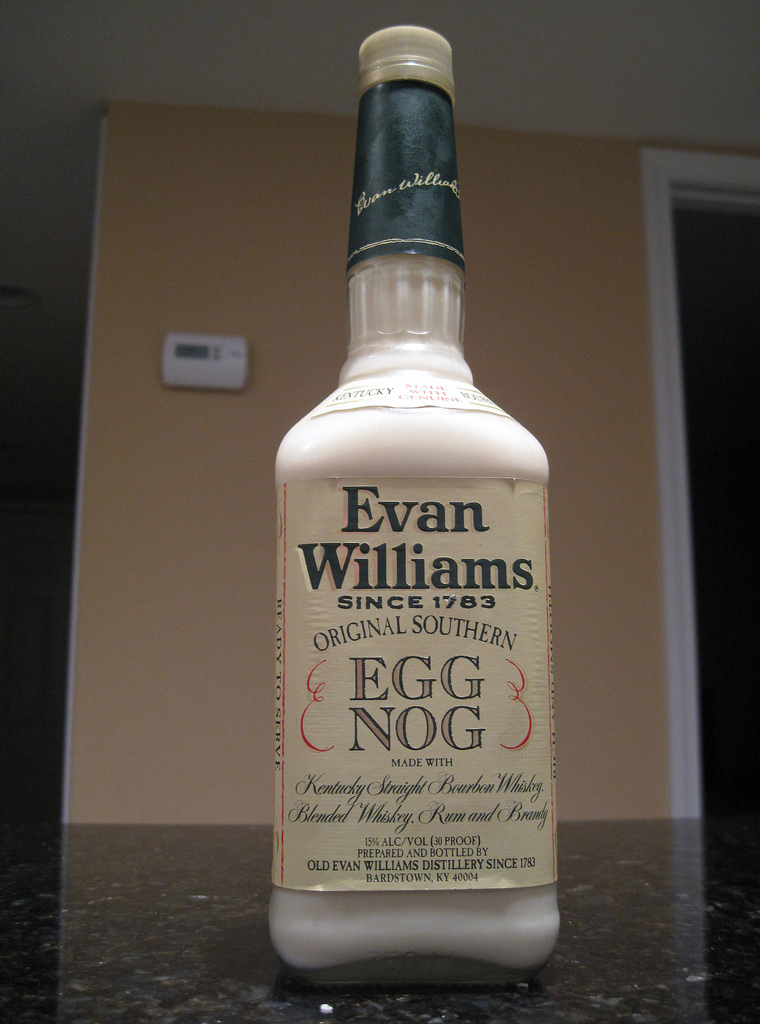
    Don't just sit around drinking eggnog and making garland hats this holiday season. Brush up on your tech skills!

    (Photo Credit: Scott Beale / Laughing Squid)

    Will You Go? New Patron Facebook Tool

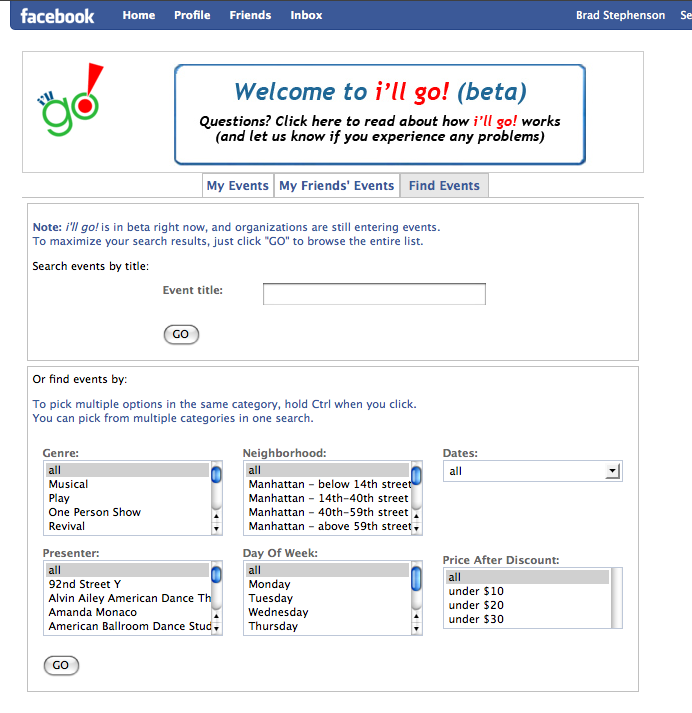
    Gene Carr, founder and president of Patron Technology, recently blogged about his company's new Facebook app for New York arts groups and audiences. The app, i'll go!, is a free downloadable tool that provides users a way to connect around events and organizations a way to encourage first-time attendance through Facebook-only discounts.

    See a screenshot of the event search interface after the jump.

    Searching for an event using the Facebook 'i'll go!' app.

    As this app is in beta, I'd strongly encourage New York organizations and audience members to install it and give it a go. If the app catches on, Carr says Patron will expand the tool to include other cities.

    Find our more about i'll go! at the app's Web site.

    Storytlr.com - Site To Watch

    Storytlr.com is a completely free Web site that can bring together content from various source feeds (Facebook, Flickr, RSS feeds, Twitter, Vimeo, YouTube, and many more) and allow you to create a Web site from them. Or, you can create an embeddable widget of the streaming content, which Storytlr calls a Lifestream, and place it on your existing Web site. What set Storytlr apart, though, is that it can also take these feeds and turn them into stories. The stories are photo-album style renderings of your feeds during a particular period of time. I'm not quite sure I can do descriptive justice of what stories are like, so you can check out this example Storytlr story, on your own. Bottom line, though, is the story mode is an easy, attractive way to present your feeds to your audience. And, these stories can be made available on your free Storytlr Web site or embedded as widgets on your existing Web site.

    Do you want to get a sense of what life was like at the Center for Arts Management and Technology in October 2008? Take a peek at our story. Even with only a few feeds (using 3 staff member Twitter feeds and CAMT's Flickr account) we created a story that, especially around the time of the 2008 Technology in the Arts Conference, shows what October was like for us.

    An extremely informative backend demo video of Storytlr has been created by Storytlr user Molly McDonald of DemoGirl.com.

    Jump past the break to see ideas for possible uses of Storytlr at arts organizations as well as other thoughts and concerns.

    Possible Uses Arts tourism and trails - gather a group of adventurous folks, give them cell phones, digital cameras, Flip video cameras, and other gadgets, and send them out onto the trail. They tweet, post pictures to Flickr, and send video to YouTube or Vimeo. When they're done, you pull all of it into a Storytlr story and you've got yourself a nice, chronological presentation of what a tour experience is like. Put the story widget on your own Web site, or link to the story directly.

    Performance and touring groups - tap a few members of your production team, artistic staff, performers, and others to volunteer their Facebook statuses, blogs, tweets, and photo feeds during the rehearsal process or tour. Post the Storytlr Lifestream widget to your Web site to give the public an updated, inside look at the production process. When the performance or tour is done, create a story to archive the experiences and share.

    Individual artists - use Storytlr as your Web site. Customize the URL and page template to your style and branding. Populate your new Storytlr site with content from other feeds and sources you already use.

    Fictionalized, documentary-style stories - back when Twitter was first gaining momentum, one of the most enjoyable articles I read about it was about the user zombieattack. This person tweeted, over the course of seven months in 2007, a blow by blow account of a fictionalized zombie attack. Perhaps something similar could be done with Storytlr?

    Caveats and Final Thoughts Get your time zones right - One of the quirks of working with Storytlr is that all of your feeds will come in chronological order. This is sort of the point, I guess, but when you create your story, you can't tweak the order of things at all. I would imagine this feature might be added in the future, but, for now, you're stuck with the time stamps supplied by your various feeds. When I first imported CAMT's feeds to create our story, everything was out of order. It ended up that our Twitter feeds were on EST, our Storytlr account was on a European time zone (the default for new Storytlr accounts, since they're a Europe based Web site) and our Flickr account was set for GMT-1:00 for some unknown reason. I had to get all of my time zone settings in sync and then re-import to Storytlr to get things correctly aligned.

    I've got a need for speed willing, tech savvy volunteers - to effectively use Storytlr, you've got to have quality feeds to pull into it. Users must be aware and sensitive to the fact that their feeds are being used by your Storytlr LifeStream and stories, and adjust the content and frequency of their postings accordingly. They must also know how to contribute to those sources in the first place.

    Work in Progress - Storytlr.com is a relatively new site (launched 9/6/2008), and there are bound to be some quirks and bugs. I noticed, for example, that some of the video clips in Story mode were essentially impossible to play at times. Reading through their blog, I see more than one instance of server downtime. What impresses me most about Storytlr is how they are responding to bugs, downtime, and feature requests. They're completely transparent, and have already developed quite a community of folks who are contributing their feedback to Storytlr's development. Check out the Feedback section of their site. Storytlr seems like it has amazing potential.

    Longevity of Storytlr - according to their site, Storytlr.com is "not a startup, just a fun project that [the developers] are building during [their] free time." This could stay the case; Storytlr could remain free to use and on the Web ad infinitum. However, it could also a) become a 'startup' that charges its users a fee for the service or b) blink out of existence. I would be cautious about investing loads of cash and time into this technology until its longevity has been proven. But a handful of hours? A fistful of dollars? Absolutely might be worth it. I would approach any project on Storytlr as a short-run investment and act accordingly. But, let's face it: nothing on the Internet is forever. Not even diamonds.com (domain expires on 7/15/2012).

    Anyone else out there have any thoughts on what might make a good Storytlr project?

    Winmail.dat's Annoying

    Here's a double-sided scenario that has plagued me for the past few months:

    • I'm blazing on the keyboard at work - sending out e-mails through Microsoft Outlook like a madman - when I get a reply that reads, "Your attachment is a winmail.dat file.  I'm not able to open those. Can you resend in a different format?"  This does not compute.  (Sorry, bad pun.)  I sent her an Excel file.  Hmmm.  I try resending the file in PDF format.  Her reply message reads, "Sorry, I'm still getting a winmail.dat file.  What is that?"-OR-
    • I'm blazing on the laptop at home - reading e-mail messages in Thunderbird.  A colleague has attached an important Word document to his message that requires my immediate attention and response.  As i go to open the file, I notice that it is listed as "winmail.dat".  Stubbornly, I click to open the file.  I am not surprised when an error message pops up to tell me that I am unable to open this file.

    Does either side of this situation sound familiar to you?  If so, then you'll be happy to know that there are ways to overcome winmail.dat syndrome!

    What is "winmail.dat"?

    A winmail.dat file is a TNEF (transport neutral encapsulation format) attachment sent by a Microsoft e-mail application like Outlook, when someone has their Outlook set to generate e-mail messages in Rich Text Format (RTF) OR when you use Microsoft Word as your e-mail editor.

    Sometimes the winmail.dat is a small file with formatting information that accompanies the original message; other times, the winmail.dat file contains the formatting information as well as the original message or other attachment files.

    What can you do to make sure people don't receive winmail.dat files from your Outlook?

    The most universal answer is to stop sending pretty e-mails.  In other words, configure your Outlook to send messages as plain text rather than rich text format.  This is an option in all versions of Outlook.  Learn how to disable rich text format here. You could select to send your messages In HTML format; however, not all e-mail recipients are able to view e-mail in HTML format.  All e-mail accounts are able to view plain text.

    According to MozillaZine, people with Outlook 2002 (aka XP) and Outlook 2003 can take the following steps to disable sending out TNEF attachments:

    1. On the "Tools" menu, click "Options", then click the "Mail Format" tab, and then the "Internet Format" button.
    2. Set "When sending Outlook Rich Text messages to Internet ..." to either "Convert to HTML format" or "Convert to Plain Text format".

    If you use a non-Microsoft e-mail application like Thunderbird or Lotus Notes, what can you do to convert winmail.dat files back to a viewable format?

    There are actually a handful of tools that can help you to view winmail.dat files.  Below is a brief list based on your computer's operating system:

    So if you're out there suffering from winmail.dat syndrome, put the sledgehammer down.  There's another way.  Cure your e-mail today!

    Google Ad Planner

    Google has opened access to their Ad Planner to anyone with a Google account. This is news of note for any arts marketing manager or coordinator and might be worth a few minutes of exploration. Ad Planner is a tool that helps you identify Web sites that your target audience is visiting by aggregating tons of search and site visit data. You can narrow your focus by demographic (gender, age, household income, education), by geographic region (country, state, metro regions), or by sites or keywords searched. You can select target Web sites and create a "Media Plan" and explore that plan through aggregate demographic data and interactive charts.

    How Google collects this data in the first place is a mystery to me and still subject to discussion, and the limitations of the data can be felt when trying to use Ad Planner to get really specific about your target audience. While playing around in Ad Planner, I found that attempting to drill down too much resulted in, well, no results.

    Trying to filter by keywords searched can be particularly problematic. For example, when I search for sites visited by people who search for the keyword "art," and no other demographic or geographic filters applied, I get a large number of results. Searching for people searching for "art" and who are in my hometown of Pittsburgh, or even my home state of Pennsylvania, returns no results. Does this mean that no one in PA is searching for "art?" No. It means that Google Ad Planner, like almost all of Google's products, is still a BETA release that has a long road of improvement ahead of it.

    Does this mean that Ad Planner is useless? Not completely. I was still able to get pretty good results searching for demographic and geographic information at the same time (it's just those darn keywords that seem to throw things off). Would I create an entire Web advertising campaign based on the Ad Planner's advice? No. But would I take a look at it to gain some additional perspective and potential targets? Absolutely.

    Disposable Film Festival

    I'm wishing that I lived in NYC today; if I did, I would go see a screening of the Disposable Film Festival (DFF) tonight at 8:00 PM. The DFF is a film festival that showcases works created by artists and amateur artists using only "disposable" media, such as cell phones, point and shoot digital cameras (such as the Flip cam), webcams, and so on. These recording devices don't require (or allow you) to carefully control and adjust the white balance, f-stops, shutter speed, frame rate or all of those other technical things that come into play when using more traditional or complex film or video cameras.

    The results are quick and dirty film making at its best and worst. As the DFF mentions on their Web site, all you have to do is 'Point. Shoot. Cut.'

    You can check out the videos in the 2008 DFF online, which might be the ideal way to enjoy these works. I'd be curious to see what a live, projected screening would be like, given the quality of video produced by current 'disposable' video technology. We may be approaching a day where festivals like the DFF spring up more and more, as more and more people have access to quick, quality video capturing.

    White Space

    White Space While many Americans are happy about last night's Presidential election results, a handful of geeks are even more excited about an important Federal Communications Commission vote.

    The FCC unanimously agreed yesterday to open up the television white spaces - a spectrum between broadcast channels - for wireless communications. The agency has stated that the move could lead to "Wi-Fi on steroids" because of the capacity for improved wireless connectivity.

    What does this means for arts organizations? Well, beyond more affordable wireless access, that remains to be seen. But we'll keep you posted as this decision comes to fruition.

    (Read more about the decision...)