This article explores how extended reality (XR) - including augmented, mixed, and virtual reality - is reshaping acting training by layering immersive technologies onto long-established methods like Stanislavski-based technique and the Method. Drawing on examples from Basrah to Juilliard and Odin Teatret, the piece shows how XR can deepen character work, expand dramaturgical research, and personalize feedback through data-driven simulations. At the same time, it raises urgent legal, ethical, and social questions around biometric data, FERPA and HIPAA protections, digital Blackface, and harassment in virtual spaces. Rather than treating XR as a magic solution, the article argues that thoughtful pedagogy, clear institutional policies, and equity-minded design are essential if these tools are to support - not replace - human-centered theatre education.
This article analyzes Ireland’s emerging position as a global cultural policy case study, focusing on the Basic Income for the Arts (BIA) program and its place within the national framework Culture 2025. While Ireland’s consensus-driven political system, strong arts advocacy networks, and history of support for artist income have enabled an ambitious, research-oriented basic income pilot, the article highlights deeper tensions within cultural policymaking. Drawing on Stephen Hadley’s concept of “cultural policy realism,” it argues that Ireland’s policies—despite their novelty—remain rooted in traditional, instrumentalist views of culture as an economic engine and national branding tool. By contrasting democratization of culture with cultural democracy, the piece situates Ireland’s model between innovation and reversion, emphasizing the need for sustained experimentation, critical evaluation, and more genuinely democratic approaches to cultural support.
This study advances Part II by translating Scopely’s strategy into an execution plan across three tracks - NPC innovation, intelligent monetization, and ethical LiveOps - supported by new evidence from a 1,159-response consumer survey, nine expert interviews (developers, influencers, and experiential professionals), and secondary industry research. Part I established the market context for AI’s disruptive potential and identified three priorities: live operations evolution, commerce optimization, and advanced player analytics. The goal of this phase is to pinpoint the highest-leverage AI applications that deepen gameplay engagement, convert payment resistance through demonstrated value, and safeguard community trust. Accordingly, Part II outlines actionable playbooks (context-aware NPCs and adaptive narratives), platform tactics (purchase-aligned mobile personalization and cross-play integration), and operational models (behavior-based matchmaking and transparency protocols) designed to drive scalable, technology-led growth while preserving the integrity of shared human play.
This study provides a comprehensive analysis for Scopely to enhance its position as a leader in interactive and mobile gaming, focusing on AI integration in live operations, in-game commerce, and player analytics. The research reveals the urgent need for gaming companies to navigate accelerated AI adoption and evolving player expectations for personalized experiences. The goal is to identify the most impactful AI applications over the next three years and strategies that maximize engagement and monetization while maintaining player trust. Significant to this goal is balancing innovation with ethical considerations, including data privacy and transparency, while recognizing AI's potential to enhance storytelling and create immersive experiences. Employing a mixed-methods approach with industry interviews, a survey of over 1,000 U.S. gamers, and secondary research, Part I establishes the foundation for understanding AI's transformative impact - setting the stage for Part II's empirical findings and strategic recommendations.
A daylight robbery at the Musée du Louvre in mid-October resulted in the theft of eight priceless pieces from the French Crown Jewels housed in the Galerie d’Apollon. The incident now serves as an in-depth analysis for arts leaders globally to confront not only external threats, like highly organized professional thieves, but also the complex, internal risk of compromised staff and the urgent need to re-evaluate their security posture, technological investment, and institutional accountability.
How to Make the Most of Your Facebook PageTuesday, October 19, 2010
2:00pm-3:30pm Eastern
Register today for $25
Presenters: Maryann Devine and Jacquelyn Kittredge
You've probably heard a lot about Facebook in the media this past year, and you may have a lot of unanswered questions. You may be hesitating taking the plunge, for a variety of reasons -- it takes too much time or loss of brand control, for example.
In this webinar, you'll learn:
Why you should consider creating a Facebook presence for your arts organization, even you've already got a great web site or blog, even if you're using other social media tools like Twitter.
Why it DOES make a difference whether you create a personal profile, a group, or a page on Facebook.
Why your organization may be invisible even to fans of your Facebook page, and what to do about it.
Why it's important to engage with your Facebook fans -- beyond the usual clichés about 'conversation' -- and how to do it.
What is a 'landing tab' and why it gives you an advantage.
How it's possible for even the smallest organizations to use Facebook applications like contests and advertising without breaking the bank.
Maryann Devine is a teacher, blogger, and consultant who helps arts people and connect with their biggest fans. She was director of marketing and public relations at The Academy of Vocal Arts before starting her own company, smArts & Culture. There she has worked with arts organizations large and small, as well as individual artists, and created classes and e-courses especially for people in the arts who have little time to spare, but a passion to learn. She has taught audience development and technology courses for Drexel University's graduate program in arts administration.
Facebook maven Jacquelyn Kittredge created her company, e-bakery, to help small businesses mix social media into their marketing strategies. A consultant with a checkered past, Jacquelyn has been a programmer, corporate trainer, user documentation specialist, middle school teacher, and fundraising organizer (as well as a gift-wrapper and surf-shop chick!). Her teaching and training experience helps her keep the technical information people-friendly and easy to learn. To that end, she recently created the online course, "Facebook Contests for Arts Organizations." Formerly the Director of Marketing and the Chief Evangelist for a healthcare start-up company, VoiceCode.net, Jacquelyn lives in Alexandria, Virginia with her husband, one dog and their three (wild) boys.
Welcome to the first installment of the Social Media Spotlight, our monthly feature focusing on arts organizations’ social media strategies.
Vancouver Opera’s social media presence, headed by photography/fashion buff and technology maven Ling Chan, goes where few opera companies have gone before. In order to achieve their goal of increasing brand awareness and facilitating two way communications with their followers, the $9 million opera company has launched initiatives like manga (a traditionally Japanese style of comic) and an annual animation contest, for instance. Currently on the company’s blog is a serial feature written in the voice of the main character of their world premiere opera, Lillian Alling.
Vancouver Opera takes ideas that many non-profit arts companies might deem risky or unsustainable and, through a combination of sheer creativity, thorough execution and diligent tracking, have made the Vancouver Opera social media sites vibrant, interesting, and unique.
Social Media Manager Ling presented her work this summer at the Opera America Conference. I caught up with her to chat:
Everything in the Vancouver Opera social media presence looks so vibrant. When you first set out, what were your goals for your organization and your audience?
Thanks! Vancouver Opera is a vibrant and innovative company that loves to engage with our community. When we first started out with social media, our goal was to put a face on the organization as well as increase awareness of the art-form of opera through educating and entertaining our tech savvy, minimally to moderately engaged supporters.
Vancouver Opera was one of the first arts organizations to really use social media tools. From the start, we were committed to reaching the next generation of opera lovers using the media of the times and integrating it into our marketing/PR mix.
Your summer blog features keep your readers captivated during Vancouver Opera's off-season. Tell me about Opera Mania 101 and the other summer blog features.
During the summer months, we needed to come up with ways to keep our followers engaged, so we came up with some regular features for the blog.
• Operamania 101 is a feature I came up with and thought would be helpful for the opera-curious. It’s opera education from a pop culture perspective. Everyone’s heard snippets of opera in movies, TV shows, cartoons and commercials and yet people might think they don’t know opera. They are more familiar with opera than they think.
Some other blog features have included:
• Bizarre Opera Videos where we post odd, unusual, or notable performances of opera found on YouTube.
• Tuesday Trivia where we come up with opera themed quizzes.
• Top Ten Lists where we invite readers to vote for their #1 choice. For example: Top 10 Villains, Top 10 Opera Tearjerkers, Top 10 Fantasy Operas
• Other features: 20 Questions with an Artist, Everyone’s a Critic, Lunchtime Poll, Opera Props
Lego Carmen, one of the "Bizarre Opera Videos" posted by Vancouver Opera to keep interest in opera during the summer months
You have a background in photography. Was this the impetus for Flickr Fashion at the Opera? What are the goals of the program and what inspired you to create it?
I love taking pictures and I have always had a passion for fashion. I went to fashion design school years ago and worked as an assistant stylist on a couple of magazine and music video shoots.
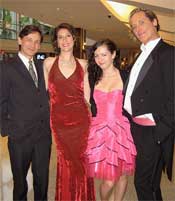
While working down at the theatre during Eugene Onegin in November 2008, I couldn’t help but notice how many young people went all out, dressing themselves “to the nines” for our operas. It wasn’t all just formal wear either. Our audiences mixed dressing up with elements of street, punk and preppy fashion, bringing a whole new flava to the world of opera.
The people who dressed up for our operas inspired me to come up with Fashion at the Opera, which you can find on our Flickr.
Describe Blogger Night at the Opera. How did it engage new audiences? Did it show an increase in sales?
Our very first Blogger Night at the Opera was in January 2009 for our Carmen opera. A prominent local blogger named Rebecca Bollwitt, aka Miss 604, came to our Eugene Onegin that previous fall and she ended up blogging about the experience on her own personal blog. We got to talking and she suggested we coordinate a blogger night, which we did and it has since became so wildly successful that other opera companies started calling us to find out how to set it up for themselves.
We invited bloggers who were opera newbies to join us, blogging pre-show and during intermission their thoughts on the opera and the whole experience of being at the opera. We gave them backstage tours and also invited them to mingle with cast, staff and guests at the post-show party on opening night.
We live streamed their web links on our VO blog, so that our readers can follow along in real time. This was great exposure for us and a way of getting the next generation interested in opera. Most of their readers have never been to the opera. But after reading about Blogger Night at the Opera, they became excited about our operas and what we’re doing with social media and bought tickets to the next performances. I had a few of them seek me out on the theatre floor to tell me they were here because of Blogger Night at the Opera.
What's Opera Ninja and how did you come up with the idea? How do other people in the organization feel about giving control of their communications over to (basically) a volunteer?
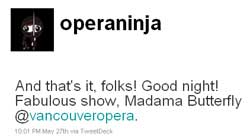
Opera Ninja evolved from Blogger Night at the Opera. We had blogger night on Opening Night. What should we do for dress rehearsal? We came up with Opera Ninja March 2009 for our Rigoletto dress rehearsal.
It was inspired by Welsh National Opera when they tweeted 12 hours in the life of the Welsh National Opera's The Marriage of Figaro, including a live relaying of the performance (also translated into Welsh).
On our dress rehearsal nights, the Opera Ninja would live tweet. Followers were engaged with seeing an event unfold and have an insider view of what was going on behind-the-scenes. The tone of Opera Ninja is cheeky, fun, irreverent. We didn’t necessarily want it to be a play-by-play of what was happening on the stage. Instead it could be the Opera Ninja’s reactions to what was going on. Our followers have found this entertaining and fun. They would add comments and also re-tweet our tweets to their own followers.
I was the original Opera Ninja but have since invited our bloggers to take on the character in their own voices. I give a lot of freedom to our Opera Ninjas in what they tweet because I trust them. They are high-profile and active Twitter users. They know the etiquette, the advantages and the drawbacks of Twitter. They understand that they can have fun as the Opera Ninja but as they’re also representing VO for the night, they have to be professional too.
Vancouver Opera has started publishing manga, a comic book based on the opera. Manga is sort of an unusual foray for an opera company to take. What inspired you to take the stories of operas to this new medium?
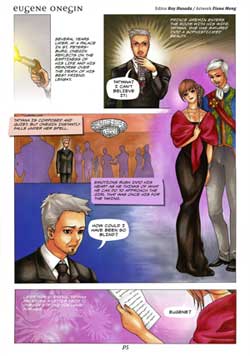
It may sound like a strange combination but the partnering of opera and manga has worked extremely well for us. We were approached by Vancouver artist & editor Roy Husada of Rival Schools four seasons ago with the idea of “manga-nizing” our operas. It started out in black & white and written in Japanese, but has evolved into colorful mangas in English. The mangas are eye-catching and it helps give readers an idea of what the opera is about, thus sparking their interest in coming to the opera. Our mangas have proven to be very popular with our followers.
By my count you have at least four Twitter accounts for Vancouver Opera. Why? What are the advantages to have many accounts? And how do you track and get a good picture of your audience?
We have 4 Twitter accounts:
1. Vancouver Opera which is our main Twitter account where I tweet daily. It's the one with the most followers and the most activity, so it’s this account where I keep track and measure all our questions, responses and re-tweets.
2. Operabot which was started for our Operabot contest, an animation contest for our Golden Anniversary season. Professional and student animators were challenged to create animated shorts of one of the four productions last year. The tweets posted to Operabot related to updates on the contest, the submissions received and any fun or wacky robots related links.
3. Opera Ninja – We wanted a dedicated Twitter account just for our exclusive “behind the scenes” tweeting during dress rehearsals.
4. Where’s Lillian – For our upcoming world premiere, we wanted to introduce our Twitter followers to Lillian Alling as she makes her epic North American journey from Ellis Island to the wilds of British Columbia. She travels on foot in search of a man named Josef. We have someone taking on the persona of Lillian Alling and tweeting in their own voice the adventures and hardships that the real Lillian Alling might have encountered. From these tweets, we hope that followers will become intrigued with Lillian Alling and want to come to the opera.
Each Twitter account serves a different purpose and we wanted to have a dedicated account for the audience who wanted just Operabot updates or just Opera Ninja updates. Also it frees up our main VO Twitter stream by not bombarding our followers with too many tweets or random-sounding trains of thoughts.
What have been the results of all of these programs for Vancouver Opera? Many times it is difficult to track the effects of social media programs. How have you been tracking your initiatives at Vancouver Opera?
Our social media initiatives have garnered a lot of positive attention from newcomers to opera, opera lovers, our peers in the industry and the media.
I track and report data to measure the impact of our social media efforts in various ways:
• Blogger – Google analytics, Like This / Tweet This buttons
• Facebook – analytics
• I use the Bit.ly shortener for our tweets to see how many people click on our links
• Through promo codes in our Tessitura software, I can find out how many tickets were purchased whenever a sales offer was put forth on our social media channels.
Any initiatives for the 2010-2011 season that you'd like to preview for us?
I have some exciting things planned but it’s a surprise. Everyone will just have to stay tuned to Vancouver Opera.
Last year around this time, we launched our Technology in the Arts webinar series. To keep this service relevant to the needs of our online community in the coming year, please share with us the topics and types of webinars you would like for us to offer. Type your ideas directly into the box below and click on "Finish Survey" - it's that easy. Thank you in advance for your thoughtful responses!
Crowdfunding websites are a simple way for artists to solicit and accept donations online. One of the best-known sites is Kickstarter, which hosted the record-breaking crowdfunding of Diaspora.
With Kickstarter, you set a fundraising goal and have three months to achieve it. If you reach your goal within three months, you keep the cash. If you don’t, the funds are returned to your backers. You design a menu of rewards to motivate backers to give. And, you keep 100% of ownership over your project -- an important consideration for artists dealing with copyright and distribution issues.
Helen DeMichiel, who funded a series of webisodes with Kickstarter, says the all-or-nothing structure is a great motivator. “You have to hustle,” she explains, and your backers get caught up in the excitement.
A previous project backer and current project starter, Tirzah DeCaria points out that most projects are funded largely by backers within the artist's existing network. She advises artists to look at Kickstarter as an opportunity to consolidate and mobilize your network rather than as a tool for reaching large groups of new fans.
Of course, Kickstarter isn’t for everyone. The site is curated, and in addition to an application process, projects must have a U.S. address and a U.S. bank account. And there are the guidelines.
In a quick scroll through Kickstarter’s current projects, I came across many projects posted by individual artists or small groups, as well as projects by a design studio, a non-profit performance company, and a video game developer. Kickstarter clearly doesn't exclude businesses, but established organizations aren't the primary users. If your organization is considering a project, Joe's post on micro-donations has some good thoughts and advice. And, again, consult Kickstarter's guidelines.
Other crowdfunding sites for artists:
Projects on IndieGoGo can be based anywhere in the world. Unlike Kickstarter, the site isn’t curated, so projects cover a broad spectrum -- creative endeavors, causes, and entrepreneurial work. And, IndieGoGo is not an “all-or-nothing” enterprise. You can keep any funds you raise along the way. IndieGoGo also has several innovative partnerships, including a fiscal sponsorship program through Fractured Atlas and the San Francisco Film Society.
RocketHub is another “all-or-nothing” crowdfunding site geared toward artistic and creative projects. RocketHub is not curated, though projects must be legal and “in good taste.” You must have a PayPal account to start a project.
What is your experience with crowdfunding art? Should established organizations stay out of it or join in the fun?
Many arts organizations have experimented with using “trailers” to promote upcoming performances or exhibitions. But what if you don’t have the time, equipment, or expertise to film and edit a video? What if all you have are photos?
Enter Animoto, a free tool that lets you quickly create short videos using a combination of photos, text, and/or video clips of up to five seconds in length. You can choose background music from Animoto’s library or upload your own.
To try it out, I created this 30-second promotion for Misnomer Dance Theater's performance back at our 2008 conference. It took about 20 minutes, including the time I spent actually finding the photos on our Flickr account.
The process is a pretty straightforward drag-and-drop design. You can add text and choose particular images to “spotlight” with extra screen time. Once your elements are arranged, one click mixes them together into a flashy 30-second video.
Other than changing the order of your elements, though, you don’t have a lot of control over the final product. Because Animoto automatically mixes the elements together for you, there’s no opportunity to fine-tune individual transitions. This is great if you’re looking for something quick and easy, but it can be a real downside for the more detail-oriented user.
Throughout the process, there is a strong push to upgrade your account, which can get a little annoying. If you’re with a 501(c)3 organization, you can request a free Pro account (normally $250/year), which allows you to make full-length, high resolution videos that are downloadable. The Pro account also includes a commercial-use license.
What have you created with Animoto? Do you have other favorite video tools?
No guards. Always open. And I assume you won't have any alarm surprises.
Welcome to the latest frontier in arts meet technology: Adobe Museum of Digital Media, the world’s first virtual museum.
What is a virtual museum? This is not simply a museum website where you can view the collections by clicking an index. Nor is this a museum placed in a virtual world such as Second Life (which interestingly enough has a thriving art scene).
The mission of the AMDM is to “Showcase and preserve digital work and illustrate how digital media shapes and impacts society.” Adobe "has changed the world...and we wanted to celebrate that,” says Rich Silverstein, Museum Director.
Keith Anderson, Creative Director, says the main question asked when developing the idea was, "how would this work in the real world?" Architects and designers were hired to create a museum that could theoretically be placed in any city in the world. There is an outside atrium, gallery space, and towers where the archives will be housed.
So how do you walk through this virtual space? There are no avatars. Instead, a sea-jelly-meets-futuristic floating machine eyeball is your guide to the space (complete with cute old-school-computer-takes-an-underwater-journey sound effects).
One of the greatest aspects of this new space is the freedom to create work that would be impossible to show in a traditional museum. Often, digital pieces are printed out on paper, or projected, and depending on the artist, a lot of the meaning behind the piece is lost (not to mention quality). It's like taking a Polaroid of The Birth of Venus. Sure, the photograph might turn out amazing and some people could like it better than the original because it has a neat 1960's quality to it... but I doubt that was the image Sandro Botticelli had in mind in 1486.
I’m excited and a bit hesitant at the prospect of this museum. Yes, I think a virtual museum will have enormous potential for artists who work in digital media. Images of many artists’ work do no justice to their pieces. However, I am someone who likes to be physically immersed in a museum. It is an escape from the real world into another universe: sometimes confusing, sometimes controversial, sometimes just beautiful, but always refreshing. It’s the same comfort as getting lost in a good book. I worry that, personally, I will not get the same satisfaction exploring the very cool looking structure from the 15-inch screen of my MacBook. But then again, I am also one of those people who refuse to use a Kindle because I like to physically hold a book. So who knows, it might be a heavenly solution to dealing with crowds and the hassle of checking your coat. And the fact that you never have to worry about hours or off days is pretty great.
What do you think? Is this where we are headed? Will virtual museums help create demand for the arts by allowing everyone to have access from the comfort of their homes?
The first show is entitled, "The Valley," and is curated by Tom Eccles. It will feature work by Tony Oursler, an amazing video artist who has already been pushing the boundaries of what digital media should look like and how it can be displayed (Did anyone catch his recent show at the Mattress Factory?). Oursler tends to highlight the strangeness of humanity in his work, and the medium of the internet and how it reflects society will obviously play a role in this new show.
Membership is free and just takes an email address. I am curious to see where the Adobe Virtual Museum goes from here. Will there be any social aspect to the museum? Will they ever partner with real life spaces for exhibits? Will they try to place a version of the museum in Second Life?
Opening night is August 2, 2010! I expect to see all of your sea-jelly-machine-eyeballs there so we can crack open a bottle of cyber wine and toast to the latest in technology meets museums!
In May, I participated in a webinar hosted by the National Assembly of State Arts Agencies that focused on creative technology strategies for state arts agencies. One of the issues that came up during the Q & A was backing up communications from social media platforms. As entities within state government, many state arts agencies are required by law to retain copies of their communications. But how do you archive communications that take place on social networking platforms like Twitter and Facebook?
Over the past two months, I have been using a potential solution. Backupify provides daily online backup for your social media and software-as-a-service data. They are the only online backup and storage provider to seamlessly back user data to the Amazon S3 cloud with its strong security and data duplication policy.
So here are the pros and cons of my experience with Backupify...
PROS
Backupify provides a centralized backup location for a number of online services, including: Flickr, Facebook, Twitter, Google Docs, WordPress, Basecamp, Gmail, and many more.
Businesses utilizing Google Apps can back up all of their data at relatively low cost.
Quick and easy setup.
With the free account, you are able to backup one account per online service. The premium account level backs up an unlimited number of accounts per service for just under $60/year.
Users are able to choose whether their accounts are backed up daily or weekly.
Users are also able to opt for a daily email notification of backups, weekly email notification, or no email notification.
The system maintains a backup history identifying when accounts were backed up, whether or not the backups were successful, and how many files were backed up per online service account.
CONS
There is no standardized format for backups because the backup file type is determined by the service providers. For example:
Facebook photos are backed up on the site as photo files, but other Facebook elements (friends, statuses, links, notes, and events) are stored as an XML (Extensible Markup Language) file - which I view using Microsoft Excel.
For Twitter accounts, users can download a PDF workbook containing the following data: profile, updates, received direct messages, sent direct messages, favorites, and mentions. Users may also download XML files for each of those individual data pieces as well as an XML file containing information about the user's Twitter followers.
WordPress blogs and websites are backed up as a MySQL database in the sql.gz format.
Currently, users may backup their personal Facebook profiles but not fan pages. I asked Backupify CEO Rob May if there are plans to add backing up Facebook fan pages to the service's offerings. He informed me that they are working with Facebook on this functionality over the next two weeks, so this option should be available in the very near future.
My personal experience with Backupify over the past two months has been a very positive one. Once the service adds the capacity to backup Facebook fan pages, it will be even more useful for arts organizations and governmental agencies using social media.
Video may have killed the radio star, but it has done wonders in shifting the paradigm of visual art.
Since the 1960s, video art has been challenging preconceived notions about how art was supposed to look. At the time, these video artists had to fight to be recognized as worthy enough to be hanging in the same space as Monet or Picasso. And nowadays, you cannot walk into a contemporary art museum without some type of video art installation. Barriers were successfully broken down. Hooray!
Let’s take a quick look at the opposite end of the art world spectrum. A magical little land on the internet where hours (and probably days) at a time can be spent: YouTube.
“We’re looking for things we haven’t seen before,” says Nancy Spector, deputy director and chief curator of the Guggenheim Foundation.
No pressure.
So what happens after videos are submitted? A panel will review all of the videos and narrow it down to 200. From those 200, 20 will be selected to show in the first Biennial of Creative Video at the Guggenheim Museums. Yes, museums. The show will be simultaneously running at the Guggenheim in New York City, Berlin, Bilbao, and Venice. All 200 finalists will have their videos shown on the YouTube Play Channel.
Partnering with the Guggenheim and YouTube, is Hewlett-Packard, who will be providing all the equipment at the museums to display the videos, as well as online tutorials about video basics such as editing and lighting.
So even if you know absolutely nothing about videos or video art, your work could be shown in one of the most renowned museums in the world. Interesting. And exciting. I think.
What are your thoughts? Will this produce great art worthy of showing in Guggenheim museums around the world? Is that even the point?
Now there is a question worth exploring… In this rapidly changing world where absolutely anyone with a camera, phone, or computer can create “art,” how do you define what is museum worthy anymore?
I think there are two schools of thought on the matter. On the one hand there are the purists who think the art world should remain an elusive and elite club that few artists ever manage to penetrate. Unfortunately, these limitations of access are crippling to the sustainability of our field. Which is what the focus should be, according to the second group. Yes, the art world must educate, question, and preserve beautiful and interesting things, but if you can’t get people to walk through the doors then what is the point? Keeping today’s audience engaged with art, regardless of the means, has become a focus for both visual and performing arts organizations. Technology is a great entry point, because everyone understands it and uses it on a daily basis. The same holds true for artists. Almost every artist I am friends with uses technology in some fashion to produce their work. They are creating amazing things, but the likelihood of top curators and critics ever hearing about them is slim to none. Which is why YouTube Play is such a great concept.
Obviously, there will be no way of creating installation style pieces similar to Bill Viola’s piece for the 2007 Venice Biennale, Ocean Without a Shore. But in this case, that is ok. Unknown artists get to show their work, interesting pieces will be created, and the museum doors will be as convenient as your computer screen.
The other day, we talked about crossing into different genres of art than you are used to… well here is your chance! Everyone is an artist.
Interested? Absolutely anyone in the world can apply by uploading your video (less than 10 minutes and created in the last 2 years) to the YouTube Play Channel. The deadline is July 31, 2010, so start creating!
Foursquare is one of the newest social media platforms to be embraced in the last year and one of the most promising new applications for businesses. According to the website, foursquare is “a mobile application that is a cross between a friend-finder, a social city-guide, and a game that encourages users to explore their neighborhoods and rewards them for doing so.” The point of the application is to help users explore their surroundings, discover new things and share their experiences with others.
Foursquare uses micro-blogging similar to twitter and interfaces all of the check-ins (posts) with a virtual map. In doing this, users tag locations, businesses and events that they are currently attending for their friends to see and read about. It is a way to share knowledge, play a game and receive promotions and rewards from businesses simultaneously. Due to the mobile aspect of the application, most Foursquare users interact with the site through smart phone applications.
The game portion of Foursquare is what sets it apart from other applications that allow users to tag locations with their posts. In foursquare, a user gets points and earns badges for checking-in at different locations, the frequency of their check-ins and the uniqueness of where they travel. An example would be the Starbucks honorary barista badge. If someone checks into five different Starbucks locations, they become an honorary barista and earn the barista badge. Starbucks is tying this badge into their customer loyalty program and offering promotions and discounts to their honorary baristas.
Collecting badges has become very trendy in many urban settings and adds a fun aspect of competition to social media. Badges are just one option that Foursquare is offering for businesses to promote themselves on the site.
Many businesses are using:
Mayoral specials – specials unlocked by foursquare to the person who has checked-in most frequently over the past 60 days
Frequency specials – specials that are unlocked by foursquare to users every ‘X’ number of check-ins
Check-in specials – a one time special unlocked by foursquare after ‘X’ number of check-ins or for checking-in at a specific time or date
Wildcard specials – not managed by foursquare, but verified by the businesses staff
Once a business sets up an account with Foursquare and tags its location on the Foursquare map, users can click on the location to receive a brief description and a To-Do list. The To-Do list is a list of recommendation that the business and other user have provided for the location. A museum might add an exhibit, event or activity to their to do list along with whatever recommendations other users have added. This along with check-in based promotions adds a new level to social media marketing and community building technology for arts organizations.
How businesses can utilize Foursquare:
Tag the location and business on the Foursquare map
Add a brief description of the location to the map
Link twitter account to Foursquare to increase activity
Add items and recommendation to the To-Do list of the location
Integrate check-in and badge based promotions
Use Foursquare as a part of a customer/patron loyalty program
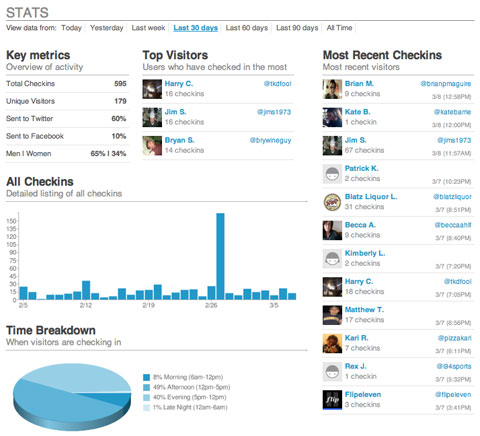
Foursquare is also providing an analytics system for businesses. Foursquare analytics has a personalized dashboard for each business that shows which users are checking-in at their locations most often, what time the location has the most Foursquare traffic, and how many check-ins are being linked to other social media plat forms. It gives a demographic breakdown of their Foursquare patrons and provides information such as total check-ins, total unique check-ins, and statistics based on daily, weekly, monthly and annual traffic. This type of data is priceless to organizations and adds a way to track profitability, return on investment, and patron use.
Foursquare is less than two years old and already has over 500,000 users. The integration of social media, entertainment and business prowess makes this company a very promising investment for the arts community. Foursquare has shown enormous potential and incredible growth. It has the possibility of becoming the next Twitter and is offering much greater potential for businesses to harness the power of social media while creating a new outlet for promotions, marketing, and community building.
Nobody ever wants to be in an emergency situation, but let’s face it, they happen. Hurricanes, floods, fires, terrorism, I.T. failures, and even epidemics are a real concern in today’s world. Last week we talked about disaster planning for artists, but what about the organizations? Almost every for-profit organization in the country has some type of emergency preparedness plan and training for staff members. But for some reason (money, time, human resources), arts organizations are a little behind this vital curve.
Which is where ArtsReady comes in! This initiative was developed several years ago by South Arts as a way to help organizations with emergency preparedness. As you probably know at this point, developing strong management practices regarding emergencies is becoming a national conversation. (Read the Green Paper published earlier this year!)
ArtsReady Program Director, Hannah Leatherbury, explains that, “We want arts organizations to start thinking about a readiness plan like they think about a strategic plan.” We conducted an interview with Hannah last September, and the podcast gives some great information about the history of the organization and importance of continuity planning.
There are three main components to ArtsReady:
(1) “Be ArtsReady” awareness campaign, which provides resources and guides for organizations to create “what if?” plans. Join the campaign!
(2) In-progress development of community source software, which will be a web-based tool to help arts organizations be more resilient after both minor disruptions or major crisis. It will allow organizations to assess their risks, have a secure backed-up location for readiness documentations, and be connected to other arts organizations to share resources and stories. Check out the demo presentation for this online tool.
(3) Membership in the Coalition for Artists’ Emergency Preparedness, a voluntary task force which is committed to organizing a nationwide support system (resources, education, advocacy) for artists and arts organizations before, during, and after disasters. **Be sure to check out, "When Disaster Strikes, Are You Prepared?" a workshop they are conducting during the Americans for the Arts Half Century Summit on June 26th at 4:00pm.
What experience have you had with emergency preparedness? Does your organization have a plan in place? We love to hear what you all are doing !
"Emergency preparedness is possibly the only topic in the world that is both terrifying and boring," quips Studio Protector's Craig Nutt.
Disaster planning is easy (and risky) to put off for another day. As we enter the Atlantic hurricane season, now is a good time to consider your own emergency preparedness. In this two-part series, we will look at resources that can help arts and culture organizations both prepare for and recover from flood, fire, and other disasters.
One resource specifically designed for artists and artisans is Studio Protector, an information toolkit created to help you "cover your A's: Art, Assets, and Archives."
Studio Protector goes beyond general preparation tips to include advice relevant to artists working with a wide variety of media. For instance, after a flooding disaster, the "First Aid for Your A's" section explains that freezing wet items can buy time, but that not all materials are okay to freeze: textiles and books, yes; paintings and ivory, no. This kind of information can help you prioritize your time in a salvage situation.
The idea for Studio Protector grew out of lessons learned by artists during and after Hurricane Katrina. Visual artists developed the tool in partnership with the Craft Emergency Relief Fund (CERF+), which provides direct grants and loans to artists who need help in emergencies.
Studio Protector is comprised of two parts:
(1) The Wall Guide contains tips and checklists that help you start small and build your disaster response plan incrementally. Five subject-specific pullout guides, which can be easily taken off site in the event of an emergency, focus on topics such as evacuation, clean-up, and salvage. The entire kit is the size of a calendar and is designed to hang on your studio wall. The online video demonstration is a good introduction to what the guide looks like and how it works. The kit is currently available through CERF+ for $16 plus shipping and handling. Profits from the sale of the Studio Protector Wall Guide go towards CERF+ programs.
(2) The Online Guide* is designed as a supplement to the Wall Guide, with artist-to-artist videos and links to additional resources. Because it contains a lot of basic information as well, it is a good first stop when working on your emergency plans -- or when beginning the recovery process. The Online Guide is available for free on the Studio Protector website.
Although it is geared for visual artists and studios, Studio Protector has advice and tips that can also be useful for performing arts organizations -- particularly those with a large investment in costumes, scenery, stage equipment, or digital archives.
*Web development for Studio Protector's Online Guide was a project of Center for Arts Management and Technology, home of this blog.
Roving arts management reporter, reporting for duty! I’m taking a brief break from my summer gig at Wolf Trap Opera Company to resume my TitA duties and re-cap the delights of the Opera America Conference this week in Los Angeles. Conferences are great places to exchange ideas. I always come away with a list of things to check out.
Here are a few great free tools on my list:
Box.net—Simple online file sharing. Can be used instead of a share drive, OR as a way to upload your season brochure for easy patron download.
Pitchengine.com-the social PR platform—Make fuss-free digital press releases with easy links to multimedia. No coding, no WYSIWYG editor screwing up what would otherwise be a reasonable task.
Twitalyzer.com- Does a slogan like “serious analytics for social relationships” take the fun out of Twitter? No way! Track your impact through hard data, not just anecdotal evidence.
Polleverywhere.com-create polls that audience members can answer via SMS text messages, Twitter, or the web. Some great advanced features for a little extra money, too!
[And I won’t assume you don’t know about Foursquare.com. If you’re not offering people who check in (or your “mayors”) something cool, look into it.]
And I must mention one that is not free (but cheap): Wildfireapp.com is ideal for setting up campaigns, coupons, and sweepstakes. Great way to capture data on your patrons.
Congratulations to the 2010 winners of the 21st annual MUSE Awards!
We all know that without a collection or traveling exhibits, a museum would not exist. Period. But how long can that museum, despite an amazing collection, exist without connecting to the public in new and exciting ways? It is impossible. Especially in this ever-changing digital age, museums have to get creative! (Slightly ironic, since they are housing creativity to begin with...)
Which is why, every year, the American Association of Museums’ Media & Technology Committee celebrates innovation and creativity of digital media in the museum sector with the prestigious MUSE Awards.
Over 200 entries from museums around the world were reviewed by an international jury of museum professionals and media experts, and the results were presented at the AAM annual conference in Los Angeles.
For full descriptions of all the winners, click the category! But in the meantime, check out some highlights and favorites.
Imagining Lincoln and Juarez;Chicago History Museum and Ed Herrman
The Chicago History Museum has developed pre-programmed iPods and accompanying worksheets, to immerse students in the exhibition with sounds that created the mood and engage them with the collection.
O Say Can You Sing? National Anthem Singing Contest; National Museum of American History, Smithsonian Institution and Night Kitchen
The National Museum of American History held a singing contest to engage the American people with the story of the flag and national anthem. Over 800 eligible entries were submitted via YouTube, and thousands of people rated and commented on their favorites. The winner was invited to perform at both the museum and the Baltimore Orioles game on June 14, 2009 (Flag Day)!
The Association Game (t.a.g.) is a non-verbal educational game for grownups where an image is chosen at random from the Open Museum collection, participants respond with an image that is somehow associated with or reminiscent of the original image, everyone votes on what they think is the best successor, and then the winning image becomes a starting point for the next round. There are three rounds a week with an average of 15 images submitted for each round. **One of my personal favorites because anyone can sign up for free and play the game now!**
UMMA's DialogTable; University of Michigan Museum of Art and Kinecity & Night Kitchen Interactive
The UMMA DialogTable is a dynamic new interactive storytelling and social learning tool located in the Vertical Gallery of the University of Michigan Museum of Art's new Maxine and Stuart Frankel and the Frankel Family Wing. The DialogTable engages audiences with art and ideas, prompting new conversations and creative connections. Since the Table is located in the extended-hours zone of the Museum, visitors can engage with the collection even after the galleries are closed!
Worldwide Animal Viewers; Museum Victoria and Megafun Pty Ltd
Melbourne Museum in Victoria, Australia recently opened a new biodiversity exhibition, “Wild: amazing animals in a changing world,” which has 770 mammal and bird mounts from all over the globe. Designed for a broad audience, the interactive interpretive device needed to be developed for all types of guests to use. Museum Victoria worked with Megafun Pty Ltd to create the PANORAMIC NAVIGATORS, in this case referred to as "Worldwide Animal Viewers," a surprisingly easy and fun system which accesses additional information about every specimen in the exhibit.
Beyond All Boundaries; National World War II Museum and The Hettema Group
Beyond All Boundaries, the signature 4-D cinematic experience at The National World War II Museum was designed to attract both new and existing audiences to the Museum, and to bring World War II to life in an entirely new way. The words and stories of actual WWII participants are brought to life by many of today's leading actors, and viewers experience the war in first person through state-of-the-art special effects where they feel the vibrations of B-17 bombers and see snow falling inside the theater during the Battle of the Bulge.
We Choose the Moon;John F. Kennedy Presidential Library & Museum and Domani Studios & The Martin Agency
We Choose the Moon is an amazingly integrated website which recreates Apollo 11's lunar mission, minute by minute, with an interactive experience that let visitors experience the mission as it happened, using archival audio, video, photos and "real-time" transmissions on the site and via Twitter.
Audio on demand program; National Museum of Australia and Icelab Pty Ltd
The National Museum of Australia's Audio on Demand program is an evolving collection of recordings of lectures, forums and symposiums held at the Museum's building in Canberra. There is a wide range of topics relating to social history, and especially the Indigenous peoples of Australia since the museum has such a strong collection.
Raising Spirits; Asian Art Museum of San Francisco and The Arts Lounge
Raising Spirits is a comprehensive public relations package designed to promote a traveling, multimedia art history presentation showcasing the Asian Art Museum of San Francisco's permanent collection. The package takes the world-renowned collection "on the road" via a plasma screen into private dining rooms of our patrons, while host Kirsten Shilakes tells tightly woven stories about art, food and wine, taking guests on a multi-sensory aesthetic and culinary journey.
Teaching and Outreach Videos; Art Institute of Chicago and Angle Park, Inc.
Collectively directed towards educators, parents, and caregivers, the Art Institute of Chicago's teaching and outreach videos demonstrate meaningful and effective strategies to engage young audiences on their visit to the art museum. Dynamically accessible in the museum and online with both English and Spanish subtitles, this group of videos created by the Art Institute of Chicago and film company Angle Park, Inc., helps teacher-student and parent-child audiences make the most of their museum visit.
Buck Ramsey's Grass: Anthem; Nevada Museum of Art and FLF Films Inc & UeBersee Inc.
The Nevada Museum of Art has created a moving piece which effectively transports the viewer into a land where the enduring tradition of cowboy poetry is a rich and vital form of cultural expression in the American West. This film was created and produced for the 2009 exhibition Between Grass & Sky: Rhythms of a Cowboy Poem, and is inspired by the Texas poet Buck Ramsey widely-celebrated poem Grass.
Concept Design: Touch the Unreachable—Looking for Finnish identity; Virva Emilia Auvinen, Aalto University School of Art & Design-MediaLab Helsinki, Finland
"Touch the Unreachable" is a concept design on how to use interactive storytelling techniques, video, 3D animation and graphic visualization for art education purposes. The "Touch the Unreachable" concept is an application designed for a museum environment and aims to promote knowledge of Finnish cultural heritage.
****
What are your favorites? How can these remarkable projects help you and your organization integrate more technology in innovative ways? We would love to hear what YOU are doing!
In a recent study focusing on the giving and technology habits of millennial donors from Achieve & Johnson Grossnickle Associates, researchers found that many people under 40 are willing to become donors but are not being approached in ways that lead to increased patronage and giving.
The study found that Millennials prefer their primary contact with an organization to be Internet based, with e-mail being the preferred form of direct communication and Google searches, web pages and social media outlets ranking highest for researching organizations and building relationships. While this in itself is not shocking, the rest of the study revealed some much more interesting facts about younger donors.
Millennial donors were over 91% likely to give a gift to an organization when asked face-to-face, as opposed to 51% likely when asked through e-platforms, and only 17% likely when asked through direct mail.
When asked what type of information they wanted to see before they would give to an organization, over 53% of Millennial donors wanted financial documents and proof of stability, and 86% wanted documentation of current programs, services, and community impact.
These facts could easily represent the traditional donors of any arts organization in the United States; this similarity should be a red flag to non-profits about their misconceptions surrounding younger donors. Millennials are concerned with the health of the organization, Millennials do want to get involved, and Millennials require face-to-face personalized interactions to become donors. Studies like this help to show that Millennials are not that different from the traditional donors which arts organizations are already cultivating. The differences emerge in how Millennials prefer to gather information and communicate with organizations rather than in the information itself.
So how can arts organizations mix the technological communication preferences of Millennials with their need for face-to-face contact?
Some recommendations for communicating with Millennials:
E-mail annual reports instead of direct mailing them or make them available as a downloadable pdf from the organization website
Update projects and project outcomes on websites and blogs in real time
Continuously post pictures, testimonials, press and videos to social media
Create an interactive online environment that allows donors to feel involved with the organization even when they are not at the physical space
Use events, parties, fundraisers, shows, and exhibitions to begin the personal face-to-face cultivation of the new donors
The objectives of these techniques mirror traditional forms of development, but the tactics have been updated for a fresher approach reflecting the technology based millennial lifestyle.
All of these online efforts support the face-to-face meetings and personalized mailings that are already in use by many organizations. Millennials can and will support organizations that take the time to reach out to them. The misconception that Millennials are not a target market willing to donate is simply leaving cash on the table and failing to connect arts organizations with their future funding base.
Fan Page Analytics
This tool helps you learn more about your Facebook fans by seeing what other pages they like. This easy, fun, and free tool is a nice complement to Facebook’s simple analytics. Knowing what your fans like can help you build your case for potential sponsors. The site's map function shows you states or countries where the highest concentrations of your fans live. This information could help you to place more strategic Facebook ads – especially if you’re a touring artist or group. Try it for your organization, and let us know what you discover.
This robust set of metrics and reports creates a nice snapshot of your current Twitter usage. The Dashboard tool also gives you advice for improving metrics like impact. A recent write-up from Mashable directed an overwhelming amount of traffic to Twitalyzer’s servers yesterday – We’re looking forward to exploring more of the features when things calm down a bit.
Find out what posts coincide with your account gaining or losing followers. TweetEffect lists your recent posts, displaying the posts in green or red as you gained or lost followers. Interesting information, but don’t forget that correlation isn’t necessarily causation…
Enter your twitter account name, and Tweet Psych creates a “psychological profile” of your account. The profile shows how often your tweets fall into general categories, theoretically giving you insight into your online persona. According to our profile, TechInTheArts tweets most about learning and work. What a serious bunch we are!
Does anyone actually enjoy the grant writing process (aka the most frustrating, time consuming, and essential activity virtually every arts organization must go through at least once a year)? To those of you who enjoy all the paperwork, I salute you. For everyone else, I’m sure you will agree that the development of online grant systems have been a tremendous asset over the past several years. Unfortunately, they do not always simplify the process.
Passwords are forgotten, the grantee cannot preview the full application, every year the same information must be reentered, supplemental files are unable to attach, and heaven forbid there are not enough opportunities to save work. Grantmakers, on the other hand, have to deal with potential duplicates in the database, an inability to format or customize applications, interim reports that are not integrated with the original application, and hundreds of applications from organizations and individuals who are not even eligible for their funding.
With all of these potential hassles and multiple vendors to choose from, how can grant makers possibly ensure they select the online grant application system that will work best for them?
Thanks to another informative report from Idealware, vendor selection does no longer have to be such a completely overwhelming process.
“Streamlining Online Grant Applications: A Review of Vendors” is a collaborative effort between Idealware, Project Streamline and the Grants Managers Network to assist grant makers in comparing various systems against the same criteria.
Vendors reviewed in the report include:
EasyGrant by Altum
eGrant* by Bromelkamp
WebGrants by Dulles Technology Partners
Grant Lifecycle Manager by Foundant Technologies
IGAM by MicroEdge
Common Grant Application by Ocean Peak
PhilanTrack by PhilanTech
It is important to note that the review’s main focus was not every specific functionality of each vendor, but rather those features which best reduced the administrative burden, such as:
Getting Started: Ease for Applicant
Getting Started: Reuse of Information
Overall Ease of Use
Good Form Design: Self Service
Flexibility of Forms
Support for Multiple Stages
Information Sharing: Collaboration
Information Sharing: Data Export/ Access
Product Background
I would not recommend making a decision based on just the paragraph summaries of each system, which did not always compare the same criteria. Instead, take the time to look through the complete report wherein each system is evaluated in the above categories through various “essential standards” and “gold standards.” These include elements as simple as required fields and word counter to things as complex as branch logic and extranet capabilities. Additionally, further information is included in the full report, such as costs, technical setup, technical support, current number of clients, and product history.
Although the systems reviewed in this report are not the only tools available, this report is a great starting point and resource for all grantmakers looking to simplify their grant application process.
As a special shout-out to fellow sci-fi fans in arts management, the staff at the Center for Arts Management and Technology bids you Happy Star Wars Day! To celebrate this joyously geeky tradition, we used the always-fun, put-yourself-in-the-video tool JibJab to create a version of The Empire Strikes Back starring...us, of course. Enjoy!
Featuring:David Dombrosky as Luke Skywalker
Shryansh Mehta as Han Solo
Melody Fleishauer as Princess Leia
Josh Futrell as Lando Calrissian
The FCC officially decided in January to clear the "white space" that exists at the 700 MHZ frequency for particularly designated usage. While the FCC fielded arguments from big cellular and broadcasters in determining white space authorization, "unauthorized users" of microphones operating on a 700 MHZ frequency were depicted as "squatters" and intruders, since many have, technically operated in this space illegally for years.
Unfortunately, this may have a serious impact on venues that use wireless microphones. Theaters, concert halls, stadiums, and others, will no longer be able to use technology that uses the 700 MHZ frequency. The FCC is giving organizations that use mics on the 700 MHZ frequency until June 12 to transition to another frequency.
This means that you need to know if this is something you need to know. This could be hugely expensive to organizations that have equipment that operates at this frequency. If nobody in your organization knows this, or knows where the equipment manuals are, you can check the FCC's website.
If you find that your equipment will have to be replaced, try contacting the manufacturer and/or the retailer where it was purchased. Some companies are being very good about offering discounts on new equipment or switching out the old free of charge, according to sources at a conversation at Arts Advocacy Day.
As promised too-long ago, here is a quick-and-dirty guide to improving your website's search engine optimization.
I certainly couldn't have made sense of this all on my own; I had the great fortune to be able to pick the brain of David Hejduk of River City Studios. He is the man behind the website-optimization curtain for many companies and organizations.
While the various search engines in creation all claim slightly different methods of operating, according to Hejduk there are some hard-and-fast rules that you can follow to make your site as discoverable as possible.
Make it easy
The 'bots that crawl the web, searching for the words that somebody wants to find, are very smart for non-sentient beings. But as people, according to Hejduk, they are like second graders. They can do a surprising amount on their own, but the easier that you make it for them, the better the results that they will return on your behalf.
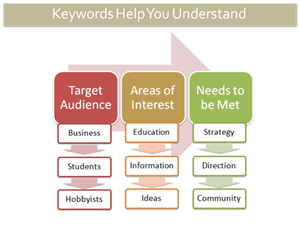
As with any marketing plan, SEO requires that you think like your audience (or the audience you hope to attract). What would people type (and usually this is a couple-word phrase, as opposed to one single word) if they were looking for your organization? What would people type if they were looking for something that your organization provides? These are the phrases and words that should continuously appear from page to page, in title tags, headers, copy, internal and external linking.
From the literal top down, your page should make it easy to figure out what you are about. Your address should include words that are pertinent to your organization--like its name, for example. Your banner should highlight words that are relevant and interesting--the more cryptic your titles (do you call the link where you can buy tickets "buy tickets" or "box office," or do you use a clever and obtuse moniker?) the more difficult it will be to directly access the information that a person seeks when they Google you.
So take a look at your homepage. How clean is it? Where is information placed? The more important stuff should be on the top, should be in bold, should be headings. Do you have captions for your visual and audio content, are you social media sites up to date (and linked from your homepage), and do you link to news articles that are relevant? And what are the keywords that appear throughout your site, indicating to the 'bots and your potential audience what you are about?
Don't assume
Don't assume that you know what your site's keywords actually are: check here to see what the 'bots consider your site's keywords. Does that list best describe your purpose and mission? Will they attract the audience you WANT to visit your site?
If not, it is time to take a moment (or multiple long moments) to work out how you want your organization to be identified online. If the words you think are most relevant are highly competitive (i.e. other websites that naturally generate more traffic use the same keywords), your site still may wind up buried deep in the results pages of a search. So think about word combinations that may be less popular but more representative of your organization, and which may bring visitors and audience that will be most interested in what you offer. A more comprehensive keyword instructional can be found here or here. When you are ready to start placing keywords strategically, check out this reference.
Get analytical
Before you tackle your very own homepage, there are a number of tangential tools that are free and require only that you insert a little code onto your pages. The first is Google Analytics. We've said it before and I am here to say it again: USE THIS TOOL. It is free. It is incredibly useful. Register your website with Google Analytics and copy the code into your page (Analytics gives you a really basic how-to when you sign up).
Analytics tracks how people find you. Do they click on a direct link that they found on someone else's page (did you even know that someone else has linked to you?) or did they find you from a google search or did they track you down from your Facebook page? If your response is, "How could I possibly know where they came from?" my answer to you is "Google Analytics!"
I don't work for Google, Google doesn't give me any kind of incentive for talking about their products (I'm so over Google Chrome, by the way), and yes, they are approaching world wide web domination, BUT...they make great free tools. And you should learn how to take advantage of what they offer.
Over the summer I gave a shout-out to the Google Business Center, and I'm here to do a follow-up cheer. Like Google Analytics, the Local Business Center is free, and provides insight into how people are finding your organization. It can give you diagnoses and provide feedback on your website's traffic. It also places your organization's physical location on a map that makes your location in real-space clearly apparent for someone who is searching. This means that somebody searching in Boston for information on the Artspace Gallery will be much less likely to get top results of Artspace Gallery on South Ridgefield Rd. in Edison, NV and Artspace Gallery and Coffeeshop in Madison, California, than your Artspace Gallery right there in Beantown.
Keep your site current
A search engine, when it crawls the web, isn't really looking at what is out there RIGHT NOW. It's actually searching the input phrase against pages that were cached in the past--sometimes a month or so ago or longer. (You can find out the last time the 'bot stopped by your site: in the list of search results there is a hyperlink below your site that says "cached" and will tell you when the page was indexed last.) This means that you want to keep a consistent presence--and it also means that you cannot guarantee that your calendar will be indexed in time for your events, so be sure there are other places that information appears that may register more readily.
Keeping your site current is important, because when you update, the bot notices the next time its crawling out there, looking for sites that are active. You don't want somebody to search for your company and have the top five results be reviews from a play you produced in 2007. You want them to find YOU. The challenge is that when your local paper is receiving a lot of traffic on a daily basis, even its archived pages are getting more action than your website. So does Facebook, incidentally.
(You say, "If Facebook receives a lot of traffic and therefore scores more highly in the bot's mind, does this mean that I should have a page on Facebook for my organization that also includes information and links to my homepage?" I say, "YES! (Caveat: don't just use Facebook to say you use Facebook, have a social media plan.) So, have some pages that have fresh, regularly updated content (this may be a blog, or perhaps a newsletter that you publish on your page once a month).
NOTE:This does not mean your entire site should get a face lift every month.There should be stable pages, with easily identifiable URLS (like www.yourgallery.com/directions and www.yourgallery.com/home and www.yourgallery.com/artists) that stay consistent. You may have links from those pages to other pages that do change frequently (your artist page may be about artists that have shown in the past, but have a link to "current show" that takes the visitor to a new page, www.yourgallery.com/lcorwinchristie), but you should have a core of reliable, recognizable pages that your visitors and Google recognize as solid.
Get listed
Alright, good work. The next thing I want you to do is sit down and think about the other search tools that people use that are NOT search engines. I'm talking about sites like Citysearch,Yelp, Yellowpages, ask.com, epinion. You may not be using them to find out something fun to do on a Saturday night, but I have news for you: a LOT of other people are. These are free directories that list businesses and allow users to write reviews and comments about experiences.
The great thing about this resource is that, because these web directories get so much traffic all the time, search engines check them. If your organization is listed with full contact information (THIS INCLUDES YOUR URL--I could rant for hours about how obnoxious it is to find a listing for someone ONLINE without a way to ACCESS THEIR WEBSITE. But I digress.), this gives a search engine more to go from. "Ohhh," it "thinks" in its little second-grade "brain," "The person searching for XYZ company is in Atlanta, and here is a listing on Yelp.com for an XYZ company that has an address in Atlanta!" Voila! A match made in Georgia!
Get linked
Another tip? Links are huge. Links to both internal and external content will improve your rating when a search engine is looking for you. As always, however, do not simply compile a list of links for the sake of having them. A search engine will notice if you have a "links" page that is little more than a list of everyone you have met and their blogs (recent or outdated).
It's much wiser, and more interesting, to integrate links into your web design. This can be in blog posts, or side bars on specific pages, definitely in artists' profiles. The more you link out to places that are both relevant and potentially interested in what you are producing, the more likely they are to link back to you. What does this mean? Well, if Google sees that you have a certain amount of popularity, that is, that there are people who think that you are saying things that are worth sharing, it will consider you more important as it indexes your site. (Yes, it's true--Google judges you.)
So, to sum it up:
Your headline, header tag, bold text or text that is a larger font, should be IMPORTANT and RELEVANT (and will thereby improve your searchability). They should be placed higher on the page and centered whenever possible. There should be a continuity of keywords across your pages.
You should have a core of a few pages that have consistent content, and from those pages link to others that are updated and altered regularly. Your homepage can be current without being overloaded with new content on a monthly basis. Having the pages link to each other ("artists" from "home," "location" from "artists" and "home") is also crucial for giving the search engines a sense of the overall picture of your site and the information therein.
Plan ahead: If you have an artist who you will be featuring in a few months, publish a page about that artists in advance. That way the 'bot can find the information before it is outdated. The 'bots only stop by every month or so (and if you were cached long before that, you have some updating to do!)
Plug your page in sites where it is kosher to do so: Yelp, Yellowpages, Citysearch, and so forth. And remember, this also gives people a forum for discussing your work, and this will give you a sense of what the word of mouth is about what your organization is doing.
This morning I had the pleasure of watching Eric Whitacre's latest virtual choir release (see video below). This effort, the composer's second, combined 185 individual singers from 12 countries recorded independently. Whitacre conducted the choir through a YouTube video. The videos were then combined together by producer Scottie Haines in a very familiar formation--the videos look like they are on risers, with Whitacre in the traditional conductor's position.
Whitacre has always been looked on as a sort of "rock star" composer in my peer group (I define them as "20-something music nerds"). My college choir was ecstatic to sing his pieces--they sounded new, modern, but with elements we could connect to both as musicians and listeners. They had cool titles, like Leonardo Dreams of his Flying Machine. (I mean, who writes choral pieces about Leonardo da Vinci's sketchbook?) And, of course, they contained those famous "shimmer" chords that we loved to sing. His "rock star" positioning is evident in his YouTube page. (check out the promotional photo that proclaims Marvel Comic/Criss Angel style "I. AM. ERIC!") Projects like this cement his reputation, and you have to admire him for it. Good music, marketed well.
Why is this project so fascinating? It's new, sure, but seeing the singers' heads, framed by their "natural surroundings" was especially compelling to me--more so than a simple video of a performance, like the YouTube Symphony Orchestra. Digitally created music presented in a digital medium rings true, more so than traditionally created music presented in a digital medium. It's the same reason why I've only been to one Met HD broadcast--I crave that feeling of "genuine-ness".
I've been doing a lot of research lately on video footage of the performing arts and have heard many different views on how video footage (especially streaming of entire performances) will either preserve or destroy the live performing arts industry. This debate exemplifies the inherent friction we sometimes find between the arts and new technologies. (There was a great speech given on this topic by Ben Cameron at the TEDx conference, if you haven't seen it yet.)
But I can't help coming back to my simple love of live performance. Nothing replaces it, in my mind. Maybe I'm atypical of my generation in that respect. Or maybe the fact that I get equally excited about Whitacre's 'Lux Aurumque' YouTube video and the Bach Sinfonia performing Bach's complete motets live in a concert hall shows that I am fundamentally and irrevocably a part of it.
Whitacre has always been looked on as a sort of "rock star" composer in my peer group (I define them as "20-something music nerds"). My college choir was ecstatic to sing his pieces--they sounded new, modern, but with elements we could connect to, and those famous "shimmer" chords that we loved to sing. His "rock star" positioning is evident in his <a href="http://www.youtube.com/user/EricWhitacresVrtlChr">YouTube page</a>. (check out the promotional photo that proclaims Marvel Comic/Criss Angel style "I. AM. ERIC!") Projects like this cement his reputation.


 How to Make the Most of Your Facebook PageTuesday, October 19, 2010
2:00pm-3:30pm Eastern
Register today for $25
Presenters: Maryann Devine and Jacquelyn Kittredge
How to Make the Most of Your Facebook PageTuesday, October 19, 2010
2:00pm-3:30pm Eastern
Register today for $25
Presenters: Maryann Devine and Jacquelyn Kittredge
 No guards. Always open. And I assume you won't have any


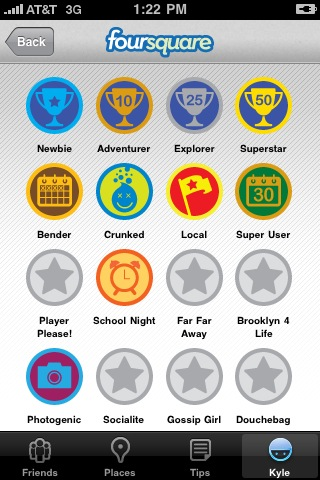 The game portion of Foursquare is what sets it apart from other applications that allow users to tag locations with their posts. In foursquare, a user gets points and earns badges for checking-in at different locations, the frequency of their check-ins and the uniqueness of where they travel. An example would be the Starbucks honorary barista badge. If someone checks into five different Starbucks locations, they become an honorary barista and earn the barista badge. Starbucks is tying this badge into their customer loyalty program and offering promotions and discounts to their honorary baristas.