Get Your Phil...

The New York Philharmonic has created a subscription series that allows people under age 35 to build their own season package for only $29 per ticket. Subscribers using MyPhil, as the program has been dubbed, get the best available seats in the house at the time of purchase, so the value of the discount fluctuates depending on the seat(s) one is able to secure. Create a flexible plan with MyPhil.

The subscription plan offers extra tickets throughout the season for guests for just $29 and also provides scheduling flexibility should a conflict arise on the date of your ticketed performance. In addition, MyPhil subscribers get a free one-year subscription to Time Out New York magazine.

This is just another example of an arts organization recognizing the unique needs and habits of the 18-35 set. I'm 31 years old, and the thing I appreciate most about plans like this is the ability to select alternate performance dates should a conflict arise. Young people are less and less likely to plan ahead, as we like to keep our social calendars flexible in the off chance that a better opportunity presents itself.

Confession: I have no social calendar. But if I did, I'd like to keep it flexible.

Zoe Keating & the Art of Looping

I just listened to a Radiolab podcast (Quantum Cello, 8/25/08) that featured the work of musician Zoe Keating. She is a cellist that uses a midi foot controller, a laptop, repeaters, a software program called Ableton Live and a plugin called SooperLooper to capture bits of her performance. She then weaves these recorded loops together with additional live music and creates some incredible pieces. You can visit her Web site and blog, as well as her MySpace page, to hear more of her music and learn about how she crafts her art. Check out the comments of the Radiolab blog post to be pointed in the direction of other live performers who are currently doing something similar with looping. It's impressive what technology can allow a lone musician to do.

Save the Museum, Save the World

Today not only marks the return of "Heroes" (for super-hero fans like me), it also marks the beginning of Superstruct, a multi-player online game from the Institute for the Future (IFTF) in collaboration with the Center for the Future of Museums, an initiative of the American Association of MuseumsSuperstruct is the first Massively Multiplayer Forecasting Game—designed to help solve real-world problems by harnessing the collective wisdom of participants to create a collaborative, open source simulation of a possible future.

Based on projections culled from forecast research conducted by IFTF, the following extreme scenarios are proposed for museums as part of the game:

"It’s 2019. Your museum is informed that an international group currently touring your building was exposed to the latest deadly strain of Respiratory Distress Syndrome. You are instructed to lock down the museum and shelter staff and visitors in place while authorities determine whether anyone is infected. Are you prepared to deal with this?"

Other snapshots from 2019:

  • Is your museum ready to help your community cope with an influx of refugees fleeing climate change, food shortages and political upheaval?
  • How will your operations change in the face of soaring energy prices or collapse of the food production and distribution system?
  • Your museum depends on its website to deliver information and attract visitors, but your content has been corrupted repeatedly in the past few months by hackers attempting to undermine your credibility. How do you adapt?"

To read more about the game, visit www.iftf.org/node/2098.

The Center for the Future of Museums intends to use the content contributed by museums as a jumping-off point for further planning and discussion within the museum field. To receive e-mail alerts from the Center for the Future of Museums about the museum-specific storyline in Superstruct, contact CFM.

Web 2.0 Expo: Day Four

Location-Based Content Delivery Today marks the close of the 2008 NYC Web 2.0 Expo, and the very last session I attended offered one of the most intriguing tools. Chad Stoller, head of marketing for Drop.io, and Conor Brady, creative director for Organic, Inc., presented the result of their collaborative efforts.

Drop.io allows you to upload files to a secure online drop and share them with others. Combine the ease of Drop.io with the interactive marketing savvy of Organic, Inc. and you end up with Drop.io Location, which lets you drop a file and associate it with an area on a Web-based map. GPS-enabled mobile phone users can then download your files when they’re in the location you’ve specified.

Drop.io Screen

I know what you’re thinking. We’ve come so far with technology that we’ve essentially traveled full-circle. Sending files electronically is a modern convenience that’s worn out its welcome, so we’re now creating tools that require people to travel to retrieve files?

True, you wouldn’t want to email your boss the following:

“Hey Mr. Johnson, I’ve completed the 2008 Second Quarter Report. If you’d like to review it, go to the Starbuck’s at the corner of 8th and Walnut.”

Mr. Johnson would probably tell you to pick up your pink slip at the corner of No Way Street and Suck It Avenue.

But Stoller and Brady offered some thoughts on how Drop.io Location might have practical value, and I’ll translate their examples to befit the arts.

Example 1: A local band has written some new songs exclusively for a theater company’s new production, and the only way for people to get those songs is to attend a performance of the play. The songs have been uploaded to Drop.io and associated with the theater’s address.

Example 2: A city has launched a new public art exhibit and wants to offer site-specific content beyond the traditional audio guides. Files could be dropped based on the location of each art piece and visitors could use their mobile devices to retrieve the content.

It’s a truly amazing tool, and it’s clear that Stoller and Brady are looking ahead. Location-based interactivity is the next major phase of marketing.

Drop.io Location is currently in beta, and you can request an account here.

Thought for the Day

If I Google search your name and get no results, does that reflect poorly on you as a human being? I think it does. Shame on you.

Web 2.0 Adventure

As there were nearly 5,000 people in attendance at the Web 2.0 Expo, it wasn’t a simple feat to physically connect with people. Case in point - my meeting with Jason Fried and David Heinemeier Hansson of 37Signals.

At about 4:30 PM yesterday, I received a text from Fried: “We’re at the keynote hall. Want to come our way?”

Me: “Cool. Be right there.”

As I arrived at the keynote hall, I received this from Fried: “Now we’re in the main lobby.”

Me: “OK, Headed that way.”

I rush to the main lobby only to receive: “Now we’re upstairs near registration.”

By this point, I was hearing the theme music from 24, and I felt like Jack Bauer in a race to save the life of some random dignitary.

Ultimately, I caught up with the 37Signals guys, and my interview with them will be featured on Technology in the Arts Podcast #51 next Friday, September 26.


Web 2.0 Expo: Day Three

As I wandered around the exhibition floor at the 2008 Web 2.0 Expo today, I was struck by the sheer number of online software tools that are available. Think of the most random activity, and there is likely a Web service to support that activity. Collaboration, aggregation, project management, stamp collecting, grocery list facilitator... on and on and on. Also, as I sat through today's sessions, it became apparent that some of these people don't know what they're talking about. And I don't necessarily mean that in a bad way. In fact, most of them will admit that they don't know.

Often a Web site will become incredibly popular, making its creator very wealthy, for no obvious reason. The success is not really quantifiable and there is no formula for repeating that success. Basically, the developers threw something against a wall, it stuck and they were asked to speak to an audience of other developers about their process.

Again, I am not disparaging the Web 2.0 Expo, as there are some phenomenal sessions and speakers. It's simply the nature of the Internet that there's a scant amount of rhyme and reason to online marketing.

Clay Shirky spoke about the prevalence of Web garbage during the keynote session this morning, and he offered the grim thought that there might not be an end to the flood of data. He supported this with a quote from Yitzhak Rabin: "If you have the same problem for a long time, maybe it's not a problem. Maybe it's a fact."

Shirky also remarked that the Internet has allowed everyone to be a publisher because of the low cost, no cost capabilities. As there is no longer an economic "crap" filter, the onus to sort through the junk is placed on the user.

Further, Tim O'Reilly, who coined the term "Web 2.0" (much to my chagrin), pointed out that the best and brightest minds in the world are being used to create goofy Facebook and iPhone applications. So it isn't likely that the river of online trash will run dry anytime soon.

When I have a solution to this problem, I'll let you know. In the meantime, check out this post from ReadWriteWeb that outlines "6 Ways to Filter Your RSS Feeds." When it comes to clearing the clutter, it's a step in the right direction.

Additional Notes

Chrome Nearly Blows Chunks: A Google developer presented the company's new Chrome browser this morning. He apologized at the beginning, mentioning that he was ill and might have to "run off the stage." Way to relax an audience, dude. Also, if you're going to present a browser that only runs on Windows, you might want to think about bringing a Windows machine. Still, he made it through the presentation without losing his breakfast. Huzzah!

Surface Without Depth: Microsoft showed off its new Surface tabletop display in the Web 2.0 Expo Hall, and I wasn't very excited. The device offers a multi-touch, multi-user interface that lets users drag items around in a very tactile way. Here are some videos that show off some of the Surface's recent commercial launches.

Yes, it's cool, and it's certainly time to explore interactivity beyond the mouse and keyboard. But the consumer version of the Surface isn't set for release until 2011. By then, surely something much more innovative - and affordable - will be available.

Web 2.0 Expo: Day Two

The highlight of my day was interviewing Eileen Gittins, the founder, president and CEO of Blurb, an online publishing service that provides print on demand tools for the general public. With Blurb's book layout software, BookSmart, users can create books using their own text and images and upload them to the Blurb server for purchasing, printing and delivery. Like Lulu.com (see Josh Futrell's recent blog post), Blurb empowers writers, photographers, graphic designers, and other artists to control the publishing of their work.

Gittins is a passionate entrepreneur who truly understands her client base. (She started Blurb based on her own frustrations with the publishing industry.) Blurb and the related project Photography.Book.Now exemplify what is truly phenomenal about the power of the Web.

No more spoilers. You can listen to my interview with Gittins (and a few other Web 2.0 Expo players) on Technology in the Arts Podcast #51 on Friday, September 26. (Go ahead and subscribe already, you slouch!)

I also digested this morning some tips on viral marketing during Jonah Peretti's Web 2.0 Expo session, Viral Marketing 2.0. Peretti, known throughout Web circles as a guerilla media guru, is the co-founder of HuffingtonPost.com and BuzzFeed.

Peretti explained that, contrary to popular opinion, a message doesn't become viral because of influential users. Rather, a message spreads because of the network that supports it. For instance, he explained, a fire spreads when the conditions are perfect and not because the spark that ignited it was special.

"Facebook created a network that would make the driest forest possible so the fires would spread," said Peretti.

The network Peretti highlighted today is what he calls the "Bored at Work" network, which is a huge people-powered network comprised of distracted corporate employees. However, he explained that a big problem with trying to spread a viral message is the "radical unpredictability" of the Web. There is no way to know who will make something popular or what will become popular.

So how can Peretti possibly offer any advice on delivering messages that will succeed in a viral way? He admitted that he didn't have a perfect answer. Still, considering his repeated success at gaining viral acclaim (see The Contagious Media Project for a list of his online exploits that have blown up), there is a great deal of cred behind the tips he offered.

For instance, may absolute favorite of Peretti's techniques is one he dubs "The Mullet Strategy." As most people know, a mullet is a hair style that features a short, professional front-end with a long, flowing rear. Peretti compared this "business in the front, party in the back" approach to marketing. Since the most contagious media is often silly, fun and even shocking, it isn't always appropriate for that content to live on the front page of a Web site. However, if there is a "party in the back" and people are enjoying and sharing that party, it will most definitely drive traffic to the other areas of your site.

Web 2.0 Expo: Day One

Today was "workshop" day at the 2008 NYC Web 2.0 Expo, and while I enjoyed the two three-hour sessions I attended, I would not consider them workshops. I always expect a workshop to provide attendees an opportunity to put into practice some of the concepts discussed. I'd strongly encourage artists and arts organizations involved in the planning of a conference or professional development series to be cautious about the use of the word workshop. Any session that exceeds two hours should have some type of engagement activity or risk losing the attention of the laptop/iPhone-wielding audience.

That being said, the leaders of both sessions I attended today managed to keep my attention. I was especially engaged during Josh Porter's presentation, "Designing for Community." Porter is the founder of bokardo design and author of the book, Designing for the Social Web.

Toward the beginning of his talk, Porter mentioned two very important things. First, your message will get out into the world, and you can either choose to ignore the message or engage with users.

An arts example: A theater company is getting negative reviews in the local newspaper for its current production, but audiences are greatly enjoying their experience with the show. Unfortunately, those audiences are shrinking because users are believing the newspaper's message. If the theater had created an online space for actively engaging its audience, it could allow the community - not the voice of a lone critic - to define its show's success.

Second, Porter said that organizations probably already have communities, whether they know it or not. The idea is to "cultivate" that community. Often in the arts, an organization will try to artificially create a community rather than managing the one which already exists. In order to build a passionate online community, Porter says, an organization should "support an activity and make people better at the activity."

So how do you make people "better" at being an arts audience? Well, that's a much larger discussion than I care to launch here, and the answer is different from one discipline to another. But the point is that an organization should work with and grow its existing community and should not try to manufacture one.

"You want the people to identify themselves as a community," said Porter.

Another great point Porter made - which has been mentioned in many forms on this blog and on our podcast - is that when an organization is considering which interactive features to add to its Web presence, it should simply "model the interactions that already exist." In other words, study how your users are already connecting (both online and offline), and provide tools that support those connections.

Finally, according to Porter, most successful community-based Web sites comprise "objects" and "verbs." For instance, a YouTube page has objects (i.e., video pane, user profile, related videos, responses, etc.) and verbs (i.e., play, upload, respond, etc.).

I'll leave you with the following image from the "Creating Passionate Users" blog, which Porter mentioned today.

Web 2.0 Expo Updates

Technology in the Arts blog and/or podcast subscribers know that I despise the buzzword "Web 2.0." So why this week am I attending the New York edition of the conference that officially launched that term into our tech lexicon? Because no matter what you call today's interactive, social online experience, the tools and applications that serve as the foundation for the modern Web are incredibly important.

So I just arrived in Manhattan for the 2008 NYC Web 2.0 Expo, where I'll enjoy a full slate of sessions and workshops designed to "immerse" me in the concepts and practices that are shaping the "Internet Revolution." (Note: I forgot to bring my big red flag, so I hope I'm not left behind when we storm the digital Bastille.)

I'll be blogging from the Web 2.0 Expo all week, so be sure to check in every day for my regular updates. Better yet, simply subscribe to our RSS feed (how?) to have my entries delivered to you as soon as I post them.

Some of the sessions I'll be attending include:

If you have specific questions about Web 2.0 or the NYC Expo, please feel free to send them to info@technologyinthearts.org.

Also: Be sure to follow my Twitter feed for regular updates.

Go Publish Yourself?

A very good friend of mine, a writer by trade, recently completed a new novel, but found traditional publishing channels not quickly amenable to the work, which he characterizes as a "part travelogue, part historical mystery." Looking to self-publish, he found Lulu.com after an internet search and, within a short time, had his new book online, proofed, and available for sale. Lulu.com is a print-on-demand (POD) service. They do books, CDs, DVDs, and more. For writers looking to publish their work, the service is free, at least for now, and comes complete with ISBN number (although, I think that if you get an ISBN number for free through Lulu, they end up owning the ISBN - see Caveat # 3 below). You select your paper size/binding, upload your document, and upload or create front and back cover artwork. They offer technical help documentation along the way and even have support via live chat.

More than just giving you the chance to make and print your own paperback book for your own private pleasure, Lulu.com lets you sell your finished product on their marketplace and on other various online retailers' sites. While the base cost of printing varies depending on the type of paper/binding you select and the number of pages in your book, authors can set their own markup in addition to this base cost (plus a  commission cost for Lulu.com) and receive this surplus after each sale. My friend has only made a few bucks so far, but he wasn't really in it for the money.

POD Caveat #1: Be sure to thoroughly examine and understand the pay structure and remission timing/procedures of the POD service you use. My friend is computer saavy, so he had very few issues in getting his book onto Lulu, but things can get pretty complicated if you're not familiar with word processing, document layout, and graphic design.

POD Caveat #2: Be willing to invest significant personal effort, or find a friend who can help, in the technical side of preparing your work for print. Free POD services often offer paid technical support, but doesn't that defeat the purpose of free?

My friend told me, "Print-on-demand has become the wild west of personal capitalism" for artists. And, I think that he's right to use the phrase "wild west." You have to protect yourself and your art.

POD Caveat #3: Know the terms and agreements of the POD service you use in terms of your rights and control of your art.

POD Caveat #4: You are putting your art out there on the free marketplace. Generally, POD services are not liable for what might happen to you artwork. Read this interesting set of articles written by someone whose artwork was stolen.

All in all, with the right amount of technical muscle and persistence, cautiousness and research about which POD service to use, and vigilance after your work has been published, it just might be possible to have a successful, fulfilling foray into the world of print-on-demand.

Other POD Sites and Articles BookSurge CafePress CreateSpace iUniverse Zazzle

POD Article on Science Fiction and Fantasy Writers of America, Inc.

Lessons Learned Self-Publishing with Lulu

Monday Morning Freebies...

Call me cliché, but Mondays stink. So I'm offering a couple useful sites to brighten your week. Zamzar: Free Online File Conversion

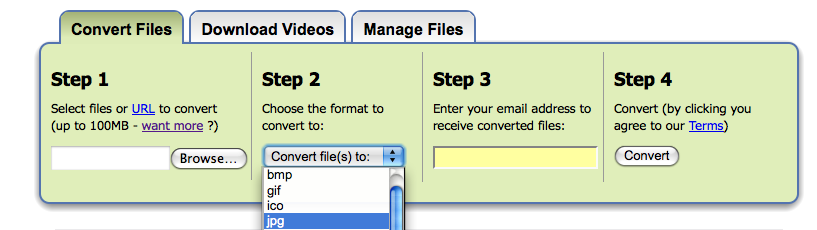
Zamzar.com is one of my favorite online discoveries in quite some time. The tool allows you to upload a file and convert it to another format of the same type. For instance, you can upload and convert a WAV audio file to MP3, a DOC file to PDF, a WMV file to MP4, etc. You can also upload a file and compress it to a ZIP file.

Once you've uploaded your file(s), you just select your desired conversion format and click "Convert." Within an hour (usually no more than a few minutes, depending on the number/size of your files), you'll receive an email with links to download your new files. The site even lets you convert multiple files at once.

Zamzar's free account lets you convert files up to 100 MB, but you can pay for premium plans.

Umbrella Today?

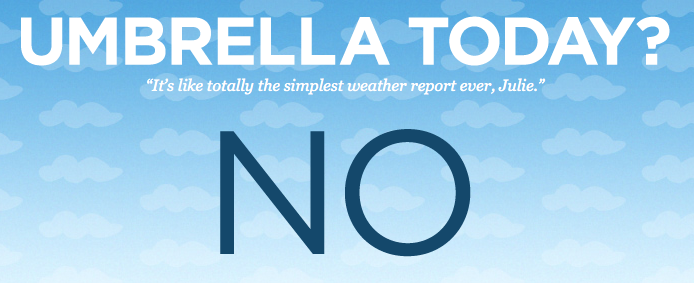
Sometimes the simplest things are the most useful. Such is the case with UmbrellaToday.com, a weather site that makes things easy.

It's always frustrating to visit a weather site, enter a zip code and get vague information and percentages. I didn't major in meteorology, and I don't want to read radar maps. Sometimes I just want to know if I'm going to get wet.

Do I need an umbrella today?

With UmbrellaToday.com, you simply enter your zip code to ask the question, "Do I need an umbrella today?" and the site gives you a big fat "YES" or "NO." You can also enter your mobile number and select a time to receive a daily text alert from the site.

Never again will my perfect quaff be ruined by Mother Nature.

Early Bird Extension and Other Conference Deadlines

Believe it or not, the 2008 Technology in the Arts Conference is only a month away.  I know how fast the days and weeks have been flying for me, so I wanted to highlight upcoming deadlines for those of you planning to attend (or thinking about attending): September 10th - Extended Early Bird Registration Deadline We've heard your requests and will be extending the Early Bird Registration deadline to Wednesday, September 10th. As a reader of this blog, you are eligible to receive 25% off all conference registration fees.  When combined with the Early Bird discount rate, your total cost for registering for the 2008 Technology in the Arts Conference is only $187.50.

To take advantage of this opportunity:

  • Go to https://www.acteva.com/go/TITA2008 to complete the online registration form.
  • In the box labeled "Activity Questionnaire," enter one of the following promotion codes.
    • If you have previously attended the Technology in the Arts Conference, enter TITA01.
    • If this will be your first Technology in the Arts Conference, enter TITA70.
    • Either code will deduct 25% from your registration costs during the online payment process.
  • This discount applies to the Hands-On Training Workshops as well as general conference registration.

September 15th - Deadline to PA Residents to Apply for Conference Scholarships Thanks to the generous support from the Pennsylvania Council on the Arts, we are offering a limited number of registration and travel scholarships exclusively for artists and arts administrators living and working in Pennsylvania.  Click here to learn more and apply online!

September 16th - Hotel Reservation Deadline for Discounted Conference Rate Call 1-800-445-8667 and give them the group code - CAM - to receive the conference rate of $129/night.

OTHER CONFERENCE INFORMATION: Conference Schedule - Learn more about this year's conference lineup

Just in case you didn't believe us...

When we say the Technology in the Arts Podcast is a great resource for a wide span of people - artists, tech geeks, technophobes - we mean it. Yea, we know what you're thinking... we're biased. But the completely impartial Colin Marshall, author of The Sound of Young America's Podthoughts blog, recently wrote a great review for the show. An excerpt:

"One of my favorite aspects of podcasting is that it allows the listener to 'meet' a wide range of new people doing neato projects who they wouldn't normally run into. Technology in the Arts serves up quite a few of those, from the founders of Artlog.com [MP3] to the president of the Association of Arts Administration Educators [MP3] to the co-director of the art-space Future Tenant [MP3]."

And we didn't even pay Colin. In fact, we've never even met him. So check out the Technology in the Arts Podcast to judge for yourself.

Also, we'd love to hear from you at podcast@technologyinthearts.org.

Take Care with Facebook Use

I just read an interesting article in the Washington Post about getting banned from Facebook for using it too much. That's right. If your organization is using Facebook, excess legitimate activities (too many messages, too many pokes, too many wall writings, etc.) could get your account suspended or deleted. If your organization uses Facebook for promotional purposes, read the article and maybe check out the post on Get Satisfaction, 13 Reasons Your Facebook Account Will Be Disabled, that they reference in the Washington Post. Some of these points are outdated (I think you can friend over 5,000 people now), but they are all good guidelines in terms of Facebook usage.

If you're really interested, you can dive into the at the User Conduct section of Facebook's Terms and the Code of Conduct to review of the official "Thou Shalt Nots."

Update/New Topic (9/5/08)

In addition to overusage, it is worth mentioning another thing to consider when using Facebook. There have been a glut of recent worm attacks targeting Facebook users.  Details about the initial round of attacks and how they were executed can be found at TechCrunch. Though the attacks started in early August, there are indications that they may still be happening. Thanks to Amanda Beals at MainStreet.Com for the topic suggestion and a link to suggestions on how to protect yourself from the hidden dangers of Facebook.

Google's New Browser

Google, the great and powerful Oz of the Internet, announced Monday that its been working on a new open-source Web browser called Chrome. A beta version of the browser is expected to be released today for Windows with Mac and Linux versions to follow in the coming months. Chrome: Google's New Open-Source Browser

So with Internet Explorer, Firefox, Safari, Opera and other browsers already available to users for free, what is the point?

According to this comic, Google feels browsers have grown to accommodate Web pages but not Web applications. Since most people use the Web to view videos, chat, play games and interact on a deeper level than ever before, Google decided to completely rethink the Web browser. Their plan, the comic states, is to build a tool that better serves the needs of the modern Web user.

If the beta releases today as expected, we'll see if early reviews project success. Since I, like everyone else, have consumed the Google Kool-Aid, I fully expect Chrome to be a winner. But I'll try to maintain a modicum of skepticism until I've at least played with the beta release.

One Man Enters, Two Men Leave (Kinda)

It's not quite Mad Max Beyond Thunderdome -  there are no chainsaws, no axes, and no high pitched whistles - but the recently developed and now-on-the-market Aguru Dome does make things interesting. The Aguru DomeA person enters the dome. Bright lights flash. A cornucopia of photos are taken. Many, many computers think. And, Bob's your uncle! A digital, 3D model of their face is created. A rendering so good, it can be then used to create incredibly realistic digital effects in film (think action sequences), video games, and so on.
Now, I'm not a CGI expert, so you can get better details from the BBC article I read (thanks to artsJournal), this DV.com article, and the Aguru Images Web site. However, I have been known to be an actor from time to time. The Aguru Dome makes me feel just a wee bit uncomfortable. Why in the world would I step into that thing? (Not that anyone would want a 3D model of my face.) I get in, and you get a digital copy of my face that, theoretically, can replace me so well that people won't notice the difference. And you have it forever.

There has been debate about whether CGI could replace live actors for some time now. There have been cases of actors and their performances being digitized, but facial rendering has been one of the weak suits of CGI. This technology seems to get us closer to technicians being able to animate the human face, without needing a live actor to do anything other than sit still for a few minutes.

I wonder if the actors' unions have started talking about this yet.  The Aguru Dome ships out to customers in September 2008.

Building a Web Site for Zero, Zilch, Nada, Nothing...

The Center for Arts Management and Technology receives calls and emails all the time from artists interested in creating a Web site for free. My first piece of advice is, "Check out WordPress.com." WordPress.com is the hosted version of the popular WordPress blog software, and they offer free accounts. The only caveat is that your site has to use the WordPress.com domain. (Hey, what's a domain?) For instance, my site would have to be something like bradstephenson.wordpress.com. However, you could throw a little cash at your site and use WordPress.com's custom domain. You can read more about that here. But that's not why you're here... you're here because you want it free. You're cheap, and I love you.

So I decided to set up a 100% free Web site for myself to demonstrate that it can be done. One thing that should be mentioned up front... If you have no interest in learning anything new with regard to technology, you should stop here and pay someone to set up your Web site. The virtual world is like the real world in that you cannot do something new without investing at least a modicum of effort.

1 - Domain Registration

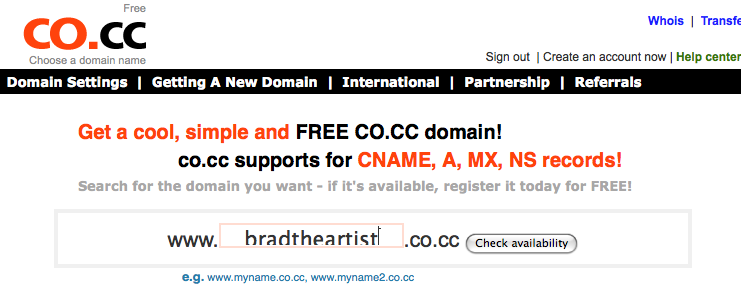
If you can live without a .com or .org Web address, there are a handful of services that offer free domain registrations. I chose www.co.cc for this exercise.

BradtheArtist Registration

2 - Web Hosting

There are countless free Web hosting services out there (including CAMT, but we offer the bare essentials for arts organizations), and you can get some pretty decent packages. For this activity, I selected X10Hosting.com, because they offer 300 MB of ad-free space. (Some free hosts force you to include their banner ads on your site, which will get you more space and perks but can be obtrusive to your visitors.) There is a searchable directory of free hosting providers at http://www.free-webhosts.com, and X10Hosting ranked very high on their list. Keep in mind that I had to wait 120 minutes after signing up to get confirmation of my account creation. Hoops to jump through? Yes. Can beggars be choosers? Up for debate.

3 - HTML Template

Assuming you don't know HTML and don't want to pay someone (free, remember?), you'll want to take advantage of one of the numerous sites that offer free Web templates. Themebot.com has some pretty nice templates of varying styles and languages (i.e., HTML, PHP, etc.) available as free downloads. I snagged an HTML template called Blue Cloud, as it was fairly clean in its structure. I clicked "Dowload" to receive a .zip package containing all the files I needed. This is what the design looked like before I modified it:

Blue Cloud

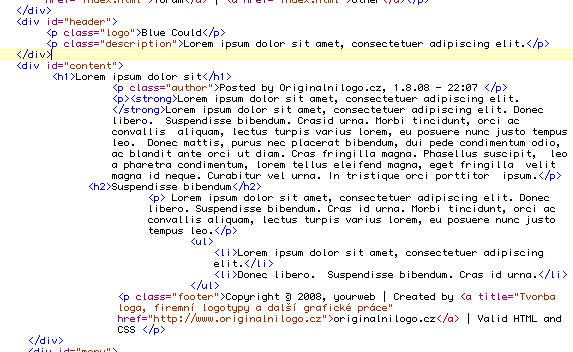
I then compared this to the index.html file from the .zip package, which looked like this:

Code for Blue Cloud

If you don't know HTML, the simplest thing to do is open the .html file in a browser and in a text editor, then compare the two.

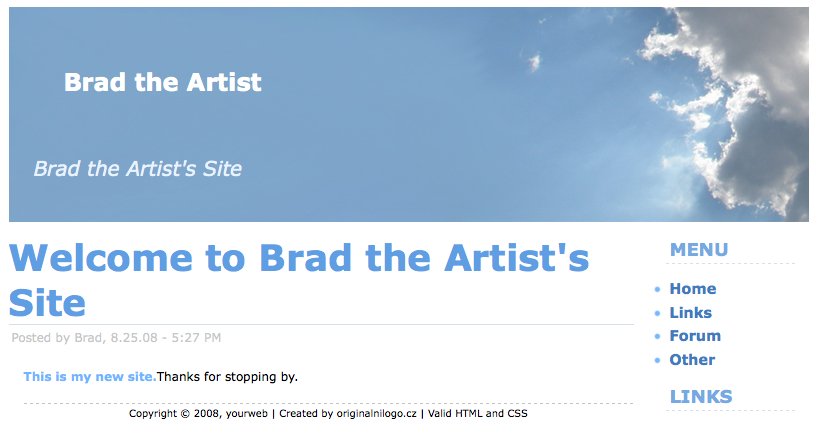
BradtheArtist

W3Schools.com offers a nice HTML tutorial for those who need some extra help.

4 - Making it All Work

When you create an account with a domain registrar, you should be asked for nameserver information. This is a series of letters and numbers that tell your domain (bradtheartist.co.cc, for example) where to find your Web files. In my case, the Web files will be hosted with X10Hosting.com, so I would simply log into my X10Hosting account, retrieve the nameserver information and enter it into my domain management interface.

When I set up my free Web hosting account with X10Hosting.com, I received FTP ("file transfer protocol") information, which I need to access my Web space. There are many free tools available for accessing an FTP account, but I recommend "FileZilla" for both PC and Mac. To access your FTP account, you'll need a hostname (i.e., ftp.mywebsite.com), username and password. Enter this information correctly into FileZilla, and you'll see a list of files and folders stored in your new Web space. You can then use FileZilla to transfer the HTML files from your computer to your Web site. Keep in mind that your Web space will look for an index.html or a default.html file to serve as your homepage.

My Recommendations

Yes, you can set up a Web site for free, but should you? It depends on your level of commitment to learning some basic HTML and your concern over having a non-standard URL (i.e., co.cc).

However, my recommendation would be to invest a few bucks into an easy-to-remember .com or .org domain. And if you don't want to learn HTML, set up a WordPress.com account and tie it to your new domain.

Try not to get frustrated, and feel free to contact us if you need some extra help.

Please note: This entry is just a demonstration of setting up a free Web site. I do not endorse any of the services listed above with the exception of FileZilla and WordPress, as these are trusted open source solutions with strong reputations.

Scholarship Opportunities for Technology in the Arts 2008

Thanks to the generous support from the Pennsylvania Council on the Arts, we will be offering a limited number of registration and travel scholarships exclusively for artists and arts administrators living and working in Pennsylvania.

  • Scholarships are available exclusively for artists and arts administrators living and working in Pennsylvania.
  • Two types of scholarships:
    • Full registration:
      • Covers registration expenses for the general conference as well as the hands-on training workshops
      • Eight of these scholarships will be awarded in 2008
      • Available to both previous and new conference attendees
    • Full registration plus travel expenses:
      • Covers registration expenses for the general conference as well as the hands-on training workshops
      • Also reimburses travel and lodging expenses up to $700
      • Allowed expenses include:  air or train fare, taxicab, car rental, gas, mileage, and hotel accommodations.
      • Five of these scholarships will be awarded in 2008
      • Available ONLY to new conference attendees
  • Applicants will be evaluated on their ability to articulate how attending the conference will assist them in their work and professional development.
  • Applications MUST be submitted online.
  • Applications MUST be submitted by Monday, September 15, 2008.
  • Applicants will be notified of their status by Friday, September 19th.

Questions?  Contact David Dombrosky.

Apply Online Now!

Technology and the Media Arts

Earlier this week, Southern Arts Federation posted a podcast conversation in which Allen Bell and I talk about tools for new media and the impact technology is having on independent film and the media arts. Listen Now: SAF Podcast #38 - Technology and Independent Media

This conversation is a companion piece to an article that Allen and I co-authored for the National Alliance for Media Arts and Culture about the only remaining organized tour of filmmakers in the U.S.

Like a Moth to a Podcast

I've just discovered and started listening to The Moth podcast. The Moth, for those of you who don't know, is a non-profit storytelling organization that brings in people - actors, playwrights, comedians, poets, personalities, and the average Joe - to tell a story from their own lives. No notes. Just a performer, a story, a microphone, and an audience. The Moth has several different live performance series and programs around the country. Now, The Moth has been around since 1997, but I'd never heard of them until a few days ago. Why? Because 1) I live in Pittsburgh, instead of New York or LA, 2) I'm not hip, and 3) I often struggle to get my recommended daily allowance of culture.

Point is: I found them eventually. I found The Moth through iTunes. I found them through their podcast.

And now? I know for a fact that I will continue to listen to the podcast. I've enjoyed their podcast so much, I'm considering buying CDs and other schwag through their site. I’m writing a blog about them. I’ve told two friends about them. And so on...

It is so very important to have as many points of entry into your organization and its services as possible, and a quality podcast can be one. We’ve got a podcast tutorial here on Technology in the Arts. There are tons of resources and guides out there. It is worth the effort, the equipment, the navigation of the waters of rights and copyright, and the time to create a new point of entry to your organization to gather fans you never knew you had, like moths to a flame.

Podcasting: Keep it Legal

I was recently directed to a great guide to ensuring that your podcast is legal. The Podcasting Legal Guide is hosted on the Creative Commons wiki and provides an overview of legal information every good little podcaster should know and understand. The Guide was created by the following parties:

Colette Vogele, Esq. Vogele & Associates http://www.vogelelaw.com/index.html Stanford Center for Internet And Society http://cyberlaw.stanford.edu/

Mia Garlick Creative Commons http://creativecommons.org/ Stanford Center for Internet And Society http://cyberlaw.stanford.edu/

The Berkman Center Clinical Program in Cyberlaw http://cyber.harvard.edu/

Also, remember that we have a Podcasting Fundamentals Tutorial available that will teach you the basics of creating and publishing your very own podcast.