Review

Ticket Buying Comes to Facebook

Concert promoters, venue managers and artists are still reeling from the historic LiveNation-Ticketmaster merger. Many feared that the merger would result in a ticketing monopoly that would force venues to raise ticket prices and only use the Live Nation-Ticketmaster service if they wanted to book a Live Nation artist. Almost a year later, a recent Chicago Tribune article indicated that ticket prices have not yet skyrocketed and independent promoters are still thriving. While there is still a fear that the worst may be yet to come, the merger hasn’t deterred venues from pursuing other options when it comes to choosing a ticketing platform.

One of the more innovative platforms is Arizona-based company,  TicketForce, which describes itself as a ticketing solution for venues  and promoters of all sizes. The company designs fully customizable  ticketing applications that allow venues and promoters to effectively  build their own brands. They recently launched a Facebook app that will  allow clients to sell tickets directly from a Fan Page. This application  allows clients to add a ‘Buy Tickets’ tab on their Facebook Fan Pages  so that fans won’t have to leave Facebook.

The app has several benefits:

  • Once the purchase is completed, a custom notification is posted to your customers’ Facebook Wall or Twitter feed that tells all of their friends about their ticket purchase with an image and link to buy tickets, too.
  • Buyers are able to search for events in a specific area, choose seats, and securely purchase tickets without ever leaving Facebook.
  • All active events are pulled automatically from your Ticketing Home and sales are fully integrated into your existing web sales.
  • Customers are prompted to share their purchase with their Facebook friends as well as on their Twitter stream

As the company illustrates:  With 500 million Facebook users, more  than 600 tweets every second, and  665,000 blogs posted every day – social media is  your most powerful sales  tool. TicketForce's latest innovation is capitalizing on social media sales opportunities and making it easier for small and mid-sized venues to find viable Live-Nation/Ticketmaster alternatives.

Changing Up The Check-in: Foursquare Updates Specials

Screen shot 2011-03-17 at 11.04.24 AM
Image via foursquare.com

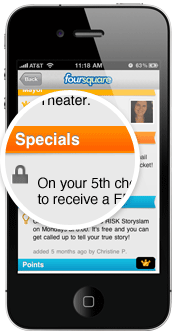
Foursquare, the popular location-based social media platform, decided to shake things up a little at the annual South by Southwest festival last week. Rolling out their new 3.0 version, Foursquare has made some significant changes to their platform in the way it operates, most notably in the way it recommends venues and offers specials.

I'll be covering the changes to the recommendation engine in an upcoming post, but today I really want to talk about the new ways arts organizations can offer specials on Foursquare. A "Special" on the platform refers to an incentive that organizations and brands can attach to a venue that is unlocked when a Foursquare user "Checks In" and meets a certain criteria. Up until last week, these specials were limited to either the frequency a user checked in (1st time, 5th time, etc.) or if the user was the "Mayor", a title held by the user that checks in the most frequently at a particular venue.

While a great idea in concept, personally I felt the result was a little lackluster in practice. Becoming the Mayor of a venue is tough, requiring checking in at that venue a large amount of times to temporarily steal the title. While this may be easy to do for somewhere like a local coffeeshop, frequented everyday, it is unrealistic to offer this incentive for an arts organization. Then there is the average check in, some organizations have offered incentives like reduced ticket prices for having a certain amount of check ins, but this is often a one-time special. The hesitation to use a more tantalizing incentive may be the fact that organizations want a little more involvement than having a user hit a button on their cell phone once.

The game has changed with the release of Foursquare 3.0. More types of specials have been added and split up according to whether they are loyalty specials or customer acquisition specials. Plus, nearby specials now appear when a user hits the "Places" tab in Foursquare's mobile platforms, showing users which nearby venues are offering incentives for their foot traffic. Here's a look at how the new specials work:

Customer Aquisition

check-inThe Check-in Special - This is the run-of-the-mill, every-time-you-check-in kind of special. It allows organizations to attach an incentive that users can claim with every check-in and is the one most often seen on the platform. Many organizations may still want to take advantage of this by offering cheaper incentives, such as a dollar off admission, to encourage visitors to adopt Foursquare and take advantage of more rewarding specials in the future.

newbieThe Newbie Special - Most of the new specials say it right in the name and this is no exception, this rewards users only for their first time check-in. Organizations may want to take advantage of this for the same reason as the regular Check-in special, to encourage initial use of the platform.

flashThe Flash Special - Now we start to get into some of the more interesting specials. The Flash special works like a flash sale, once a certain number is reached the special expires. It is first come, first serve. For example, say your special events are dragging a little bit for the first few hours, on average. A Flash Special can be used to create some interest in showing up first, such as "First 10 people to check-in unlock a private meet and greet with ______ !".

swarmThe Swarm Special - Swarm specials are all about building a crowd. Swarm specials are only unlocked if a certain number of users, set by the organization,  check-in at that organization's venue within a set three hour period. This can be a great way to reward a large crowd with an incentive that would be more attractive for a group event than for an individual. For example, an organization could  have a special encore from a performer if that night's swarm special is unlocked.

friendsThe Friend Special - This is by far my favorite new special. Users can only unlock this special by having a certain number of their foursquare friends, not just users that happen to be at the venue already, check-in alongside them. When paired with a great reward, this can be a great way to incentivize people to bring their friends along to your venue. The number of friends required to unlock the special is completely up to the organization.

Rewarding Loyalty

mayorThe Mayor Special - Hey now, we can't forget about the Mayor! This special works the same way as the old special, it is unlocked by the current Mayor of the venue. The Mayor is determined by which user checks in the most times in the previous 60 days and the check-ins only count once per day towards mayorship. This is so a user cannot stand in your lobby and just hit the check-in button over and over again until they have the mayorship.

frequencyLoyalty Specials - A little bit like the regular check-in special, this special rewards frequent visitors who are regularly checking in. One version of a Loyalty special gives users a goal of total check-ins to unlock a reward. Since you can set the number, organizations may want to pair this with a sweet reward for that user who visits over 100 times. Again, only one check-in counts towards this special per day. Another parameter organizations can set with Loyalty specials is the time that user has to reach the set goal, such as having a goal of 10 check-ins for one month. This type of special could be paired up with a more temporary event like an exhibition or a performance series.

It will be interesting to see if and how arts organizations take advantage of these new specials that Foursquare has launched. The biggest advantage to the service is that it is one of the few social media platforms out there that require users to physically be in the space. Coming up in a future post, I will go into some of the other improvements Foursquare has made to its platform, including the ways their new recommendation engine will help direct users to your organization.

Philanthroper: A New Daily Deal Site for Non-Profit Donations

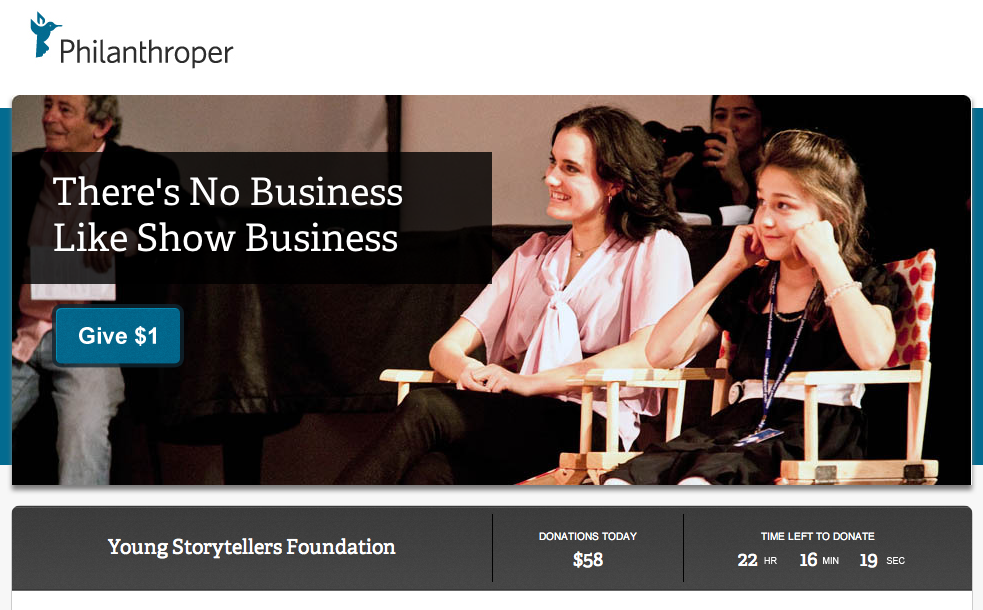
philbird2_reasonably_smallA new daily deal site launched this past month, but this site doesn’t offer a deal for a spa trip or half off dinner at some posh restaurant. New site Philanthroper offers a non-profit story a day, a daily solicitation for a non-profit doing some good, and asks visitors to give just one dollar. Launched by Mark Wilson, reporter for Gizmodo and Esquire, Philanthroper aims to make donating a daily habit for the internet culture. The idea behind Philanthroper is very similar to dynamite daily deal sites like Groupon and Living Social. Each non-profit gets front-page realty on the site, but just for 24 hours. Instead of a daily discount, Philanthroper shares the stories of non-profits, from local to global, and gives visitors the opportunity to donate a dollar. When the 24 hours come to an end, a new non-profit goes up and the previous day’s organization receives their funds within about a week.

Why just a dollar? As the site states:

So you can donate another $1 tomorrow. And another the next day. Use Philanthroper daily, and we guarantee, you'll donate more over time than you would have otherwise plus it won't sting your bank account so badly. Use Philanthroper every day and you'll be on the right track to give more, more easily. If you're compelled to make a larger donation, fantastic. We always link their site. So go for it.

Philanthroper restricts the amount you can donate to just that one dollar and limits visitors from donating more than once a day. The idea here isn’t to solicit a major gift, but to create a culture of daily giving. Donating a single dollar can be a pretty tempting request. Personally, I spend more on a cup of coffee or downloading an app that will make my phone sound like an air raid siren.

The financial cut Philanthroper takes from each donation is the biggest thing setting them apart from other crowdfunding sites like Kickstarter and USA Projects. That’s because the amount Philanthroper retains is zero – you read that right, zero. Philanthroper states right out that they will never take a cut of your donation, although the site’s payment service mPayy will take a whopping 1% of each donation – a penny.

Screen shot 2011-02-25 at 11.43.32 AM

This is how Philanthroper can offer that minimum donation level of $1, whereas other non-profits are often forced to ask for a minimum of around $10 due to the processing rates of current payment services. Support for the site comes from advertising, so as website Arstechnica puts it “…only your eyeballs, and not your charitable gifts, are paying to keep things going.”

How does a non-profit get a daily deal? The site selects only official 501(c)3 organizations, with a special interest in those that bring in less than $1 million per year. The main focus is on those non-profits that are young and growing and could use every single extra dollar. Religious non-profits are not promoted on the site and individuals raising funds will not make the cut. Think you know a non-profit that’s perfect for the site? Philanthroper invites site visitors to suggest tips for non-profits out there worthy of their own daily deal.

Creating a habit of daily giving in our current internet culture is a pretty exciting idea. Philanthroper is taking advantage of the impulsive nature of users of sites like Groupon and Living Social. If the popularity of the site can continue to grow, there is a possibility to make a huge difference for many small non-profits. Visit the main site here and check out what today’s daily cause is that you can throw a dollar towards.

Instant Encore: Classical Music goes Mobile

Margo Drakos, co-founder and COO of InstantEncore
Margo Drakos, co-founder/COO of InstantEncore

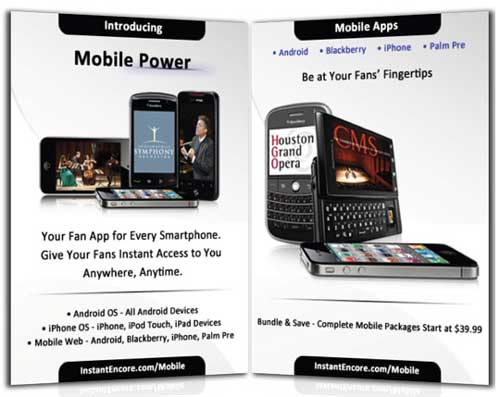
Margo Drakos is a woman on a mission. The co-founder and COO of InstantEncore wants to take classical music directly to its audience via a host of online services, including a digital strategy package for powering custom websites for organizations, a website builder for artists and the development of mobile apps. Recently, the company has been busy building custom mobile apps for Android, iPad, iPhone and all smartphones. InstantEncore’s mobile apps have previously been featured on this blog in Tom’s article 10 Arts and Culture Mobile Apps from 2010.
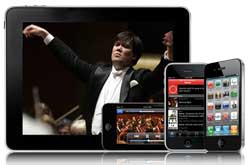
apple-interface-250wInstantEncore currently powers about 100 iPhone apps and 50 Android as well as hosting mobile web apps, which make an organization's website functional on a mobile phone. Their platform powers the app for the popular YouTube Symphony Orchestra, which, at over 125,000 downloads, and beats both the Taylor Swift and Linkin Park apps by about 90,000. Instant Encore also hosts the apps of notable organizations like the NY Philharmonic, Chamber Music Society of Lincoln Center, Cleveland Institute of Music and Houston Grand Opera.

I talked with Margo recently to catch up on Instant Encore's latest endeavors.

What is InstantEncore? InstantEncore.com is a classical music platform that enables artists and arts organization to harness the power of technology to connect with their fans anywhere, any time. We are the infrastructure! We have created the only classical music-specific digital asset management system that essentially allows our Partners from a broad spectrum of the performing arts world to enter digital content – event listings, ticket selling, audio recordings (streaming, download, public or private), video (live or on-demand), news, blogs, and photos - one time, and have all of their content published in real time to their own website, mobile apps, Facebook or Twitter accounts.
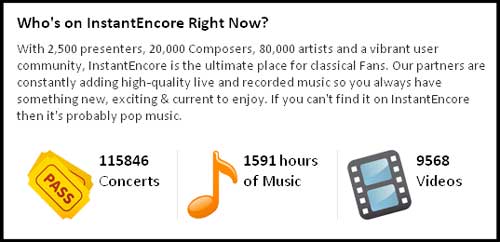
instantencore1 How did the idea for InstantEncore come about? Two things happened: I was playing cello for a living and I had sort of grown frustrated with the disconnect between musicians and the audience, where the field was going, and how technology was disrupting the traditional models. I felt passionate about re-personalizing the concert experience without losing artistic integrity.

An InstantEncore concert card offering a music download.

An InstantEncore concert card offering a music download.

Meanwhile, I had the pleasure of meeting some wonderful engineers and they had a really powerful search engine specific for classical music that resulted in a high-end jukebox called Maestro. It had originally been created to help catalog vast CD collections, like that of our chairman/CEO. I was talking to them about how sometimes as a performer you would go to a live event and afterwards people would say “I loved the concert. How can I hear it again? How can I get a recording?” And of course I was always trying to sell some unrelated CD. So I talked to these engineers about this predicament that a lot of musicians always find themselves in, and so we actually created this concept of the “Instant Encore”—where you can take a card at the concert, go home, and download the content that you just heard.

How has InstantEncore evolved from the days of concert cards to now? Instant Encore started with a very powerful search engine that had organized and standardized all classical music meta data, and our objective was to build the tools that would enable fans to connect with the music and artists they love, in a personal, immediate way. We wanted to leverage technology to extend and enhance every aspect of the live concert experience. We are committed to providing the 21st century tools that will save organizations time and money by automatically or quickly powering their digital assets to connect with fans and engage sponsors.
mobile_api_release-mobile-onlyw

How does the Instant Encore component fit in with an organization’s existing social media presences and organizational website? Our goal is to streamline redundancies and save resources. Right now, you have a lot of people that are trying to update their website, spending a great deal of time developing a content management system internally instead of spending development time and resources on the front end. Then there is the mobile space--if an organization does not have a good web-browsing experience from a smartphone, people will close the site. Then organizations are manually pushing content that is often a PR push to Facebook and then to Twitter as well. So there’s a great amount of time and effort in trying to maintain all these very necessary social network platforms.

Obviously details about classical music can be a nightmare to organize or for data entry. We have a very standardized way—unless it’s a world premiere, it’s all in our search engine’s system. For example, if you start to type in “Beethoven Symphony No. 5”, it’s going to have the opus number and the key and all the movements and you just click on that and it’s automatically transferred. So, you’re never entering all that information yourself, which is 1) time-saving and 2) tagged at the most specific level, which allows people that are not looking specifically for you to find you and you that already know you and want to find you to customize their experience.

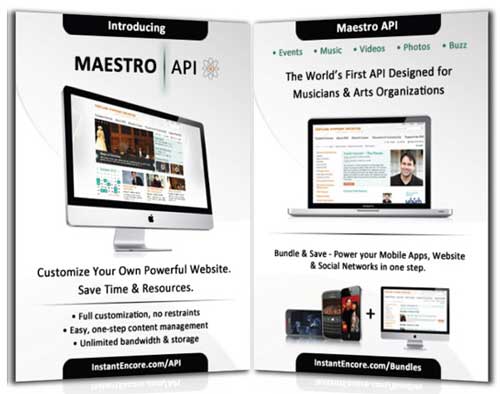
Our system is set up so that you as a Partner can enter an event listing in moments in our secure Control Panel. By that one simple event creation in our content management system, it updates in your website with our webbuilder or more advanced API (Application Programming Interface—see the end of this entry for more information). posts to the partner’s social networks, mobile apps, etc. You can do a host of different things—tag your YouTube channel. You can manually upload music for streaming or download purchase. Or you can create a private download code campaign for donors or concertgoers. One of our most valuable features is this web crawler that goes through hundreds of RSS feeds and finds articles specific to arts organizations and tag any article from newspapers or blog. This can automatically appear in your app or website as the latest news, so you’re not having to physically manage your app or site but your content is current.
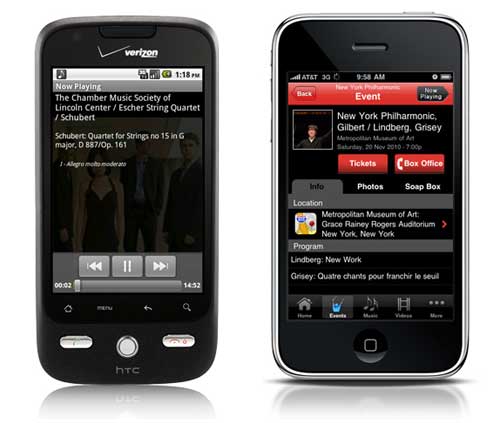
The music player feature on InstantEncore's Android app (left) and the events feature on InstantEncore's iPhone app (right).The music player feature on InstantEncore's Android app (left) and the events feature on InstantEncore's iPhone app (right).

So basically it’s just a one-stop shop. It’s a digital asset management system where you come to enter your content in one place and it goes to all the platforms that you’re using. We’re just an aggregator and publisher of that content… Our concept was that it should be something that a two-person organization can use our tools and manage and have a very robust, beautiful integrated social media presence or an organization with a budget over 10 million can use the same tool.

Regardless of all the features you offer, many organizations might have trouble getting the rights to use pieces of music or convincing players that a mobile app is somewhere the music should be. What are some of the arguments you can make to convince them that this is something worth doing? I come from the musician/recording side of things, am a current member of the AFM and as a child was a member of AFTRA and SAG, so I certainly appreciate where the musicians are coming from. What I think is important is that, fortunately or unfortunately (however you want to perceive it) we’re in a new period that is such disruptive change, brought on in part by technology and change is always painful. There are new great opportunities but the existing models and the days of residuals in the way that we used to know it, at least right now, are not there. I think it’s really important to actually be very upfront about this. Artists are highly intelligent people and creative people and have wonderful ideas to bring to the marketing and development side of the business. I think it is so important that everyone be a stakeholder charting this new world together.

I think part of this is taking a holistic approach and saying that there are certainly a group of people that are going to want a physical CD’s and there’s people that are going to want to download content. But there’s a certain group of people know who just want what they want, when they want it. We see from our stats that music or videos are increasingly having a very short shelf life. People will often want to hear a new live recording over and over and then they move on and that is it. I often say to my friends and colleagues that you have to have some faith and work together to try things. Every community and every audience is different, but if you don’t have the tools to even explore or try things, that’s very challenging. I think mobile is so essential. People will be accessing the internet via their mobile devices more than from a computer within the next few years. If you don’t have a good user experience to access your content via mobile or any content in it, in my opinion, I think it will be very, very challenging.

You mentioned that you are focusing your research efforts on return on investment in digital media and how orgs can get sponsorship for their technology initiatives. Can you tell me more? Why should anyone care about social media and an integrated digital strategy? Why should anyone care about having a mobile app? I’m a very “nuts and bolts”, frugal person. When I look at some of the organizations that I work with and see how much they’re spending on print material and yet they don’t want to spend a few thousand on a mobile presence, or want to wait a few years to see where this mobile thing goes, I think it is quite alarming. Showing people the return on investment is critical for them to care.
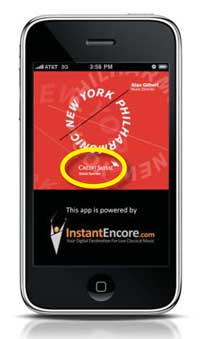
Many arts organizations' apps are sponsored by corporations or foundations.

Many arts organizations' apps are sponsored by corporations or foundations.

Many organizations we are working with have packaged a digital or mobile sponsorship package and in many cases, new donors or people who were not previously interested in sponsorship at a significant level, are excited to be part of new technology, sponsoring live video streaming on websites and mobile platforms and much more.

It’s built into our platforms—ways for people to feature sponsors, going through their audience to create new audiences, etc. What I’ve found is that I’ve been pushing organizations to think outside of their printed program with a printed logo and think, how can we think outside of the box and take the old ways that we used to monetize and seek corporate sponsors and take this into the digital space? Some organizations have come up with some fabulous things. Whether it’s embedded streaming announcements featuring sponsors, ad spots with sponsors, getting grants to cover new educational and audience development initiatives—various things. They’ve been able to monetize this in new ways, from new sponsors (not cutting out of other things).

I am very excited that Telstra, the telecom company in Australia, hired us to create a premium custom app for the Sydney Symphony that will include live video streaming of ten concerts in their mobile apps and website. This is a win-win for everyone.

How should arts organizations approach technology? There are so many platforms out there, there is so much information and everything’s changing so rapidly. I remember launching the app with the New York Phil and at that time, apps were still—people thought “what the heck is that?” So, the most important thing is to integrate digital media strategy into organizational strategy—into every aspect of decision-making across all departments. It involves PR, it involves marketing, it involves development, it involves operations, the audio recording department, musicians—absolutely everyone. I think that buy-in is essential. I think one of the most important things is just to start small and get permission to try something. If it doesn’t work, don’t let it validate that “this is never going to work” and if it’s a home-run, that doesn’t mean that it’s going to work the next time. It’s important to look at just getting started but with a clear, integrated strategy approach. And really, actually, there’s a lot of fear sometimes when it comes to technology and I think part of what’s been fun to see is that oftentimes, it’s a lot more fun than people necessarily anticipate and I think that that’s been a really rewarding part of what we’re doing.

When Thomas Hampson made his recital available for download and Performance Today, Minnesota Public Radio, and European Public Broadcasting Union announced it on air. We read the comments from people from around the world—from United Arab Emirates, to Germany to California to Wisconsin—about how that music impacted them and how grateful they were for that. I was very honored and proud that some of our tools could be helping to connect the power of his voice and his artistry globally in a way that’s never happened before. I think that’s really what it’s about and instead of feeling more protectionist, as scary as it feels, to embrace democratized access in this engaged age.

More info on Maestro API:
mobile_api_release-api-onlyw

A Guide to Mobile Marketing, Pt. 2: Check-In Platforms

In part 2 of this Mobile Marketing Series, let's examine the value of two mobile-based check-in platforms: Facebook and Foursquare. We'll take a look at how to properly set up your organization on these platforms and explore some creative ways to run check-in campaigns. Foursquare

As of December 2010, Foursquare reported over 5 million registered users worldwide. These users often use the platform to see what their friends are up to and discover nearby businesses and organizations that may interest them. Foursquare allows users to "check-in" via their mobile phones, collect points, let friends know where they are, and earn badges.

Foursquare Screenshot

Here's how to get your organization setup properly on Foursquare:

  • To register with Foursqaure, visit: http://www.foursquare.com/businesses.
  • Registering with Foursquare allows you to edit venue information, view analytics, activate and deactivate specials, and add employees.
  • One of the most valuable benefits to registering your organization is the ability for venue owners to view real-time stats like: total daily check-ins over time, your most recent visitors, your most frequent visitors, gender breakdown of your customers, what time of day people check in and the portion of your venue's check-ins that are broadcast to Twitter and Facebook
  • Bonus Tip: Just as with Google Places, your check-in campaign will be most effective if you ask customers to check-in. During the registration process, a business may request for Foursquare to mail them a free promotional sticker that invites users to check in.

Make sure to claim your FREE sticker when you register!

Facebook Places

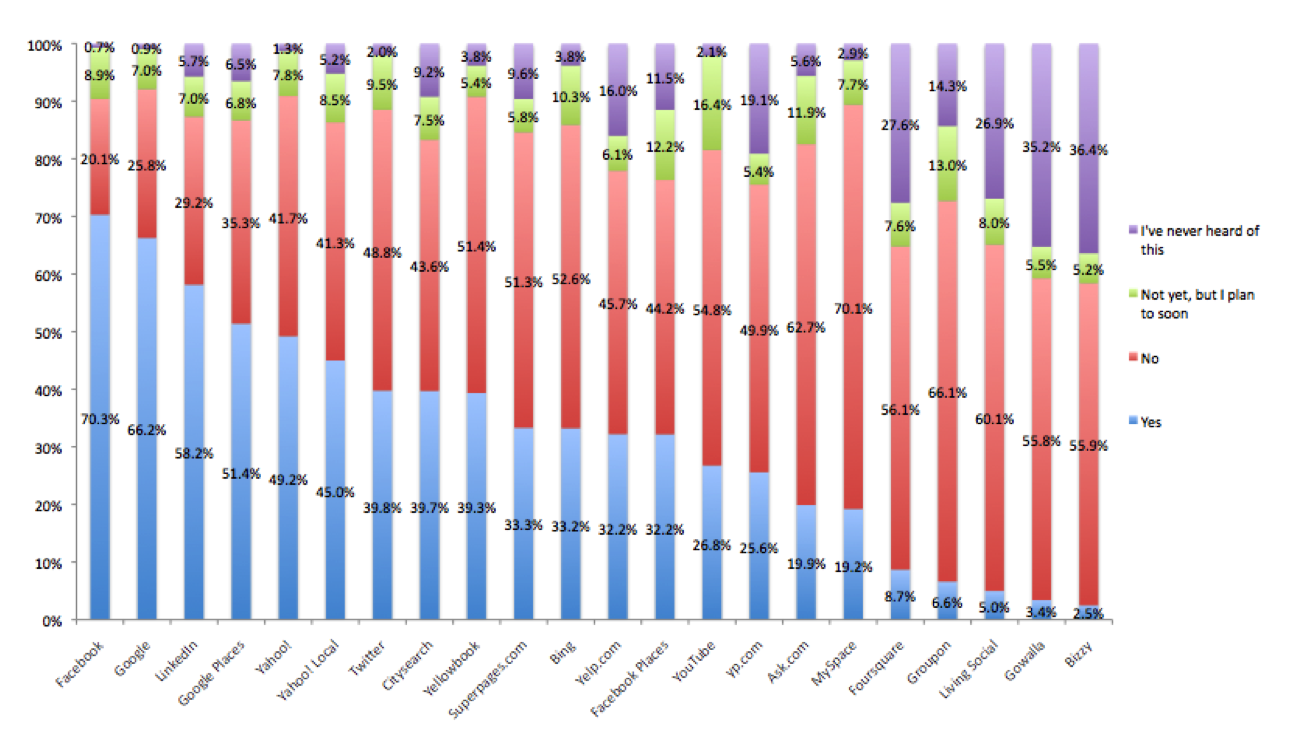
Another popular mobile check-in platform is Facebook Places. A recent Merchant Circle survey (the largest online network of local businesses owners) suggested that Places is gaining popularity over other check-in services like Foursquare and Gowalla.

Facebook Places Screenshot

Here's how your organization can get setup in Facebook Places:

  • To claim your Place, search for your business name on Facebook via the normal Search bar.  If your business’s Place already exists on Facebook, click on it to  visit its page. At the bottom left side of your Place there will be a  link that says "Is this your business?" Click on the link and you will  be directed to a claiming flow.
  • By claiming your Facebook Place page, you can manage your place’s address, contact information, business hours, profile picture, admins and other settings.
  • Facebook also allows you to merge this Place page with any existing Facebook Fan Pages you may have. To do this, visit a place that you have successfully claimed, and scroll to the "Merge with existing Page" link in the left side navigation menu. Click this link, and a prompt will appear to walk you through the process.
  • Bonus Trip:  Facebook offers a fantastic resource on offering deals after you set up a Place page.

How Arts Orgs Are Using Check-In Platforms

Here are a few examples of how arts organizations are currently using check-in platforms:

  • Austin-based film and music festival South By Southwest decided to turn this process into a game.  The festival's website lists what types of badges users can compete for. In addition to competing for badges, points are also awarded to users who check in at unusual places or at early hours of the morning.
  • The Whitney Museum recently partnered with FourSquare on creating a custom badge. Users who unlock this badge can present their smartphones to the front desk and redeem a $5 admission to the museum. This is a great example of how organizations can offer deals to customers.
  • Brooklyn Museum      offers great incentives for customers who unlock the coveted 'Mayor' badge. Foursquare mayorships are awarded to customers with the most days checked into a venue over the last 60 days. If a customer is Mayor on their Target First Saturdays events, they can receive a 1st fans membership for one year. Brooklyn Museum's community page also utilizes      FourSquare's API to show who has recently checked in, what badges their customers are unlocking, and who has obtained the title of 'Mayor'.
  • These types of services could also be used for arts events like gallery crawls or for arts organizations to partner with local restaurants. A gallery crawl could provide a similar type of adventurous environment where users could compete for special badges and earn points based on how many organizations they check-in with during the span of the crawl.

So what about your organization? Are you registered with location-based social media sites?  If so, how are you using your presence there?  (Please, share your thoughts and experiences in the comments area below.)

In the upcoming parts of this series, we'll take a look at QR Codes, SMS, and mobile app creation!

Upcoming Webinar - Google Analytics - Boot Camp for Beginners

google-analyticsGoogle Analytics - Boot Camp for BeginnersTuesday, March 8, 2011 2:00pm - 3:30pm Eastern Register today for $25 Presenter: David Dombrosky

Google Analytics is by far the most widely used website analytics software, and it's free.  Yet many artists and arts managers pay little attention to what the analytics data is telling them about their websites.  Very few of us actually use the data to inform decisions about the design of our sites and the content that we post on our sites.

In this 90-minute webinar, we will:

  • Explore the various types of data captured by the Google Analytics service
  • Review methods for charting traffic to your site driven by your social media accounts
  • Discuss what the numbers actually mean and their implications for your site and your visitors
  • Articulate strategies for utilizing Google Analytics to make decisions regarding website design and content

David Dombrosky is the Executive Director of the Center for Arts Management and Technology (CAMT), an applied research center at Carnegie Mellon University investigating ways in which arts organizations can use online technology to more effectively meet their goals. He frequently presents technology and social media workshops for arts conferences – most recently for The Association of American Cultures, Performing Arts Exchange, Chorus America, Opera America, College Art Association, and Grantmakers in the Arts.

Opera by You: How to crowdsource a production

By this point we’ve all heard about crowdsourcing. It's a way to outsource a project and let a large group of people create it online. (See video at the end of the post for a fuller explanation, complete with animated fish.) We’ve heard about crowdsourcing logo designs, requests for proposals (RFP's) or even determining which paintings to show in an exhibition. But how about an full-length opera? Well, one company is crazy enough to try it.

The Savonlinna Festival in Finland has been developing an opera through the collaboration platform wreckamovie since 2010. The Opera by You initiative has been developed in five phases, some of which overlap. First, the crowd collaborated on a plot and name for the opera in July 2010. They decided on the title Free Will and the following plot, as described by Paivi Salmi, Project Manager of Opera by You:

God has had enough of all the misery that people are suffering from and calls a meeting with the angels. They decide to send a few dead geniuses back to Earth to make things better. They are supposed to make a huge difference in science and art and create world peace. The geniuses are Joan of Arc, Oscar Wilde and Wolfgang Amadeus Mozart.

Second, writers began work on the libretto (or script) to the opera. The process is halfway completed and is set to be done in May. Third, the composers in the group began setting the words to music in September. Fourth, the project coordinators launched the visualization plan. Salmi described the process.

Visualization means to us creating the concept of “environment” on the stage: the era of the opera, stage sets, wardrobe, lightning etc. We have decided together with the community that the story of Free Will will take place in our modern time and now we proceed on deciding how the different scenes look like visually.

Visualizations of Hell from Opera by You
Visualizations of Hell in the year 2012 from Opera by You

The libretto, composing and visualization plans are set to be ready at the end of May 2011. In the last phase, the whole concept will be moved to the hands of the Savonlinna Opera Festival for production, and that is where the crowdsourcing will end when it comes to the live opera production. The opera will be produced during Savonlinna’s 2012 summer festival season. The crowdsourcing will continue in that the existing community within the wreckamovie platform will work with the current plot, creating an animated movie version of the live opera. To see the opera creation in action, visit http://operabyyou.wreckamovie.com.

Paivi Salmi manages the web community creation process as well as the marketing and community partnership initiatives. I caught up with Salmi and asked her about the collaborative process of crowdsourcing the opera.

How did this idea originally come about? The Savonlinna Opera Festival has been frontrunner in developing opera genre in Finland. We have had several projects for instance for creating operas for kids. This spring we will again launch this kind of project where kids create opera as part of their normal school work. The Savonlinna Opera Festival has had several Finnish world premieres with quite unusual productions. We are actively searching new ways of reaching new audiences for the opera and also new ways of creating the opera. So in the spirit of “Web 2.0,” we decided to try the collaborative product development or crowdsourcing in the web also in the field of the opera.

How did you choose wreckamovie as the platform to create the opera? The wreckamovie platform provides the basic tools for collaborative discussion and working. It is also well-known in the Europe at least and already has lots of members interested in collaborative working on the web. We also plan to create an animated movie about the plot of our opera and for that second phase of the project, wreckamovie will the best available tool.

With so many people collaborating on one project, how do you select the best ideas? How do you deal with differing opinions on the direction the project should take? We have five operatives in the team who are experienced opera creation professionals (a script writer, a stage director, a composer, a production specialist and a visualization expert) who will guide the creative process in the web. Their task is to select best ideas, give the "developing” tasks for the community.

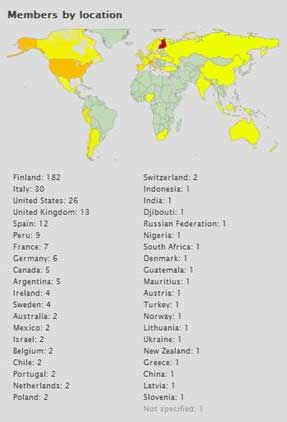
Opera by You Community Members by Country
Opera by You Community Members by Country.

Who are the people collaborating on the project? Do you know the make-up as far as country, age, and profession? Do most have an artistic background and collaborate on areas of the project they specialize in? When it comes to age, they are average 35 years old, mostly motivated by composing and visualizing. We don't collect any information about their profession or education, so we do not know if they already are professionals in the field of opera or classical music.

How do you plan to distribute the opera once it is produced at the festival in 2012? Will the footage be available online, recorded or streaming? The opera will be performed 3 times during summer 2012 in the Savonlinna Opera Festival. If some opera house is interested in the project, we will naturally export the production. We plan to make footage available and also animated movie which will be distributed online. The project was launched at the Opera America annual meeting in L.A. last June.

How are you addressing intellectual property issues for the contributors to the project? Every member has to sign user agreement and accept Wreckamovies terms of use where the member gives all rights to the project. So there will be no intellectual property issues.

What has been the response from the online community and the opera community at large? The community has been growing steadily, but only certain members are active in all "production lines". It goes so that some are writers, some others composers and some only interested in the visualization part. But mainly people are very excited and willing to work "for free". We also want make it easy to just anyone without any classical music or opera experience to participate to the collaborative work. We have reached a very good visibility to our project in the internet. For instance in the launch phase of the project there were lots of articles in online media for instance in Latin America, India and Europe. The larger opera community has been very interested and curious. We have been asked to present the project in several conferences and seminars. People are also very interested in the process itself--how has it been ”structured” etc. within opera community but also in the larger community of art, theatre and even social media.

Here's a more detailed answer to the question "What is crowdsourcing?"

The State of the Mobile - The 2011 Museum & Mobile Survey

Image via intomobile.com

Image via intomobile.com

This past month the results came in for the 2011 Museum & Mobile survey. The survey is part of an ongoing research project focused on the uses and trends of mobile technology in museums.

The survey launched last September and had more than 700 responses, with professions ranging from museum employees to mobile technology vendors and researchers.  The effort was international, but the majority of responses (80%) were from the United States, with the United Kingdom (5%) and Canada (4%) as the next largest group of respondents.

The survey points to some interesting trends that are cropping up with mobile development for museums. There is a ton of information in the survey, but here are some of the interesting things I pulled from the presentation:

  • Of the 738 survey respondents, 30% already have some form of a mobile program in place and 23% planned to develop one. 36% of institutions had no plans to go mobile and the remaining 11% were responses from vendors and researchers.
  • When asked which terms best described their current or planned mobile program, the most common responses were: Some sort of audio tour, free for visitors, and visitors were expected to provide their own hardware (i.e. smartphone, iPod).

  • The goals for the mobile programs were most commonly described as providing supplementary information and diversifying the visitors’ experience. Personally, I loved that the next two most common goals were an emphasis on experimentation and creating an interactive experience.
  • What was most challenging for museums with mobile programs in place? Encouraging adoption among visitors, producing the content, and keeping that content up to date.
  • The largest challenge for those planning to develop a mobile plan? The implementation costs.
  • Looking ahead five years, most institutions said that implementing in-house content development was a definite goal.
  • What I found promising was that respondents to the survey had a strong desire to see more research done, even among those who had no mobile plans at all.  The most requested areas of research were: Guidelines for user experience design, methods for conducting visitor evaluations and analysis of different technology systems.

So beyond these points, what are some of the larger takeaways from the survey? Well, for one, the survey goes to show that mobile technology is more than a fad. Mobile programs are becoming more common and less of an anomaly among museums. The survey also provides a snapshot of some of the concerns about development and adoption of a mobile program.

It was a little disappointing to see that among the technology being definitely implemented in the next five years, new tech like RTLS and augmented reality were the bottom two. Personally, I would not underestimate the possibility of this technology becoming an expectation among visitors, even within the next few years.

Also, the survey pointed out that 50-55% of respondents consider having a mobile-friendly website as something that should be definitely implemented in the next five years. An organization’s website will often be the first portal of entry for a mobile user, and having a website that is optimized for mobile platforms should be a higher priority.

Overall, I think the biggest takeaway of the survey is that the future of mobile technology in museums will not be just some flashy app. Throughout the field, serious thought is being put into how these programs can be developed in a way that are both substantial and engaging for the user. It was awesome to see institutions describe the goals of their current or planned mobile programs as experimental and interactive.

There were a lot of interesting results from thus survey, the above points were only a few that jumped out at me. For the more in-depth results of the survey visit Museum & Mobile’s website to view the full presentation.

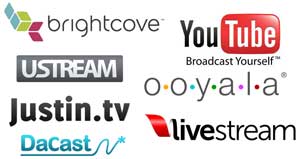
Livestream, Ustream, We all stream: A practical guide to streaming platforms

So many options...
With so many choices when it comes to streaming video, what's an arts organization to do?

A few weeks ago, I highlighted some emerging trends in arts marketing for 2011.  One of the trends was “changing media consumption”, part of which includes arts organizations streaming performances live, whether to ballparks or online.

So let’s say that your organization is interested in streaming a performance live as it is happening or streaming a pre-recorded performance at a scheduled time. What are your options as far as platforms for streaming that video? And which organizations are out there using these platforms?

YouTube: The Non-option for Live Streaming

YouTube is the big name for online video, but livestreaming on YouTube will only be available for content partners. YouTube has not announced when livestreaming capabilities will go live. Approved by YouTube, content partners are people and companies that post regularly to the site and so that they can monetize their content with ads and rentals, obtain better digital quality for their uploads, and use YouTube’s Insight analytics tools.

You can apply to become a YouTube content partner to gain the above benefits. They have a special program specifically for nonprofits that currently includes arts organizations like Anaheim Ballet, MOMA, and Pilobolus Dance.

So when should you use YouTube? As of now, it’s the most mainstream choice for video, and therefore the easiest platform on which to build a community. YouTube has also streamed major events involving the arts community, like the Guggenheim’s YouTube Play Event. You might use it to post clips of the streaming event after the event is over and to host videos long-term; but right now, don’t depend on YouTube to release streaming capability any time soon.

Brightcove/Ooyala: The Gold Standard

Brightcove is the high-end gold standard for streaming. Many major corporations use it, as well as arts organizations like San Francisco Ballet and the Royal Opera House. It’s best for larger companies with highly valuable and highly demanded content as well as companies who want to fully integrate their streaming efforts with other components of their technology portfolio, via APIs, SDKs and other programming tools. Ooyala has a similar high-end set up used by companies like TicketMaster and ElectronicArts. Brightcove and Ooyala are great for larger companies with a lot of resources at their disposal. However, the price may not be affordable for organizations likely to use livestreaming once a year and only intend to stream to computers or existing mobile platforms—as opposed to a projector that would require higher quality video or a customized mobile platform that would require extensive development.

Livestream, Ustream, and Justin.tv: The mainstream for livestreaming

You may be thinking, “Okay, Brightcove sounds great, but my organization is not nearly as big as the Royal Opera House.” The most popular choices for streaming video amongst American arts organizations are livestream.com and ustream.tv. Both platforms offer mobile integration, easy interfaces and most any other feature you would want. Livestream even offers monetization opportunities.

Justin.tv appears to be gaining market share, but fewer arts organizations are on it, and its audience tends to skew younger and more male than the other platforms. Organizations like Wolf Trap have streamed pre-recorded events on livestream, a necessity when subtitles must be entered. Last summer the organization’s opera company streamed a cabaret performance of two world premiere operas Bastianello by John Musto and Lucrezia by William Bolcom.

Lee Anne Myslewski, Administrative Director, described the opera’s choice to use Livestream. “We chose Livestream because the interface was the most intuitive and it seemed to work the most consistently on all platforms/browsers. (Intuitive is important!) We were also specifically looking for an integrated chat function so that the audience and the artists could interact in real time during the broadcast. The process was smooth – easy for even a non-video person to create. We did have some viewers struggle with the speed of the file and intermittent pauses, but that could have been due to any number of causes - file size, their connection speed, or traffic on the site. If we go forward with the project we’ll likely use them again.”

One of the most notable successes on Livestream was Misnomer Dance Theatre’s stream of a performance in April 2010, which reached 2,000 viewers in 19 countries. Organizations are not only using LiveStream and Ustream to broadcast perform footage, though. They are also using it for production diaries like Second Wind Productions, press conferences like the Detroit Symphony Orchestra and educational initiatives like the Orange County Public Schools Orchestra Programs.

DaCast: No fuss monetization

Increasingly, companies want to monetize online content, and a recent Pew study (good summary here by ReelSEO) shows that people will pay for it.  Monetizing content can basically be done in two ways: generating revenue through advertising, or having the consumer directly pay for online content (pay per view), which can be on a one-off or subscription basis.

LiveStream requires $350 a month for their premium service, which includes opportunities for monetization. However, if you want to monetize your content with less financial commitment up front, DaCast is a sensible option.

DaCast describes itself as self-service model. In a way, all streaming services are self-service, but DaCast allows companies to monetize their content in the same self-service way that you can upload a video to YouTube. The only fees that you pay are for bandwidth, with a minimum $5 commitment. (The first 10GB are free, too.) Most excitingly, DaCast has developed a plug-in for Flash which allows users to pay directly on their video screens, rather than clicking through to another page.

The question is: could a paid model be right for your organization? As DaCast CEO Stephane Roulland said, “This is an excellent question.” Aggregated sites like classicaltv.com and Ovation are already monetizing content. Classicaltv uses the pay-per-view model while Ovation uses the ad-based revenue model. The Metropolitan Opera’s Met Player might be one of the one of the only single-organization streaming sites. The key is figuring out if your organization will break even on the fees to secure the rights and the fees to stream.

More resources:

Data Sharing & Arts Organizations - Take Part in the Conversation

Data SharingOur friends at Fractured Atlas are relaunching their Issue Brunch series and have asked me to facilitate a discussion on the benefits and challenges of data sharing among arts organizations. As Tiffany Bradley, Development and Marketing Specialist for Fractured Atlas, recently wrote:

As more organizations lead collaborative efforts, the implications of sharing data come to the forefront. Data sharing - whether for marketing, ticketing, fundraising purposes - raises a host of issues. Does pooling information about patrons lead to greater revenues for all parties? Or do organizations risk a negative response from patrons? Integrating the range of software that arts organizations use is also a problem in its own right.

This panel discussion will be streamed live on February 11, 2011 at 1:15 pm EST via UStream at http://www.ustream.tv/channel/fracturedatlas. Online participants will be able to engage one another in discussion and submit questions for the panel.

Panel participants include:

  • Deborah M. Abramson - The Pew Charitable Trusts
  • Joe Harrell - Alliance for the Arts
  • Adam Huttler - Fractured Atlas
  • Barbara Janowitz - Theater Subdistrict Council/City of New York
  • Chrisopher J. Mackie, Ph.D - Open Health Tools
  • Maris Smith - Situation Interactive

So what has your experience been like with data sharing among arts organizations?  What benefits have you received?  How did you approach the organizational and technological challenges?  Leave a comment below and be sure to join us on Friday for what is certain to be an engaging conversation.

A Guide to Mobile Marketing, Part One

This is the first in a multi-part series of articles exploring various tools and tactics for promoting and marketing on the mobile web.

From museums and opera companies using QR Codes to festivals using Foursquare to launch a musical scavenger hunt, it's becoming apparent that designing a mobile marketing campaign can be one of the more challenging, creative and rewarding ways to engage customers.

Consider some of these recent findings:

  • Mobile campaigns are capturing an increasing level of consumers' attention across key metrics:  mobile ad awareness reached 31% in 2010, up from 14% in 2009 and 16% in 2008.

Smartphone Use On the Rise!

As smartphones increase in popularity, users are often utilizing this technology to discover local events and local businesses that may interest them. This has resulted in an increased demand for businesses wanting to implement effective mobile marketing campaigns. In this blog series, I want to examine what tools and strategies arts organizations can use to implement effective campaigns.

Location Based Tools

One of the most popular uses for smartphones is generating directions to and/or information about local businesses. Here are two tools that organizations can use to elevate their visibility to smartphone users.

1. Google Places:

With the recent launch of a Google Places App for both the iPhone and Android platforms as well as a scheduled Google Maps update for the Android smartphone, the importance of having an up-to-date listing in Google Places is extremely relevant for an effective mobile marketing campaign. Below is a screenshot of the Google Places app in action:

To ensure that your organization appears in a Google Places mobile search, you must first make sure that you register with Google Places online. Here's a quick overview of how to get started

  • Claim your business by verifying your listing
  • Add pictures and videos to make your Place Page more compelling
  • Review the Google Places Getting Started Guide for any other questions
  • Bonus Tip: If your organization receives a certain amount of positive reviews, Google will mail a window decal with a personalized QR Code. 200,000 businesses have already received these decals.
  • Bonus Tip #2: An easy way to boost your rankings in a Google Places Search is to make sure your business is properly listed in online directories like Yellow Pages and City Search. Google indexes these "citations" in order to determine what is most appropriate to a user's search query
  • Bonus Tip #3: According to a recent article on Mashable.com, Google Hotpot - recommendation engine and ratings/reviews system for places - has "officially gone worldwide."  Hotpot integrates with Google Places and also appears in Google search results.  Here's a brief overview of how Hotpot works:

2. Yelp Another popular app for smartphones is the local search platform, Yelp.  The company has reported that more than 41 million people visited Yelp within the past 30 days (as of December 2010). Yelp also reports that 27% of its searches come from its iPhone application. Businesses can setup free accounts to post pictures, special offers and send out messages to customers.

Just like Google Places, businesses owners must first register their organization on Yelp's website. Login to Yelp for Business Owners in order to create a listing for your business. One of the major challenges with maintaining a Yelp and Google Places profile is encouraging patrons to leave positive reviews. The easiest way to receive reviews, is simply to ask for them.

In upcoming posts, we will be examine: effective 'check-in' campaigns on services like FourSquare and Gowalla, how to set up QR codes, developing mobile applications, and how to run effective short code (SMS) campaigns.

Rise of the Masters

As the controversy surrounding internet piracy continues brewing, music industry officials and musicians continue to find new ways to promote and profit from their work. Digital downloads are one tool that make it easier for musicians to connect with and cultivate a fan base globally. The Recording Industry of America reports that there are more than 400 authorized digital music services worldwide offering more than 12 million songs. Digital sales compromise nearly one half of total revenues for the music business in the United States.

Digital downloads aren’t just for "current musicians", however. Apple’s recent acquisition of The Beatles music catalog resulted in 450,000 copies of Beatles albums and two million individual songs being sold in the first week alone.

Another exciting entry into the digital download market is Europe's leading digital label, X5. The label licenses music, acquires various catalogs and refines the material for high end products. This process has allowed them to form exclusive partnerships with and distribute music to companies like iTunes, Amazon, Rhapsody, Napster and Spotify. Since their formation in 2006, X5 has become the best selling classical label in the United States, with a product portfolio of over 200,000 titles. Spotify's principal owner, Northzone Ventures, is also investing 7 million Euro in the label.

In December of 2010, the company launched their latest classical music series entitled Rise of the Masters. Rise of the Masters is unique in that it highlights the works of twelve of history’s greatest composers, including Mozart, Beethoven and Bach. The recordings feature some of the world’s greatest orchestras including the City of London Simfonia and the Amsterdam Sinfonietta as well as soloists Freddy Kempf, Torleif Thedeen and Monica Hugget. The downloads are available via the iTunes Store and all other major online retailers. X5 has also launched a Twitter account, Facebook page and iPhone app to promote the series.

While digital downloads are certainly helping the music industry to regain a bit of financial ground, series like Rise of the Masters seeks to accomplish a more important goal. The music label aims to "animate the digital custom base and reinvent digital  music worldwide." X5's use of social media, modern artwork and mobile apps to promote the series are engaging a new generation of listeners and hopefully encouraging these new listeners to patronize their local arts organizations.

Changing The Way You See With Augmented Reality

When looking ahead at what will be the most exciting technology for the arts in the coming year, augmented reality is bound to pop up in the conversation. You may be familiar with augmented reality already. The National Football League has taken advantage of this technology for years to project lines of scrimmage and game time information onto the field in real-time during television broadcasts. So what exactly is augmented reality (AR)? According to Wikipedia:

Augmented reality (AR) is a term for a live direct or indirect view of a physical, real-world environment whose elements are augmented by computer-generated sensory input, such as sound or graphics.

AR layers digital elements on top of our view of the everyday world. This overlay can be done in a number of ways: through the use of handheld devices like smartphones, through desktop computers with a webcam, by wearing specialized headsets, or by projecting a digital images/animations onto a real world location.

Since AR has the possibility to create such a unique visual experience, it naturally has attracted adopters from the creative community. Here are just a few cool projects taking advantage of AR:

DIY Day MoMA – Augmented Reality Art Invasion! On October 9th, 2010, Sander Veenhof and Mark Skwarek decided they would circumvent the traditional art world and host their own exhibition at the Museum of Modern Art using AR. The artists took advantage of the augmented reality viewer app Layar, currently available only on iPhone and Android devices, to create a virtual exhibition of digital works. By downloading the Layar app and loading the “AR Exhibition” layer, anyone with a camera-enabled smartphone or mobile device can view numerous digital artworks throughout MoMA. This includes both 2-D and 3-D images and animations and an additional 7th floor that only exists in the world of AR. The digital artworks have continued to be on display since DIY Day wrapped up in October.

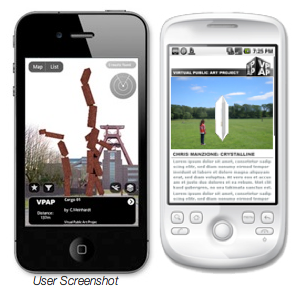
A user view of the VPAP AR layer on both an iPhone and an Android. Image courtesy of VPAP.

The Virtual Public Art Project Also utilizing the Layar app, the Virtual Public Art Project (VPAP) takes the idea of AR artworks one step further by placing pieces around the globe. The artworks can be viewed in the round and from multiple perspectives, just as you would be able to with a real piece of public art. Check out some of the current works on display on VPAP’s website . If you’re interested in creating your own piece of AR artwork for the public, VPAP puts out multiple calls for submissions.               

The Macula Project – Mapping 600 years of history The Macula Project is comprised of a group of artists exploring the relationship between image, sound and the viewer. The city of Prague was searching for a way to celebrate the 600th anniversary of the astrological clock tower situated in the center of the city and turned to the Macula Project for a creative solution. The artists at the Macula Project turned to AR for the project and projected this stunning work that took the audience through the 600-year history of the clock tower.  Macula was able to achieve this by digitally mapping the building beforehand and tailoring their animation so when it ran through a digital projector, the perspective lined up perfectly with the real life clock tower.               

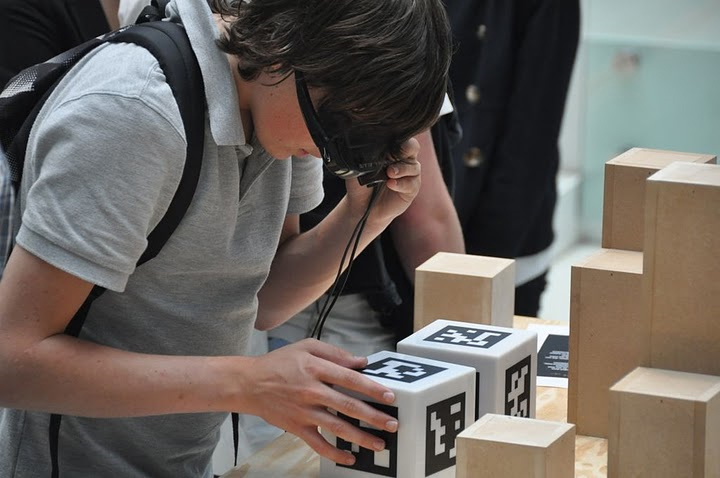
The Getty Museum – Exploring the Augsburg Display Cabinet in 3-D If there is one frustrating roadblock shared across the gamut of art lovers, it’s the frustration over not being able to personally handle and explore a piece of art in a museum. The Getty Museum understood this burning desire and took advantage of AR technology to let their visitors have a more in-depth exploration of one of the pieces from their decorative arts collection. Using an online program launched within a web browser, a computer’s built-in webcam, and a printed out “AR tag”, an art lover can handle a 3-D model of a 17th century collector’s cabinet. By rotating and tilting the AR tag, the cabinet will spin 360 degrees and various doors can be opened and explored.                A student examines a box in the exhibition that is covered in AR tags. Image courtesy of the University of Groningen.

The University of Gronigen – Giving students X-ray vision Part of a permanent exhibit in their Hall of the Bernouilliborg, the University of Gronigen teamed up with Science LinX and Nanopodium to create a unique science experience for their students. The exhibit is comprised of multiple boxes covered with AR tags. By wearing a special set of glasses containing display screens and a camera, the boxes’ walls suddenly disappear for the user. The user can then tilt and turn the now ‘hollow’ box that contains various types of 3-D science-related models, such as a model of a chain of molecules.

The types of projects that are now possible with augmented reality are rapidly growing and the technology is some pretty exciting stuff to play with. But beyond the wow factor that comes with AR, what are some of the ways that arts organizations can use this technology in worthwhile and innovative ways? Can AR extend to projects beyond the visual arts? Are there ways that this technology can be used to engage with large audiences as well as the individual? I don’t think it is too far a stretch of the imagination to envision actors on stage reacting to digital props or musicians playing digitally created instruments. As with any new tech, it will be exciting to see how AR develops and continues to merge our reality with a digital one.

Google Apps: Cost Effective Tools For Your Organization

google_appsFor smaller arts organizations and individual artists, buying various types of management software packages and setting up services for data back-up and storage can really eat into what may already be a tight budget. But having these software and services are essential to efficient, day-to-day management. This is where Google Apps could be a great, free to low-cost solution.
Google Apps is a suite of online software and storage tailored to the needs of organizations of different sizes. All of the apps (you can see a list of the core apps here) operate within your internet browser. This means that there is no software to be installed on your organization’s machines. This also means that updates and IT maintenance for the software will be handled for free by Google, though the service varies depending on which package you select.

If there is a more specialized need such as CRM or photo editing, Google Apps for Business comes with its own app marketplace.  Similar to the app stores for iPhone and Android, the marketplace has a variety of free, more specialized applications to add to your Google account. All of the apps are desktop applications, but many of them work for both desktop and mobile devices.

So using apps that run in an internet browser are nice, but where is the information saved? While you can save your information to a personal computer or device, data storage and back-up can also take place in cloud storage. One of the main advantages to cloud storage is that your data can be accessed from any computer with an internet connection. It is important to note that storage only comes with a Google Apps for Business account.

I will admit that some of these Google apps do not have the same depth and power as other software packages, like the Microsoft Office Suite, but they definitely get the job done and fill the majority of the needs for most day-to-day operations. If the specific utility you need isn’t available in one of the core apps, you can usually find what you need in the marketplace.

There are three different types of accounts :

  • Google Apps (up to 50 accounts) - This option is free and allows your organization to add up to 50 user accounts. Comes with the basic core of google apps, but lacks some of the more specialized business features and support as the other options.
  • Google Apps for Business - The business version comes with all of the amenities including apps, storage and support. The pricing of this version is based on how many users you have in your organization, each user added costs $50 per year.
  • Google Apps for Nonprofits - While this option does not come with storage, it is more robust than the free version, plus customer support is offered. Google grants discounts (40%) to larger non-profits, of 3,000 or more, for the business version and offers smaller non-profits the education version for free.

So for many organizations that operate on smaller staffs and for individual artists, this is an extremely cost-effective way to get some quality management software and storage.

10 Arts and Culture Mobile Apps from 2010

Merely half a day away from the end of the year, today is a great day to reflect on all the different happenings in 2010. One of the big things I have been looking back on is the growth of useful mobile apps for arts and culture audiences and managers. Here is a look at ten of these apps from the past year selected by the Technology in the Arts team and you, our lovely readers:

The Florida Grand Opera | FREE

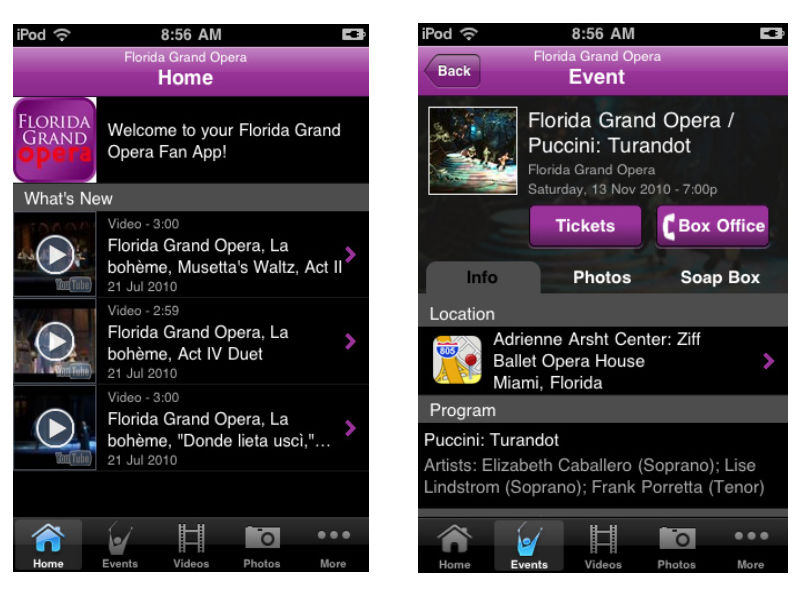
Available for: iPhone, AndroidFGOThe Breakdown: A great app for the Opera lover in us all, the Florida Grand Opera app offers news about the company, events updates, listings of upcoming performances, and streaming audio of the 2010-2011 season. One aspect of the app I really enjoyed was the videos section, containing a multitude of interviews and performances from the FGO. The only real complaint I have about the app is the necessity to sign up for updates from FGO before being allowed access into the app.
Google Goggles | FREE

Available for: iPhone, Android

goggles_artwork

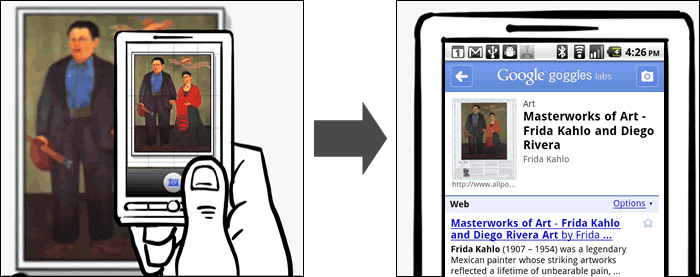
The Breakdown: Google Goggles is a visual search engine built into a mobile app. It utilizes your smartphone's camera to capture and scan an image, object, or landmark and perform a search online to provide information on it. This is a very fun app to play around with and can be very helpful when trying to identify an artwork without a clear label or an unknown landmark. The app is still in beta though and cannot identify anything that is not already currently online in some form.

The L.A. Phil | FREE

Available for: iPhone, Android, & Blackberry

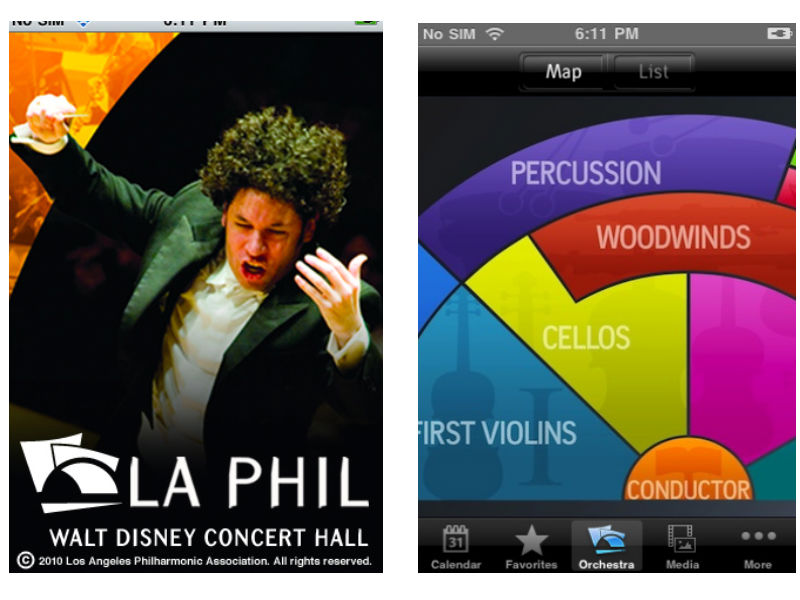
laphilThe Breakdown: The LA Philharmonic app has a lot of same offerings as the Florida Grand Opera app in terms of news, media, and listings of events. What sets this app apart is the interactive Orchestra map, laying out the different groups of muscians in the LA Phil. When a user taps on a section of the orchestra, such as First Violins, they are directed to profiles of each musician with in-depth biographies. This app is packed full of great content and an excellent way to learn more about classical music and the people that perform it.
AMNH Explorer | FREE

Available for: iPhone

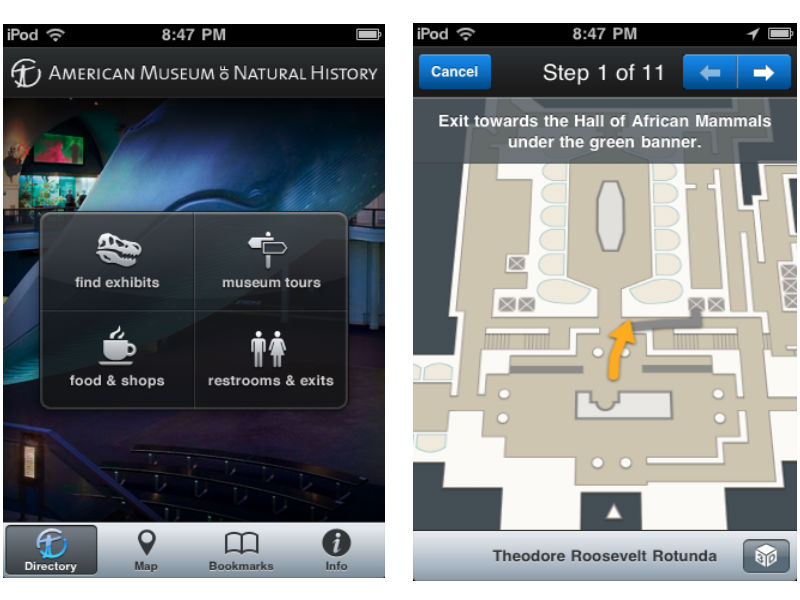
AMNHThe Breakdown: The Explorer app from the American Museum of Natural History is a great guide for navigating a very large museum. The app acts as a personal in-museum GPS, finding your location and providing information on the exhibits within that area. The app can not only find your location, but provide turn-by-turn directions from one exhibit to the next. This may go against some museum purists love of getting lost within a museum, but on a busy day in a museum packed with visitors this app could be an incredible advantage.
Is This Art? | FREE

Available for: iPhone

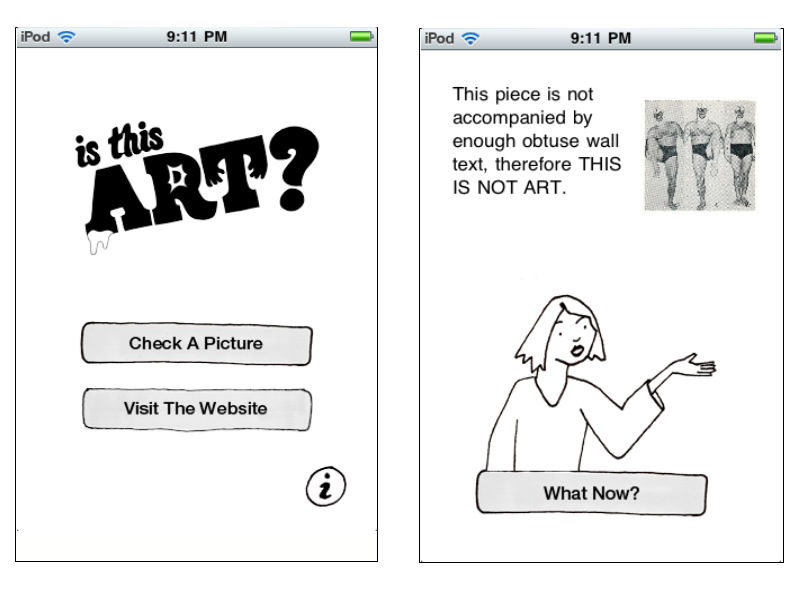
IsThisArtThe Breakdown: A fun app from the folks at Deeplocal and the Mattress Factory, Is This Art? is one way to win those age old arguments about what is and isn’t art. Users snap a picture of the art in question and open it within the app to test its validity in the art world. The explanations the app gives are often hilarious such as, "This makes me feel intellectually inferior, therefore THIS IS ART" and, "This piece is not accompanied by enough obtuse wall text, therefore THIS IS NOT ART". All of the images users put to the test can be uploaded to the project's ongoing blog.
Brooklyn Museum Mobile | FREE Available for: iPhone, Android, & Blackberry bklyn

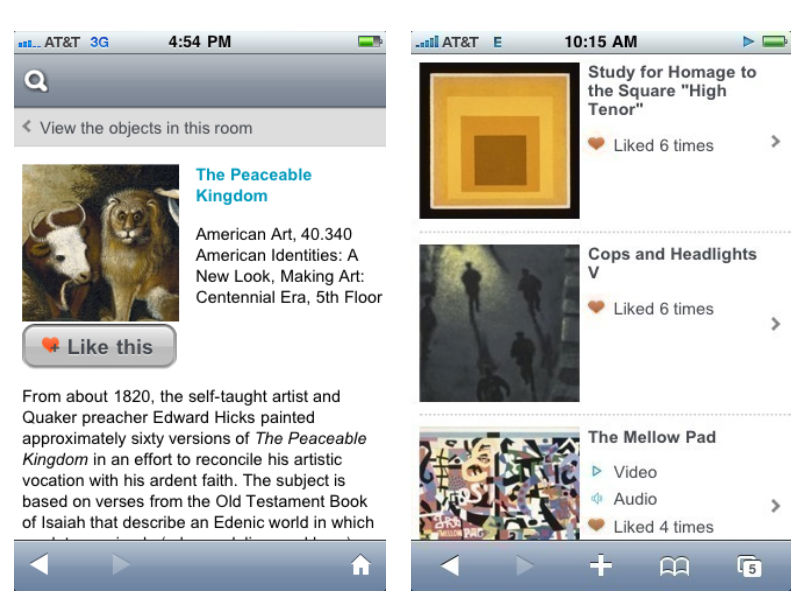
The Breakdown: Another great app for a large museum, Brooklyn Museum Mobile has less of a focus on navigation and more on community and interaction. The app brings in aspects from social media by inviting users to add descriptive tags and/or "like" artworks from the collection. This acts as a recommendation system for other visitors and encourages a more participatory experience. The aspect I like about Brooklyn Museum's offering is that the app runs off of a mobile website, meaning that it is not device exclusive and anyone with a web-enabled device can join in the fun.

The Lighting Handbook | $4.99

Available for: iPhone

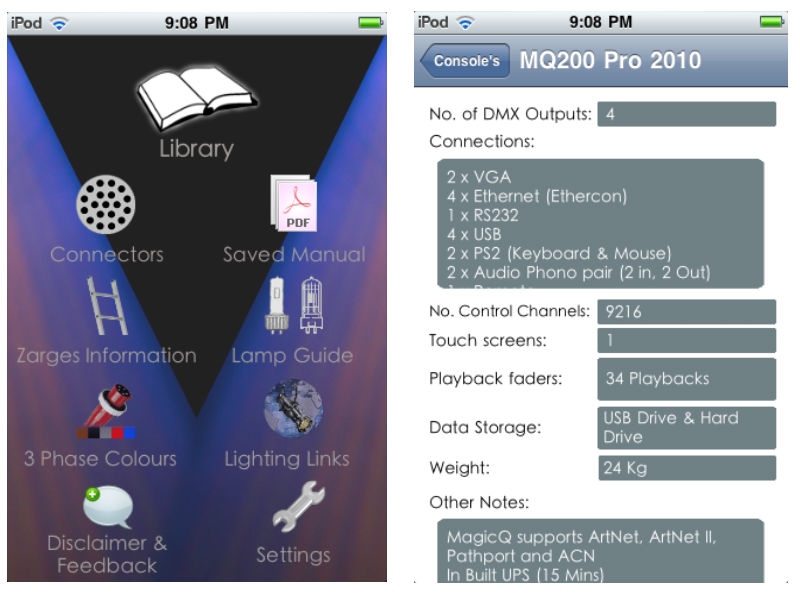
LightHandBookThe Breakdown: This is a great app for all of you theater techies. The Lighting Handbook is exactly what it sounds like, an in-depth guide to all things lighting, conveniently in your pocket.
Chicago Gangland Tour | $2.99

Available for: iPhone

Capone

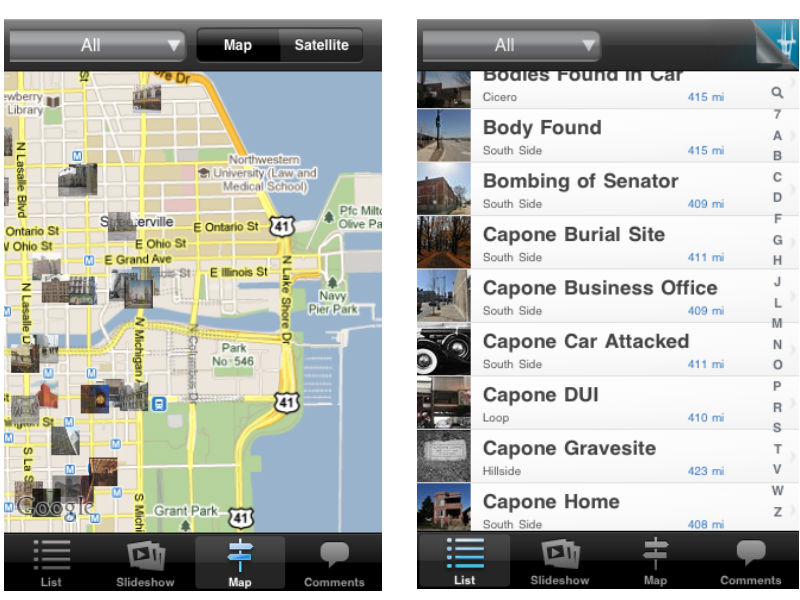
The Breakdown: Ever wanted to walk in the footsteps of famous gangster Al Capone? That's exactly what the Chicago Gangland Tour app helps you do, integrated with google maps to give users a handheld guide for a historical walkthrough of Chicago's mafia history. This app provides info on all the different sites historical relevance and invites users to add their own comments. My favorite aspect of the app is the drop-down menu where results can be sorted by subjects like murders, shootouts, and gangster hideouts.

At The Booth | $0.99

Available for: iPhone, Android

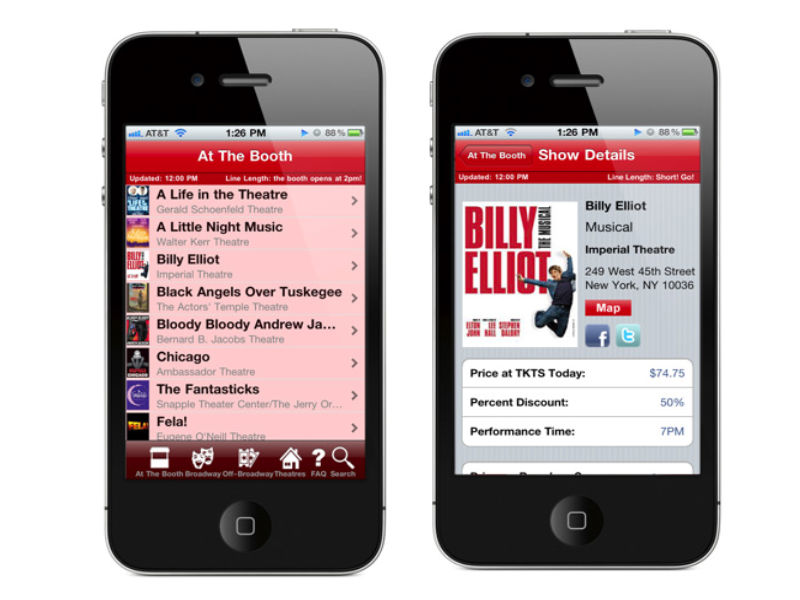
atboothThe Breakdown: At The Booth is a full-service app for attendees of Broadway and Off-Broadway shows in New York City. The main page updates with every launch of the app and includes the latest shows and theater locations. For each show the app provides info on the showtimes, ticket prices, discounts, synopses, links to reviews and videos, and nearby restaurants. Listings will appear with a pink undertone to let users know if there are long lines at the theater. The only real complaint I have about the app is that the listings are only viewable in list form, whereas a map option would really assist in seeing all that is available in the immediate area.

The Sundance Festival 2010 | $4.99

Available for: iPhone

Sundance-iPhone-screenshot-small-738392

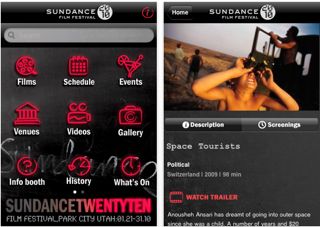
The Breakdown: The Sundance Festival app acts as an online brochure for the annual film festival. In addition to offering videos and reviews on films being shown, the app gives festival attendees real-time updates as to what is happening with the film fest's various events and screenings. The one feature that this app lacks is a way to create custom schedules of screening times and events. This would be invaluable at a festival where multiple things are being offered at once and making the most of the your time requires a lot of planning.

Best of Technology in the Arts 2010 -- David's Favorites

As we move into 2011, it's time to take a look back at my favorite articles and podcast episodes from Technology in the Arts in 2010.

My Top 10 TITA Articles (in chronological order)

1. Building Audience Diversity Through Social Networking - Part 1, Part 2 and Part 3 -- Amelia investigates why arts organizations use certain social networking sites but not others (such as ethnically specific sites like Black Planet) and what impact this has on their ability to use social networking as a tool for building diverse audiences. [Okay, okay...I'm counting this three-part series as one really looooonnnggg article.]

2. SEOoooo….what? Improving your organization’s search engine optimization. -- Corwin takes a look at search engine optimization: what it is; why it is important; and what you can do to optimize it for your website. [And it was published on my birthday, which makes it extra special.]

3. Micro-donations: Proving Size Doesn’t Always Matter -- Joe highlights reasons and tips for starting a micro-donation campaign for your organization.

4. Social Media Spotlight: Vancouver Opera -- Amelia kicks off our Social Media Spotlight series by interviewing Ling Chan, Social Media Manager for the Vancouver Opera, about her social media strategy and experiments.

5. Online Group Discounts and the Arts - Tara unearths some of the buzz around the use of online group discount sites like Groupon and Living Social.

6. Is your organization engaging older adults through social media? -- Molly questions our assumptions about social media sites as places to primarily engage younger audiences.

7. Going Mobile - Websites vs Apps -- Reprinted from Americans for the Arts' Arts Marketing Blog Salon, I break down the differences between mobile apps and mobile websites with an eye toward where arts organizations should invest their time and money.

8. The Handheld Guide: Experimenting with Mobile Technology in Museums -- Tom digs deeper into mobile apps by exploring how they are used by and within art museums.

9. Social Media Spotlight: The Guggenheim and YouTube Play -- Thomas interviews Guggenheim Associate Curator Hanne Mugaas about YouTube Play, a biennial celebrating creative talent in the realm of online video.

10. 7 steps to a Successful Facebook Ad Campaign -- Tara discusses the benefits of and best practices for creating Facebook Ads.

My Top 4 Podcast Episodes (in chronological order)

#66 – Google Wave, Google Buzz and the iPad -- A humorous (yet informative) conversation with Brad, Amelia and me wherein I make this ridiculous prediction that the iPad was not going to take off. LOL.

#70 – Discussion of "Theatre & Social Media in 2009″ with Devon Smith -- Pat interviews Yale Repertory Theatre's Devon Smith about her research report “Theatre & Social Media in 2009.”

#71 – Audience 2.0, Smartphone Apps and Tips for Working with Developers -- Brad, Jeff and I get into a rowdy conversation about everything from the NEA's Audience 2.0 report to smartphone apps for the arts.

#78 – Seven Digital Trends and Their Implications for the Creative Sector -- My interview with thought leader and arts consultant Brian Newman about trends in the technology sector and what they (will) mean for the arts industry.

Happy New Year to all of our fans, friends, readers and listeners! We'll see you on the flip side in 2011.

Where Can I Park for the Show? Now, There's an App for That

ParkPGH-1As a denizen of downtown Pittsburgh, I am well aware of how difficult it can be to find a parking spot when I go to the theatre, a gallery crawl, or the symphony. You end up driving to various parking garages only to find a "Lot Full" sign at the entrance. In a brilliant bit of service to the arts organizations in the cultural district, the Pittsburgh Cultural Trust has created ParkPGH - a multi-platform service providing real-time parking availability information for eight garages in downtown Pittsburgh.

Here are two key reasons why I find this to be a brilliant service:

Addressing a community challenge: By creating ParkPGH, the Pittsburgh Cultural Trust has provided a solution for an issue impacting not just audience members for its own venues, but also audience members for a multitude of arts and cultural organizations not affiliated with the Trust, as well as employees and visitors for other businesses in the downtown cultural district.

Multiple ways of accessing information: The Cultural Trust worked with developers at Deep Local to create a multi-platform service, so that audiences have multiple ways of learning about available parking options.  In addition to the iPhone application, ParkPGH has a mobile website, a traditional website, and both text and voice option -- thereby offering the service to anyone with a phone or access to the Internet.

ParkPGH-2

Did I mention that the parking availability information is updated every minute? A key layer of the service developed in collaboration with Traffic 21,  a multi-disciplinary initiative of Carnegie Mellon University directed from within Heinz College, which provided research capabilities and back-end support for the ParkPGH project.

So, thanks to the Pittsburgh Cultural Trust for making it easier and more convenient for me to find a parking spot in the cultural district! Hopefully, this idea will catch on in other cities.

USA Projects: A New Crowdfunding Platform for the Arts

logoCreated in 2005 as a grant-making and arts advocacy group based, United States Artists (USA) acts as an avenue for individual artists to find private funding for themselves and their projects.  Earlier this month, they entered into the foray of crowdfunding platforms with the launch of the USA Projects, a fund-raising engine that is specifically focused on funding individual artists and their projects through grassroots micro-donations.
Part social network, part fund-raising vehicle, the USA Projects site combines many aspects of other popular crowdfunding sites like Kickstarter, RocketHub, and IndieGoGo.  While still in beta testing, the site has already garnered some major attention according to The New York Times:

In testing, the Web site attracted roughly 36,000 unique visitors and raised a total of $210,000, with an average of $120 from each of 1,500 small donors, Ms. DeShaw said.

Not bad at all for a recently launched crowdfunding platform for the arts. Still, there are some major differences between USA projects and the other crowdfunding sites out there. Here’s a look at some of the similarities and differences between USA Projects and its peers:

Similarities

  • It’s all or nothing, baby – Like Kickstarter and Rockethub, USA Projects adheres to the “all or nothing policy” wherein projects must meet 100% of their stated fundraising goal, or the funds are returned to their respected donors.  Some people have seen this as a great motivator for their projects, while others claim it is a waste of time. This isn’t true of every platform though, IndieGoGo allows people to keep all funds contributed to their projects, even if the final fund-raising goal has not been met.
  • The final countdown – As is common on crowdfunding sites, artists on USA Projects have three months in which to raise the money for their projects.
  • Getting friendly – Most of the platforms out there have a social media element to them, and the USA Projects site is no exception. Users on the site can create profiles, follow artists and funders, send messages, leave comments, and view recent activity on the projects they have funded or have an interest in. This creates a more personalized experience as well as a stronger connection to the projects and the artists.
  • Incentivizin’ – Crowdfunding sites mirror traditional donor campaigns in that different donation levels come with various perks and rewards.  Since the perks and rewards are determined by the artists, the endless possibilities are limited only by the artists’ capacity to deliver.  Rewards might range from a personal note from the artist to prints or video downloads of the resulting artwork, from private studio visits to the chance to sing back-up on the artist’s CD, etc.

Differences

  • At what cost? - In order to meet the bottom line, sites like Kickstarter and RocketHub will charge a percentage of the final funds and for the credit card processing fees. These fees can amount from 5-8% of a project’s total funds raised.  Since United States Artists is a not-for-profit organization, there is no fee attached to the projects.

    [Correction: According to an FAQ on the USA Projects Web site: "81% of every dollar pledged goes directly to the artist’s project, and 19% supports USA’s programs for artists and the site’s administration." So with this information, it appears that the percentage of funds received by US Artists is two or three times the percentage received by other crowdfunding sites. -- Hat tip to Justin Kazmark.]

  • Who gets to play in the sandbox? – Now we hit the major difference between USA crowdfunding and the other platforms out there: not just any artist can add a project to the site.  In order to appear on USA Projects, the artist in charge must have received a previous grant or award from a USA Project Partner or recognized organization.  Visit the main website here to view all of the recognized organizations and their award/grant programs.

This requirement for artists to have been granted a USA grant, or equivalent from a partner organization, in the past in order to pilot a project raises some interesting questions about this model of crowdfunding:

  • Is the policy too exclusive? Requiring grants or awards in order to even start a project excludes a large number of artists right off the bat. And while there are a considerable number of organizations partnering with USA, they do not cover the full spectrum of creative professionals in the United States.
  • Does the grant/award requirement go against the spirit of crowdfunding? One of the exciting aspects of crowdfunding is that virtually anyone can start a project and find the funders to make it happen.  So what happens to all the first timers? The energetic artists with a great idea and the will to make it happen, but lacking the professional background to make it onto the site? It can be argued that much of the success individuals have had on sites like Kickstarter can be attributed to the strength of the idea behind the project, not necessarily their past accomplishments.
  • Will having “approved” artists act as an incentive for people to donate larger amounts? There is definitely a reassurance when donating to an artist who has had some previous success and support. But most existing crowdfunding platforms already have the reassurance of returned funds and set time limits, so how big of an impact will having pre-approved artists make?  Will USA’s stamp of approval result in more donations or larger donations for these artists?

It will definitely be interesting to see how the USA Projects platform grows over time and if the requirements for projects will stay the same or evolve with that growth.  Additionally, how might this model for crowdfunding the arts affect other existing platforms?

Fill in the ________: A New, Social Entertainment Website

myspace-logo-225MySpace, the original social networking site, has relaunched and re-branded itself as My_______ ,the world's first “Social entertainment” website.  The purpose of the website has shifted from a social networking site motivated by the slogan “a place for friends” to a site intent on “becoming the leading entertainment destination that is socially powered by the passions of fans and curators.” Essentially, the new My_______ focuses less on people and more on media and digital content sharing. The sleek new site combines the most popular features of Facebook, Twitter, Foursquare, and Youtube into a single media focused platform. Users can now follow artists and organizations on topic pages, similar to Facebook fan pages, while receiving real time updates on the music, videos and content being heard, viewed, or uploaded by them (very reminiscent of Twitter).

In this way, members will be able to see what music their favorite opera company is listening to as well as what they are posting. Users will be shown the media that their friends are consuming, not just the media that their friends and topics are posting. It opens a new opportunity for media recommendations, community building, viral marketing, and content sharing.

These updates appear on the new homepage now referred to as the dashboard which can be viewed in three modes: list, grid, or full screen.

The list mode looks almost exactly like a Facebook news feed.  The grid view integrates watchable videos, playable songs, pictures, and micro-blogs in a chronological collage of media tiles, and the full screen mode allows users to experience their media updates in an interface similar to iTunes coverflow.

Picture 3

My_______ has combined multiple features from across the web  that have never been offered in tandem before - creating a unique media viewing and sharing experience.  Some of the other new features include: interactive games, karaoke (Opera?), free music playlists creation (competing with Pandora?), and media trending.

The new interface and combination of features could prove very useful to cultural institutions and arts managers if the user base is willing to readopt a floundering platform.

The largest obstacle for the new My______ is the old MySpace.  The relaunch comes after one of the worst years in the company's history.  MySpace lost 50% of its user base between 2009 and 2010, a critical hit for the organization and a terrible loss for its functional use as a communications tool and social network.  The new My________ is much more in line with Internet usage interests and behaviors of Millenials, but it is not yet clear if they will return to the site.

Connect with FacebookIn order to make the transition smoother and help regain customers, My______ has paired with Facebook to create what they are calling a mashup, in which My_______ takes all of a user’s profile information, friends, and likes from Facebook and imports them into a My_______ page; making the process of setting up a new functioning account much quicker and helping users grasp the changes and full functionality of the site much faster.  This partnership bodes well for My_______ and provides a clear focus away from social networking and onto new media and digital content sharing.

For arts organizations and non-profits that are currently tweeting links to content on Twitter, uploading videos to YouTube, and sharing pictures and events on Facebook, the new My_______ offers a single platform that will combine all three. A one-stop shop for all of your social entertainment and digital media needs. The ability for pictures and videos to appear directly in a news feed like Twitter but with a usable interface like Facebook is very desirable and something that I believe has huge potential.  Pairing the interface with the content and media focus allows for a more streamlined experience that is not diluted by the social aspect of Facebook and Twitter.  The New My_______ is definitely trying to steer away from content that does not surround music, media or artists in some way.

The ability to create opera karaoke, post audio excerpts from a concert, or share video from a stage production or event that are instantly previewable and clickable in a media focused feed that is more graphic than Twitter, less convoluted than a YouTube subscription, and easier to deliver than Facebook is very enticing.  If users begin to adopt the new My_______, it seems only natural for organizations to follow. Only time will tell if this snazzy new facelift will take off, but the potential is definitely real.

Tracking Direct Marketing with GURLs & PURLs

Direct marketing campaigns are notoriously difficult to track in terms of ROI and effectiveness.  It’s hard to know which of your organization’s communications best reaches your audience, the artfully designed postcard and brochure or the large billboards and posters placed throughout your area. Organizations usually have to rely on methods such as surveys and historical estimates to track the effectiveness of their marketing campaigns. One possible solution to this tracking problem is to utilize customized URLs with your organization’s marketing efforts. When someone clicks on a custom URL, they are directed to a custom landing page seperate from your organization's main site and specific to your marketing campaign and can be individually noted using online analytics. There are two types of custom URLs currently available for marketing campaigns (and also great for puns): GURLs and PURLS

PURLs or Personal URLs will include both a message specific to your marketing campaign and the recipient’s name inside the URL. They are totally custom and best fit for E-mail and direct mail campaigns. PURLS contain the recipient’s name generated from your organization’s mailing list and leads to a custom landing page that can offer content specifically tailored for that person. For example, if Technology in the Arts were to have a membership campaign, our PURL would look like this:

www.ThomasHughes.JoinTechnologyInTheArtsToday.com

GURLs or General URLs are the more generic version of a PURL, usually including just a campaign name, but offer the same advantage with tracking. The landing pages are also more generic and the ability to customize the offer based on who clicks the link is lost. GURLs are a better fit for marketing efforts like signage, billboards, and print advertisements. For instance, say I wanted to use a custom URL for a newspaper advertisement for our website’s membership campaign; the GURL would look like this:

www.YourTechnologyInTheArtsMembership.com

If your organization decides to try out utilizing either GURLs or PURLs, or both, in its next direct marketing campaign, here are a few things to consider when choosing a service:

Cost – According to easypurl.info, the cost of a PURL can range from 4 cents to 12 cents per purl. The price varies based on the amount needed. For example, a campaign using about 10,000 PURLs can average about 10 cents per PURL.  This is a case when you might want to go with a less personal, but less expensive, GURL. For both PURLs and GURLs, there is usually a setup cost for both the template and landing pages to which the custom links are directed.

Lifespan – These custom links won’t last forever, so this is an important question to ask when choosing a service. GURLs tend to have a longer lifespan that PURLs, which contributes to them being better for instances like billboard and signage where you are trying to reach a less specific audience.

An example of the PURL analytics data taken from getsatisfaction.com
An example of the PURL results and ROI tracking data taken from getsatisfaction.com

Data – What kind of tracking abilities comes with the URL service? In a recent post, we discussed the advantages to using custom URLs for tracking a variety of metrics using Google Analytics. Check into the kind of metrics that are offered and how well you can import, export, and integrate the data into your current database.