Arts & Technology

Emergency Preparedness for Artists, Part I: Cover Your A's

"Emergency preparedness is possibly the only topic in the world that is both terrifying and boring," quips Studio Protector's Craig Nutt. Disaster planning is easy (and risky) to put off for another day.  As we enter the Atlantic hurricane season, now is a good time to consider your own emergency preparedness.  In this two-part series, we will look at resources that can help arts and culture organizations both prepare for and recover from flood, fire, and other disasters.

One resource specifically designed for artists and artisans is Studio Protector, an information toolkit created to help you "cover your A's: Art, Assets, and Archives."

Studio Protector goes beyond general preparation tips to include advice relevant to artists working with a wide variety of media.  For instance, after a flooding disaster, the "First Aid for Your A's" section explains that freezing wet items can buy time, but that not all materials are okay to freeze:  textiles and books, yes; paintings and ivory, no.  This kind of information can help you prioritize your time in a salvage situation.

The idea for Studio Protector grew out of lessons learned by artists during and after Hurricane Katrina.  Visual artists developed the tool in partnership with the Craft Emergency Relief Fund (CERF+), which provides direct grants and loans to artists who need help in emergencies.

Studio Protector is comprised of two parts:

(1) The Wall Guide contains tips and checklists that help you start small and build your disaster response plan incrementally.  Five subject-specific pullout guides, which can be easily taken off site in the event of an emergency, focus on topics such as evacuation, clean-up, and salvage.  The entire kit is the size of a calendar and is designed to hang on your studio wall.  The online video demonstration is a good introduction to what the guide looks like and how it works.  The kit is currently available through CERF+ for $16 plus shipping and handling.  Profits from the sale of the Studio Protector Wall Guide go towards CERF+ programs.

(2) The Online Guide* is designed as a supplement to the Wall Guide, with artist-to-artist videos and links to additional resources.  Because it contains a lot of basic information as well, it is a good first stop when working on your emergency plans -- or when beginning the recovery process.  The Online Guide is available for free on the Studio Protector website.

Although it is geared for visual artists and studios, Studio Protector has advice and tips that can also be useful for performing arts organizations -- particularly those with a large investment in costumes, scenery, stage equipment, or digital archives.

*Web development for Studio Protector's Online Guide was a project of Center for Arts Management and Technology, home of this blog.

Four free online tools you should know about

Roving arts management reporter, reporting for duty! I’m taking a brief break from my summer gig at Wolf Trap Opera Company to resume my TitA duties and re-cap the delights of the Opera America Conference this week in Los Angeles. Conferences are great places to exchange ideas. I always come away with a list of things to check out. Here are a few great free tools on my list:

  • Box.net—Simple online file sharing. Can be used instead of a share drive, OR as a way to upload your season brochure for easy patron download.
  • Pitchengine.com-the social PR platform—Make fuss-free digital press releases with easy links to multimedia. No coding, no WYSIWYG editor screwing up what would otherwise be a reasonable task.
  • Twitalyzer.com- Does a slogan like “serious analytics for social relationships” take the fun out of Twitter? No way! Track your impact through hard data, not just anecdotal evidence.
  • Polleverywhere.com-create polls that audience members can answer via SMS text messages, Twitter, or the web. Some great advanced features for a little extra money, too!

[And I won’t assume you don’t know about Foursquare.com. If you’re not offering people who check in (or your “mayors”) something cool, look into it.]

And I must mention one that is not free (but cheap): Wildfireapp.com is ideal for setting up campaigns, coupons, and sweepstakes. Great way to capture data on your patrons.

Also, this is pretty sexy: operabyyou.com

Look for conference interviews by yours truly coming up on future Technology in the Arts podcasts!

Thanks to Ceci Dadisman and Palm Beach Opera for many of these sites!

How to Opt Out of the Facebook Mistake

Facebook’s privacy settings and the wave of controversy they caused have created a new level of user awareness when it comes to personal information on web-based technologies. The Palo Alto giant decided to roll out a new program where people were automatically opted in to share their personal information across the web that they had saved on Facebook. Facebook coupled this roll out with a poor explanation of what it was, who it was affecting, and how users could manage it. The convoluted privacy controls and constitutionality were hit hardest, but they were not the real problem in this case. The actual problems here lie in communication and choice. I agree with Mark Zucherburger that a more open Internet is a better Internet and that the more people share, the more social the Internet will become. Unfortunately, sharing ones personal information needs to be a choice and users need to understand how and why they are sharing their information. “Because it’s good for you” is not an acceptable answer for most people.

Arts organizations in the US need to take this Facebook quagmire and use it as a case study for their own e-marketing and e-mailing policies. Communication and choice will lead to stronger web based support and a happier constituency.

Things arts organizations should keep in mind:

  1. E-mail and e-marketing should almost always be opt in for supporters
  2. Organization should explain why and how they will be contacting people
  3. If possible, users should be able to customize what they receive
  4. Opting in and opting out should be very easy and take little effort
  5. Safety measures on how the organization will protect a users personal information and contact information should be clearly stated on the website and reiterated in the first e-contact

Opt in policies are generally the most effective and considered to be best practice. This is where Facebook made their fatal mistake and where arts organizations need to ensure they are excelling.  Organizations only want people to receive information that want to receive it. By allowing people to opt in to programs, the organization is letting the individual take responsibility and targeting individuals who want more contact with the organization.

Once someone has opted in to e-marketing and/ joined the e-mail list for an organization, they should be able to choose what they want to receive information about. Maybe they only want information on ticket sales or a certain type of programming. Maybe they only want the annual report and education programming. Being able to customize what information they receive will help keep them more engaged with the organization and make them less likely to opt out or stop reading e-blasts.

Finally, people should feel safe giving an organization their e-mail address and personal information. With all of the information sharing, spamming and possibilities for profit, consumers are very wary of giving away any contact information these days. Post on your website and in the confirmation e-mail how you are protecting their identity and their personal information. These practices will help any organization build a strong e-mailing list and e-marketing campaign.

Bravo! Hats Off to Innovative Technology!

Congratulations to the 2010 winners of the 21st annual MUSE Awards! We all know that without a collection or traveling exhibits, a museum would not exist. Period. But how long can that museum, despite an amazing collection, exist without connecting to the public in new and exciting ways? It is impossible. Especially in this ever-changing digital age, museums have to get creative! (Slightly ironic, since they are housing creativity to begin with...)

Which is why, every year, the American Association of Museums’ Media & Technology Committee celebrates innovation and creativity of digital media in the museum sector with the prestigious MUSE Awards.

Over 200 entries from museums around the world were reviewed by an international jury of museum professionals and media experts, and the results were presented at the AAM annual conference in Los Angeles.

For full descriptions of all the winners, click the category! But in the meantime, check out some highlights and favorites.

Audio and Visual Tours

Imagining Lincoln and Juarez; Chicago History Museum and Ed Herrman

The Chicago History Museum has developed pre-programmed iPods and accompanying worksheets, to immerse students in the exhibition with sounds that created the mood and engage them with the collection.

Community

O Say Can You Sing? National Anthem Singing Contest; National Museum of American History, Smithsonian Institution and Night Kitchen

The National Museum of American History held a singing contest to engage the American people with the story of the flag and national anthem.  Over 800 eligible entries were submitted via YouTube, and thousands of people rated and commented on their favorites.  The winner was invited to perform at both the museum and the Baltimore Orioles game on June 14, 2009 (Flag Day)!

Games

t.a.g. Open Museum

The Association Game (t.a.g.) is a non-verbal educational game for grownups where an image is chosen at random from the Open Museum collection, participants respond with an image that is somehow associated with or reminiscent of the original image, everyone votes on what they think is the best successor, and then the winning image becomes a starting point for the next round. There are three rounds a week with an average of 15 images submitted for each round. **One of my personal favorites because anyone can sign up for free and play the game now!**

Interactive Kiosks

UMMA's DialogTable; University of Michigan Museum of Art and Kinecity & Night Kitchen Interactive

The UMMA DialogTable is a dynamic new interactive storytelling and social learning tool located in the Vertical Gallery of the University of Michigan Museum of Art's new Maxine and Stuart Frankel and the Frankel Family Wing. The DialogTable engages audiences with art and ideas, prompting new conversations and creative connections. Since the Table is located in the extended-hours zone of the Museum, visitors can engage with the collection even after the galleries are closed!

Interpretive Interactive Installations

Worldwide Animal Viewers; Museum Victoria and Megafun Pty Ltd

Melbourne Museum in Victoria, Australia recently opened a new biodiversity exhibition, “Wild: amazing animals in a changing world,” which has 770 mammal and bird mounts from all over the globe. Designed for a broad audience, the interactive interpretive device needed to be developed for all types of guests to use.  Museum Victoria worked with Megafun Pty Ltd to create the PANORAMIC NAVIGATORS, in this case referred to as "Worldwide Animal Viewers," a surprisingly easy and fun system which accesses additional information about every specimen in the exhibit.

Multimedia Installations

Beyond All Boundaries; National World War II Museum and The Hettema Group

Beyond All Boundaries, the signature 4-D cinematic experience at The National World War II Museum was designed to attract both new and existing audiences to the Museum, and to bring World War II to life in an entirely new way.  The words and stories of actual WWII participants are brought to life by many of today's leading actors, and viewers experience the war in first person through state-of-the-art special effects where they feel the vibrations of B-17 bombers and see snow falling inside the theater during the Battle of the Bulge.

Online Presence

We Choose the Moon; John F. Kennedy Presidential Library & Museum and Domani Studios & The Martin Agency

We Choose the Moon is an amazingly integrated website which recreates Apollo 11's lunar mission, minute by minute, with an interactive experience that let visitors experience the mission as it happened, using archival audio, video, photos and "real-time" transmissions on the site and via Twitter.

Podcasts

Audio on demand program; National Museum of Australia and Icelab Pty Ltd

The National Museum of Australia's Audio on Demand program is an evolving collection of recordings of lectures, forums and symposiums held at the Museum's building in Canberra.  There is a wide range of topics relating to social history, and especially the Indigenous peoples of Australia since the museum has such a strong collection.

Public Relations and Development

Raising Spirits; Asian Art Museum of San Francisco and The Arts Lounge

Raising Spirits is a comprehensive public relations package designed to promote a traveling, multimedia art history presentation showcasing the Asian Art Museum of San Francisco's permanent collection. The package takes the world-renowned collection "on the road" via a plasma screen into private dining rooms of our patrons, while host Kirsten Shilakes tells tightly woven stories about art, food and wine, taking guests on a multi-sensory aesthetic and culinary journey.

Teaching and Outreach

Teaching and Outreach Videos; Art Institute of Chicago and Angle Park, Inc.

Collectively directed towards educators, parents, and caregivers, the Art Institute of Chicago's teaching and outreach videos demonstrate meaningful and effective strategies to engage young audiences on their visit to the art museum. Dynamically accessible in the museum and online with both English and Spanish subtitles, this group of videos created by the Art Institute of Chicago and film company Angle Park, Inc., helps teacher-student and parent-child audiences make the most of their museum visit.

Video

Buck Ramsey's Grass: Anthem; Nevada Museum of Art and FLF Films Inc & UeBersee Inc.

The Nevada Museum of Art has created a moving piece which effectively transports the viewer into a land where the enduring tradition of cowboy poetry is a rich and vital form of cultural expression in the American West. This film was created and produced for the 2009 exhibition Between Grass & Sky: Rhythms of a Cowboy Poem, and is inspired by the Texas poet Buck Ramsey widely-celebrated poem Grass.

Honeysett & Din Student Award (new this year!)

Concept Design: Touch the Unreachable—Looking for Finnish identity; Virva Emilia Auvinen, Aalto University School of Art & Design-MediaLab Helsinki, Finland

"Touch the Unreachable" is a concept design on how to use interactive storytelling techniques, video, 3D animation and graphic visualization for art education purposes. The "Touch the Unreachable" concept is an application designed for a museum environment and aims to promote knowledge of Finnish cultural heritage.

****

What are your favorites? How can these remarkable projects help you and your organization integrate more technology in innovative ways? We would love to hear what YOU are doing!

Micro-donations: Proving Size Doesn’t Always Matter

The Obama campaign, the Nelson Mandela Foundation, and The American Red Cross have all embraced electronic micro-donation campaigns as an effective tool in gathering financial and community support for their causes. The prominence of these cases and their rampant success provides the evidence necessary for arts organizations to begin adopting this new technology to enhance their current giving campaigns. These organizations altered the traditional view of contributed income by looking at three hundred $10 donations as equal to and in many ways greater than one $3,000 donation. This logic has very little to do with the amount of money being given and much more to do with the amount of people giving it. Micro-donation campaigns are about involving as many people as possible and using their collective support to raise awareness as well as funds. They are not just about filling the coffers. They are about educating donors, building support, and cultivating future participation and giving.

A micro donation can be defined as a small gift usually given through electronic media and most often associated with the support of a cause, project, or individual. Point-and-click web based interfaces, e-mail, and SMS txt messaging are the most popular and effective platforms.

Reasons to start a micro-donation giving campaign:

  • Small time commitment from management
  • Little implementation cost leading to a large return on investment
  • Widening donor market segments
  • Generating new donors and interest
  • Creating ‘buzz’ and word-of-mouth support
  • Ease of social media integration
  • Building momentum, education, and visibility of the organization

Having acknowledged these benefits, micro-donation campaigns have not been proven effective for annual giving platforms, large gifts or operating funds. They have been proven effective in supporting specific projects, programs, campaigns, and Individuals.

A recent article written by Rich Mintz, the man behind both the Obama Campaign and the Haiti relief effort by the American Red Cross provided 5 big tips to help organizations set up a successful micro-donation campaigns and/or internet giving program.

  1. Make it easy to give money and sign up online
  2. Reward people who have just signed up with useful follow up contact and content
  3. Communicate how much donations matter (even the very small ones)
  4. Create online participation opportunities
  5. Give people a sense of what’s going on backstage – and in your back offices.

To elaborate:

  • Micro donations should be the easiest way a person can give money to an organization. It should take less than three clicks on a website or the simple task of responding to an SMS txt message or e-mail.
  • Donors want to know more about an organization once the feel they have invested in it. Send an initial personalized e-mail or SMS text message to donors within 24 hours elaborating on what they are supporting and how they helped.
  • Every donor even one who only gives $5 should feel like they have made a difference and created impact. By framing their support this way, the organization is setting itself up for future involvement and donations.
  • Creating an online community and an interactive online space provides an outlet for people to be involved with the organization outside of the physical space.
  • A behind the scenes look at an organization shows transparency and provides a sense of community. It puts faces, personalities and people with the names, this is important when building support,

Technology has provided a new and proven opportunity for cultivating contributed income in the current economy. If adopted, these campaigns will soon be key in cultivating new donors, creating new support and sheering up funding for new and innovative projects in the cultural community.

Dynamic Pricing: Making It Work?

The debate over dynamic pricing continues. Back in March, Gene Carr from Patron Technology wrote a great overview of dynamic pricing and voiced his support for the practice. Last week, Trisha Mead at 2am Theatre challenged the naysayers with a post about her own successful dynamic pricing experiment. And The Mission Paradox responded by cautioning readers about dynamic pricing’s potential to tarnish a non-profit’s image. While there has been plenty of discussion about audience impact, what I haven’t heard much about is the technology behind dynamic pricing. Many ticketing systems are not designed to handle fluctuating ticket prices. Work-arounds can be frustrating and confusing for the ticket seller. Particularly in outlet situations, where ticket sellers handle the sales for many different groups and venues, the seller’s level of comfort with your ticketing setup and policies can make a huge difference in the customer’s experience.

In addition, as Carr notes, there is no “magic computer program” determining the best prices for your tickets at any given time. Organizations and consultants may have their own formulas or schedules, yet for the most part such changes are not programmed to occur automatically. A dynamic pricing strategy may have an effect on an organization’s bottom line, but it will likely have some impact on your staff’s time as well. How to implement dynamic pricing may be as important a discussion as whether to implement it at all.

What is your experience with setting up dynamic pricing? Do you know of a ticketing system that makes dynamic pricing simple?

Giving Habits, Technology and the Millennial Misunderstanding

In a recent study focusing on the giving and technology habits of millennial donors from Achieve & Johnson Grossnickle Associates, researchers found that many people under 40 are willing to become donors but are not being approached in ways that lead to increased patronage and giving. The study found that Millennials prefer their primary contact with an organization to be Internet based, with e-mail being the preferred form of direct communication and Google searches, web pages and social media outlets ranking highest for researching organizations and building relationships. While this in itself is not shocking, the rest of the study revealed some much more interesting facts about younger donors.

  • Millennial donors were over 91% likely to give a gift to an organization when asked face-to-face, as opposed to 51% likely when asked through e-platforms, and only 17% likely when asked through direct mail.
  • When asked what type of information they wanted to see before they would give to an organization, over 53% of Millennial donors wanted financial documents and proof of stability, and 86% wanted documentation of current programs, services, and community impact.

These facts could easily represent the traditional donors of any arts organization in the United States; this similarity should be a red flag to non-profits about their misconceptions surrounding younger donors. Millennials are concerned with the health of the organization, Millennials do want to get involved, and Millennials require face-to-face personalized interactions to become donors. Studies like this help to show that Millennials are not that different from the traditional donors which arts organizations are already cultivating. The differences emerge in how Millennials prefer to gather information and communicate with organizations rather than in the information itself.

So how can arts organizations mix the technological communication preferences of Millennials with their need for face-to-face contact?

Some recommendations for communicating with Millennials:

  • E-mail annual reports instead of direct mailing them or make them available as a downloadable pdf from the organization website
  • Update projects and project outcomes on websites and blogs in real time
  • Continuously post pictures, testimonials, press and videos to social media
  • Create an interactive online environment that allows donors to feel involved with the organization even when they are not at the physical space
  • Use events, parties, fundraisers, shows, and exhibitions to begin the personal face-to-face cultivation of the new donors

The objectives of these techniques mirror traditional forms of development, but the tactics have been updated for a fresher approach reflecting the technology based millennial lifestyle.

All of these online efforts support the face-to-face meetings and personalized mailings that are already in use by many organizations. Millennials can and will support organizations that take the time to reach out to them. The misconception that Millennials are not a target market willing to donate is simply leaving cash on the table and failing to connect arts organizations with their future funding base.

Four Free Analytic Tools for Facebook and Twitter

Fan Page Analytics This tool helps you learn more about your Facebook fans by seeing what other pages they like. This easy, fun, and free tool is a nice complement to Facebook’s simple analytics. Knowing what your fans like can help you build your case for potential sponsors. The site's map function shows you states or countries where the highest concentrations of your fans live. This information could help you to place more strategic Facebook ads – especially if you’re a touring artist or group. Try it for your organization, and let us know what you discover.

Twitalyzer

This robust set of metrics and reports creates a nice snapshot of your current Twitter usage. The Dashboard tool also gives you advice for improving metrics like impact. A recent write-up from Mashable directed an overwhelming amount of traffic to Twitalyzer’s servers yesterday – We’re looking forward to exploring more of the features when things calm down a bit.

TweetEffect

Find out what posts coincide with your account gaining or losing followers. TweetEffect lists your recent posts, displaying the posts in green or red as you gained or lost followers. Interesting information, but don’t forget that correlation isn’t necessarily causation…

Tweet Psych

Enter your twitter account name, and Tweet Psych creates a “psychological profile” of your account. The profile shows how often your tweets fall into general categories, theoretically giving you insight into your online persona. According to our profile, TechInTheArts tweets most about learning and work. What a serious bunch we are!

Which Vendor? Simplifying Online Grant Applications

Does anyone actually enjoy the grant writing process (aka the most frustrating, time consuming, and essential activity virtually every arts organization must go through at least once a year)? To those of you who enjoy all the paperwork, I salute you. For everyone else, I’m sure you will agree that the development of online grant systems have been a tremendous asset over the past several years.  Unfortunately, they do not always simplify the process. Passwords are forgotten, the grantee cannot preview the full application, every year the same information must be reentered, supplemental files are unable to attach, and heaven forbid there are not enough opportunities to save work.  Grantmakers, on the other hand, have to deal with potential duplicates in the database, an inability to format or customize applications, interim reports that are not integrated with the original application, and hundreds of applications from organizations and individuals who are not even eligible for their funding.

With all of these potential hassles and multiple vendors to choose from, how can grant makers possibly ensure they select the online grant application system that will work best for them?

Thanks to another informative report from Idealware, vendor selection does no longer have to be such a completely overwhelming process. 

“Streamlining Online Grant Applications: A Review of Vendors” is a collaborative effort between Idealware, Project Streamline and the Grants Managers Network to assist grant makers in comparing various systems against the same criteria.

Vendors reviewed in the report include:

  • EasyGrant by Altum
  • eGrant* by Bromelkamp
  • WebGrants by Dulles Technology Partners
  • Grant Lifecycle Manager by Foundant Technologies
  • IGAM by MicroEdge
  • Common Grant Application by Ocean Peak
  • PhilanTrack by PhilanTech

It is important to note that the review’s main focus was not every specific functionality of each vendor, but rather those features which best reduced the administrative burden, such as:

  • Getting Started: Ease for Applicant
  • Getting Started: Reuse of Information
  • Overall Ease of Use
  • Good Form Design: Self Service
  • Flexibility of Forms
  • Support for Multiple Stages
  • Information Sharing: Collaboration
  • Information Sharing: Data Export/ Access
  • Product Background

I would not recommend making a decision based on just the paragraph summaries of each system, which did not always compare the same criteria.  Instead, take the time to look through the complete report wherein each system is evaluated in the above categories through various “essential standards” and “gold standards.”   These include elements as simple as required fields and word counter to things as complex as branch logic and extranet capabilities. Additionally, further information is included in the full report, such as costs, technical setup, technical support, current number of clients, and product history.

Although the systems reviewed in this report are not the only tools available, this report is a great starting point and resource for all grantmakers looking to simplify their grant application process.

For more detailed information, download the full report from Idealware for free!

*eGrant began as a product of the Center for Arts Management and Technology, home of this blog

May the Fourth Be With You

As a special shout-out to fellow sci-fi fans in arts management, the staff at the Center for Arts Management and Technology bids you Happy Star Wars Day!  To celebrate this joyously geeky tradition, we used the always-fun, put-yourself-in-the-video tool JibJab to create a version of The Empire Strikes Back starring...us, of course.  Enjoy!

Featuring: David Dombrosky as Luke Skywalker Shryansh Mehta as Han Solo Melody Fleishauer as Princess Leia Josh Futrell as Lando Calrissian

What is an Arts Organization's "Online Voice"?

On April 29th, Technology in the Arts will present the webinar  "Finding Your Online Voice" featuring renown arts consultant Maryann Devine from smArts & Culture.  We caught up with Maryann to talk about the idea of an arts organization's "online voice" and why it matters. What is an organization or individual’s “online voice”, and why is it important? By "online voice," I mean the tone and style of your encounters with people online. It should be an extension of the organizational voice you use elsewhere -- in your brochures, in your fundraising letters, in your advertising ... Unfortunately, most arts organizations use a bland, impersonal voice for their offline communications that's impossible to tell from their competitor down the street or across town. They mix in a little hype for the marketing writing, but so does everyone else, so everyone ends up sounding alike. How do you stand out?

Why is your online voice important? Because whether it's your web site, or your Facebook Fan Page, we're talking about spaces that have their own social norms and user behavior. It's like taking your board meeting voice into the cocktail party and then to the kitchen table at your neighbor's house. If you don't adjust your tone, people are going to look at you funny! You're not going to connect with people. And that's why you're online in the first place, isn't it?

How can we take stock of our online voice? You can take an inventory of all the places where your organization has an online presence.  For example:

  • your web site
  • your email newsletter
  • your blog
  • your Twitter account(s)
  • your Facebook Fan Page
  • your custom social network
  • forum spaces where your staff or volunteers participate in an official capacity
  • blogs where your staff comments, on behalf of the organization

Then ask yourself:

  • How do your online interactions sound next to your offline communications?
  • Do they all sound like they're coming from the same organization, or do they seem wildly different?
  • How do people online respond to them?

In the webinar, we'll talk about how to sound like YOU (the organization) and still strike the right tone for the online space.

How will this upcoming webinar help artists and arts managers to refine their online voice to better meet their goals? Getting closer with the people who love what you do -- that's a strategy that supports fundraising, ticket sales, awareness building -- just about any goal I can think of that might be on an artist or arts manager's agenda. A distinct and -- dare I say it? -- authentic online voice helps people find YOU and listen to you instead of tuning you out, like they do with most of the other organizations and businesses that are vying for their attention. When they know it's YOU, they'll WANT to pay attention.

April 29 -- 2:00pm-3:30pm Eastern -- "Finding Your Online Voice" -- Register today for $25

Technology in Arts Advocacy

Fellow TITA bloggers Corwin, David, and I attended Arts Advocacy Day yesterday in Washington, D.C. Americans for the Arts hosts this event every year. Over 500 arts professionals attended this year to learn about the issues and then lobby their Congresspeople. I thought I was a pretty good arts advocate. I always took the time to explain to people about the arts and how they change people's lives and enrich communities. But what struck me is how much I could have been doing this whole time that I hadn't been doing.

I assumed that you had to know ALL the facts, ALL the budget numbers, ALL the studies on the arts to be an effective advocate--or an advocate at all. But you don't. Facts help. Personal stories are even better. Simply taking action at all is the most important part, though.

Just because today is the day after Arts Advocacy Day doesn't mean it's too late to make an impact. (This is an excuse I'm ashamed to say I've used before.) There are going to be 364 more days after Arts Advocacy. While a designated day helps us focus everyone's efforts, our organizations, our funders, our artists and the cultural welfare of our nation need our voices continuously.

At its heart, this blog is about the ways that arts professionals and artists can use technology to create the future of art and culture. This may be as complex as building robots that make music. But it could also be as simple as one of the three ideas below.

Three simple ways you can speak for the arts today:

1. EASY: Write one paragraph about why the arts matter to you. Add a sentence encouraging an increase in NEA funding to $180 million this year. (more info here) Send it to your Congresspeople. (email form)

2. EASIER: Tweet a condensed version and tag with #arts. This was a trending topic yesterday and the tag is still pretty hot.

3. EASIEST: Join the Arts Action Fund (sponsored by Americans for the Arts). Click here, enter some info. It's free.

Wasn't that easier than building a music-making robot?

Tweet the Arts on National Arts Advocacy Day

Next Tuesday, April 13th, is National Arts Advocacy Day, when more than 500 arts advocates will be talking to their government officials in Washington, D.C. about the power of the arts and the need for arts education and arts funding. Whether or not you can make it to DC on April 13, please take the time to create a tweet featuring the hashtag #arts on your Twitter accounts and tell you friends to do the same.   If we get enough tweets with #arts we’ll push “arts” into Twitter trending topics for the day.

More information can be found at http://www.tweetartsday.org

Upcoming Webinar - Finding Your Online Voice

devine_pic_registernowApril 29, 2010Finding Your Online Voice 2:00pm-3:30pm Eastern Presenter: Maryann Devine Registration: $25

When we’re talking about social media, it's easy to get caught up in the technical nuts and bolts. In this webinar, you'll hear about the softer side of connecting with your audience online.

Think about how you use social media in your personal life. What would your best friends think if you posted updates on Facebook like “What’s your favorite thing about my New Year’s Eve party? Post in the comments!!! Invites still available!”

That’s how many arts organizations use social media – as desperate micro-advertising. And that's why people ignore it.

In this 90 minute webinar, you will learn:

  • How your unique voice helps your audience listen up
  • The keys to extending that voice online
  • How to avoid common pitfalls
  • How other arts organizations get it right

Maryann Devine is a teacher, blogger, and consultant who helps arts people connect with their biggest fans. She was director of marketing and public relations at The Academy of Vocal Arts before starting her own company, smArts & Culture. There she has worked with arts organizations large and small, as well as individual artists, and created classes and e-courses especially for people in the arts with little time to spare but a passion to learn. She has taught audience development and technology courses for Drexel University's graduate program in arts administration.

Does technology appeal to some sixth sense?

The iPad (insert hackneyed joke about the name here) may be the most powerful indicator of the new direction of our experience of museums and reception of art.  Interestingly, the iPad coincides with the release of Nina Simon's book, The Participatory Museum.  Worth a read, her book refines (and, in a sense, re-imagines) the institution of the museum, casting it as a changeable form that can relate and react to the visitors' experience. This got me thinking. As children we learned about our world through our senses, and an important sense was our sense of touch.  Our understanding of our environment was shaped by the information that our tactile experiences relayed, and the power we did or did not have to change the physicality of our surroundings.  Space was something that we inhabited, and in so doing, we left some sort of a tangible mark on the world.

Certainly it may be argued that our travels in cyberspace leave trails as well.  But are our senses diluted when filtered through technology--and, as consequence, are we reinventing the role of art in our lives?  As more and more people receive art from their computers, cell phones, digital devices, is some part of the artistic experience lost?

Certainly, there are many purists who will (and have) vehemently replied, "YES!"  Have you ever heard the phrase "the smell of the greasepaint, the roar of the crowd"?  Art, whether experiencing or producing art, is a multi-sensory experience.  Although digitization of art enhances collaboration and enables the appreciation of a piece by a broader audience, does technology actual remove part of the essence of what it is to both create and receive the artistic experience?  Or is the unique way in which the audience interacts with digitized art the new sixth sense?

As a student, I have become acutely aware of the manner in which I interact with my computer-based work compared to that which I can hold in my hand and mark up with pen or highlighter.  I find that I am more present, and more focused, when it is not just me and my glowing computer screen.  I don't care to read a book electronically, and though I have tried repeatedly to listen to audiobooks (so that I can, surprise!, mult-task), the book-experience is much less fulfilling when it does not involve a tangible, dog-earable, paper-and-ink product that I can hold in my hand.

Producers of today's art  can, potentially, consider myriad factors involving reproduction, dissemination, and audience that change as rapidly as technology.  The longevity of an artistic reproduction depends on the longevity of the media used to reproduce it.  Watching the Met perform in high definition might, in some ways, be better than getting a nosebleed seat at the real thing--but is it as emotionally powerful as seeing the show live?  How about appreciating the "Mona Lisa" daily as your desktop image, only to be startled by the appearance of the actual painting, which, in real life, may have hues you'd never seen?  Even music pumped through headphones as you run on the treadmill or ride the subway--your other four senses (and likely your brain) are occupied by the business of existence: you are not a captive audience.

Is a diluted experience in order to reach more people a fair exchange?  Are we willing to compromise (or perhaps I should say "accept a differently-imagined") artistic experience for the knowledge and understanding that the pixels reach further than the atoms of oil paint: if there are twice as many eyes or ears or minds receiving the art, does it matter that the collective attention of this audience may be only half as riveted as it would be experiencing the art live and in person?

What do you think?

SEOoooo....what? Improving your organization's search engine optimization.

<a href=

As promised too-long ago, here is a quick-and-dirty guide to improving your website's search engine optimization.

I certainly couldn't have made sense of this all on my own; I had the great fortune to be able to pick the brain of David Hejduk of River City Studios. He is the man behind the website-optimization curtain for many companies and organizations.

While the various search engines in creation all claim slightly different methods of operating, according to Hejduk there are some hard-and-fast rules that you can follow to make your site as discoverable as possible.

Make it easy

The 'bots that crawl the web, searching for the words that somebody wants to find, are very smart for non-sentient beings. But as people, according to Hejduk, they are like second graders. They can do a surprising amount on their own, but the easier that you make it for them, the better the results that they will return on your behalf.

As with any marketing plan, SEO requires that you think like your audience (or the audience you hope to attract). What would people type (and usually this is a couple-word phrase, as opposed to one single word) if they were looking for your organization? What would people type if they were looking for something that your organization provides?  These are the phrases and words that  should continuously appear from page to page, in title tags, headers, copy, internal and external linking.

From the literal top down, your page should make it easy to figure out what you are about. Your address should include words that are pertinent to your organization--like its name, for example. Your banner should highlight words that are relevant and interesting--the more cryptic your titles (do you call the link where you can buy tickets "buy tickets" or "box office," or do you use a clever and obtuse moniker?) the more difficult it will be to directly access the information that a person seeks when they Google you.

So take a look at your homepage. How clean is it? Where is information placed? The more important stuff should be on the top, should be in bold, should be headings. Do you have captions for your visual and audio content, are you social media sites up to date (and linked from your homepage), and do you link to news articles that are relevant? And what are the keywords that appear throughout your site, indicating to the 'bots and your potential audience what you are about?

Don't assume

Don't assume that you know what your site's keywords actually are:  check here to see what the 'bots consider your site's keywords. Does that list best describe your purpose and mission? Will they attract the audience you WANT to visit your site?
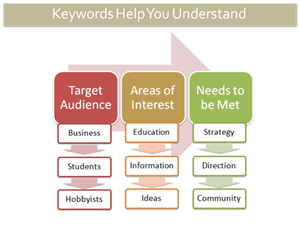
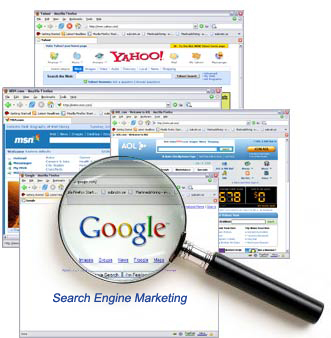
Image from http://www.searchengineguide.com/stoney-degeyter/seo-101-part-8-everything-you-need-to-kn.php

Image originally found here.

If not, it is time to take a moment (or multiple long moments) to work out how you want your organization to be identified online. If the words you think are most relevant are highly competitive (i.e. other websites that naturally generate more traffic use the same keywords), your site still may wind up buried deep in the results pages of a search.  So think about word combinations that may be less popular but more representative of your organization, and which may bring visitors and audience that will be most interested in what you offer.  A more comprehensive keyword  instructional can be found here or here. When you are ready to start placing keywords strategically, check out this reference.

Get analytical

Before you tackle your very own homepage, there are a number of tangential tools that are free and require only that you insert a little code onto your pages. The first is Google Analytics. We've said it before and I am here to say it again: USE THIS TOOL. It is free. It is incredibly useful. Register your website with Google Analytics and copy the code into your page (Analytics gives you a really basic how-to when you sign up).

Analytics tracks how people find you. Do they click on a direct link that they found on someone else's page (did you even know that someone else has linked to you?) or did they find you from a google search or did they track you down from your Facebook page? If your response is, "How could I possibly know where they came from?" my answer to you is "Google Analytics!"

I don't work for Google, Google doesn't give me any kind of incentive for talking about their products (I'm so over Google Chrome, by the way), and yes, they are approaching world wide web domination, BUT...they make great free tools. And you should learn how to take advantage of what they offer.

Over the summer I gave a shout-out to the Google Business Center, and I'm here to do a follow-up cheer. Like Google Analytics, the Local Business Center is free, and provides insight into how people are finding your organization. It can give you diagnoses and provide feedback on your website's traffic.  It also places your organization's physical location on a map that makes your location in real-space clearly apparent for someone who is searching. This means that somebody searching in Boston for information on the Artspace Gallery will be much less likely to get top results of Artspace Gallery on South Ridgefield Rd. in Edison, NV and Artspace Gallery and Coffeeshop in Madison, California, than your Artspace Gallery right there in Beantown.

Keep your site current

A search engine, when it crawls the web, isn't really looking at what is out there RIGHT NOW. It's actually searching the input phrase against pages that were cached in the past--sometimes a month or so ago or longer. (You can find out the last time the 'bot stopped by your site: in the list of search results there is a hyperlink below your site that says "cached" and will tell you when the page was indexed last.)  This means that you want to keep a consistent presence--and it also means that you cannot guarantee that your calendar will be indexed in time for your events, so be sure there are other places that information appears that may register more readily.

Keeping your site current is important, because when you update, the bot notices the next time its crawling out there, looking for sites that are active. You don't want somebody to search for your company and have the top five results be reviews from a play you produced in 2007. You want them to find YOU.  The challenge is that when your local paper is receiving a lot of traffic on a daily basis, even its archived pages are getting more action than your website. So does Facebook, incidentally.

(You say, "If Facebook receives a lot of traffic and therefore scores more highly in the bot's mind, does this mean that I should have a page on Facebook for my organization that also includes information and links to my homepage?"  I say, "YES! (Caveat: don't just use Facebook to say you use Facebook, have a social media plan.)  So, have some pages that have fresh, regularly updated content (this may be a blog, or perhaps a newsletter that you publish on your page once a month).

NOTE: This does not mean your entire site should get a face lift every month. There should be stable pages, with easily identifiable URLS (like www.yourgallery.com/directions  and www.yourgallery.com/home and www.yourgallery.com/artists) that stay consistent.  You may have links from those pages to other pages that do change frequently (your artist page may be about artists that have shown in the past, but have a link to "current show" that takes the visitor to a new page, www.yourgallery.com/lcorwinchristie), but you should have a core of reliable, recognizable pages that your visitors and Google recognize as solid.

Get listed

Alright, good work. The next thing I want you to do is sit down and think about the other search tools that people use that are NOT search engines. I'm talking about sites like Citysearch,Yelp, Yellowpages, ask.com, epinion. You may not be using them to find out something fun to do on a Saturday night, but I have news for you: a LOT of other people are. These are free directories that list businesses and allow users to write reviews and comments about experiences.

The great thing about this resource is that, because these web directories get so much traffic all the time, search engines check them. If your organization is listed with full contact information (THIS INCLUDES YOUR URL--I could rant for hours about how obnoxious it is to find a listing for someone ONLINE without a way to ACCESS THEIR WEBSITE. But I digress.), this gives a search engine more to go from. "Ohhh," it "thinks" in its little second-grade "brain," "The person searching for XYZ company is in Atlanta, and here is a listing on Yelp.com for an XYZ company that has an address in Atlanta!" Voila! A match made in Georgia!

Get linked

Another tip? Links are huge.  Links to both internal and external content will improve your rating when a search engine is looking for you.  As always, however, do not simply compile a list of links for the sake of having them. A search engine will notice if you have a "links" page that is little more than a list of everyone you have met and their blogs (recent or outdated).

It's much wiser, and more interesting, to integrate links into your web design. This can be in blog posts, or side bars on specific pages, definitely in artists' profiles.  The more you link out to places that are both relevant and potentially interested in what you are producing, the more likely they are to link back to you.  What does this mean?  Well, if Google sees that you have a certain amount of popularity, that is, that there are people who think that you are saying things that are worth sharing, it will consider you more important as it indexes your site.  (Yes, it's true--Google judges you.)

So, to sum it up:

  • Your headline, header tag, bold text or text that is a larger font, should be IMPORTANT and RELEVANT (and will thereby improve your searchability).  They should be placed higher on the page and centered whenever possible. There should be a continuity of keywords across your pages.
  • You should have a core of a few pages that have consistent content, and from those pages link to others that are updated and altered regularly.  Your homepage can be current without being overloaded with new content on a monthly basis.  Having the pages link to each other ("artists" from "home," "location" from "artists" and "home") is also crucial for giving the search engines a sense of the overall picture of your site and the information therein.
  • Plan ahead:  If you have an artist who you will be featuring in a few months, publish a page about that artists in advance.  That way the 'bot can find the information before it is outdated. The 'bots only stop by every month or so (and if you were cached long before that, you have some updating to do!)
  • Plug your page in sites where it is kosher to do so: Yelp, Yellowpages, Citysearch, and so forth.  And remember, this also gives people a forum for discussing your work, and this will give you a sense of what the word of mouth is about what your organization is doing.
Eric Whitacre dreams of his Virtual Choir Machine

This morning I had the pleasure of watching Eric Whitacre's latest virtual choir release (see video below). This effort, the composer's second, combined 185 individual singers from 12 countries recorded independently.  Whitacre conducted the choir through a YouTube video. The videos were then combined together by producer Scottie Haines in a very familiar formation--the videos look like they are on risers, with Whitacre in the traditional conductor's position.

Whitacre has always been looked on as a sort of "rock star" composer in my peer group (I define them as "20-something music nerds"). My college choir was ecstatic to sing his pieces--they sounded new, modern, but with elements we could connect to both as musicians and listeners. They had cool titles, like Leonardo Dreams of his Flying Machine. (I mean, who writes choral pieces about Leonardo da Vinci's sketchbook?) And, of course, they contained those famous "shimmer" chords that we loved to sing. His "rock star" positioning is evident in his YouTube page. (check out the promotional photo that proclaims Marvel Comic/Criss Angel style "I. AM. ERIC!") Projects like this cement his reputation, and you have to admire him for it. Good music, marketed well.

Why is this project so fascinating? It's new, sure, but seeing the singers' heads, framed by their "natural surroundings" was especially compelling to me--more so than a simple video of a performance, like the YouTube Symphony Orchestra. Digitally created music presented in a digital medium rings true, more so than traditionally created music presented in a digital medium. It's the same reason why I've only been to one Met HD broadcast--I crave that feeling of "genuine-ness".

I've been doing a lot of research lately on video footage of the performing arts and have heard many different views on how video footage (especially streaming of entire performances) will either preserve or destroy the live performing arts industry. This debate exemplifies the inherent friction we sometimes find between the arts and new technologies. (There was a great speech given on this topic by Ben Cameron at the TEDx conference, if you haven't seen it yet.)

But I can't help coming back to my simple love of live performance. Nothing replaces it, in my mind. Maybe I'm atypical of my generation in that respect. Or maybe the fact that I get equally excited about Whitacre's 'Lux Aurumque' YouTube video and the Bach Sinfonia performing Bach's complete motets live in a concert hall shows that I am fundamentally and irrevocably a part of it.

Whitacre has always been looked on as a sort of "rock star" composer in my peer group (I define them as "20-something music nerds"). My college choir was ecstatic to sing his pieces--they sounded new, modern, but with elements we could connect to, and those famous "shimmer" chords that we loved to sing. His "rock star" positioning is evident in his <a href="http://www.youtube.com/user/EricWhitacresVrtlChr">YouTube page</a>. (check out the promotional photo that proclaims Marvel Comic/Criss Angel style "I. AM. ERIC!") Projects like this cement his reputation.

Anonymous input, please!

We're putting together a webinar on digitizing art, and want to know what YOU want to know.  Please help us make this an experience that benefits you by filling out this 3-question survey. I promise you--it will take less time than it took you to fill out the Census. Even if you are the only person living in your household.

Thanks!

Upcoming Webinar - Putting Social Media Strategy Into Action

rebeccakrausehardie_registernow150pxMarch 23, 2010The Arts & Social Media, Part II: Turning Strategy Into Results 2:00pm-3:30pm Eastern Presenter: Rebecca Krause-Hardie Registration: $25.00

You've dabbled with social media; you've got a general sense of how to think strategically; now what? In this session, we'll go beyond the jargon into the nitty-gritty and practical details of executing a successful social media plan. This is a highly interactive session. As the starting point, we'll explore your goals, questions and your projects and clarify the steps needed to turn them into reality.

In this engaging 90-minute session, you will:

  • Learn how to create a step by step action plan to get you going
  • Look at some great case studies from other arts organizations
  • Identify and define 5 practical steps you can take now to have your project soar
  • Rebecca Krause-Hardie is a project manager, facilitator/trainer, social media strategist, & arts blogger, helping arts and non-profits use the web and social media effectively. Rebecca has over 20 yrs experience in new media, business, marketing, finance and project management. She developed and has been the Executive Producer of the award winning New York Philharmonic's Kidzone website, now in its 10th year. Representative clients include the Boston Symphony, NY Philharmonic, Detroit Symphony, MAPP International, Canadian Museum of Nature, NYS/Arts, Caring.com and the Paul Taylor Dance Company and Dance/USA.

    Please Note: While this session builds upon ideas discussed in The Arts & Social Media, Part I: From Experiment to Strategy, this webinar is a stand-alone session appropriate for all artists and arts administrators.