Can You Ever Have Too Much Redundancy?

SanDisk has created a flash drive for the forgetful, careless, or paranoid:  the 4GB Cruzer® Titanium Plus, a USB flash drive that automatically copies the drive's contents to an online account every time you plug it into a internet-connected computer. Scenario 1 - You delete an important file from the drive and need to recover it, pronto.  You easily access your online account, which also has 4GB worth of file space.  Your account stores files that you delete from your drive for 30 days provided the total size of the currently backed up drive files and the previously deleted files do not exceed 4GB.

Scenario 2 - You lose the drive.  You have the option to password protect your files using a AES hardware data encryption feature on the drive.  Plus, the drive comes with two years free service with BoomerangIt, a lost-and-found mediator; you slap a sticker on the drive, and, if someone finds it, BoomerangIt facilitates its return (for a fee, of course).

Scenario 3 - You run over the drive with your Subaru. Again, you're covered.  The drive's gone, but your files are still online.

So, what's it going to cost you?  $60 for the drive and $30 a year (after a 6 month free trial) for the online service.  That's a fairly hefty price, at first glance, for a 4GB USB drive, but the peace of mind might be worth it. 

For more details and specs, check out SanDisk's press release.

2008 AAM MUSE Awards - Applications due Jan. 11th

The American Association of Museums (AAM) Media and Technology Committee is accepting online applications for the 2008 AAM MUSE Awards until Friday, January 11, 2008. The cost is $25 per entry. The 2007 Muse Awards competition received nearly 200 applications from a wide variety of museums in North America, Europe, Australia and Asia. Entries included audio, cell phone and interactive handheld tours, interactive kiosks and multimedia installations, podcasts, blogs, games, websites, online collection and image databases, videos and e-mail marketing campaigns. This year AAM is expecting another exciting round of projects that reflect innovation in the museum media community.

Entry categories include:

  • Audio and Visual Tours
  • Extended Experience
  • Games
  • Interactive Kiosks
  • Interpretive Interactive Installations
  • Multimedia Installations
  • Online Presence
  • PR and Development
  • Teaching and Outreach
  • Video

MUSE award winners demonstrate outstanding achievement in the following areas:

  1. Success in meeting the stated educational goals
  2. Visual design
  3. Production quality
  4. Functionality
  5. Appropriate use of technology
  6. Overall appeal

Click here for more information and to apply online.

Let's Take a Moment to Mourn DRM

According to an article in Business Week, Sony BMG Music Entertainment will start selling songs without copyright protection sometime this quarter, a move that will essentially kill the much-loathed digital rights management, or DRM. Basically, this means that songs you download through iTunes, Amazon, eMusic, or any other service will be completely unprotected.

Naturally, the catalyst for this move is money. A company would never do anything out of the goodness of its collective corporate heart. Sony and other labels realized that DRM was not only restricting the illegal distribution of music; it was also restricting the LEGAL distribution of music. With the canning of DRM, we should begin to see a plethora of new platforms for online music sales.

The irony in this story? Well, apparently the music industry is frustrated by Apple's pricing structure and wants a larger piece of the pie from music sales. The funny thing is that DRM was really what led to Apple's domination in the legal download market. When online music sales started to take off, the iPod was the dominant MP3 player on the marketplace (and still is, really, though there are more options now), and the only way you could buy and play protected music for the iPod was from Apple.

The only way for the music industry to cut into Apple's iTunes dominance is to offer unrestricted mp3 sales to retailers like Amazon.com, as MP3s can be played on any digital audio device.

What does this mean for the arts community? In my opinion, it won't make it less likely that an orchestra's performance will be shared illegally. However, it does level the playing field. If music executives - the people with money - have to deal with unrestricted audio being freely distributed, perhaps the strategies they devise to curb illegal activity will help to inform the nonprofit world.

In other words, we're all in the same boat, so the rowing should get a little easier for us artists.

Read the full Business Week article.

Powered by ScribeFire.

Much Ado About File Formats

The web has been buzzing this week with discussion of an issue with Microsoft Office and older file formats. Here's the gist of the issue:

  • When Microsoft came out with Office 2007, the new software blocked users from opening files created by older versions of Word, Excel and Power Point - mostly programs launched in 1995 and earlier. The change also kept users from opening some files made in Corel Corp.'s CorelDraw.
  • In September of this past year, Microsoft released Office 2003 Service Pack 3 - a free package of updates and fixes which also blocks users from easily opening the older file formats.

So why would Microsoft make it difficult for Office users to open older Office file formats?

According to Microsoft, opening these files poses a security risk. Specifically, the code that reads these older file formats may open a PC to hacker attacks.

What should you do if you ever find yourself using Office 2007 or Office 2003 updated with Service Pack 3 and needing to open an older file format?

  • You can create a trusted location and place the files there. This is documented in http://support.microsoft.com/kb/922849. It's an easier process if you're running Office 2007 than if you're on Office 2003, but it is an option.
  • You can change the default version that Office 2007 & 2003 will still open. Information on how to do this may be found here.

Granted, most of us are not regularly opening active files from 12 or more years ago.  The only files I still open that are so old are a series of poorly written poems from my undergraduate days.  Hmmmmm, maybe it's better if I don't open those after all....

Man from Mars

I can't remember where I first heard this lovely bit of advice, but I figured I'd pass it on (especially since one of my New Year's resolutions is to make silly pictures of myself more often). Man on MarsWhen looking at your organization's Web presence, it sometimes helps to ask yourself, "Would a man from Mars understand this? Would he be able to figure out what we're about?"

If a casual, first glance at your home page does not make it clear what your organization does or where a visitor can find needed information, then it might be time for an overhaul.

Klaatu barada simple.

End of Year Tech Lists

As we head into the final stretch of 2007, the time has come for a barrage of "end-of-the-year" lists.  Here are a few tech-related lists worth checking out: The 15 Biggest Tech Disappointments of 2007 (PC World)

30 Most Popular Stories of 2007 (PC World)

  • Okay, this list contains a plethora of other lists.  I apologize for going all "meta" on you.

The Year in Online Video (Wired)

2007 Foot in Mouth Awards (Wired)

Have a safe and happy New Year!

Holiday Guilt Gifts with a Techie Twist

We hope you are having a happy Christmahannukwanzika.  This post is for all of you out there who need the dreaded "guilt gift".  You know who you are -- you received an unexpected gift from someone and now feel the need to get something for them in return.  Here are four holiday "guilt gift" ideas with a techie twist from our friends at ThinkGeek.com. USB Plasma BallUSB Plasma Ball - Remember the plasma balls that used to be sold in the mall at Spencer Gifts?  Now, they have one that plugs into your computer.  The perfect desk accessory for that eccentric friend.

PhotobucketUSB Memory Watch - In addition to displaying the time, this watch helps you carry your valuable data with you at all times.  With 2GB of capacity, it has more than ample storage.

USB Drink Warmer and ChillerUSB Drink Warmer and Chiller - It's perfect and it's simple - a hotplate powered by USB keeps your coffee warm. Flip a switch, and it can keep a cold drink cool.  Great for bipolar caffeine addicts.

Driving LED EmoticonDriving LED Emoticon - The Driving LED Emoticon is a battery powered, wirelessly controlled message sign that can be attached to the rear window of your car via the included suction cup.  It can display any one of five different messages - smiling face, frowning face, "Thanks", "Back Off" and "Idiot". Isn't it great that technology allows us to communicate more clearly than finger gestures?

Please BCC Me

It's amazing how many people still don’t, at the very least, BCC their recipients when sending out mass emails. BCC stands for blind carbon copy; this means that any address listed in a BCC field will get a copy of the email, but their email address will not be displayed to anyone else who is sent the email. That includes anyone in the TO or CC fields. Before I continue, I want to offer this to all of those out there who have been victims (I thought about putting that in quotes, but ultimately decided not to) of non-BCC’ing. Whenever your email address is exposed in a manner you wish it hadn’t, send a friendly response to the sender of the email and point them to this post. I have composed a reply with this post’s link here.

Since September 2007, I've received at least 5 emails where I my email address is listed right out in the open in the CC field (along with a total of 406 other individual email addresses). My email address has been leaked on audition notices, a Holiday "goodie guide" from the couple who made my wedding cake, a local performance group's new show announcement, and other emails.

So what's the big deal?

Security. Pure and simple. If you have email addresses for patrons, artists, donors and so on, it is your responsibility to protect those addresses and use them wisely. Due to the faux pas of the aforementioned emails, I now have access to over 400 email addresses of people who have shared interests. I could add them to my own email distribution list, send them my own announcements, spam them, track them down, flame them, or worse. To borrow an analogy..."Look at it another way, would you send your entire holiday card address list out with each card you sent?"

Nobody wants their email addresses shared in this way. Nobody.

How do you BCC?

It’s simple. When sending a mass email, first put your own address in the TO field (1). I know this sounds weird, but trust me, this is the thing to do. Plus, you’ll receive a copy of the email in your own inbox for your records. Then, put all of your other addresses (the ones you want to hide) in the BCC field (3). You have the option of adding addresses in the CC field (2), but keep in mind that everyone getting the email will see these addresses.
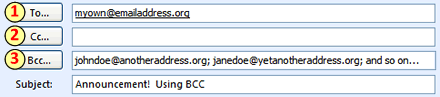
Screenshot showing email address fields

All of the recipients in the BCC field will get a copy of the email with the same address in the TO and FROM fields (in the screenshot above, myown@emailaddress.org) and no other addresses.

Pretty nifty, huh?

The specifics of using the BCC field, like getting it to show up in your email composition area in the first place and the formatting used to separate email addresses (commas or semicolons) can differ depending on what software you are using. If you need help figuring it out, I’d suggest using either the help resources of your email program, the links listed at the end of this post, or an internet search.

What other mass email options are out there?

This BCC business is the bare minimum that you should do to protect your recipients’ privacy. But, if you’re a group or organization that is currently or will be sending out lots of mass emails (or eBlasts, if you prefer the hip and trendy terminology), consider utilizing one of the many bulk email software/services out there. Here’s a list (in alphabetical order) to get you started in your searching.

http://www.constantcontact.com/ http://www.icontact.com/ http://www.lsoft.com/ http://www.patrontechnology.com/

Anyone out there use one of the services mentioned above? Or are using a different one and want to tell us about it? Please leave us a comment.

Related links http://www.cs.rutgers.edu/~watrous/Bcc-for-privacy.html http://www.iwillfollow.com/email.htm

Blogfather, We Salute You

As this is a blog, I thought it appropriate to point out that Monday was the 10-year anniversary of the term "weblog." The term was first coined on December 17, 1997, by Jorn Barger, an interesting character, to say the least. Barger is a thing of Internet lore, having spent time as a software programmer, a technology theorist and, most recently, a homeless drifter.

Here's a 2005 photo of Barger:

Eek. He may be a bit Charles Manson-esque, but he's the father of blogging, and he deserves some recognition this week.

If you want to check out Barger's own blog, Robot Wisdom, visit www.robotwisdom.com. As Barger believes a blog should be more a history of Web travels than a journal, you'll notice that he comments very little and mostly offers up links.

And if you'd like to read more about Barger, visit his entry on Wikipedia. Remember, not everything on Wikipedia is true, so take the tales of Barger's travels and trials with a grain of salt.

Powered by ScribeFire.

Everything Old Is New Again

Greetings!  As Cary mentioned in a previous post, I accepted the Executive Director position with the Center for Arts Management and Technology; and after three weeks on the job, I couldn't be more thrilled.  I love the mission; the staff is fantastic; and the work environment has been wonderfully inviting.  There's just one thing...relearning Microsoft Office. I know that part of changing jobs involves learning new policies, procedures, systems, and (in this day and age) software; but this is Office I'm talking about here - the backbone of administration, right?  At my previous organization, I grew to be an "advanced" user with Office 2002.  I had a gold star and everything; but now, I have to learn Office 2007, and I'm right back in the novice seat.

Sure, I have transitioned between previous versions of Office, but this is different.  For example, they took away my trusty standard toolbar in Word - you know the one with File, Edit, View, Insert, Format, Tools, Window and Help - and replaced it with a Fluent user interface featuring Home, Insert, Page Layout, References, Mailings, Review and View. Okay, okay...maybe that's not such a big deal.

But what about this?  They changed the file extensions.  Now, when I send a MS Word document to a colleague, they receive a .docx file instead of a .doc file.  That's four letters instead of three.  What were they thinking?  Of course, I can save my files in an Office 2002-compatible format before sending them, and Microsoft does offer a series of converters allowing users of previous Office versions to open 2007 files.  

Hmmm, maybe this transition isn't going to be that difficult after all.

Click here for more information on the improvements built into Office 2007

Wired's Geekipedia: Technology Defined

Tired of being the only one in the room who doesn't know Ajax from crowdsourcing? Now if anyone ever confounds you with a technology concept or buzzword, you can simply nod your head as if you know what they're talking about, excuse yourself to the restroom, and look it up using Wired's Geekipedia.

New entries are added all the time, and you can even suggest entries.

Powered by ScribeFire.

The Next Generation of Market Research?

A San Francisco company called Emsense claims to have technology that will monitor a person's reactions to visual and auditory stimuli, such as a TV commercial or video game. Basically, the test subject wears a headset that looks like the visor Geordi La Forge wore on Star Trek: The Next Generation, and the device measures blink rate, breathing, skin temperature and head motion. Then the system's software analyzes the data and presents findings to the test administrator.

How useful would something like this be for arts organizations?

Since most arts ads are print based, the Emsense device wouldn't be very practical. However, imagine hooking up random ballet audience members and measuring their responses to a performance. Would funders be interested in how the 'Dance of the Sugar Plum Fairies' cause a substantial elevation in skin temperature?

Maybe not. But it's always good to be aware of new possibilities.

Read the full article from Technology Review.

Nonprofit dance and IT?

The folks at Misnomer Dance just sent me a link to their proposal to IdeaBlob for $10,000 that would allow them to build web-streaming for dance rehearsals, create an online theater where visitors can watch and direct performances and develop tools to display the geographic are of online audiences. Of course, the skeptic in me wants to know how you could possibly do all this for $10,000, even assuming that it will all be done low-cost, mash-up style. On the other hand, the idealist in me wants to get in on that online theater thing right now! Body mounted cameras? Sign me up! I've always wanted to know what it's like to be able to jump as high as dancers, or be lifted up and twirled around over someone's head... Maybe this would be my chance to find out!

If you'd like to vote for Misnomer to win the $10k, click here.

...And in the old-fashioned tradition of eating words...

Maybe we do get some extras out of the deal, too! A piece I just saw in today's NYT describes new research that suggests musicians (specifically conductors) are able to simultaneously process sound and sight more effectively than the average person. So there ya go. The benefit of art is art. And the benefit of training musically is heightened senses. (Who woulda thought?)

Art for art's sake

[Writers note: apologies are given in advance for the blatant lack of technology talk in this post.] A couple weeks ago, I was a panelist at an Americans for the Arts "Creative Conversation" here in San Francisco. We were hosted at the lovely Brava Theater Company in the Mission. A group of passionate arts administrators, we sat in a circle on the stage and discussed a wide range of topics including collaboration, community engagement, grass roots initiatives, lobbying and activism.

And, of course, we discussed obtaining funding for the arts. How do you make a compelling case? How do you get people on board? How do you educate folks about your programming? And, inevitably... the question that is always raised when we talk about raising money for our field: what are the ACTUAL benefits of the arts?

Reporting Live from AFTA’s National Arts Marketing Project Conference

Well, I’m down in sunny, breezy Miami, FL, enjoying the warm weather and the Americans for the Arts NAMC. It’s been a busy two and a half days of conferencing, and I just wanted to take a minute and share a few cool things I’ve learned while here:

  • According to a survey conducted this past March by FireSpring (I think), when asked whether they use a particular medium more or less this year than the last, an average of 52% responders indicated that they were using the Internet more. Every other medium (radio, print, newspapers, television) all showed a decrease. Now, more than ever, organizations must put time, money and deep consideration into their Web presence.
  • The Philadelphia Orchestra is working in conjunction with Internet2 to stream real time content into educational venues around the world, giving viewers an inside and behind the scenes look into the concert unfolding live before their eyes. The have completed a pilot program, and plan to launch a more wide-spread, sustainable program soon. For more information, you can read their press PDF by clicking here.
  • Bijan’s on the River here in Miami makes a HUGE plate of paella (6’ or 7’ wide?) for parties. It was spectacular.

Well, that’s all for me. I’ve got to grab a bite, hop on a flight, and head back to wonderful, but cold, Pittsburgh, PA.

For more information about AFTA's NAMC, please visit: http://www.artsusa.org/events/2007/abc/namc/default.asp

Ahhh intentions.

It's been almost three weeks since the 2007 Technology in the Arts conference and, I'm sure you're wondering, what happened to the Technology in the Arts blog!? Well, my friend, you're not alone. I've been wondering the same thing. Particularly when I'm dozing off to sleep after another long hectic day and it pops into my head that, once again, I haven't written anything.

Rest assured that things have not really slowed down that much on the Conference side of things at CAMT. We've been busy making all the session evaluations electronic, determining how best to analyze our results, tying up all the lose monetary ends (event planners, I know you feel my pain), and, well, generally cleaning up. (Don't you like how I tell you to rest assured? I'm sure all of you were having panic attacks over whether or not we were working on the conference!)

Oh, and there's been one other tiny, little, minor change: I've moved to San Francisco. That's right. I'm actually sitting and writing this now from the City by the Bay. This transition has been a long time in the coming, and I'm delighted to say that the new ED of CAMT is a phenomenal man and one who loves the arts and technology... David Dombrosky.

In fact, David and Jerry Coltin are going to meet up with me here in SF tomorrow and Friday for a good old fashioned brain dump. Then, David will start full-time at CAMT on November 26. I, on the other hand, am starting an arts management consulting firm and my first client is... wait for it... CAMT! For whom I will be running both the Technology in the Arts conference in Pittsburgh as well as our new sister conference in Waterloo, Ontario.

Now that you're fully in the know, feel free to stop stressing over the terrible, terrible lack of blog postings at your favorite blog. And feel free to drop us a note... Particularly if you attended this year's event! We'd love to hear what you thought, and any ideas you have for making the event even better next year!

Technology in the Arts: Post-Conference Wiki

Elizabeth Perry, one of our Technology in the Arts 2007 presenters, was kind enough to set up a wiki site for post-conference discussion. You can access the wiki at http://tita.pbwiki.com/.

The site is public, and the password is tita2007.

Please post any interesting conference follow-up information. If you were a presenter this year, please also post a way for people to access your session content. A great way to do this is by using SlideShare. It's easy... and free!

Final Search Engine Optimization article

Make Your Nonprofit Website a Top “Hit”: A 30 Day Step by StepGuide to Dramatically Improved Search Engine Optimization Part 4 of 4 By Lance Trebesch and Taylor Robinson Lance@TicketPrinting.com http://www.ticketprinting.com/

Week 4 Objective: Your objectives in the fourth and final week include emailing potential link partners, negotiating link agreements, and continuing your education of SEO and nonprofit resources online.

Let’s Get Started:

1. Link Recruitment Email- Unless you have a personal friend within the site you are trying to contact, the first step you should take is to email requests for links. To do this you will want to make sure that your email contains the following:

  1. Include the request for the link early in the email so the reader knows the purpose.
  2. Explain what your website has to offer and why it will be beneficial for them to link to you. Be sure to demonstrate how this will benefit the users of the partner site.
  3. Tailor your request for the site you are contacting. Do some research and learn what services they provide to better understand their needs.
  4. Give your sites URL (address) that you would like them to use for the link. To make your link structure look more natural to search engines, do not always give the URL of your homepage. Where appropriate, link to pages within your site that are more beneficial to the link partner.
  5. Tell where you would like your link to be placed within their site.
  6. Give your contact information and request for them to contact you if they are interested.

Link Negotiations- After you have made contact with the organization; you will negotiate the terms of the link. Use the information you collected in week three with your primary and secondary link objectives to discuss the link placement. Again, your goal should be to get a link on their homepage, or within a part of their site that is topically relevant. Other points of negotiation will likely be how long the link will be posted and the appearance of the link. Use varied anchor text with your links. For example, do not ask for a “click here” link, but rather one that is topically relevant such as the organization’s name or main purpose.

2. The Future

Staying current with the latest technology advancements will make your nonprofit more successful. Below are three technology changes that will have a direct impact on your organization. By understanding what these key changes are and how you can use them, your organization will be better positioned for the future.

  1. Vertical Search Engines- Have you ever wanted to search for information that is specific to nonprofits but been unable to find what you are looking for in general search engines such as Google or Yahoo? The growing number of vertical search engines may be the solution you are looking for because they are specifically focused on one topic or user group. Today, Guidestar and the Nonprofit Technology Network (NTEN) are great tools which help network nonprofit organizations and related information. GoodSearch is also an excellent choice for more broad information searches because they donate 50% of their total revenue back to the nonprofits registered on their site.
  2. Rich Media and Content– Rich media is becoming more and more popular due to its aesthetic appeal, but should be implemented with caution. It is often difficult for search engines to crawl frames and java content and therefore may be detrimental to your SEO efforts. Also, users with low bandwidth internet connection may become frustrated while waiting for pages to load. For more information on optimizing rich media content, visit http://www.seonews.com/.
  3. Social Networking- Sites such as MySpace, Facebook, Squidoo, and Friendster have caught the attention of many commercial companies and nonprofits alike for their unique ability to connect individuals. Many nonprofits are using social networking sites to raise awareness for their organization and accomplish very real fundraising objectives. For more information about how to leverage social networking, read TechSoup’s article, “What Can Social Networking Do for Your Organization?” or part one of my fundraising series titled, “6 Unique Online Fundraising Techniques for Your Nonprofit”

Review- Let’s now review your progress over the last four weeks.

  1. You have identified several keywords and integrated these into our websites content. This has helped your website become more visible to searchers and improved its natural search position.
  2. You have created a blog on your website which facilitates communication between affiliates and the organization while simultaneously encouraging other blogs/sites to link to you.
  3. A well thought out link campaign strategy which targets topically relevant partner sites has been established.
  4. You have begun to execute your link recruitment campaign by sending emails and negotiating link agreements.

Congratulations! You are on your way to vastly improved search engine optimization. Remember that great SEO is a continuous process and should be perused with diligence for as long as your organization is on the internet.

Week 4 Checklist:

  • Email websites
  • Negotiate link agreements
  • Establish technology goals for future
  • Continue SEO campaign and remain current with research