



Touring the Louvre with a Nintendo 3DS

The eagerly awaited Nintendo 3DS audio guides arrived at the Louvre in early April. For security reasons, they are not quite the action packed adventure that some may have been hoping for. Nevertheless, the audio guides are a great way to tour the museum and have some neat capabilities.

A recent review by Mike Schramm of Joystiq provides insight on just how Nintendo 3DS has been utilized at the Louvre.  As he notes, the audio guide lets visitors explore the museum in three ways; an interactive map, a Masterpieces Tour, or an option called Visit a Must-See Work.

The interactive map highlights points of interest within the museum, which indicate the presence of audio commentary for a particular work.  According to Schramm, “Each point of interest on the 3DS' map has at least one bit of audio commentary on it, and sometimes more than that, with various museum officials or professors talking about the work in more depth.”

The second option is the Masterpieces Tour, which will lead you to artworks that have known to draw gasps, tears, and unquestionably, l'humanité en masse.  The Masterpieces Tour always keeps apace with you thanks to the 3DS has geolocation capabilities. Those with a tendency to wander will be happy to hear that the audio commentary only begins once you are within the vicinity of the masterpiece. The tour is also flexible in that you can visit other works during your tour; the 3DS will simply (and silently) wait for you to get back on track.

The final option is the Visit a Must-See Work, which will light up a “flashing route line” to a famous artwork nearby. If you happen to be lost, the option acts as a silent distress call, saving you from museological trouble one masterpiece at a time.

The Louvre’s audio guide also makes use of Nintendo’s display and 3D capabilities.“In addition to the audio commentaries, there are 3D photos of the galleries, high-definition images of the artworks, and 3D reconstructions to help you identify the exhibits and give you extra information.” Schramm mentioned how high resolution images of artworks are available on the 3DS, making it easier to explore details on the touch screen. The display is also used to showcase different artworks being compared to the artwork at hand during an audio commentary.

The only drawbacks noted by Schramm were the short battery life and the 3DS’s inability to keep up with location changes of certain pieces. Even so, the Nintendo 3DS is a Super Mario sized step forward in interactivity and audience engagement at the Louvre. In fact, the Nintendo 3DS echoes back to The O at the Museum of Old and New Art (MONA), with its geolocation and touch screen capabilities.

Devices such as The O and the 3DS do more than just guide users, they help them discover. And this sense of discovery is a lot more compelling when users are leading themselves through one of the world’s most visited museums. Nintendo in the Louvre? C’estformidable!

Eventbrite’s Newest Ticketing Solution: the "At the Door Card Reader"

Eventbrite, an online event management company and ticketing platform, just recently released a new product to make selling tickets on-site easier for the consumer and event manager- an iPad credit card reader. In the past, Eventbrite operated completely online. Event managers would create an event page for, let’s say, a jewelry-making workshop or a local symphony concert. Buyers would purchase their tickets online. However, those who purchased their tickets onsite at the last minute were not able to purchase them through Eventbrite. For this reason, Eventbrite launched the iPad application in December, “At the Door,” available for free from the iTunes App Store . 

Can "Highlight," a Location-Based Application, Serve the Arts?

Back from South by Southwest (SxSW), a few of our Technology in the Arts staff members are buzzing about the exciting digital apps, tech tools, and conversations they participated in during their jam-packed, no sleep, wild partying (just kidding…kind of…) trip to Austin, Texas, last month. One of the most talked about technologies from the SxSW interactive conference was and continues to be Highlight, a location-based application available for free for the iPhone at the iPhone App Store.

Let's Talk About Tumblr

Tumblr has not been discussed here in over a year, which I believe to be an egregious error. Since it’s undergone some significant changes since our last post, let’s revisit this microblogging platform (which is one of my personal faves). Our original post covered the basics of Tumblr, so if you haven’t checked it out, maybe that’s a good way to get up to speed.

This article is part one of a three part series about Tumblr for arts organizations. The second part can be found here, and the third part will be posted April 27, 2012.

Tumblr was launched in 2007 and is very popular amoung Millennials. Half of users are under the age of 25, and about 20% are in the 25-34 range. The average user spends over two hours on the site per visit and as of 9:00 EST this very morning Tumblr had 19.7 billion posts from 49 million blogs.

Tumblr has some features that are new or a bit different since our last post, including:

The new posting Dashboard - Image via Tumblr.com

Revamped Messaging System A slew of spam messages last year caused the website to reconsider how users message one another. The main communication issue still remains (inability to have a real discussion), users can only post short replies to posts with questions or if the users have the “reply” option enabled. Messages are limited to a certain number of characters and cannot contain links.

Fan Mail The new messaging system does contain a “Fan Mail” feature, which is exactly what it sounds like. Users can customize the appearance of short messages to their favorite blogs who have this function enabled.

Tumblr Fan Mail - Image via Tumblr.com

Share on Tumblr Like Pinterest, Tumblr has a bookmark button that allows users to grab content from anywhere on the web and share it on their Tumblr.

Mass EditTumblr has a mass post edit feature! Now you can easily select posts, delete them, and alter their tags.

There are still some challenges when it comes to Tumblr:

Bye bye Directory The Directory was an aggregation of Tumblr’s top blogs, organized by category. With its disappearance, Tumblr has become even more of a clique – it's hard to find Tumblr blogs unless you already know where to find them. Tumblr still recommends blogs that would be relevant to your interests on your Dashboard, but since you have to have a Tumblr and follow enough blogs for them to know what you like and make a recommendation… It’s a little bit Catch-22.

Success Metrics There’s still the challenge of measuring the impact of your posts. Tumblr has made it easy for you to install Google Analytics to your blog, but offers no internal solutions. (It is still awesome to have a post blow up and go viral though).

Overall, Tumblr is still an interesting blogging platform, with a lot of opportunities for arts organizations to connect with a young demographic. The first week of April will feature the second part of this series: a Mini-Nar on creating your own Tumblr. We’ll also talk about some best practices, including how to fully utilize a GPOY, interacting with your community, and the importance of GIFs. Get hype! Go enjoy your weekend! Don’t burn yourself with that new iPad!

The Royal Opera's The Show Must Go On, Reviewed

has the player assuming the role of a stage manager at a variety of different productions.  The degree to which the player succeeds or fails at a series of mini games effects the show itself at the end of the scenario.  This game was play tested on a IPad 1 for this review. Fun:  (4 out of 5 stars) The game plays well.  The characters are charmingly rendered and are well suited to the genre of performing arts that they represent.  The music of the show in question plays on cheerfully in the background and was a highlight.  There was a good sense of immediacy in the constituent games within each production and as such the overall sense of timing was well designed.  The strategies involved in game play were pretty linear and as such may be better suited for a younger audience.

Playability:  (4.5 out of 5 stars) The game is quick to learn and master.  The constituent games are well suited to the touch interface.  Each module within a show has enough different about it to keep most people engaged for hours.

Depth:  (2.5 out of 5 stars)  The app and the four shows yielded about six and a half hours of game play.  The player has to unlock each show in order and can play individual modules in the score attack mode.   For an adult player the replay factor is limited after the four show scenarios replay is probably quite a bit better for a younger audience.

Value: (4.5 out of 5 stars) For the price of $.99 this feels like a bargain.

Overall: (4 out of 5 stars) There are a lot of good things going for The Show Must Go On.  This app is a fun and easy introduction to four famous shows.  The music that plays with the game is lovely, even when played through iPad speakers.  I highly recommend checking this app out for killing time during holiday travel, it worked well for me.

Everybody's talking about Google Art Project

Is Google Art Project setting a new standard for the online art world, or is it all just hype?  Since its release a few days ago, the public has taken its first stroll through the project’s virtual galleries and in general, first impressions have been enthusiastic.

Birth of Venus

Birth of Venus

"The Birth of Venus" by Sandro Botticelli. Uffizi Gallery, Florence via Google Art Project

Arts lovers are all abuzz about its fabulous image quality, its accessibility to broad audiences, and its educational potential.  While it is too early to tell how much of an impact Art Project will actually make on museums and the art world, the collaborative spirit and innovative technology of the site shows great promise.

For the past 18 months, Google has collaborated with 17 world-class museums to create "Street View"-style tours of their permanent collection galleries.  While “walking” around a gallery, a virtual museum-goer can zoom in on any one of 1000 artworks.  Many of these images are also accompanied by information such as descriptions of the work, artist biographies, links to more in-depth coverage on the museum’s website, and even some informational videos.

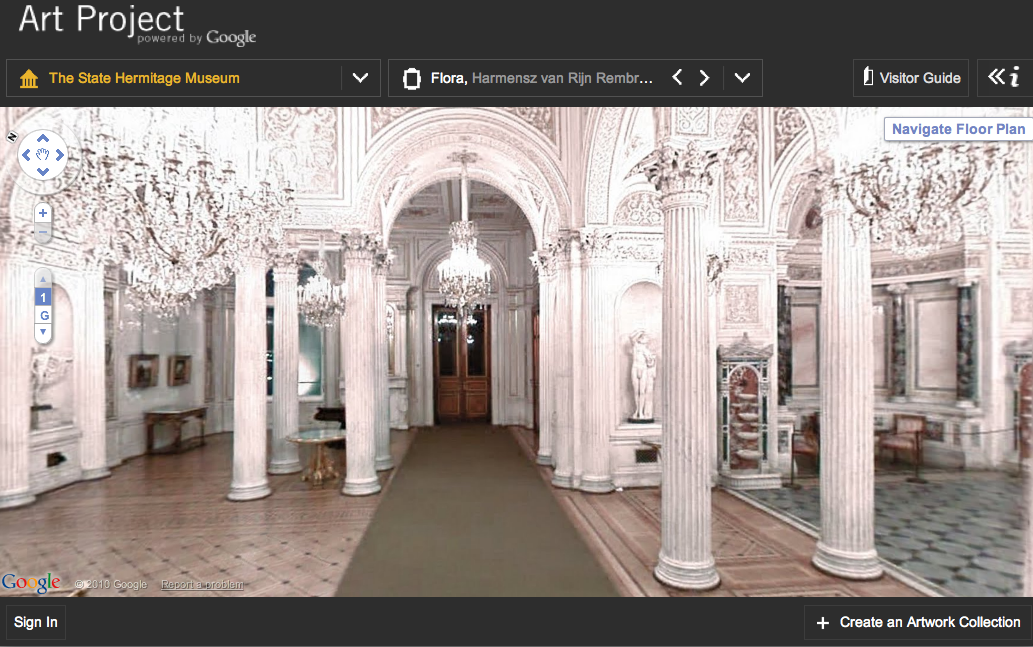
The Hermitage Museum via Google Art Project

The Hermitage Museum via Google Art Project

The State Hermitage Museum, St. Petersburg, Russia via Google Art Project

Even better, one artwork per museum is available in “gigapixel” resolution of up to 14 million pixels so that you can zoom in almost microscopically close to the canvas.  This allows for an intensive scrutiny of artwork that has not been previously available online.

In addition, visitors have the option to curate their own virtual collections, including details that are captured by zoom, and comments about the art.  These collections can be shared via Facebook, Twitter or embedded link.  It’s free, but you’ll need to sign in to a Google account to create your own collections.

  • Navigating through the virtual galleries can be mesmerizing. Personally, I loved the feeling of revisiting those museum galleries that I hadn’t been to in years. It was a truly moving experience to be able to unlock those visual memories. And for those museums that I haven’t yet visited but have always wanted to see, it was great to get a taste of what visiting might actually feel like.

  • The Street-View technology at times can be quite cumbersome and frustrating. Often, I found myself stumbling around, bumping into invisible walls, fruitlessly clicking away and trying to back myself out of corners. In addition, the image resolution of the navigation tool can be fuzzy, especially in contrast with the images of the artwork itself.

Starry Night

Starry Night

  • The “gigapixel” technology is jaw-dropping, and it feels so much more intimate than your run-of-the-mill online image. As Nancy Proctor and Julian Raby of the Smithsonian point out, "to engage with the work of art in this way transforms the web experience from an informational one to an emotive one.” I imagine, and hope, that these super high-resolution images will someday become ubiquitous in online museum collection. While not a substitute for seeing the art in person, these images are breathtaking in their own right. Detail of "Starry Night" by Vincent Van Gogh. MOMA via Google Art Project

  • Many pieces in the galleries are blurred out due to copyright issues. While this is understandable, it can also be distracting. Furthermore, most of the museums offer very few actual galleries to explore. MOMA, for example, has just one gallery and the lobby. And the lobby doesn’t have any art that is actually visible or accessible to the viewer. Over at Art21, guest blogger Kevin Buist has some interesting thoughts about the uncanny effect of seeing so many doorways into other galleries that in fact are blocked by those invisible walls.

It’s an impressive debut, despite its flaws.  Perhaps most exciting is its collaborative approach to making museums accessible to new audiences around the world.  While virtual gallery tours have been offered online before, they have existed in isolation from one another.  Art Project brings them together in a visually stunning way, where curious users can wander around museums that they didn’t even know existed.

Some have criticized that Google is cherry-picking the museums involved and therefore curating its artistic content, but I would counter that they had to start somewhere.  If the Art Project is successful, doubtless they will need to grow their museum roster, especially to include non-western museums.  And I suspect that some of those navigational kinks can be worked out over time as well.

It remains to be seen if the Art Project will truly be able to sustain audiences over time, but I hope that it can.  Anytime art can reach new audiences in innovative ways, I think that it’s cause for the art sector to celebrate.

Product Review: Choral Management Software

Since the ChorusAmerica conference is coming up this week, I have been looking into the growing field of choral management software. I began with the question of why choruses would invest in discipline-specific software instead of a more general tool.  In conversations with creators of three relatively new tools (Choral Management Package, Groupanizer, and Museminder), it became apparent that choruses have some very specific needs that more general management software isn't addressing well -- needs such as managing repertoire, tracking attendance, sharing calendars, and maintaining a performance history.

The tools in this article have a wide variety of features, capabilities, and pricing structures. Each has the potential to save you time, ease communication, and prevent duplicate work. I encourage you to try the demos and videos to see if a program is a good fit for your chorus.

And, as always, let us know about your own experiences. Are you using a choral management program?  Do you have a favorite piece of software that isn't listed here?

Choral Management Package (CMP)

In 2004, Filemaker7 invited the public to enter their innovative software solutions into a contest. In response, Ray Fahrner reworked a system he had built for his own choir into a package that could be useful to a wide range of choruses. He didn't win the contest, but his changes and the feedback he got from testers and reviewers led to the release of the Choral Management Package (CMP) in 2005.

CMP has a mix of choral-specific features -- such as a music library and event history -- along with capabilities to track financial transactions and to manage contacts. While the tool is designed to help any director, Fahrner noted that it is most helpful to the busiest directors and to directors who manage multiple choruses.

Fahrner emphasized that CMP is a true "package" -- a self-contained, downloadable program that you install on your desktop. During a transition to a new computer, the entire database can be burned onto a CD and installed on the new machine.

The Choral Management Package is available to download for a one-time fee, which includes 30 minutes of tech support or customization. A free demo is available via the CMP website.

Groupanizer

Groupanizer, the newest of these three, hit the market in early 2009. Tom Metzger created the software with communication foremost in his mind. He describes Groupanizer as a "private social network for choruses." Leaders can update calendars and send emails, and chorus members can update their learning progress and access shared files such as member handbooks or policies.

Metzger explained that the more members a chorus has, the more the group will benefit from automation. Smaller groups can benefit as well, but they often have fewer resources for technology -- a primary driver behind Groupanizer's tiered pricing based on group size.

Metzger is working on an update that allows members with certain "roles" to connect to tailored job descriptions and timelines. He also has plans to release versions in German, Finnish, and Swedish in the near future.

Groupanizer's monthly fee depends on the size of your chorus. A 30-day trial is available online.

Museminder

Margaret Cribbs originally created Museminder as a dance studio management program. In 2007, seeing the technology needs her own chorus faced, she began tailoring the system to handle choral management as well.

In reworking the program for choruses, one of Cribbs' main projects was to create a music library. This library allows you to search for pieces using information such as composer, arrangement, language, or number of copies. Other features of the original studio management software are of particular benefit to choruses as well -- including personalized calendars, integrated email, attendance tracking, and an array of reports. The event management component allows touring choirs to manage their tour rehearsals, performances, and promotional events all in one place.

Cribbs explained that mid- to large-sized choruses would benefit most from her software, as would choruses that need to track a substantial number of financial transactions.

Cribbs is working on an update that links the music library to the event component, which will give users historical information such as when a piece was last performed.

Information about Museminder's monthly fee is available on the FAQ page. The online users guide contains videos and screenshots of the program.

Product Review: Online Submission Tools for Music, Video, Visual Art, and Writing

Now that websites and email addresses are as ubiquitous as mailing addresses and phone numbers, organizations that accept submissions have a new way of receiving work from artists.  Many find that receiving submissions via email can be overwhelming, and coordinating review of pieces among judges or editors can result in a lot of cluttered in-boxes and overlooked submissions.  Getting a panel together to review portfolios for a competition may be costly, and relying on the numerous moving parts and unforeseen expenses adds a level of complication that could be unnecessary. Fortunately, there are a number of products that have been developed over the past few years that are designed specifically for everything from publishers to film festivals.  These online tools enable organizations to receive submissions and have a review process that cuts out the need for endless emails or envelopes of slides or manuscripts.

All of the products below have a central place online where submissions are uploaded by applicants and stored for review, annotation, comments, and more by administrators or jurors. They each excel in different mediums, and have a variety of costs associated with them.

Submishmash

Developed by a writer, this free program was intended to enable small journals and publications to accept and review submissions in a more streamlined and organized manner.  Slightly customizable to link from and match your website, this submission tool offers unexpected flexibility and enables publishers to accept payment (submission fees, etc.) electronically with the submission.  Developers of submishmash have extended the scope of downloads to include photos, music, and additional types of media.  Submishmash streamlines the review process, allowing editors to communicate with one another, make notes on what stage of the process they are in, and enable the authors of work to check in on their submissions to see what stage of the review process they're in.  Files are downloaded to editor's computer for review.  Quick list of notable features:

  • Handles word documents (automatically converts to PDF when reviewers download), images, and audio files

  • Ability to email form and personal letters to author and editors with one click

  • Ability to fund contests and publications by charging submission fees without setting up a PayPal account

  • Streamline the editing process and eliminating the messiness and confusion of email submission acceptance by putting all work in one place for review

  • Allows authors to submit word documents which are automatically converted into PDF for review

  • Publisher can run multiple competitions and calls for submissions simultaneously

  • Free to use (if you do end up charging for submissions, a small percentage of that is taken by developers)

Submishmash developers are working on more customizable and advanced versions that will be available for purchase, but plans to keep the current version free.

CueRate*

*CueRate is a product of the Center for Arts Management and Technology, home of this blog.

cuerate

cuerate

CueRate is an extremely flexible and powerful tool for arts organizations of all types.  Designed especially for organizations "where artists or students apply for scholarships, fellowships, awards or grants," CueRate enables submissions of images, video, audio, or text, and can handle multiple file uploads at one time.  Embeddable in your website, it allows artists to submit a resume and artistic statement in addition to their artwork.  Files can be reviewed within the application itself, preventing panelists from having to download items onto their computers.  Designed to assist large juried competitions with accepting and reviewing submissions from around the world, CueRate has a variety of capabilities that can be implemented both remotely and onsite.

  • Designed to accept written, video, audio, and image files

  • Submissions do not need to be downloaded onto your computer, but can be reviewed in the browser

  • Artist statements, resume, and responses to particular questions can be answered and included with submissions

  • Customizable to match your website

  • Tech support

  • Variable expense based on your organization's needs

  • Panelists can review from remote locations or adjucation can be moderated in one location with panelists scoring individually but experiencing work at once

  • Customize your rating system

  • Score entries in a manner that can be converted into excel, pdf, and online files

Entrythingy

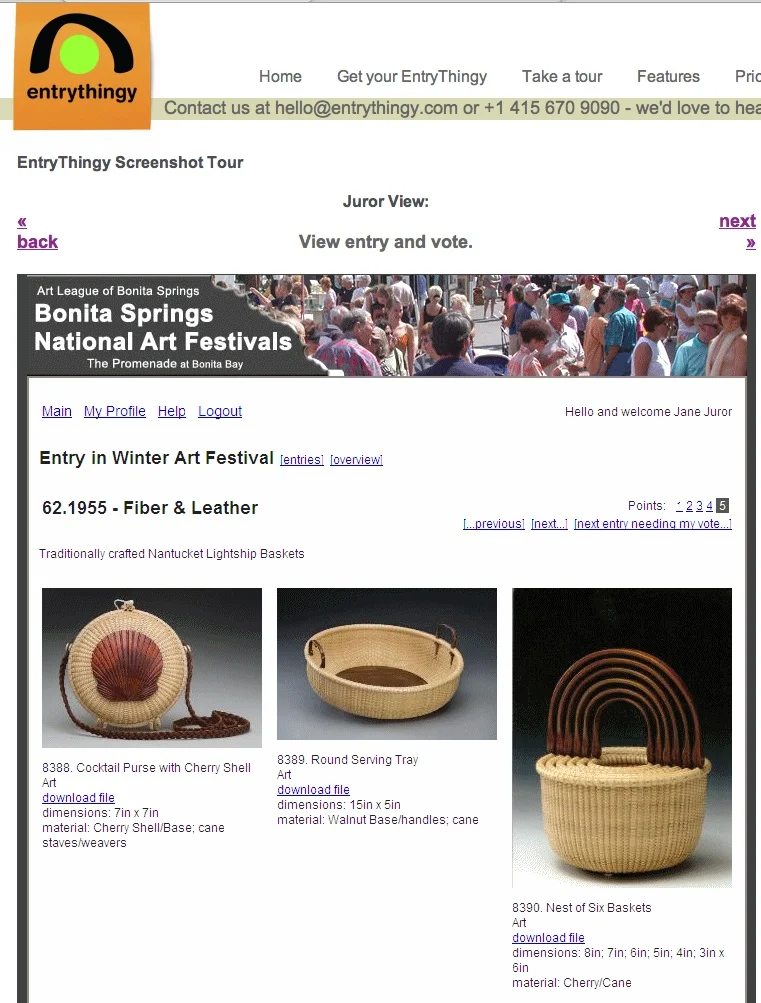
entrythingy

entrythingy

Offering a free trial, entrythingy is geared toward galleries and festivals that accept only submissions of images.  Structured similarly to CueRate, Entrythingy has many of the same features, and the cost to an organization depends entirely on the volume of submissions received.  The website for Entrythingy offers many videos to step interested organizations through the process of using the product.

  • Handles image files

  • Entries can be judged online or by jurors downloading work to their computers

  • Accepted entries can be shown in an online gallery using embeddable code

  • Entrythingy pricing is based on the volume of submissions received, entrant emails sent, length of time artwork is stored on the site, and gallery sales made using the gallery widget

  • Organization can hold and accept entries for multiple competitions simultaneously

  • Good do-it-yourself information online with videos and screen shots to help organizations learn functionality

Slideroom

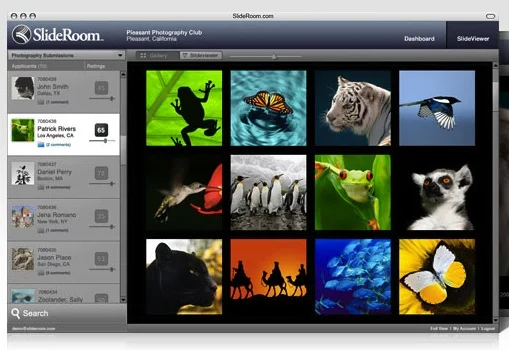
Slideroom Juror View

Slideroom Juror View

Like CueRate, Slideroom has proven ideal for organizations and institutions that accept submissions of portfolios of visual work.  Used most widely by colleges and universities, reviewers can make comments on images and share these comments with others who are viewing the submissions.  From a juror's standpoint, the online layout is snazzy and sharp, and access can be customized across users.  Slideroom also allows administrators to generate reports in Excel and PDF.

  • Handles image files

  • Online help and support

  • Attractive layout and design

  • Pricing plan based on plan level and can be a monthly or annual fee

  • Applicants see a very clean and simple layout

  • Applicants can upload text files to include statement and resume

  • Standardized rating system where jurors can rate pieces and portfolios

Site Review - Events Marketing by Constant Contact

Constant Contact has just released its Event Marketing service, and the service meets a lot of the needs that an organization might have when gathering information about prospective attendees. The greatest strength of this new service is its use as data tracking tool. It has integrated a number of elements to allow the event's creator to gather information about and evaluate the experiences of registrants and participants. Standout features include:

  • Customizing registrants' required information, so the user can decide if he wants to know registrants' companies, websites, phone numbers, etc., including customizable question--for example, "Last show you attended at our theater."

  • Live tracking of invitee responses.

  • Event reporting that gives a rundown of who received an email, who has registered, and registrants' details.

  • Exportable Event Reports, so that information about registrants can be integrated into spreadsheets or analyzed later as a downloadable CSV file.

  • Survey generator to develop a survey to send to participants to get feedback on their experience, or perhaps before the event (to figure out the number of vegetarians to carnivores, for example).

It also contains some great accessibility features for both the registrant and coordinator.

  • A dedicated event page hosted on Constant Contact that is linked to from the invitation email, and has a URL that can be embedded on organization's website, sent in additional emails, included on social media profiles.

  • Ability to pay registration fees from event website through Paypal. Additional payment instructions can also be included, for example, paying by check or at the door.

  • Customizable, auto-sent registrant confirmation email, including "opt-out" of future event-related communication feature.

  • The event coordinator can choose a date or respondent number at which to automatically close registration, which Constant Contact monitors.

  • Ability to modify event details after posting.

  • Ability to export event details into your calendar.

  • Great suggestions for content, offering guidelines to word successful invitations and offer relevant event information.

There are, however, two minor gripes that I had with the Event Marketing tool that I wish to note. The first of these is that the Constant Contact invitations are, in structure and design, very similar to the regular Constant Contact emails. I think that this could be a drawback for someone who is skimming through an inbox: they may not realize this is actually an invitation.

The second drawback is the sheer number of steps it takes to create an event invitation and email.

The first screen prompts you to enter the critical event information (date and time/host/location/payment information/etc.) and to title the event. These values are then transferred to the invitation email and the event page.

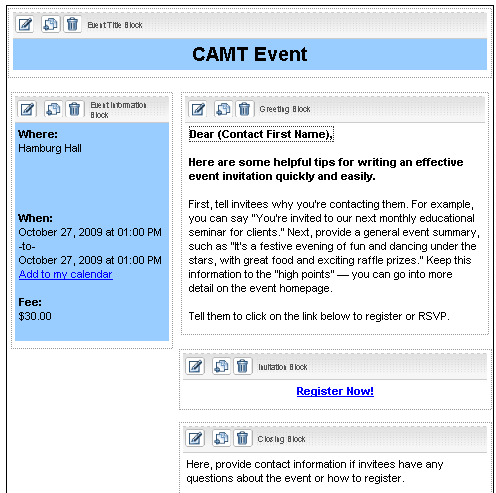
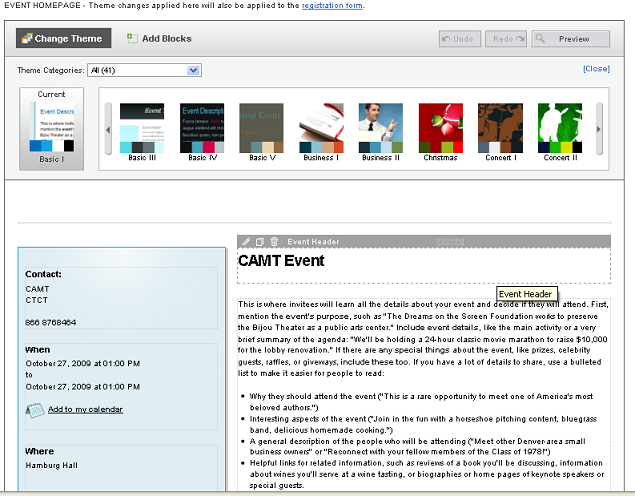
Here I think Constant Contact should have added another screen that requires the user to fill in information that can be transferred to both the invitation and the website. Instead, the next screen the event coordinator sees is as follows:

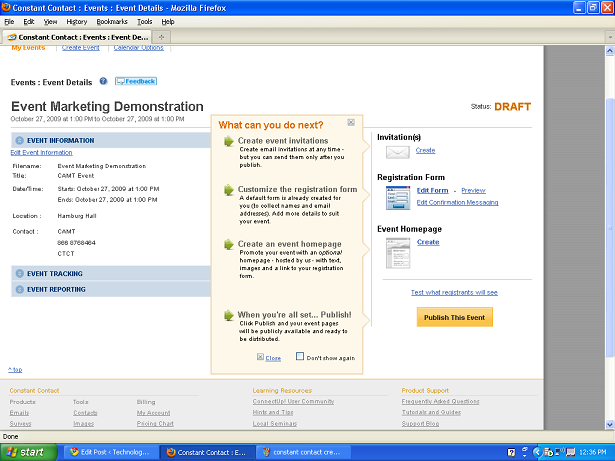
constant contact navigation screen

constant contact navigation screen

Though a user can choose any of the steps, the screen encourages the user to create an email, then to decide what information registrants would need to supply, and finally to create a webpage for the event. While it's ok as it stands, I think that Constant Contact could have streamlined the process.

In its current incarnation, the email template is unexciting, similar to the standard Constant Contact newsletter template. A person can move a few boxes around, insert some images somewhat awkwardly into the designated spaces, and change the color of fonts and boxes (there aren't any nifty templates that integrate images). The text in each box (other than event location, date) much be individually edited on the screen.

cc invitation prompt

cc invitation prompt

The (not pictured) final effect isn't particularly earth-shattering.  I think that Constant Contact would have been wiser to have the event coordinator next see a screen with input boxes like the basic "Event Date/Time/Etc." box, but including the prompts that it currently has on the Invitation and Page creation screens:

cc site prompt

cc site prompt

Rather than edit information directly in the template, as the user does now, he could fill in information about the event and interesting details (see the suggestions that Constant Contact offers), in addition to adding images that he might want to integrate into his theme.   He would then be directed to the event page design screen above, where he could edit the appearance of the event page.  Instead of prompts, however, he would see his own user-generated text and images pulled from the previous page.  Likewise he would see components of his text and images pulled into the invitation template page--perhaps with some elements repeated on both, and some specific to the invitation or the page.

At this point the user could decide on a theme or template, which would be applied to both this page and the email template. In this way two major steps would have been streamlined, the look and feel of each element, as well as information provided, would be more unified.  The user could then make modifications or adjustments (moving boxes, removing images, altering wording) on the above screens, rather than entering data from scratch.

Overall, Constant Contact has created a tool that is very attuned to the needs of organizations who have events to build interest, show support, and raise funds. It enables organizations to keep track of respondents and gather information about them for further communication. It also integrates tools to measure the attendees' perceived success of an event.

Constant Contact does require that the user run Internet Explorer 7.0 or Firefox. Constant Contact starts at $15/month and the site includes video tutorials, and a subscription includes live coaching and phone support.

Now available: Virtual Gallery Software Review!

Virtual Gallery Review

Virtual Gallery Review

Technology in the Arts just released a publication reviewing virtual gallery software for artists and arts organizations interested in creating 3D virtual exhibitions. Access the PDF publication here. The publication reviews three online gallery systems: Virtual Gallerie,  Image Armada, and Scenecaster / 3D Scene.  Which one is best for your organization? Check out the publication to find out which virtual gallery software meets your needs.

This research was initiated by the CUE Art Foundation, which sought to find an existing software system that will allow artists to create and display virtual exhibitions easily.