






Artificial Intelligence (AI) is already reshaping how children learn — in private schools, public classrooms, homeschool environments, and museum galleries. The question is no longer whether it will arrive, but who controls it and who benefits.
Immersive technology is not new in the slightest, with immersive tricks like ‘Pepper’s Ghost’ and projectors being used for decades. Nor is animation new, with animated shorts dating back to the early 1900s. Animation is a constantly evolving medium that lends well to immersive and Extended Reality (XR), and has been combined with XR to create well-known products, such as Pokémon Go. By combining two growing fields with a strong IP as the baseline, there are exponential growth opportunities for both fields. However, the combination of immersive technology and narrative-led animation continues to fall short of its potential in the entertainment market. Most combinations of animation and immersive technology often end up as avatar creators, video games, or VR experiences. The goal of this research project is to find an approach to combining animation and immersive technology that is marketable, accessible, and creates immersive storytelling.
This article examines the shifting domain of audience engagement within the arts, tracing a trajectory from ephemeral street painting performances to the high-stakes spectacle of the Super Bowl halftime show and the emergent "postdigital" museum. By synthesizing the institutional critiques of Stephen E. Weil, the "Third Space" theories of Ray Oldenburg, and the "Experience Economy" framework by Pine and Gilmore, the future of cultural meaning lies in the transition from institutional authority to communal "polyphony." Through a series of case studies—including street painting festivals and the "Benito Bowl"—this paper explores how the quality of "presence" and the "Arc of Engagement" serve as the definitive mechanisms for meaning-making in an increasingly mediated, technosocial world.
International theatre festivals have long served as sites of cultural exchange, political expression, and artistic innovation. This article traces their evolution from post–World War II cultural diplomacy to their role in today’s “creative city” economy, examining how festivals reflect shifting geopolitical forces, neoliberal policies, and ongoing tensions between global prestige and local representation.
This Women's History Month, AMT Lab highlights five groundbreaking women redefining the intersection of arts and technology across disciplines spanning new media, algorithmic theater, performance art, music activism, and artificial intelligence. Each trailblazer has used the tools of her time to challenge who gets to be seen, heard, and represented. Their collective body of work makes clear that the future of art and technology will be shaped, in no small part, by women who refused to wait for a seat at the table.
Josh Futrell and I are sitting in a Web usability workshop at Technology in the Arts: Canada at the moment, and I thought I'd share some notes from the session. The workshop is being led by Robert Barlow-Busch, director of product design at Primal Fusion, a semantic web startup in Waterloo, Ontario, Canada. Robert's overriding thought about usability testing is quite simple but very important: "Observe people using your Web site."
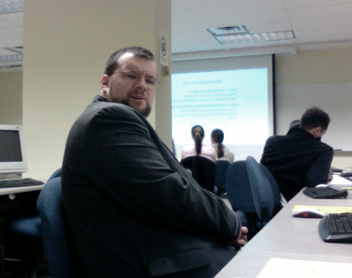 Josh looks please to be learning about usability.
Why conduct usability testing?
Aside from basic usability testing, Robert also just talked about projective exercises, which determine what type of emotions people attach to your organization. In the session's particular projective exercise, we were asked to imagine that a group of car manufacturer logos were members of a family. Who in the family would each of the logos represent? Robert's point was that this type of activity is more engaging than simply asking, "What do you think about Ford, Chrysler or Volvo?"
By the way, the entire group agreed that Ford was the drunk uncle. Sorry, Ford.
How does this translate to the arts field? An example that Robert presented was for an arts organization to use this type of activity to test how people view the organization's logo in comparison to the logos of other available activities (cinema, zoo, arcade, video games, Netflix, etc.).
Other resources:
The full set of slides from Robert's workshop will be available soon at TechnologyInTheArts.ca.


Everything is ready for tomorrow's conference. Brad starts off the conference with his podcasting workshop in the morning; Josh teaches an afternoon session on content management systems; and I bounce around throughout the day to make sure session leaders have everything they need.
If you are not able to join us in person, perhaps you can attend a virtual panel session in Second Life.
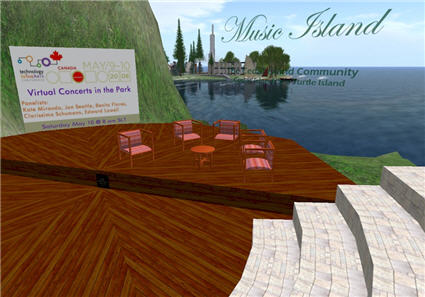
The image above shows the set for Saturday's panel being held in Second Life on "Virtual Concerts in the Park" which you can attend in Second Life on Saturday at 8:00AM SLT (Second Life Time = Pacific Time) by going to this SLURL - http://slurl.com/secondlife/Sea%20Turtle%20Island/46/26/22/ - which will take you to the telehub behind the amphitheatre. Hope to see you there!
Technology in the Arts bloggers David Dombrosky, Brad Stephenson, and I are packing up to go to our sister conference, Technology in the Arts: Canada, hosted by the Centre for Cultural Management at the University of Waterloo in Ontario. We're flying out tomorrow for the Friday-Saturday conference. I'll be giving a presentation on navigating the murky waters of CMS selection in a session called Content Management Systems: Would You? Could You? Should You? The simile in my presentation that I'm most proud of myself for writing? "Open Source Software (OSS) is free like a piano listed in the classifieds is free: Free grand piano. Needs tuned and refinished. You haul."
Brad's delivering his hands-on session Attack of the Pod People: Engaging Your Audience with Audio Podcasts. He's currently trying to figure out how to get 50 pairs of headphones into Canada without breaking them or causing him to be pulled aside at any security checkpoints.
If you're going to be at the conference, be sure to stop us and say hello. If you're not, no worries. We'll be posting thoughts and musings about what we learn from our friendly neighbors to the north during and after the conference. Plus, there's the U.S. conference coming up on October 9-11, 2008, in Pittsburgh.
Seinfeld jokes aside... It is very important for arts organizations to remain masters of their domains. We were recently contacted by a relatively large arts organization that was having trouble accessing their Web site. Each time they tried to access the site, they encountered a message explaining that their domain name registration had expired and that they would have to bid to regain control of the domain.

I thought it would be helpful to explain what a domain name is and why you should never let yours expire.
What is a domain name?
Every site has an Internet Protocol (IP) address that looks like this: 206.187.23.211. However, it would be very cumbersome to always have to say: "Hey, check out my Web site! It's http://206.187.23.211." That's where a domain name comes into play.
A domain name is the memorable name used by most people to identify your Web site. For instance, if you go to http://204.194.30.217, you will get the Artsnet Web site. But it's much easier to ask people to visit "Artsnet.org" than "204.194.30.217."
To register a new domain name, you must use an officially licensed registrar, such as Network Solutions.
What happens when a domain name expires?
When a domain name expires, it is officially up for grabs. If someone were to buy your domain name upon expiration, they would have complete control of that Web address. Basically, three bad things could happen:
In fact, there are individuals who earn a living snatching up expired domain names and charging extreme prices for the original owners to regain control.
How does one remain master of his/her domain?
If you need assistance obtaining your domain name registrar information, please feel free to contact us.
(Please Note: The 'Seinfeld' image above was used without the permission of Sony Pictures. If they send me a cease and desist order, I will gladly comply. I will also brag about my first official cease and desist order.)
A few months ago, I yelped about Yelp, an online community of business reviews written by John and Jane Public. At that time, Yelp had provided some advice for business owners on how to manage their image on Yelp. The information was simple and didn't really provide much in the way of control or features. That advice is still there, but Yelp has just added a Yelp for Business Owners service. It allows organizations to claim their business page and then access some extra features: tracking the number of visitors who view your business information on Yelp, private customer messaging, and immediately business information updates, to name a few.
If your organization is aware of its presence on Yelp, and is looking for ways to get more involved, these are some fine features. If anyone out there uses the Yelp for Business Owners service or has Yelp stories, please feel free to share them in the comments.
Want to be one of the cool kids? Sure you do. Who doesn't? The Center for Arts Management and Technology is currently offering sponsorship opportunities for its 2008 Technology in the Arts Conference, scheduled for Oct. 9-11 in Pittsburgh, PA.
 Be almost as cool as this guy.
Some additional sponsorship notes:
Want more info about the conference? Follow this page for regular updates.
Want more info about sponsorship opportunities? Get it here.
Come on... everyone's doing it.
(Image in this post licensed under Creative Commons, courtesy of ninjapoodles' Flickr photostream.)
Recently, I attended a webinar from Patron Technology on how to effectively use the subject line in e-mail marketing messages. And they should know! Patron Technology, a sponsor of the 2008 Technology in the Arts Conference, has been on e-mail marketing with arts organizations for years with its PatronMail service. Why does the subject line matter?
According to Christine Blodgett at Patron Technology, "The subject line IS the marketing message. It is your first point of contact with an e-mail recipient. If they don't like it, then they won't open it. If they don't open it, then it won't produce the desired effect."
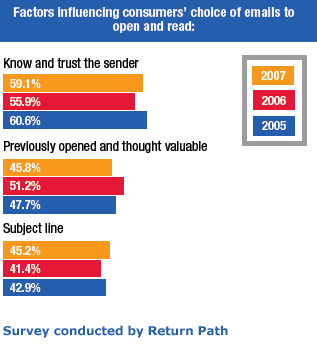
A recent survey conducted by Return Path reveals the subject line to be the third most important factor for determining whether or not someone will open an e-mail marketing message.
So how do can we best harness the power of the subject line?
Make every word matter - When you look at your inbox list, how many words do you typically see in the subject line? Not very many, right? So:
Many arts organization Web sites offer users the opportunity to contribute to their online programming in some way, but it's typically an artificial engagement practice. Rarely do users ever offer up anything truly artistic, and it's even rarer still for the organization to showcase the work in a meaningful way. However, the Brooklyn Museum is taking the idea of "you" as the online curator to a new level and letting Web visitors select the pieces for an upcoming exhibit in its physical space. Its upcoming photography show Click! A Crowd-Curated Exhibit lets users register and adjudicate work that was accepted as part of a March 2008 open call. The submitting photographers were asked to "consider Brooklyn's transformation over the years, its past and its present, and submit a photograph that captured the 'changing face(s) of Brooklyn.'"

Now that the call for submissions has closed, the Museum has launched a Web interface that walks users through the registration and evaluation process. Rather than just showing images and asking users to vote for their favorites, though, the Brooklyn Museum offers evaluation guidelines. This is a real exhibit, and the Museum wants thoughtful consideration from its curators.
The Click! curator interface presents the image, its title and a description. Clicking the "Viewing Size" functions will increase or decrease the image size for those who wish to adjust for their screen resolutions or who wish to scrutinize the photo's detail. Users can also see thumbnails of the next images to be evaluated.
When the "curator" is ready to evaluate an image, he or she needs only to adjust the evaluation slider between "Most Effective" and "Least Effective" based on two questions presented by the Museum:
"Curators" have until May 23, 2008, to submit their evaluations, and the exhibit will run from June 27-August 10, 2008, at the Brooklyn Museum.
While it's true that the crowd-curated approach doesn't work for all types of exhibits, the Brooklyn Museum has chosen a medium and theme that works well with an audience evaluation process. They ask about "technique and aesthetic," but the primary question is about Brooklyn's transformation.
So I guess my questions are:
I'd be most interested to hear what formally educated curators have to say about the crowd-curated concept.
Those of you who actually visit TechnologyInTheArts.org rather than simply subscribing to our RSS feeds may have noticed a change to the site earlier today. We just completed the first phase of a graphics and content overhaul to bring the Center for Arts Management and Technology’s various services together in one convenient location. We welcome you to explore the site and provide us with feedback by clicking here or using the Contact Us button on the main menu at any time.
Next week, I'll describe in detail the changes we've made and how we've tapped into the full potential of WordPress.
By the way, subscribing to our blog and/or podcast feeds is a good thing and not at all vile like I made it seem earlier in this post. Find out how to subscribe and have all of our content sent directly to you!
Box.net, providers of free online file storage and collaboration services, recently released this humorous image that sums up the shift in perception many in the tech world have had toward Google. The piece of "art" is called Googolopoly. (Be sure to click the image for a full-size version, because reading the game board is the best part.)

You arts bloggers out there should be on the lookout for a sinister Web prowler known as the "splog," or spam blog.
Splogs automatically lift the content from real blogs to increase their own search engine rankings and generate advertising opportunities.
Wired.com recently release a How-To Wiki for fighting splogs: Read it now.
And Lorelle on WordPress, a blog about blogging, has a post about identifying splogs: Check it out.
Be sure your blog isn't being ripped off by a splog, as it could be detrimental to your site traffic and Google ranking.
Have you ever wondered, "Wouldn't it be great if someone created a 'Guitar Hero'-styled game for other forms of music?" Well, Immersion Music, Inc., a nonprofit arts organization located in the Boston area, has done just that with the game Virtual Maestro.
According to an April 13th article on PittsburghTrib.com, "Two 'Virtual Maestro' exhibits have been appearing in concert-hall lobbies across the [United States] since November as part of a project created by Swiss banking giant UBS, which often sponsors classical music events and organizations, to increase interest in classical music..."
Bravo!
We just upgraded the Technology in the Arts blog to WordPress 2.5 and I'm jazzed. The new version has so many new features back here on the administrative side of things: an auto-save feature, a simpler interface, and access to great plug-ins (or widgets). The process was quick, painless, and transparent to our loyal readers. But, we didn't just trust to luck that it would be so. When performing major system upgrades, here are some rules of thumb I like to follow:
A documentary by Dutch filmmaker IJsbrand van Veelenhat premiered recently at the Next Web conference has been posted on YouTube. Clocking in at about 45 minutes, it's not a quick clip, but it's definitely worth your time.
I have recently become interested in - nay, obsessed with - tracking down the most effective way(s) to manage my email inbox, and I wanted to share a couple things that really work for me.
I also noticed recently that Getting Things Done guru David Allen offers a free document, Getting Email Under Control, on his Web site. It isn't groundbreaking, but there are several good ideas and reminders.
How do you keep your email under control?
In honor of the late Sir Alec Guinness, born 94 years ago today on April 2, 1914, I'm posting a link to a blog on LifeHacker.com that tells you how to view an ASCII (text-only) version of the first Star Wars movie - Episode IV. By the way, for those who need to know how to get to the command line that the instructions mention:� for Windows, go to Start -> Run and type "cmd" and hit enter; for Mac OS X, open "Terminal" located in the /Applications/Utilities folder.
Now if we can just convince the guy who did this (Simon Jansen) to turn other classic films in to ASCII art.� Blade Runner, perhaps?

To watch the ASCII Star Wars without having to use your command line or to learn more about Simon Jansen's other projects (like a life-size, beer brewing version of Futurama's Bender) visit http://www.asciimation.co.nz.
Adobe recently released a slimmed down, browser-based version of its king-of-all-photo-editing software Photoshop, so I decided to take it for a test drive. Photoshop Express features a very simple interface, and upon signing in, the user is immediately presented with a clear set of options.

PS Express also provides a nice photo library so you can easily edit uploaded photos, create albums and email your best shots to friends.

A very nice feature of the library (see the left column of the above screenshot) is the ability to add photos from PS Express directly to your Facebook, Photobucket and/or Picasa account(s). You can also instantly create HTML links to the images so they can be easily embedded into Web pages.
 |
Hovering over an image displays a list of options for that photo. For instance, you can edit, rotate, email, link and download images directly from this list.One of the better aspects of PS Express is the fact that there are multiple ways to accomplish a particular task. For example, if I simply want to rotate an image, I can simply select "Rotate" from the initial drop down list of choices, and I don't have to navigate all the way into the editing area. |
But the editing area is, of course, the best part of PS Express. Though the options are definitely not as robust as those in the desktop version of Photoshop, there are more than enough editing tools for novice photographers or anyone wanting to make quick touch-ups. Some of the tools include cropping, exposure adjustment, red-eye removal, saturation settings, white balance and color manipulation.

Yes, that is me standing beside a toilet in a prison cell. No, I did not get arrested. I was visiting the Eastern State Penitentiary in Philadelphia, PA.
Editing an image is incredible easy, and any changes you make are reversible. When you select an editing tool, you're presented with a menu of possible results. In the image below, I've selected "Saturation," and PS Express has shown me all of the variations I can achieve.

Photoshop Express is currently in beta (public testing), and the service is completely free. I strongly recommend this online tool for both its basic photo editing and image management tools.
Check it out and let us know what you think.
An announcement from the Mellon Foundation: The deadline for nominations for the 2008 Mellon Awards for Technology Collaboration (MATC Awards) is April 14, 2008. The MATC Awards consist of up to ten $50,000 or $100,000 prizes, which a receiving institution can use in a variety of ways to continue its technology leadership. The awards honor not-for-profit institutions that have demonstrated exemplary leadership in the development of open source software for one or more of the constituencies served by The Andrew W. Mellon Foundation: the arts and humanities in higher education; research libraries, museums; performing arts organizations; and conservation biology.
An online nomination form and more information may be found at http://matc.mellon.org. The nominations are public: the community is invited to visit the site and comment.