Free Web Sites for Artists...

I know the subject of this post sounds like a bit of spam that might roll through your inbox, but thanks to Artlog.com, artists can create Web sites that are easy to use and offer some nice features. Most importantly, the sites are free to registered Artlog.com users (for the time being). Artlog.com is designed to connect people to art and artists to other artists. Their portfolio section is particularly intriguing because it not only allows artists to create their own Web sites with gallery, blog and resume modules; it also allows artists to use their own Web domains. For instance, if I create a site on Artlog.com, it can either be bradartsite.artlog.com (in which case, I don't have to own a domain) or bradartsite.com (in which case, I do have to own a domain).

Want more info about domain names? Check out this recent blog entry.

I recently interviewed the site's creators, Manish Vora and Dylan Fareed, for the Technology in the Arts podcast. Their interview will be released in episode #45 on June 27.

Get LinkedIn to Technology in the Arts

For those of you who use LinkedIn to build your own professional network, we invite you to join our new Technology in the Arts group on the site to connect with others observing and exploring the intersection of the arts and technology. LinkedIn Groups offers extra features to networks and group-based organizations to help their members stay in touch with one another and discover powerful new business contacts within their groups and beyond.

How might LinkedIn Groups serve as a connecting tool for other professional networks and member groups with which you interact?

It always feels like somebody's watching me...

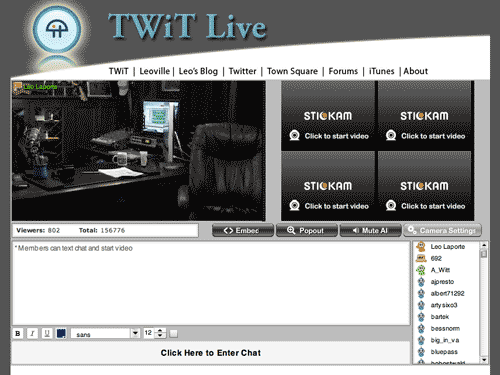
I recently interviewed podcast superstar Leo Laporte for the Technology in the Arts show, which was a great experience for a geek like me. Leo recently started broadcasting streaming video on a daily basis (about 2-7 PM Eastern, he says) at TwitLive.tv. Basically, he streams a video of his podcast studio constantly so you can catch all of his recordings live as they're being created. It's fascinating because you get to hear all the outtakes and pre- and post-recording conversations. Also, Leo's live stream features a chat window and in between shows, he responds directly to chat room messages.

There's something artistic about an empty studio, isn't there?

The amazing thing is that you can set up something similar to Leo's studio rather inexpensively, because there are a number of free streaming video services available. Leo uses Stickam.com, and UStream.tv is another very popular service. Obviously, Leo's equipment is very expensive, but anyone can set up their own broadcast empire on the cheap and with relative ease.

CAMT is tossing around the idea of creating a Technology in the Arts membership program, and we're in the process of laying out the services that would be available to members. One thing we've discussed is creating a weekly tech Q&A show for artists and arts managers using a streaming video service.

If you have thoughts on the structure of such a show or on other services we could offer Technology in the Arts members, please feel free to comment on this entry or email us.

By the way, my favorite UStream video feed is "The Ketucky Incident," which is basically set up to track the movements of bigfoot in Kentucky. I've yet to actually see Bigfoot walk past the Web cam... surprise, surprise.

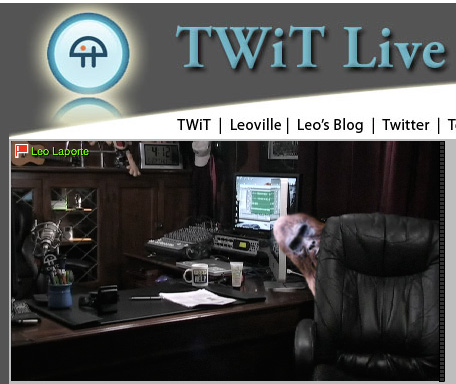
But I have seen some unexplained things on Leo's cam late at night:

Okay, folks, it's time for YOU to drop some serious knowledge!

October 9-11 -- Pittsburgh, PA Proposals for sessions and workshops are now being accepted for Technology in the Arts 2008 conference to be held at the Hilton Pittsburgh in downtown Pittsburgh, Pennsylvania from October 9 - 11. The conference has two primary types of programming - Hands-On Workshops and Conference Sessions.

  • Hands-On Workshops: Thursday, October 9th: Held in a computer lab environment, these workshops will provide "nuts & bolts" instruction to guide participants through technical processes toward concrete solutions to challenges. Each hands-on workshop will last 2 hours and 30 minutes.
  • Conference Sessions: Friday, October 10th & Saturday, October 11th: Held in breakout rooms near Conference Registration and the Tech Expo, conference sessions may use a number of possible formats to cover relevant issues relating to the use (or potential use) of technology in arts management or production. Conference sessions will last 1 hour and 15 minutes.

Not an expert? You don't have to be one to organize a session. Here are some tips for pulling together a top notch session.

Proposal Criteria: A panel of arts and technology practitioners will review all submitted proposals to select the final program in early July. Sessions will be selected based on the following criteria:

  • Exploration of new or compelling ideas, technologies or practices
  • Speakers' expertise and/or experience with the topic
  • Session's relevance to the conference

In addition to the above criteria, the panel will be charged to select workshops and sessions with an eye toward providing a well-rounded gamut of topics and ideas for conference attendees.

Benefits for Session Leaders and Participants: Individuals who propose sessions selected for the conference program will each receive a complimentary registration for the conference and hands-on training day. Other session participants or speakers will be offered a severely reduced registration rate of $50 for the conference and hands-on training day. All session participants will be responsible for their own travel and hotel expenses.

Proposal Components: To be considered, proposals must include the following information:

  1. Session title
  2. Session type - Hands-On Workshop or Conference Session
  3. Session format - For Conference Session proposals only
  4. Description of the proposed session
  5. Explanation of relevance to the conference
  6. Contact information and bio paragraph for session leader
  7. Other potential presenters and what they would add to the session

Submit your session proposal online by June 30, 2008.

All applicants will be notified of their proposals' status by July 11. For questions or additional information, contact David Dombrosky.

Your Second Life Avatar is Killing My Planet...

It was recently determined that a Second Life avatar uses as much energy as a real-life Brazilian. So try as you might to escape your polluted first life, you're doing even more damage as a Second Life user. The following campaign has been created in order to promote a campaign on the energy-conscious site Big Green Switch that urges Second Lifers to offset their avatar's carbon footprint.

Second Life users: Give a hoot and check out Big Green Switch.

SlideShare - the largest community for sharing presentations

So after the Technology in the Arts: Canada, we were posting presentations and resources from the conference when we ran into a slight snag. A number of the PowerPoint slide presentations were too large to e-mail. At first, I recommended that the presenters use a large file transfer site, but then a colleague showed me the virtues of SlideShare. SlideShare allows you to:

  • Embed slideshows into your own blog or website.
  • Share slideshows publicly or privately.
  • Synch audio to your slides.
  • Market your your event on slideshare.
  • Join groups to connect with SlideShare members who share your interests
  • Download the original PowerPoint / Pdf file

For example, here's the embedded version of Linda Roger's presentation "Virtual Concerts in the Park" from last week's Technology in the Arts: Canada conference:

Did I mention that SlideShare is free? With all of the arts conferences and presentations I have attended over the years, it's amazing that I had not heard of this resource. I can't wait until I get to play PowerPoint Karaoke!!

2008 MUSE Awards Announced

Now in its 19th year, the MUSE awards competition recognizes outstanding achievement in museum media. The competition is an activity of the Media and Technology Standing Professional Committee of the American Association of Museums.

The MUSE Awards competition received nearly 180 applications from a wide variety of museums in North America, Europe, Australia and Asia. Entries included audio, cell phone, and interactive handheld tours, interactive kiosks and multimedia installations, podcasts, blogs, games, websites, online collection and image databases, videos, and e-mail marketing campaigns.

Thirty eight judges – museum and media professionals from across the county – were involved in the process of selecting the winners. Winning entries were expected to demonstrate outstanding achievement in content quality; interface design; functionality; production quality; visual appeal; the user’s experience; and the intent to which new directions were charted or old challenges resolved through technical innovation. A complete list of judging criteria and MUSE Award winners can be found on the Media and Technology website.

AVG Free 8 Released

AVG Anti-Virus Free 8.0 was recently released, and I've been wanting to share this info for a couple weeks, but I am just now getting around to it.

AVG Free is as good as (or better than) most of the top paid anti-virus solutions, so I strongly recommend this product for Windows users.

To get AVG Free 8.0 or for more information, visit the AVG Free site.

Check out PCMag's recent review of AVG Free 8.0.

Web Usability Notes from TitA: Canada

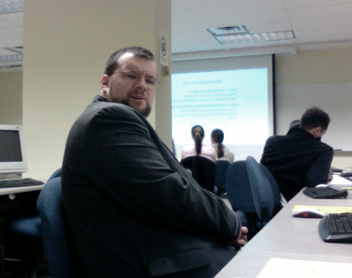
Josh Futrell and I are sitting in a Web usability workshop at Technology in the Arts: Canada at the moment, and I thought I'd share some notes from the session. The workshop is being led by Robert Barlow-Busch, director of product design at Primal Fusion, a semantic web startup in Waterloo, Ontario, Canada. Robert's overriding thought about usability testing is quite simple but very important: "Observe people using your Web site."

Josh Futrell at TitA: Canada Josh looks please to be learning about usability.

Why conduct usability testing?

  • More useful
  • Easier to use
  • More desirable (more positive emotional responses)

Aside from basic usability testing, Robert also just talked about projective exercises, which determine what type of emotions people attach to your organization. In the session's particular projective exercise, we were asked to imagine that a group of car manufacturer logos were members of a family. Who in the family would each of the logos represent? Robert's point was that this type of activity is more engaging than simply asking, "What do you think about Ford, Chrysler or Volvo?"

By the way, the entire group agreed that Ford was the drunk uncle. Sorry, Ford.

How does this translate to the arts field? An example that Robert presented was for an arts organization to use this type of activity to test how people view the organization's logo in comparison to the logos of other available activities (cinema, zoo, arcade, video games, Netflix, etc.).

Other resources:

The full set of slides from Robert's workshop will be available soon at TechnologyInTheArts.ca.

Stage is set for Technology in the Arts - Canada

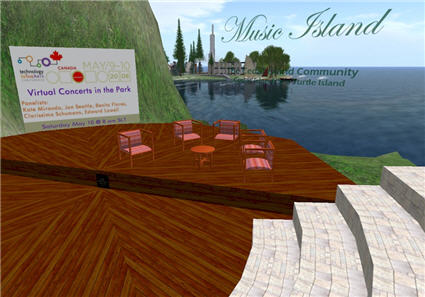
This week\'s Technology in the Arts - Canada will feature a virtual panel in Second Life on Saturday morning.

Everything is ready for tomorrow's conference.  Brad starts off the conference with his podcasting workshop in the morning; Josh teaches an afternoon session on content management systems; and I bounce around throughout the day to make sure session leaders have everything they need.

If you are not able to join us in person, perhaps you can attend a virtual panel session in Second Life.

The image above shows the set for Saturday's panel being held in Second Life on "Virtual Concerts in the Park" which you can attend in Second Life on Saturday at 8:00AM SLT (Second Life Time = Pacific Time) by going to this SLURL - http://slurl.com/secondlife/Sea%20Turtle%20Island/46/26/22/ - which will take you to the telehub behind the amphitheatre.  Hope to see you there!

Going North

Technology in the Arts bloggers David Dombrosky, Brad Stephenson, and I are packing up to go to our sister conference, Technology in the Arts:  Canada, hosted by the Centre for Cultural Management at the University of Waterloo in Ontario.  We're flying out tomorrow for the Friday-Saturday conference. I'll be giving a presentation on navigating the murky waters of CMS selection in a session called Content Management Systems: Would You? Could You? Should You?  The simile in my presentation that I'm most proud of myself for writing?  "Open Source Software (OSS) is free like a piano listed in the classifieds is free:  Free grand piano.  Needs tuned and refinished.  You haul."

Brad's delivering his hands-on session Attack of the Pod People: Engaging Your Audience with Audio Podcasts.  He's currently trying to figure out how to get 50 pairs of headphones into Canada without breaking them or causing him to be pulled aside at any security checkpoints.

If you're going to be at the conference, be sure to stop us and say hello.  If you're not, no worries.  We'll be posting thoughts and musings about what we learn from our friendly neighbors to the north during and after the conference.  Plus, there's the U.S. conference coming up on October 9-11, 2008, in Pittsburgh.

Master of Your Domain

Seinfeld jokes aside... It is very important for arts organizations to remain masters of their domains. We were recently contacted by a relatively large arts organization that was having trouble accessing their Web site. Each time they tried to access the site, they encountered a message explaining that their domain name registration had expired and that they would have to bid to regain control of the domain.

I thought it would be helpful to explain what a domain name is and why you should never let yours expire.

What is a domain name?

Every site has an Internet Protocol (IP) address that looks like this: 206.187.23.211. However, it would be very cumbersome to always have to say: "Hey, check out my Web site! It's http://206.187.23.211." That's where a domain name comes into play.

A domain name is the memorable name used by most people to identify your Web site. For instance, if you go to http://204.194.30.217, you will get the Artsnet Web site. But it's much easier to ask people to visit "Artsnet.org" than "204.194.30.217."

To register a new domain name, you must use an officially licensed registrar, such as Network Solutions.

What happens when a domain name expires?

When a domain name expires, it is officially up for grabs. If someone were to buy your domain name upon expiration, they would have complete control of that Web address. Basically, three bad things could happen:

  1. They could keep it and never return control to you.
  2. They could charge you an exorbitant amount of money for the domain name.
  3. They could redirect your old Web address to any site or use the address to host a malicious site. Your Web visitors would no longer see your schedule of upcoming performances; rather, they might see pornography - or worse - a George W. Bush fan site!

In fact, there are individuals who earn a living snatching up expired domain names and charging extreme prices for the original owners to regain control.

How does one remain master of his/her domain?

  1. ALL arts organizations should know the name and contact information of their site's domain name registrar. If you don't know this information, you can use a lookup service. For instance, go to the Network Solutions WhoIs page and enter a Web address in the search field. To see the registrar information, click the link labeled "Show underlying registry data for this record."
  2. Set some type of automated reminder for yourself in advance of the domain name expiration date. Many registrars offer this feature, but it's always good to set up your own reminders so you don't miss an alert that has fallen prey to your spam folder.
  3. Create a technology binder for your organization that contains all important information about your organization's internal and external tech operations. This binder should contain information about your Web site (domain registrar, hosting provider, administrative access, etc.), as well as all software and hardware license and maintenance details. TechSoup provides a bit more information on this subject.

If you need assistance obtaining your domain name registrar information, please feel free to contact us.

(Please Note: The 'Seinfeld' image above was used without the permission of Sony Pictures. If they send me a cease and desist order, I will gladly comply. I will also brag about my first official cease and desist order.)


Yelp for Business Owners

A few months ago, I yelped about Yelp, an online community of business reviews written by John and Jane Public.  At that time, Yelp had provided some advice for business owners on how to manage their image on Yelp.  The information was simple and didn't really provide much in the way of control or features. That advice is still there, but Yelp has just added a Yelp for Business Owners service.  It allows organizations to claim their business page and then access some extra features:  tracking the number of visitors who view your business information on Yelp, private customer messaging, and immediately business information updates, to name a few.

If your organization is aware of its presence on Yelp, and is looking for ways to get more involved, these are some fine features.  If anyone out there uses the Yelp for Business Owners service or has Yelp stories, please feel free to share them in the comments.

Sponsor Technology in the Arts 2008 and be the envy of all your friends...

Want to be one of the cool kids? Sure you do. Who doesn't? The Center for Arts Management and Technology is currently offering sponsorship opportunities for its 2008 Technology in the Arts Conference, scheduled for Oct. 9-11 in Pittsburgh, PA.

Be almost as cool as this guy.

Some additional sponsorship notes:

  • Any sponsorship of $1,000 or greater secures a spot in our Tech Expo.
  • We have built into our three-day schedule more than four hours dedicated exclusively to the Tech Expo. We will also be promoting the Expo as a primary feature of the conference.
  • The Tech Expo will be located near registration in a very prominent location in the hotel.
  • All coffee breaks will be held in the Tech Expo area to provide additional exposure.
  • We will be providing a 15-minute recognition announcement and demo/speaker opportunity for the sponsor of our Keynote/VIP Luncheon.

Want more info about the conference? Follow this page for regular updates.

Want more info about sponsorship opportunities? Get it here.

Come on... everyone's doing it.

(Image in this post licensed under Creative Commons, courtesy of ninjapoodles' Flickr photostream.)

OPEN NOW! - The Power of the Subject Line

Recently, I attended a webinar from Patron Technology on how to effectively use the subject line in e-mail marketing messages. And they should know! Patron Technology, a sponsor of the 2008 Technology in the Arts Conference, has been on e-mail marketing with arts organizations for years with its PatronMail service. Why does the subject line matter?

According to Christine Blodgett at Patron Technology, "The subject line IS the marketing message. It is your first point of contact with an e-mail recipient. If they don't like it, then they won't open it. If they don't open it, then it won't produce the desired effect."

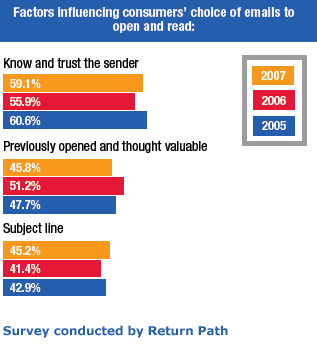
A recent survey conducted by Return Path reveals the subject line to be the third most important factor for determining whether or not someone will open an e-mail marketing message.

So how do can we best harness the power of the subject line?

Make every word matter - When you look at your inbox list, how many words do you typically see in the subject line? Not very many, right? So:

  1. Keep it concise - Under 50 characters (approximately 7 to 10 words)
  2. Pay attention to word placement - Place incentivizing phrases ("Free tickets for.."), time-based phrases ("Last chance to..."), and informative labels ("______ Monthly Bulletin") toward the beginning of the subject line.
  3. Be clear - Tell them what's inside. Make sure the content promised in the subject line is easy to find in the e-mail.
  4. Be honest - DON'T oversell it!
  5. Be consistent - If you have a type of message that you send out on a regular basis (like an e-newsletter), make sure to label them in a consistent way so that recipients will easily recognize them in their Inboxes.

Who wants to be a curator?

Many arts organization Web sites offer users the opportunity to contribute to their online programming in some way, but it's typically an artificial engagement practice. Rarely do users ever offer up anything truly artistic, and it's even rarer still for the organization to showcase the work in a meaningful way. However, the Brooklyn Museum is taking the idea of "you" as the online curator to a new level and letting Web visitors select the pieces for an upcoming exhibit in its physical space. Its upcoming photography show Click! A Crowd-Curated Exhibit lets users register and adjudicate work that was accepted as part of a March 2008 open call. The submitting photographers were asked to "consider Brooklyn's transformation over the years, its past and its present, and submit a photograph that captured the 'changing face(s) of Brooklyn.'"

The Brooklym Museum\'s crowd-curated exhibit

Now that the call for submissions has closed, the Museum has launched a Web interface that walks users through the registration and evaluation process. Rather than just showing images and asking users to vote for their favorites, though, the Brooklyn Museum offers evaluation guidelines. This is a real exhibit, and the Museum wants thoughtful consideration from its curators.

The Click! curator interface presents the image, its title and a description. Clicking the "Viewing Size" functions will increase or decrease the image size for those who wish to adjust for their screen resolutions or who wish to scrutinize the photo's detail. Users can also see thumbnails of the next images to be evaluated.

When the "curator" is ready to evaluate an image, he or she needs only to adjust the evaluation slider between "Most Effective" and "Least Effective" based on two questions presented by the Museum:

  1. How well does the image illustrate or express the theme "The Changing Faces of Brooklyn"?
  2. Do you consider this an exceptional image, given the technique and aesthetics?

"Curators" have until May 23, 2008, to submit their evaluations, and the exhibit will run from June 27-August 10, 2008, at the Brooklyn Museum.

While it's true that the crowd-curated approach doesn't work for all types of exhibits, the Brooklyn Museum has chosen a medium and theme that works well with an audience evaluation process. They ask about "technique and aesthetic," but the primary question is about Brooklyn's transformation.

So I guess my questions are:

  1. Though it certainly isn't necessary to be an art expert to be qualified to evaluate the Click! submissions, should one at least be fairly familiar with Brooklyn?
  2. Is this type of non-expert evaluation - as one recent blog reader mentioned - contributing to the dumbing down of art?
  3. If enough people evaluate the work, does the group consensus validate that piece for a public show?

I'd be most interested to hear what formally educated curators have to say about the crowd-curated concept.

Notice something new?

Those of you who actually visit TechnologyInTheArts.org rather than simply subscribing to our RSS feeds may have noticed a change to the site earlier today. We just completed the first phase of a graphics and content overhaul to bring the Center for Arts Management and Technology’s various services together in one convenient location. We welcome you to explore the site and provide us with feedback by clicking here or using the Contact Us button on the main menu at any time.

Next week, I'll describe in detail the changes we've made and how we've tapped into the full potential of WordPress.

By the way, subscribing to our blog and/or podcast feeds is a good thing and not at all vile like I made it seem earlier in this post. Find out how to subscribe and have all of our content sent directly to you!