Box.net, providers of free online file storage and collaboration services, recently released this humorous image that sums up the shift in perception many in the tech world have had toward Google. The piece of "art" is called Googolopoly. (Be sure to click the image for a full-size version, because reading the game board is the best part.)
Splog... Sounds Fun, Is Evil
You arts bloggers out there should be on the lookout for a sinister Web prowler known as the "splog," or spam blog.
Splogs automatically lift the content from real blogs to increase their own search engine rankings and generate advertising opportunities.
Wired.com recently release a How-To Wiki for fighting splogs: Read it now.
And Lorelle on WordPress, a blog about blogging, has a post about identifying splogs: Check it out.
Be sure your blog isn't being ripped off by a splog, as it could be detrimental to your site traffic and Google ranking.
"Guitar Hero" for Orchestral Music
Have you ever wondered, "Wouldn't it be great if someone created a 'Guitar Hero'-styled game for other forms of music?" Well, Immersion Music, Inc., a nonprofit arts organization located in the Boston area, has done just that with the game Virtual Maestro.
According to an April 13th article on PittsburghTrib.com, "Two 'Virtual Maestro' exhibits have been appearing in concert-hall lobbies across the [United States] since November as part of a project created by Swiss banking giant UBS, which often sponsors classical music events and organizations, to increase interest in classical music..."
Bravo!
1...2...3...Upgrade!
We just upgraded the Technology in the Arts blog to WordPress 2.5 and I'm jazzed. The new version has so many new features back here on the administrative side of things: an auto-save feature, a simpler interface, and access to great plug-ins (or widgets). The process was quick, painless, and transparent to our loyal readers. But, we didn't just trust to luck that it would be so. When performing major system upgrades, here are some rules of thumb I like to follow:
- Learn as much as you can beforehand. Does the product have a blog or a press release that will walk you through what's new? Are there any forums or discussions with additional insight about upgrading? Investigating before you upgrade will give you a jump start on the inevitable re-learning you'll need to do and it will also help you to decide whether or not the upgrade is worth doing in the first place.
- Backup everything. Is there a chance something could go wrong? Absolutely. So backup everything (or as much as is practical). Before upgrading our blog, we backed up our files and database, just in case.
- Put your foot in the water. If you have the ability or the luxury, perform the upgrade in a safe, test environment before applying it to any live or working systems.
- Have an escape route. Even if you've tested the upgrade and it worked perfectly, always expect the worst. Have contingency/restore plans in place and the necessary tools and staff at hand should something, Spock forbid, go wrong.
- Don't forget about the learning curve. Any upgrade is going to require at least some sort of re-learning on the part of the user. If the upgrade is significant, or if you have many people who are affected by the upgrade, don't forget to spend time developing a training plan before you move forward.
Wikipedia's Credibility
A documentary by Dutch filmmaker IJsbrand van Veelenhat premiered recently at the Next Web conference has been posted on YouTube. Clocking in at about 45 minutes, it's not a quick clip, but it's definitely worth your time.
Managing Email
I have recently become interested in - nay, obsessed with - tracking down the most effective way(s) to manage my email inbox, and I wanted to share a couple things that really work for me.
- Inbox Zero. Instead of letting my inbox fill up, I process everything at self-established intervals using Merlin Mann's Inbox Zero steps: Delete, Delegate, Respond, Defer and Do. Following these five rules at a regularly scheduled time will ensure a clean inbox. Keep in mind, though... When you choose to defer, you must move that email out of the inbox and create a task for yourself.
- Three Folders. I have set up three main email folders: Follow Up, Hold and Archive. When I choose to defer (see above), I simply place the email in the Follow Up folder and create a new task list entry. If I'm waiting on a response before I can complete an item, I place it in the Hold folder. And if I simply need to save the email for future reference, it goes in the Archive folder.
- Five Sentences. I try my best to keep email responses to five sentences or less, based on a Web site I discovered a few months ago. Thought I might occasionally run longer, this concept has helped me focus on the structure and purpose of my message: Who am I? What do I want? Why should I get it? When do I want it? I even put a little message about the five sentence philosophy into my email signature so people know I'm being efficient and not rude.
I also noticed recently that Getting Things Done guru David Allen offers a free document, Getting Email Under Control, on his Web site. It isn't groundbreaking, but there are several good ideas and reminders.
How do you keep your email under control?
ASCII Stars Wars
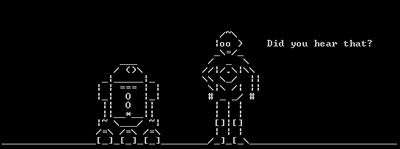
In honor of the late Sir Alec Guinness, born 94 years ago today on April 2, 1914, I'm posting a link to a blog on LifeHacker.com that tells you how to view an ASCII (text-only) version of the first Star Wars movie - Episode IV. By the way, for those who need to know how to get to the command line that the instructions mention:� for Windows, go to Start -> Run and type "cmd" and hit enter; for Mac OS X, open "Terminal" located in the /Applications/Utilities folder.
Now if we can just convince the guy who did this (Simon Jansen) to turn other classic films in to ASCII art.� Blade Runner, perhaps?

To watch the ASCII Star Wars without having to use your command line or to learn more about Simon Jansen's other projects (like a life-size, beer brewing version of Futurama's Bender) visit http://www.asciimation.co.nz.
Photoshop Express: Browser-Based Photo Manipulation
Adobe recently released a slimmed down, browser-based version of its king-of-all-photo-editing software Photoshop, so I decided to take it for a test drive. Photoshop Express features a very simple interface, and upon signing in, the user is immediately presented with a clear set of options.

PS Express also provides a nice photo library so you can easily edit uploaded photos, create albums and email your best shots to friends.

A very nice feature of the library (see the left column of the above screenshot) is the ability to add photos from PS Express directly to your Facebook, Photobucket and/or Picasa account(s). You can also instantly create HTML links to the images so they can be easily embedded into Web pages.
![]() |
Hovering over an image displays a list of options for that photo. For instance, you can edit, rotate, email, link and download images directly from this list.One of the better aspects of PS Express is the fact that there are multiple ways to accomplish a particular task. For example, if I simply want to rotate an image, I can simply select "Rotate" from the initial drop down list of choices, and I don't have to navigate all the way into the editing area. |
But the editing area is, of course, the best part of PS Express. Though the options are definitely not as robust as those in the desktop version of Photoshop, there are more than enough editing tools for novice photographers or anyone wanting to make quick touch-ups. Some of the tools include cropping, exposure adjustment, red-eye removal, saturation settings, white balance and color manipulation.

Yes, that is me standing beside a toilet in a prison cell. No, I did not get arrested. I was visiting the Eastern State Penitentiary in Philadelphia, PA.
Editing an image is incredible easy, and any changes you make are reversible. When you select an editing tool, you're presented with a menu of possible results. In the image below, I've selected "Saturation," and PS Express has shown me all of the variations I can achieve.

Photoshop Express is currently in beta (public testing), and the service is completely free. I strongly recommend this online tool for both its basic photo editing and image management tools.
Check it out and let us know what you think.
Deadline Approaching for the 2008 Mellon Awards for Technology Collaboration
An announcement from the Mellon Foundation: The deadline for nominations for the 2008 Mellon Awards for Technology Collaboration (MATC Awards) is April 14, 2008. The MATC Awards consist of up to ten $50,000 or $100,000 prizes, which a receiving institution can use in a variety of ways to continue its technology leadership. The awards honor not-for-profit institutions that have demonstrated exemplary leadership in the development of open source software for one or more of the constituencies served by The Andrew W. Mellon Foundation: the arts and humanities in higher education; research libraries, museums; performing arts organizations; and conservation biology.
An online nomination form and more information may be found at http://matc.mellon.org. The nominations are public: the community is invited to visit the site and comment.
Google Grants...and Google for NPO's
UPDATE: Be sure to read our most recent post on Google resources for arts organizations.
I know this makes two in a row from me on Google. However, in my defense, I have been meaning to write this post for a few weeks now and, since I just found out (thanks to the Non-Profit Tech Blog) that Google has a launched a new non-profit portal that aggregates all of its services that apply to NPO's, I figured now is a good time to highlight one of Google's services that, I think, totally rocks:
To really explain Google Grants, I first need to explain Google AdWords. You know those “Sponsored Links” that sometimes appear to the right of your search results on Google? Those are brought to you by Google AdWords. I’m not going to explain any more than that since Google has already done that work for me with the detailed information and demos on its site. Suffice to say, Google AdWords can help increase traffic to your Web site.
And Google Grants is a program that Google has developed to help non-profit organizations have access to free Google AdWords advertising. Organizations who are awarded Google grants get at least 3 months of AdWords service with cap of $10,000 worth of advertising per month. Awesome! Google Grants even goes beyond just giving away free advertising, by helping organizations to define and refine ad campaigns.
Click below for a Q & A with a past Google Grant recipient after the jump.
If your organization wants to learn more about Google Grants, please visit the new non-profit portal that Google has launched and click the Google Grants link. Or, you may click here. Google also has developed a Google Grants Blog.
One of the reasons I’m so interested in Google Grants is that one of CAMT’s clients, Art in Context, was a recipient of a Google Grant in late 2007. I’ve interviewed Teresa Schmittroth, Program Director at Art in Context, about her organization’s experience.
JOSH: How was the Google Grant application process?
TERESA: The process was actually pretty easy. The grant application requires standard information about the organization such as nonprofit status, mission statement, contact information, a brief statement on how Google Adwords would contribute to the organization, and a description of the organization's target audience. In addition we were asked to submit a proposed ad campaign and a sample of key words relevant to our organization. We applied for the grant on July 12, 2007. Within 24 hours we received [a confirmation] response. By November 29, 2007 we were notified that our organization was selected for a Google Grants award and our account was activated.
JOSH: How did you find using AdWords?
TERESA: I was really impressed with the depth of the ad campaign that the Google Grants Team set up for Art in Context. Upon activating our account there were several 'ad groups' they had developed for us specifically addressing the type of information we provide public access to, e.g., Exhibition Listings, Artist Listings, Image Listings, etc. The ads were slightly commercial-eze for a nonprofit library, but compelling. I spent several days tweaking the language and the key words, but the structure Google set up was really good. By January, when searching for the word "artists" on Google, Art in Context was among the first results in Google's Sponsored Links.
JOSH: Did you see an increase in your site traffic as a result of your work in AdWords?
TERESA: We did experience a very noticeable spike in phone calls from researchers after the ad campaign began. Also, the following comparison of page views between February 2007 and February 2008 demonstrates a definite increase in information displayed, which is key to our mission:
| February 2007 | February 2008 | |
| Page Views | 1,514,630 | 2,042,540 |
| Average per Day | 54,093 | 70,432 |
| Average Page Views per visit | 4.27 | 7.09 |
Here is a snapshot I just put together for our board:
Google Grant activity for Art in Context Dec 1, 2007 to Feb 29, 2008
- There were 30,188 clicks to Art in Context from Google's Sponsored Links.
- There were 2,146,880 ad impressions for Art in Context displayed in Google's Sponsored Links.
- It would have cost us $20,510.48 for this service if this were not a grant!
JOSH: Any other thoughts/comments about the Google Grants program and Google AdWords?
TERESA: Thank you, Google!
And thank you to Teresa Schmittroth, Program Director at Art in Context, and Google Grants.

CAMT to Attend Museums and the Web 2008
![]() |
CAMT team members will attend Museums and the Web 2008 in Montreal, Quebec, Canada, April 9-12, 2008. The annual conference explores "the on-line presentation of cultural, scientific and heritage content across institutions and around the world." If you are planning to attend MW '08, please email CAMT, as we'd love to connect with you. |
Wired.com's Semi-Monthly Photo Contests
The folks at Wired.com have decided to host a series of semi-monthly photo contests for reader-submitted photography. I have been really impressed with the photography that has been submitted. Check out submissions for their current photo contest "Show Us Your Best Night Photo." Maybe I should submit this photo from the 2008 Toronto Winter Festival?

They just wrapped up a contest for reader self-portraits and posted the top photos as determined by Wired.com's photo department as well as the readers' picks for best self-portrait.
Wired.com is using a Reddit widget as the upload mechanism for their readers' photo submissions. Of course, Conde Nast Publications (Wired's parent company) owns Reddit - so they got to use the widget for free; but other organizations could use a simple contact form wherein the applicant places information and a link to their photo on Flickr or Photobucket .
What a great way for magazines, museums, galleries, art centers, and other organizations with a visual art connection to engage their audience and acquire user-generated content!
2008 NTEN Nonprofit Technology Conference
Today kicked off the 2008 NTEN Nonprofit Technology Conference in New Orleans, Louisiana. On my way toward downtown, I took this photo of Jackson Square on my cell phone.

I spent about three hours in the Science Fair (normally called an "exhibit hall" at other conferences) absorbing as much as I possible could about the various technology product and service providers who work with nonprofit organizations. I met some people doing really wonderful work, and I hope to introduce them to you as sponsors for our 2008 Technology in the Arts Conference in October! Click here for a list of companies in residence at this year's Science Fair.
After the Science Fair, I went to dinner with my fellow CAMT teammates Haebin and Guillermo, who wanted to find a place to get seafood and alligator. We ended up at the Cajun Cabin on Bourbon Street. Check out Haebin playing the spoons with the restaurants cajun/zydeco band!

After dinner, we ventured further into the wilds of the French Quarter. It turns out the Haebin has an fun-loving inner rock star who just had to get up onstage at the Cat's Meow to do a karaoke rendition of "Girls Just Want to Have Fun." Cyndi Lauper would have been proud.

On my walk back to the hotel, I passed an interesting gallery on Royal Street and took a photo of this large scale facial sculpture.

Day One - Thumbs up for me.
Considering technology's role...
On Saturday, I participated in the most terrifying and exhilarating acting experience of my life: Bricolage Urban Scrawl (BUS). Bricolage is a Pittsburgh-based theater company, and its annual BUS project is a spin on the play-in-a-day concept. Six playwrights gathered on Friday evening, rode city buses for two hours as inspiration, then spent the night writing 15-minute plays. The following day, a slew of actors, including myself, met at Bricolage's space, were handed our scripts and started rehearsing for that evening's performance. These were full productions... not readings. No scripts, no calling for line. Horrifying.
And what was even more horrifying for me was the fact that I had to learn 12 pages of singing and monologues in a matter of hours. Not to mention the fact that the script called for my character to be in his underwear the entire play. It was like a double-nightmare come true: Standing naked in front of people and forgetting all your lines.
But my point is not that I tore off my clothes or nailed every line of my monologues (which I totally did); rather, my point is that interesting and engaging projects like BUS are made much simpler through technology.
The playwrights were able to write from home and email their scripts to the artistic director, rather than hand delivering them after a sleepless night. Also, the production team was able to send each rehearsal party (director and actors) off to different rehearsal spaces around the city and stay coordinated through mobile text messaging.
Yes, this type of theater has been happening since long before computers and cell phones, but I certainly wouldn't want to try and pull something like this off without them. Maybe I'm just spoiled.
Or maybe an event like this would be even better without all of this technology. Would the acting company grow closer? Would the playwrights gain something by sitting around the same space working out their plots?
Technology also has its limits. When 8 PM hit, it was curtain up and no technology could make me look any leaner in the buff. Also, as far as I know, the brain implant that lets an actor upload lines directly to his/her brain has yet to be invented.
Creative Commons: Not perfect but it works
Thought I'd give a little teaser on our upcoming podcast interview with independent musician Jonathan Coulton, known by millions of geeks as the guy who wrote the song Still Alive for the award-winning console game Portal.
Coulton will be featured in Technology in the Arts Podcast episode 38 (to be published Friday, March 14) talking about how he's used Creative Commons and other online practices to build a rabid and connected fan base.
Creative Commons, Coulton explains, allows an artist to apply a standard copyright and then scale back the restrictions. While many musicians and record executives are trying to find ways to lock down their songs, Coulton has found a way to make money giving his music away for free.*
Coulton, and others like him, understand that once you establish a fan community hundreds of thousands strong who are deeply connected to your work, you'll have no problem paying your bills. And Coulton certainly likes people to pay if they can... After all, he has a family to support.
Check out our upcoming podcast for the full Coulton interview, and check out Coulton's songs here.
So what do you think? Can free work for musicians? Should musicians run their own careers?
*Free is fine, but you can also support Coulton's work. Find out how.
Google Website Optimizer - A Fight to the Best
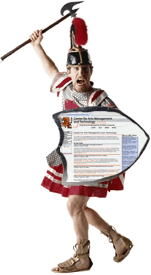
Like Caesar in the days of yore, you can host your very old gladiatorial games and pit different versions of your Web pages against each other.� With the help of Google's Website Optimizer (unfortunately, as of now, it is a free tool only available to those organizations with Google AdWords accounts), visitors are shown different versions of a particular page, and the choices they make once there are tracked.� You can then view reports detailing the results to help make decisions about your site design and strategy. More information, including walk-thru demos and guides is available at: http://services.google.com/websiteoptimizer/

Library of Congress Partners With Flickr
The U.S. Library of Congress has formed a partnership with the photo-sharing site Flickr to make more than 3,000 historical photographs from accessible to the public. As reported in a recent issue of Avisio from the American Association of Museums, "The photographs are from two of the Library of Congress's most popular collections, the George Gratham Bain News Service and the Farm Security Administration/Office of War Information. They include high-resolution images—with no known copyright restrictions—of newsworthy events in the 1910s and color photographs from the 1930s and 1940s."
The collection is housed in an area of Flickr called The Commons, wherein the site claims, "These beautiful, historic pictures from the Library represent materials for which the Library is not the intellectual property owner. Flickr is working with the Library of Congress to provide an appropriate statement for these materials. It's called 'no known copyright restrictions.' Hopefully, this pilot can be used as a model that other cultural institutions would pick up, to share and redistribute the myriad collections held by cultural heritage institutions all over the world."
It will certainly be interesting which cultural institutions choose to make their photo collections available through The Commons. As many institutions derive revenue from granting permission to use their photographs for a fee, I wonder to what degree this project will take off beyond the Library of Congress...
Shame on You, User!
Interesting little piece on AppScout.com today featuring highlights from Kyle Monson's interview with Google's user experience designer, Jon Wiley. The bit I found most intriguing is that Wiley discussed user feelings related to unintuitive Web user interfaces (UIs). According to Monson, Wiley mentioned that a frustrating UI can make a user feel bad about him/herself. Often in the design phase, there isn't much thought that goes into the psychological effects of a Web page or navigation, and I think this is another layer that deserves consideration.
This is especially true for arts organizations that typically have an aging constituent base. Do you really want to make someone feel ashamed that they can't figure out your online ticketing system?
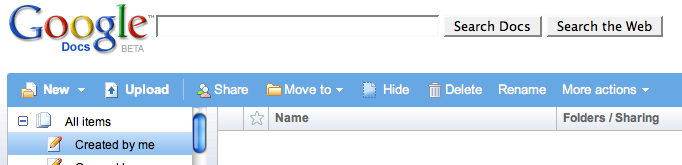
An example Google UI:

All of my options are right in front of me and fairly clear.
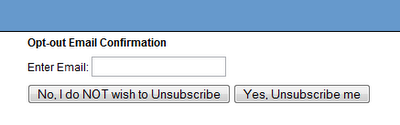
An example of a bad UI:

No, I do NOT not wish to NOT unsubscribe... what?
CAMT to Attend Nonprofit Technology Conference
CAMT team members will attend NTEN's Nonprofit Technology Conference in New Orleans, LA, March 19-21, 2008. The theme of this year's conference is "Building Community," and CAMT will be connecting with members of the arts community throughout the week. If you are planning to attend the NTC and wish to meet with a CAMT team member in New Orleans, please email us.
sIFR – Taming Fonts Too Dangerous For The Web
Have a new design for your Web presence that doesn’t use standard Web safe fonts? Tired of boring old Arial, Helvetica, or Times New Roman? In the past, if you wanted to use fonts that weren’t Web safe, you pretty much needed to put the text into an image, like a GIF, to be sure that people would see your text the way that you intended. After that, changing text meant creating a new image.
Then came sIFR – Scalable Inman Flash Replacement – which essentially takes text and uses JavaScript to build it into a Flash movie (where it’s able to apply the font that you want). And, presto! A headline in Matura MT Script Capitals!
sIFR has been around for a while, and has cross-browser and cross-platform compatibility. And the great thing is, if an end user’s browser doesn’t have the tools needed to display the sIFR text, a Web safe font alternative that you specify will be used.
Learn more about sIFR and its implementation.
Other Resources: - sIFR in Action - sIFR Font Libraries