




A Couple Monday Morning Offerings...

I stumbled upon a couple of online offerings I thought were worth a mention. One is a very inclusive Web hosting package and the other is a large file sharing tool. Happy Monday! Yahoo! Small Business Web Hosting

I am very impressed with the Yahoo! small business $11.95 per month Web hosting package. Understandably, some arts organizations can't afford $144 per year for Web hosting, but this might be a nice solution for those groups with at least a minimal budget.

What is most impressive about the Yahoo! hosting package is the "bang for your buck" factor, to be quite cliché. The list of included features is quite impressive and includes:

  • Unlimited server space
  • Unlimited email storage
  • Support for FrontPage and Dreamweaver
  • PHP for enhanced Web site functionality
  • MySQL with unlimited databases
  • WordPress and Movable Type blog tools
  • 1,000 email addresses
  • Web statistics tracking
  • 24-hour toll-free phone support
  • 99.9% uptime
  • Site backups in multiple geographic locations

Another feature that seems to be appealing for those with little Web design experience is the package's site creation tool, which is an online Web site builder that basically walks you through the process of setting up a new site. For those in the know or that already have a site, Yahoo! provides FTP tools so you can build a more complex site or move your existing pages.

I'm certainly not trying to be a salesman for Yahoo!, but I thought it was worthwhile to mention this Web hosting package, as I get questions all the time about affordable hosting solutions that offer advanced features.

Of course, for those organizations with little or no budget for Web hosting, the Center for Arts Management and Technology still offers free Web hosting. No PHP or nifty blogging tools with our package, but it's free and very reliable.

Pando - Large File Sharing

Many arts organizations - especially museums and galleries - need to send large image, video and audio files. Pando lets you send files via IM, email or the Web up to 1 GB for free and up to 3 GB with its Pro account that runs only $24.95 per year.

This is a pretty good deal when compared to the more popular YouSendIt.com's 2 GB plan that costs $109.99 per year.

Pando requires both the sender and receiver to download the free Pando tool, but it's a quick and easy download and installation process. The send/receive process is also quite simple, and the Pando software offers a user-friendly layout. For those who get stuck sending or receiving, Pando.com offers fairly thorough documentation on using its software.

The Digital Museum - A New Book and Upcoming Webinar Series

The Digital Museum (cover)Recently, the American Association of Museums published The Digital Museum: A Think Guide, in which twenty-five leading thinkers in the fields of technology and museums explore the impact of new technology on all aspects of museum operations, from interpretation to conservation. Topics range from the use of handheld devices, websites and digital games to open source technology and real-time learning. Beginning on Tuesday, February 12, AAM will launch "The Digital Museum: Transforming the Future Now" - a four-part series of monthly webinars further exploring areas identified in the publication and facilitated by leading practioners in the field. According to AAM, "The Digital Museum webinar series will help you explore how recent innovations in technology are transforming museum operations of every kind, from exhibitions and content delivery to education, audience evaluation, and institutional planning."

For more information on each webinar and to register for the series

Stanford Lively Arts Strikes a Deal with iTunes

Stanford Lively Arts, Stanford on iTunes U and iTunes have launched a new promotion that will allow Stanford University's faculty, staff, students and Lively Arts patrons to download music by artists featured in the upcoming Lively Arts season using free iTunes gift cards. From now through March 15, the cards will be made available to patrons at all Lively Arts performances and to customers at the Stanford Bookstore, Tresidder Express, the Track House Sport Shop, the Cantor Arts Center Gift Shop and the Stanford Shop at Stanford Shopping Center. Lively Arts plans to mail the cards to Stanford students, faculty and staff in early February and will make the cards available to its community partners, including the Palo Alto Unified School District and East Palo Alto's educational program College Track.
The first Lively Arts event where patrons received the iTunes gift cards was the Merce Cunningham Dance Company's performance on Friday, Jan. 25, which featured a new work with music by composer Mikel Rouse titled eyeSpace. During the performance, the audience used iPods distributed at the theater to select and personalize the music that accompanies the dance. Rouse's music is also on the gift card.

In addition, the card will include music of the Jazz at Lincoln Center Orchestra with Wynton Marsalis, Blind Boys of Alabama, Meridian Arts Ensemble, Academy of Ancient Music, Turtle Island Quartet, Rosanne Cash, Kronos Quartet, Rob Kapilow and the Pacifica Quartet. Recipients of the cards will be able to download complete tracks from the artists at no charge until they expire on March 31.

This is iTunes' second such promotion with the performing arts at an educational institution. The first was with the University of Illinois' Krannert Center in September 2007. With all of the performing arts centers located at colleges and universities throughout the nation, I wonder if this is beginning of a new trend in the presenting and touring industry. It strikes me as a great way to use iTunes as an audience development tool.

JotYou!

JotYou is a site that allows you to send SMS text messages to mobile phones, but with a twist. You can set up the message delivery so that it only delivers when people are in a specific geographical area and you can adjust the send time and expiration time of the message. So, your recipients only get the message if they are in the area you have selected within the specified time frame. If they arrive too late or if they do not move within the location radius, they never get the text message.

After looking at the demo video for JotYou, I got to thinking that this service might actually be useful to arts organizations. I'm not going to go into the pros, cons, and etiquette of using mobile messaging as a marketing tool, since that's a whole other can of worms. But, for the sake of argument...

Let's say your organization sponsors a gallery or art crawl through your downtown cultural district. You could have people sign up beforehand to be part of the Art Crawl Mobile Messaging Tour, which would message the guests, as they navigate the streets, with tips about things to see, directions to get there, and maybe even clues that would lead them to Art Crawl Mobile Messaging Tour exclusive content (like free cups of hot chocolate and coffee).  How cool is that?

I have not actually tried JotYou, so I don't know how reliable the service is or how accurate its geographical-based messaging is, but I think that the potential for creating value-added experiences for willing participants could be interesting enough to start experimenting with JotYou.

A Good Cause

Today's post isn't arts-related, but all of us in the not-for-profit world are interested in supporting a good cause when we hear of one. Beth Kanter, fellow nonprofit technologist and author of Beth's Blog, asked me to share a link to an online campaign she's involved with, Route Out of Poverty for Cambodian Children.

Case Foundation, Parade Magazine and GlobalGiving are offering $50,000 to the campaign that can raise the most through unique donations will score 50 G's for their charity!

From Beth:

"Right now we're in second place with 7 more days to go.  I'm reaching out to my network to ask if they will blog or twitter about the campaign and ask their networks to contribute the minimum donation of $10. The contest ends on January 31."

Click here to read more about Route Out of Poverty and contribute now!

Sundance: Art Meets Tech in Park City

Brad and I are in Toronto working with our colleagues in the Great North on developing the content for the Technology in the Arts - Canada conference for May 9 & 10 in Waterloo. During a few moments yesterday when I hit the streets with my Visa (aka shopping), Teresa Hollingsworth from the Southern Arts Federation called me to give me her celebrity sightings report from the Sundance Film Festival. Once my petty jealousy cooled down, I wondered what interesting intersections of art and technology were taking place at Sundance this year. Here's what I've learned:

  • Last year, Sundance opened a screening room in Second Life with the indie film Four Eyed Monsters. The festival continued using its SL screening room this year with the premiere of Lynn Hershman's new movie Strange Culture featuring Tilda Swinton and Thomas Jay Ryan portraying the true story of Steve Kurtz.Synopsis: In 2004 artist and college professor Steve Kurtz was preparing for a MASS MoCA exhibition that would let audiences test whether food has been genetically modified when, days before the opening, his wife tragically died of heart failure. Distraught, Kurtz called 911, but when medics arrived, they became suspicious of his art supplies and called the FBI. Dozens of agents in haz-mat suits sifted through his home and impounded his computers, books, cat, and even his wife's body. The government held Kurtz as a suspected bioterrorist, and, nearly three years later, the charges have not been dropped. He still faces up to 20 years in prison. Because he is legally barred from comment, the movie uses actors as avatars to tell this story of contemporary art, science, politics and paranoia. � Click here for Variety's review of the film
  • Continuing in the Second Life vein, this year the festival premiered "Invisible Threads" by Stephanie Rothenberg, a new media performance artist, and her collaborator, Jeff Crouse, a digital artist and programmer. "Invisible Threads" is a virtual sweat shop that produces real-life, custom-ordered, personalized blue jeans. The project is intended as art, but the creators see it as a window into so-called "telemetric manufacturing methods of the future."“What I think is fascinating about her work is that it is a step towards what our future is going to be,” said Jeffrey Winter, a panel programmer for the Sundance Festival who focuses on media, art and technology. “It’s called art now, but in the future it’s going to be how you get your jeans. It will be daily life. So often what you call art is just people who see the future before the rest of us do.”
  • Sundance also premiered a landmark in DIY cinema -- the first solo computer-generated animated feature. M Dot Strange (nee Michael Belmont) -- writer, director, editor, producer and animator of We Are the Strange -- is the first YouTube filmmaker to hit Sundance's big screen.Synopsis: Blue is a young girl navigating the streets of a terrifying, sinister fantasy world all alone. When she meets Emmm, a fellow lost soul, she joins him on a quest for some ice cream. Upon arriving, they realize the ice cream shop has been taken over by dark forces, and the whole city is teeming with evil. Bizarre monsters surround Blue and Emmm on all sides until Rain, a sadistic hero, arrives to rescue them and exterminate the source of the evil. More about the film and filmmaker

Okay, now I am more jealous. Next year, Teresa definitely has to take me with her to Park City!

When href="Links, Links, and More Links"

I stumbled on a great collection of links of artist using technology, hosted by the San Francisco State's Conceptual Information Arts (CIA) program.  There's over 4,000 links to artists whose arts melds with disciplines as various as computer media, robotics, virtual reality, and even microbiology. However, after clicking around and encountering some broken links, I started to wonder, "How the heck do they keep track of so many links?  How does anyone who has an extensive list of external links avoid frustrating, broken links?"  After some searching, I found something interesting.  And free.  And simple.

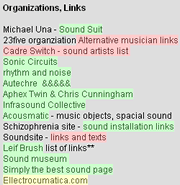
There's an add-on for the FireFox browser called LinkChecker that you can use to verify the links on any Web page you browse to.  Links are highlighted different colors based on status (green is a valid link, red is a broken link, yellow is a link with an error, and gray is a link that times out before responding).  I installed this add-on and put the page of links at the SFS CIA program to the test.

FireFox LinkChecker Add-On ScreenshotFor the 4,238 links on the page, LinkChecker took about an hour to go through them all, but I just minimized the page and let it run in the background.  Once it was done, I knew that I could click with confidence.  This is a great tool for the end user, especially someone doing research (on artists using technology, perhaps?).  Run the LinkChecker, go have a cup of cocoa, and come back and know exactly which links are valid. 

From a site manager's perspective, the add-on is helpful as well.  You can test your own site's link pages, see what links are broken, and then clean up your code to remove them.  The main downside of this add-on is that it is completely manual.  The link checking isn't done automatically or at a regularly scheduled time, and LinkChecker only flags a link as broken (placing the burden of maintenance on the site manager).

I would bet good money that there are link validation software and monitoring services out there that are more robust than LinkChecker, but I've never used or investigated them.  Still, LinkChecker is simple, free, and a great resource to have when dealing with loads of links.

Anyone out there struggling to keep their collection of links clean and tidy?  Know of any other tools or resources to verify links?  Want me to do a little more digging on this subject?  Give us some comments!

Related Links: W3.org Link Checker - http://validator.w3.org/checklink FireFox Add-Ons - https://addons.mozilla.org/en-US/firefox/

Fair Use and New Media

A new study by the Center for Social Media at American University examines user-generated content with respect to copyright issues. The study was conducted by Center director Pat Aufderheide and Peter Jaszi, co-director of the law school’s Program on Information Justice and Intellectual Property. The study shows that many online videos using copyrighted material could be protected under fair use policies.

Fair use, a hotly debated concept that lacks clear guidelines, allows for the quoting of copyrighted material without asking permission or paying royalties. The study warns that perfectly legal and valuable social commentary might be curbed by major content holders' (Sony, NBC, Viacom, etc.) new practices for controlling piracy.

The Center for Arts Management and Technology will feature an interview with the lead investigators of this study on episode 35 (scheduled for release on Friday, February 8, 2008) of its Technology in the Arts podcast.

Read the full study.

Google Apps

I sat in on a webinar yesterday, courtesy of NTEN, which gave a whirlwind, back-end tour of Google Apps. What is Google Apps? Google Apps is an online collection of communication and collaboration tools, such as Gmail, Google Calendar, Google Talk, and Google Docs.

  • Gmail (email) - many folks out there use Gmail for their own free, personal email account, but Google also offers Gmail for businesses. One neat feature of Gmail is the ability to use labels (taxonomy) on your emails to help with sorting and search management. Also, emails are displayed as conversations, so it’s really easy to view, sort, and file entire email chains.
  • Postini - recently acquired by Google, Postini provides software that is integrated into Gmail that provides better spam filtering and email archiving, security and encryption. Unfortunately, this service is only offered with the paid Premiere Edition of Google apps (more on this later).
  • Google Calendar – there’s nothing really fancy about Google Calendar; it’s your basic calendar application. One nice thing is that it is tapped into your Gmail contact list. You can also sync up your mobile phones or BlackBerrys. Also, with some editions of Google Apps, you can set-up and allow reservations of shared resources, like conference rooms.
  • Google Talk (instant messaging) – an IM in your browser. It’s also integrated into Gmail and its contacts. For more information on IMs, see David’s previous blog post.
  • Google Docs (document creation and management) – this is the meat and bones of Google Apps, in my opinion. While Gmail, Postini, and Calendar might all combine forces to overthrow Outlook or Thunderbird, Google Docs is Google's attempt to replace MS Word, Excel, and PowerPoint. All of the Docs are powered by AJAX, which basically means they're all browser-based and stored in HTML (essentially). I'm not going to go into all of the features of Google Docs, but some of the highlights include being able to have multiple people simultaneously working and saving on a document, versioning which keeps a history of every change made to a document, and the export to PDF feature. Google Docs also serves as a document repository for your Docs-created documents, but at this point you can't upload other file types (at least I don't think so).

What’s it cost? The free Standard Edition has access to most Google Apps functions, but there are limitations: 6.32 GB storage, no 99.9% uptime guarantee, text-based ads on certain screens, no 24/7 assistance, no Postini, no email migration tools, and so on.

Non-profit organizations are eligible to receive the free Education Edition, which gets you some of the benefits missing from the Standard Edition, but you still don’t get a 99.9% uptime guarantee or Postini.

The Premiere Edition, which gets you the whole enchilada plus 25 GB of space instead of 6.32, costs $50/user account/year.

For more detailed breakdown of the different editions, click here.

Is it a good idea for my organization to start using Google Apps? Well, that depends. If you are a small office that's connected to the internet and want to take advantage of the collaborative tools that Google Apps provides, then maybe it's worth looking into. Google Docs, for example, is a very strong, collaborative resource that doesn't require an organization to pay for, own, or manage server(s) to share documents. The free Google Apps Education Edition gets you some nice features, and cost of the Premiere Edition isn't astronomical. However, there are some things to consider.

  • There currently is no offline support for Google Apps. If your internet connection goes on the fritz, so does your ability to access and work on your documents. Google is working to change this with Google Gears, but it's in development and might not be ready for a while.
  • Without paying for the Premiere Edition, you don't get a 99.9% uptime guarantee. Doesn't sound like to big of a deal...until you can't access your files. This is just something to consider, though, rather than lose sleep over; Google's network is very, very big and most likely trustworthy in terms of uptime, redundancy and security.
  • In its current state, Google Apps seems more like a supplement to, rather than a replacement for, other processes and software. The convenience of the collaborative tools might be overshadowed by the additional time and energy spent configuring, learning, and using these new tools.

Though it may happen in the future, I don't think Google Docs or any other online document creation and management software is robust enough, at this point, to replace MS Office. Personally, I’ve been using Word since I had to write my first school report (on the state of Arizona) and I can't quite come to grips with the idea of never using it again. Yet.

Google Apps and other "Desktop in the Sky" applications (see a previous post by Brad on ajaxWindows for an example) are worth keeping an eye on. Case in point: if you visit Google Apps site, you'll see that almost all of the product's logos have the term "Beta" included in them. As the presenter explained yesterday, Google is constantly improving and modifying Google Apps. In a few years time, Google Apps could become powerful and all-in-one enough to woo me away from MS Office. We'll see.

If you have any other questions about Google Apps, feel free to either check out their site or post a comment and I’ll do my best to answer.

More resources:

Convert PDFs to Word Documents

If you're like me, you cry when you watch Extreme Makeover: Home Edition. Wait, that's not what I meant. Xtreme Makeover Bus driver... Move that bus!

I meant... If you're like me, it's often frustrating to try and edit a PDF document. The file type was created to facilitate the sharing of documents without causing formatting issues, and PDF editing has always been difficult for users.

Now, thanks to www.hellopdf.com, you can simply convert your PDFs into Word documents for free.

I've not yet used the tool, so I'm skeptical about its ability to carry my PDF formatting into the Word document without some corruption. I'd love to get some comments from those of you who try this tool.

Instant Messaging in the Workplace

A few years ago at my previous job, I engaged in a debate with some colleagues over whether or not we should set the staff up with the ability to send instant messages (IMs) to one another. I argued that instant messaging would allow us to communicate with each other more efficiently, but my boss argued that instant messaging would reduce productivity and weaken the staff's interpersonal connections. Needless to say, my boss won out. Not that I was bitter about it. When I transitioned to my current position with the Center for Arts Management and Technology, I was pleasantly surprised to learn that the staff had incorporated instant messaging into the office's culture. Rather than calling each other's extensions or sending short e-mails back and forth, staff members send brief IMs to one another. In fact, instant messaging proved to be quite a valuable tool during my job transition. I frequently used IMs to ask questions of and gain clarity from my predecessor.

So has my experience with work-related instant messaging validated my argument from years ago and proven my boss wrong? Yes...and no.

Instant messaging has indeed proven to be wonderful tool for informal workplace communication - asking brief questions, sending quick reminders, sharing internet links, etc. The real-time rapid exchange not only fosters an immediacy of communication, but it also gives the user the feeling that they are engaging in a more personal conversation than e-mail. Correspondingly, the personalities of the users are often infused into the exchange. Rather than weakening interpersonal connections, instant messaging can actually strengthen these connections by providing the messengers with a personal medium for communication.

It hasn't replaced my use of e-mail or face-to-face meetings, but instant messaging has changed how I use these other means of communication with my colleagues. Now, I tend to use e-mail for formal messages as well as messages containing important details or information that the recipient may need to access later. While I still chat informally with colleagues in-person, a great deal of my face-to-face meetings with co-workers are used for brainstorming, problem solving and other collective business activities.

Now for the "No" part. I must admit that I do feel some pressure to interrupt my work throughout the day to answer instant messages as they appear, and it has impacted my productivity to some degree. There is a solution for this. I can change my online status to indicate that "I am currently unable to reply," or I can log out.

It sounds so simple, yet it truly requires a shift in my work habits. Over the years, I have developed the habit of responding immediately to incoming email and IMs. (I also do this with returning voicemail and answering incoming phone calls.) Now, I realize that in order to focus on particular tasks and work items, I need to turn off my IMs, close my email and turn off the phone. After all, if it's really important, they'll leave a message... Right?

Related items:

Can You Ever Have Too Much Redundancy?

SanDisk has created a flash drive for the forgetful, careless, or paranoid:  the 4GB Cruzer® Titanium Plus, a USB flash drive that automatically copies the drive's contents to an online account every time you plug it into a internet-connected computer. Scenario 1 - You delete an important file from the drive and need to recover it, pronto.  You easily access your online account, which also has 4GB worth of file space.  Your account stores files that you delete from your drive for 30 days provided the total size of the currently backed up drive files and the previously deleted files do not exceed 4GB.

Scenario 2 - You lose the drive.  You have the option to password protect your files using a AES hardware data encryption feature on the drive.  Plus, the drive comes with two years free service with BoomerangIt, a lost-and-found mediator; you slap a sticker on the drive, and, if someone finds it, BoomerangIt facilitates its return (for a fee, of course).

Scenario 3 - You run over the drive with your Subaru. Again, you're covered.  The drive's gone, but your files are still online.

So, what's it going to cost you?  $60 for the drive and $30 a year (after a 6 month free trial) for the online service.  That's a fairly hefty price, at first glance, for a 4GB USB drive, but the peace of mind might be worth it. 

For more details and specs, check out SanDisk's press release.

2008 AAM MUSE Awards - Applications due Jan. 11th

The American Association of Museums (AAM) Media and Technology Committee is accepting online applications for the 2008 AAM MUSE Awards until Friday, January 11, 2008. The cost is $25 per entry. The 2007 Muse Awards competition received nearly 200 applications from a wide variety of museums in North America, Europe, Australia and Asia. Entries included audio, cell phone and interactive handheld tours, interactive kiosks and multimedia installations, podcasts, blogs, games, websites, online collection and image databases, videos and e-mail marketing campaigns. This year AAM is expecting another exciting round of projects that reflect innovation in the museum media community.

Entry categories include:

  • Audio and Visual Tours
  • Extended Experience
  • Games
  • Interactive Kiosks
  • Interpretive Interactive Installations
  • Multimedia Installations
  • Online Presence
  • PR and Development
  • Teaching and Outreach
  • Video

MUSE award winners demonstrate outstanding achievement in the following areas:

  1. Success in meeting the stated educational goals
  2. Visual design
  3. Production quality
  4. Functionality
  5. Appropriate use of technology
  6. Overall appeal

Click here for more information and to apply online.

Let's Take a Moment to Mourn DRM

According to an article in Business Week, Sony BMG Music Entertainment will start selling songs without copyright protection sometime this quarter, a move that will essentially kill the much-loathed digital rights management, or DRM. Basically, this means that songs you download through iTunes, Amazon, eMusic, or any other service will be completely unprotected.

Naturally, the catalyst for this move is money. A company would never do anything out of the goodness of its collective corporate heart. Sony and other labels realized that DRM was not only restricting the illegal distribution of music; it was also restricting the LEGAL distribution of music. With the canning of DRM, we should begin to see a plethora of new platforms for online music sales.

The irony in this story? Well, apparently the music industry is frustrated by Apple's pricing structure and wants a larger piece of the pie from music sales. The funny thing is that DRM was really what led to Apple's domination in the legal download market. When online music sales started to take off, the iPod was the dominant MP3 player on the marketplace (and still is, really, though there are more options now), and the only way you could buy and play protected music for the iPod was from Apple.

The only way for the music industry to cut into Apple's iTunes dominance is to offer unrestricted mp3 sales to retailers like Amazon.com, as MP3s can be played on any digital audio device.

What does this mean for the arts community? In my opinion, it won't make it less likely that an orchestra's performance will be shared illegally. However, it does level the playing field. If music executives - the people with money - have to deal with unrestricted audio being freely distributed, perhaps the strategies they devise to curb illegal activity will help to inform the nonprofit world.

In other words, we're all in the same boat, so the rowing should get a little easier for us artists.

Read the full Business Week article.

Powered by ScribeFire.

Much Ado About File Formats

The web has been buzzing this week with discussion of an issue with Microsoft Office and older file formats. Here's the gist of the issue:

  • When Microsoft came out with Office 2007, the new software blocked users from opening files created by older versions of Word, Excel and Power Point - mostly programs launched in 1995 and earlier. The change also kept users from opening some files made in Corel Corp.'s CorelDraw.
  • In September of this past year, Microsoft released Office 2003 Service Pack 3 - a free package of updates and fixes which also blocks users from easily opening the older file formats.

So why would Microsoft make it difficult for Office users to open older Office file formats?

According to Microsoft, opening these files poses a security risk. Specifically, the code that reads these older file formats may open a PC to hacker attacks.

What should you do if you ever find yourself using Office 2007 or Office 2003 updated with Service Pack 3 and needing to open an older file format?

  • You can create a trusted location and place the files there. This is documented in http://support.microsoft.com/kb/922849. It's an easier process if you're running Office 2007 than if you're on Office 2003, but it is an option.
  • You can change the default version that Office 2007 & 2003 will still open. Information on how to do this may be found here.

Granted, most of us are not regularly opening active files from 12 or more years ago.  The only files I still open that are so old are a series of poorly written poems from my undergraduate days.  Hmmmmm, maybe it's better if I don't open those after all....

Man from Mars

I can't remember where I first heard this lovely bit of advice, but I figured I'd pass it on (especially since one of my New Year's resolutions is to make silly pictures of myself more often). Man on MarsWhen looking at your organization's Web presence, it sometimes helps to ask yourself, "Would a man from Mars understand this? Would he be able to figure out what we're about?"

If a casual, first glance at your home page does not make it clear what your organization does or where a visitor can find needed information, then it might be time for an overhaul.

Klaatu barada simple.

End of Year Tech Lists

As we head into the final stretch of 2007, the time has come for a barrage of "end-of-the-year" lists.  Here are a few tech-related lists worth checking out: The 15 Biggest Tech Disappointments of 2007 (PC World)

30 Most Popular Stories of 2007 (PC World)

  • Okay, this list contains a plethora of other lists.  I apologize for going all "meta" on you.

The Year in Online Video (Wired)

2007 Foot in Mouth Awards (Wired)

Have a safe and happy New Year!

Holiday Guilt Gifts with a Techie Twist

We hope you are having a happy Christmahannukwanzika.  This post is for all of you out there who need the dreaded "guilt gift".  You know who you are -- you received an unexpected gift from someone and now feel the need to get something for them in return.  Here are four holiday "guilt gift" ideas with a techie twist from our friends at ThinkGeek.com. USB Plasma BallUSB Plasma Ball - Remember the plasma balls that used to be sold in the mall at Spencer Gifts?  Now, they have one that plugs into your computer.  The perfect desk accessory for that eccentric friend.

PhotobucketUSB Memory Watch - In addition to displaying the time, this watch helps you carry your valuable data with you at all times.  With 2GB of capacity, it has more than ample storage.

USB Drink Warmer and ChillerUSB Drink Warmer and Chiller - It's perfect and it's simple - a hotplate powered by USB keeps your coffee warm. Flip a switch, and it can keep a cold drink cool.  Great for bipolar caffeine addicts.

Driving LED EmoticonDriving LED Emoticon - The Driving LED Emoticon is a battery powered, wirelessly controlled message sign that can be attached to the rear window of your car via the included suction cup.  It can display any one of five different messages - smiling face, frowning face, "Thanks", "Back Off" and "Idiot". Isn't it great that technology allows us to communicate more clearly than finger gestures?

Please BCC Me

It's amazing how many people still don’t, at the very least, BCC their recipients when sending out mass emails. BCC stands for blind carbon copy; this means that any address listed in a BCC field will get a copy of the email, but their email address will not be displayed to anyone else who is sent the email. That includes anyone in the TO or CC fields. Before I continue, I want to offer this to all of those out there who have been victims (I thought about putting that in quotes, but ultimately decided not to) of non-BCC’ing. Whenever your email address is exposed in a manner you wish it hadn’t, send a friendly response to the sender of the email and point them to this post. I have composed a reply with this post’s link here.

Since September 2007, I've received at least 5 emails where I my email address is listed right out in the open in the CC field (along with a total of 406 other individual email addresses). My email address has been leaked on audition notices, a Holiday "goodie guide" from the couple who made my wedding cake, a local performance group's new show announcement, and other emails.

So what's the big deal?

Security. Pure and simple. If you have email addresses for patrons, artists, donors and so on, it is your responsibility to protect those addresses and use them wisely. Due to the faux pas of the aforementioned emails, I now have access to over 400 email addresses of people who have shared interests. I could add them to my own email distribution list, send them my own announcements, spam them, track them down, flame them, or worse. To borrow an analogy..."Look at it another way, would you send your entire holiday card address list out with each card you sent?"

Nobody wants their email addresses shared in this way. Nobody.

How do you BCC?

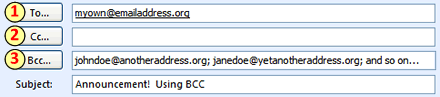
It’s simple. When sending a mass email, first put your own address in the TO field (1). I know this sounds weird, but trust me, this is the thing to do. Plus, you’ll receive a copy of the email in your own inbox for your records. Then, put all of your other addresses (the ones you want to hide) in the BCC field (3). You have the option of adding addresses in the CC field (2), but keep in mind that everyone getting the email will see these addresses.

Screenshot showing email address fields

All of the recipients in the BCC field will get a copy of the email with the same address in the TO and FROM fields (in the screenshot above, myown@emailaddress.org) and no other addresses.

Pretty nifty, huh?

The specifics of using the BCC field, like getting it to show up in your email composition area in the first place and the formatting used to separate email addresses (commas or semicolons) can differ depending on what software you are using. If you need help figuring it out, I’d suggest using either the help resources of your email program, the links listed at the end of this post, or an internet search.

What other mass email options are out there?

This BCC business is the bare minimum that you should do to protect your recipients’ privacy. But, if you’re a group or organization that is currently or will be sending out lots of mass emails (or eBlasts, if you prefer the hip and trendy terminology), consider utilizing one of the many bulk email software/services out there. Here’s a list (in alphabetical order) to get you started in your searching.

http://www.constantcontact.com/ http://www.icontact.com/ http://www.lsoft.com/ http://www.patrontechnology.com/

Anyone out there use one of the services mentioned above? Or are using a different one and want to tell us about it? Please leave us a comment.

Related links http://www.cs.rutgers.edu/~watrous/Bcc-for-privacy.html http://www.iwillfollow.com/email.htm