





First in a series of Search Engine Optimization Articles

We are pleased to present the first in a series of four articles written by Lance Trebesch and Taylor Robinson from TicketPrinting.com related to search engine optimization. Read on...

Make Your Art Organization a Top “Hit”: A 30 Day Step-by-Step Guide to Dramatically Improved Search Engine Optimization Part 1 of 4

By Lance Trebesch and Taylor Robinson

Lance@TicketPrinting.com www.TicketPrinting.com

Do you ever wonder why some websites seem to steal the top positions on search engines? No, it is not magic, and yes, your art organization can do it too. The “secret” to achieving this success for your website is by harnessing the power of search engine optimization. By following this step-by-step guide, you will be well on your way to drastically improving your websites standing in only 30 days.

Overall Objective:

The overall objective should be to improve your websites position on search engines.

What you need to know:

Despite what some companies may want you to believe, there are no tricks or shortcuts to SEO and you will not top the list of search results overnight. Three major areas should be focused on for a successful SEO campaign. These areas include:

1. Keywords 2. Website design 3. Links

Week 1:

Objective:

Your objectives in the first week include submitting your site to several link directories and improving your websites keyword structure.

Let’s Get Started:

Directories- Submitting to nonprofit directories such as CharityNavigator, Yahoo Health, idealist.org, and fundsnetservices or general directories such as Business.com, Best of the Web, and DMOZ will immediately affect your websites search rankings. While listing your site on directories is worth your time, the links are of little overall value and will only have a minimal impact on your ranking.

Keywords- Keywords are the words/phrases that tell search engines about the purpose of your site. It is important to identify which words are most advantageous to your organization so they can be optimized in your content. Begin selecting keywords by brainstorming every word/phrase that is topically relevant to your organization. Remember, put yourself into the shoes of the searcher and avoid industry jargon. Be sure to include the name of the organization and the main service the organization provides. Additionally, when selecting keywords try to avoid general terms such as “theater”, “art”, or “fundraiser” and select keywords that are unique and relevant. Two problems arise when general keyword terms are used:

  1. The phrase becomes more competitive and harder to rank well on.
  2. The site receives traffic from people who are looking for a different service than your organization provides.

Art organizations in particular need to include action keywords such as “donate” or “contribute” to make their fundraising campaigns more successful. If you are still unable to generate keywords, browse through websites of similar organizations and look which keywords are used on their sites.

Keyword Tracker Tools- Once you have developed a starter list, you are ready to test the words using one of the many online keyword tracker tools. The best free online tool today is yahoo’s Overture. This will show the popularity of the keyword entered during the last month and give a rough idea of what additional keywords may work for the organization. However, for the organization that wants to launch a more targeted and successful SEO campaign, Wordtracker is the correct instrument to use. Wordtracker has additional features such as the inclusion of plurals and misspellings in its search. Most importantly Wordtracker includes the competition for each of the keyword phrases. The trick here is to select keywords that are popular searches but not commonly used by other organizations.

Keyword Density- There has been a great deal of hype regarding keyword density and finding the correct density for each search engine. Keyword density refers to the frequency that the keyword is used. According to the most current and accurate articles written on the subject, such as the Unfair Advantage (within searchenginenews.com), keyword density is in fact much less important than originally predicted. The only standing rule of keyword density is not use “keyword stuffing” techniques where the phrase is repeated multiple times. Search engines now monitor this tactic and will actually lower your sites ranking if they detect stuffing. Search Engine Land’s article, SEO “Don’ts”: 20 Fatal Mistakes You Must Avoid to Succeed, gives an accurate list of pitfalls such as keyword stuffing that you will want to steer clear of when implementing your SEO strategy.

New Website Content- When incorporating keywords into the websites text, be sure to look at the content from the users’ point of view, and strike a balance between the user and the search engine (priority always goes to the user), making content friendly for both. For further reading on how to layout your website to optimize its effectiveness with search engines read Matt McGee’s 21 Essential SEO Tips & Techniques or one of the many articles on the subject in Search Engine Land.

Title and Header Tags- The most important keywords identified should be included in the websites title and header tags. A title tag is a short html code that tells search engines about your site, while headers are viewed by users on the top of each page and tell the purpose of the page. The 7 Essential Title Tag Strategies of High Ranking Web Pages in 2006 has further information about how to improve title tags to optimize your search performance.

Week One Checklist:

  • Submit your website to directories
  • List keywords
  • Test your keywords with online tools
  • Research title and header tags
  • Improve your websites content by adding keywords

Tux the Linux Penguin vs. Bill Gates

Can a little penguin destroy the Windows empire? (Photo Uncredited)
On one of our recent podcasts, we talked about Ubuntu, the Linux-based open source operating system. I recently discovered that Ubuntu is, in fact, the OS Dell and Lenovo are now offering as a Windows alternative.

People often ask about Linux and the move to open source, and I typically advise against it... at least in the current tech environment. While the open source model has its benefits, the most important being the leveraging of collective developer wisdom, there are also many pitfalls for the novice user.

When you buy your next computer and the sales rep or online form asks you, "Windows or Linux?," what will you choose?

The following article provides a few bullet points to consider before taking the open source OS leap:

Is it time to exit from Windows?

Powered by ScribeFire.

A few good articles...

One thing that's consistently true about information technology is that you can't trust what was true today to be true tomorrow. If it's hard to identify and articulate the scope for your technology project, it can be even harder to find the tools that match up with your requirements. Founded in November 2005 by a brave woman named Laura Quinn, idealware.org is a nonprofit organization that publishes unbiased articles about technology tools in a wide variety of areas, from electronic newsletters to blogging to Constituent Relationship Management. Laura seeks input from a wide variety of technology professionals and all the authors involved strive to provide honest, plain-talking information about a given subject, and in my humble opinion, they're doing a great job.

Check out Idealware.org's "A few good tools" report series on topics like Web Analytics and CMS, or more theoretical articles like "In Search of CRM" or "Building Peace Through Information and Communication Technologies."

Saving the Planet One Search at a Time

Back in January, 2007, Boston Blogger Mark Ontkush decided to do some fancy mathematical magic and figure out how much energy could be saved if Google switched from a white background to a black background. I had never considered this before, but it makes sense that a mostly black screen uses less energy than mostly white. Not an incredible amount (15 watts) less, but if you consider how many hits a day Google gets (about 200 million) it starts to add up. After his computations, Ontkush announced that changing Google to a black background would save 3,000 megawatt-hours a year. 3,000 megawatt-hours! Holy batteries, Batman! I was astounded. Primarily because I didn't know what a megawatt-hour equated to. After some quick research, I had some additional perspective. It turns out that 3,000 megawatt-hours could power roughly 95 homes for an entire year. Not quite as mammoth as I original thought, but still not inconsequential.

And other people took notice. Specifically, an Australian company called Heap Media decided to put Ontkush’s musings into action. And so, Blackle.com was born. Powered by Google Custom Search, Blackle returns Google quality search results while saving energy with its black background. A running tally on the front page notes how much energy Blackle has saved (at the time of this posting, approximately .147 megawatt hours).

For my own part, I’ve set Blackle as my new home page for my browser (sorry Google) to see how it feels to use this inverted color scheme as my primary search engine. Luckily, I don’t use any features of Google beyond the search engine; I don’t have a Gmail account or custom iGoogle pages, so I’m not really losing any functionality by switching to Blackle. It will be interesting to see if I can make the change stick.

In reality, using Blackle is not going to save the world. But it is a small, small step. And if it helps keep me conscious of my energy consumption, that’s something.

Visit Dresden's Art Gallery in Second Life

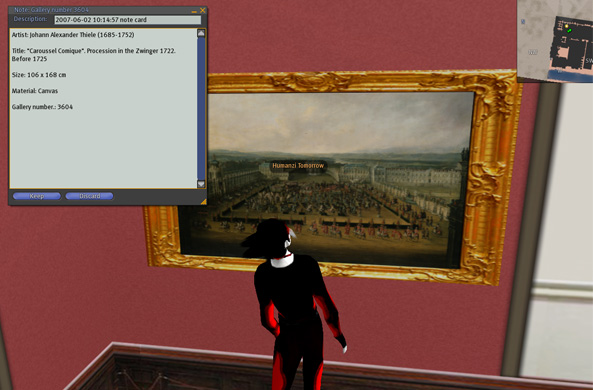
Not everyone can afford a trip to Dresden, Germany, but now anyone with a computer and a Second Life account can visit the city's famous art gallery. In June, a digital version of the entire building - 37,700 square feet and 750 paintings - was launched in the 3-D virtual world of Second Life.

My Second Life self viewing a painting in Dresden's gallery. (View Full Image)

Check out the full story and some images from WIRED.com.

Powered by ScribeFire.

BOOKMARK ME: Database of Online Productivity Software

Here is an excellent database of Office 2.0 tools. "Office 2.0" is essentially a term describing the Web-based workspace that uses online tools such as customer relationship management, calendars and word processors.

The database is a great source of Office 2.0 toys, and everything can be sorted by name, vendor, reviews, user interface technology and Google page rank.

Powered by ScribeFire.

Web 1.0 is so ten years ago...

I happened upon a great blog entry on Slayerment.com about upgrading your Web site to Web 2.0. It provides 12 ways to move that pitiful static thing you created using a Geocities account back when Vanilla Ice was cool into an honest to goodness interactive online tool. Yes, "Web 2.0" is just one of those annoying buzz terms, but this entry is funny AND insightful, a great combination:

12 ways to turn your Web 1.0 site into a Web 2.0 site | Slayerment

Powered by ScribeFire.

Keep Your Inbox Clean...

Here is a great presentation by Merlin Mann of the popular 43 Folders digital organization site on his Inbox Zero concepts. Basically, he discusses keeping your inbox completely clean by processing email in one of five ways: Delete, Delegate, Respond, Defer, or Do. It's a great method of dealing with email, and I encourage everyone to take 30 minutes to watch the main portion of his presentation.

reCAPTCHA: Stop Spam, Read Books

Recently I noticed that we had roughly 6,800 spam blog comments awaiting approval. As much as I'd like to read nearly 7,000 entries about Viagra and someone's dead Brazilian father who left them $2 million of which I can have half if I just help them access the money, I simply don't have that kind of time. So I've added a reCAPTCHA tool to our blog's comment area. reCAPTCHA is a variation on the common CAPTCHA tool, which helps Web forms distinguish between human users and computer users (a.k.a. spammers). You've encountered a CAPTCHA if you've seen something that looks like this on a Web site registration form:

CAPTCHA

Well, reCAPTCHA is similar except that when you enter these funky words into a reCAPTCHA module, you're helping to digitize books. According to the reCAPTCHA Web site, about 60 million CAPTCHA words are entered every day. Since computers have difficulty "reading" scanned text to make it truly digital, reCAPTCHA presents Web form users with two digital words - one it knows and one it needs your help with. It uses the one it knows to validate that you're a human user and the one it doesn't know to add a new digitized word to the book.

Visit this site for more information about how reCAPTCHA works, and click "Comments" below to try it out!

Almost one year ago today...

I blogged about the issue of data loss many organizations and individuals, myself included (I can kiss all those undergrad research papers saved on 3 1/2 inch floppy disks goodbye) experience due to outdated file formats. I came across an article posted to the Americans for the Arts Cultural Policy listserv detailing the same issue. The article originally appearing in the BBC News Web site, "Warning of data ticking time bomb", can be read in full by clicking on this link: http://news.bbc.co.uk/1/hi/technology/6265976.stm

Part of me feels that the idea of a "ticking time bomb" is a bit on the sensationalist side. Surely large organizations with the resources to handle that much information will figure out a way to keep the data accessible. I think the people who will get the short end of the stick unfortunately are those without the labor and/or money to figure out. Having worked in a variety of arts organizations from five-person outfits to mid-sized organizations, my impression is that there is often not enough emphasis on proper data storage.

My challenge to you is to think of how you will safeguard your organization's vital information - data about your constituents, grant recipients, financial transactions, donor histories, etc - how will you ensure the information is still easily accessible thirty years from now? It is our responsibility to make sure as much of the organizational history as possible is passed on to our successors. It would be great if we could pass it on in such a way that they can actually use it to further the mission of the organization.

It was a wonderful two weeks for Technology in the Arts...

...with the addition of two partners. ERC Systems logo Fig Leaf logo

The ArtsTech Award Ceremony & Reception is exclusively sponsored by ERC Systems, a California based creator of artist registries and online event calendars. Read more about their services at www.ERCSystems.com.

The VIP Dinner is graciously supported by Fig Leaf Software, a software provider and technology consultant firm based out of Washington, DC. More information about their products and services may be found at www.figleaf.com.

CAMT staff thanks both of these organizations for their support of the conference and is pleased to include them in the array of exciting programming coming this fall.

Š

If you're coming to the conference...

...don't forget to join us as we kick things off on October 11 with a tour of two Pittsburgh arts organizations:

  • The Pittsburgh Glass Center - In honor of Pittsburgh's 2007 celebration of glass art (www.pittsburghcelebrates.org), we'll take a tour of this 16,000-square-foot glass art facility and be treated to a glass-blowing demonstration.
  • The Entertainment Technology Center - This state-of-the-art technology training center at Carnegie Mellon University offers a two-year Masters of Entertainment Technology degree, jointly conferred by Carnegie Mellon University's College of Fine Arts and School of Computer Science.

Pre-conference also includes the "Birds of a Feather" affinity dinner. Be sure to sign up for this fun-filled afternoon for only $50 when you complete your online conference registration.

CAMT Partners with Historic Pittsburgh Hotel

CAMT is proud to announce its Technology in the Arts conference partnership with the Omni William Penn Hotel in Downtown Pittsburgh. Located close to all conference activities, as well as a wide array of cultural and dining experiences, the Omni William Penn will be offering special rates to Technology in the Arts attendees. View more information about our partner hotel.

Conference Registration Now Open!

CAMT is pleased to inform you that early bird registration for Technology in the Arts 2007 is now open! Don’t miss this opportunity to attend the conference at the low advance rate of only $160, which gets you two days filled with interesting sessions, workshops, exhibitors and hands-on activities. And for just $50 more, you can join us for some exciting pre-conference fun on October 11, including site visits and the “Birds of a Feather” affinity group dinner.

Register online now!

(Please note: If you attended the conference last year, you can log in with your existing account.)

Also, the Technology in the Arts 2007 scholarship application is now live as well. Through the generous support of the Pennsylvania Council on the Arts, attendees residing in Pennsylvania may apply for a travel and/or registration scholarship.

Please let us know if you have any questions about registration, scholarships or the conference in general.

We look forward to seeing all of you in October!

ArtandCulture.com Joins Exhibitors

It is my pleasure to announce that ArtandCulture.com, a very cool Web site showcasing a wide array of artists and arts organizations, has joined the Technology in the Arts 2007 exhibitor fair. The preliminary plan is for the folks from ArtandCulture.com to set up an informational booth where artists can learn about the site, discuss the tool's many interactive features and future development plans and even add their own profiles.

ArtandCulture.com Logo

Thank you in advance to ArtandCulture.com for taking part in our conference.

And can you think of a better Web address than that?