Community Building

Will You Go? New Patron Facebook Tool

Gene Carr, founder and president of Patron Technology, recently blogged about his company's new Facebook app for New York arts groups and audiences. The app, i'll go!, is a free downloadable tool that provides users a way to connect around events and organizations a way to encourage first-time attendance through Facebook-only discounts.

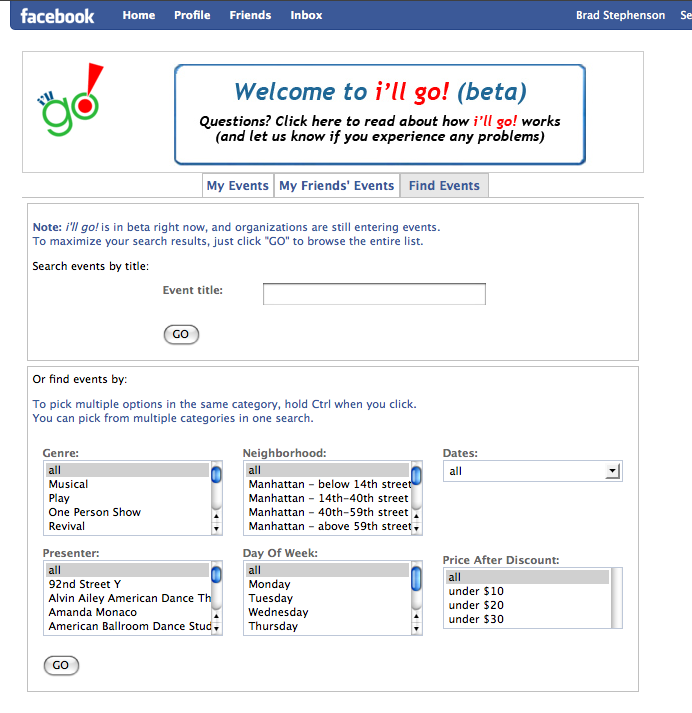
See a screenshot of the event search interface after the jump.

Searching for an event using the Facebook 'i'll go!' app.

As this app is in beta, I'd strongly encourage New York organizations and audience members to install it and give it a go. If the app catches on, Carr says Patron will expand the tool to include other cities.

Find our more about i'll go! at the app's Web site.

Creative Commons - Building a Shared Culture

A few weeks ago, the topic of Creative Commons came up during a technology workshop I was leading, and a number of attendees were unaware of it and its potential for rethinking the way we approach the copyright of intellectual property. Recently, Creative Commons released a short video by renowned filmmaker Jesse Dylan, known for helming a variety of films, music videos, and the Emmy Award-winning “Yes We Can” Barack Obama campaign video.  The video “A Shared Culture” uses interview footage with leading thinkers behind Creative Commons to talk about the organization's mission, but perhaps the most impactful aspect of the video is its incorporation of photographs and music with CC licenses.

Next week at the National Arts Marketing Project Conference in Houston, CAMT's own Brad Stephenson will lead a panel session on the ways in which artists and arts organization may benefit from utilizing Creative Commons licenses in their work.  If you're at the conference, be sure to check it out.

Surviving the Economic Meltdown as a Nonprofit

Several posts from around the arts blogging community have addressed the issue of fundraising in financially tough times. ("Tough" is an understatement, I know.) TechSoup recently posted an entry that pulls together some of the posts, and I thought it was important to share the link here. Obviously, there are no silver bullets, but it's helpful to see an overview of other organizations' strategies for fundraising when wallets are light. If nothing else, it's good to know that all nonprofits are sharing in this struggle.

So what technology tools are important for surviving the economic downturn (aka: recession, depression, slowdown, bump in the financial road)?

Social Media - Facebook, MySpace, Flickr and other online social resources are still the best way to use the Web to create community and investment in your organization. And if someone is truly invested in you, they will continue to support you regardless of their financial situation. Activate your network and get others to spread the news about how great you are.

Donation Buttons, Links and Widgets - (Please note: This post is not intended to endorse Barack Obama. Rather, this is an endorsement of his fantastic digital asset team. I feel there are valuable lessons to be learned by the nonprofit world from Obama's online campaign strategies.) Barack Obama's digital campaign efforts have been astounding. Even if he doesn't win the upcoming election, his campaign's online fundraising success has been extraordinary. One thing that has led to this success is the sheer number of times the campaign asks for money. In every message I receive from them, be it via Web, email or mobile device, there is a donation link or button. And because of the way their communications have been tailored and carefully crafted, I don't think of them as spam. In my opinion, if someone has opted into your lists, they're telling you they're interested in your work. As any fundraising pro will tell you, the secret to success is not being afraid to ask for money over and over and over again. Also, the Obama team hasn't asked me to give large gifts. Typically they're asking for $25-50. It's much easier and more likely for me to give $25 a few times a year than it is for me to give $250 in one lump sum. This may sound odd, but why not nickel and dime your supporters?

Online Fundraising Events - Rather than dishing out tons of money for artist travel, catering and rental fees when you want to offer fundraising events, why not try to host a few fee-based online opportunities? For instance, an arts organization could team up with a local band to offer an online concert followed by a chat session. You could require a donation in order for a user to access the concert and followup chat. Obviously, there is no virtual replacement for a live gala, but you may be overlooking some valuable opportunities for providing donors additional online content.

An important thing to remember is that in times of financial distress, it is more important than ever to make sure you have a clear and measurable communication strategy. For more information on establishing clear and effective communication goals, check out the Spitfire Strategies Smart Chart 3.0. This doesn't focus exclusively on digital communications, but it can be easily tailored for any type of message.

Save the Museum, Save the World

Today not only marks the return of "Heroes" (for super-hero fans like me), it also marks the beginning of Superstruct, a multi-player online game from the Institute for the Future (IFTF) in collaboration with the Center for the Future of Museums, an initiative of the American Association of MuseumsSuperstruct is the first Massively Multiplayer Forecasting Game—designed to help solve real-world problems by harnessing the collective wisdom of participants to create a collaborative, open source simulation of a possible future.

Based on projections culled from forecast research conducted by IFTF, the following extreme scenarios are proposed for museums as part of the game:

"It’s 2019. Your museum is informed that an international group currently touring your building was exposed to the latest deadly strain of Respiratory Distress Syndrome. You are instructed to lock down the museum and shelter staff and visitors in place while authorities determine whether anyone is infected. Are you prepared to deal with this?"

Other snapshots from 2019:

  • Is your museum ready to help your community cope with an influx of refugees fleeing climate change, food shortages and political upheaval?
  • How will your operations change in the face of soaring energy prices or collapse of the food production and distribution system?
  • Your museum depends on its website to deliver information and attract visitors, but your content has been corrupted repeatedly in the past few months by hackers attempting to undermine your credibility. How do you adapt?"

To read more about the game, visit www.iftf.org/node/2098.

The Center for the Future of Museums intends to use the content contributed by museums as a jumping-off point for further planning and discussion within the museum field. To receive e-mail alerts from the Center for the Future of Museums about the museum-specific storyline in Superstruct, contact CFM.

Web 2.0 Expo: Day Two

The highlight of my day was interviewing Eileen Gittins, the founder, president and CEO of Blurb, an online publishing service that provides print on demand tools for the general public. With Blurb's book layout software, BookSmart, users can create books using their own text and images and upload them to the Blurb server for purchasing, printing and delivery. Like Lulu.com (see Josh Futrell's recent blog post), Blurb empowers writers, photographers, graphic designers, and other artists to control the publishing of their work.

Gittins is a passionate entrepreneur who truly understands her client base. (She started Blurb based on her own frustrations with the publishing industry.) Blurb and the related project Photography.Book.Now exemplify what is truly phenomenal about the power of the Web.

No more spoilers. You can listen to my interview with Gittins (and a few other Web 2.0 Expo players) on Technology in the Arts Podcast #51 on Friday, September 26. (Go ahead and subscribe already, you slouch!)

I also digested this morning some tips on viral marketing during Jonah Peretti's Web 2.0 Expo session, Viral Marketing 2.0. Peretti, known throughout Web circles as a guerilla media guru, is the co-founder of HuffingtonPost.com and BuzzFeed.

Peretti explained that, contrary to popular opinion, a message doesn't become viral because of influential users. Rather, a message spreads because of the network that supports it. For instance, he explained, a fire spreads when the conditions are perfect and not because the spark that ignited it was special.

"Facebook created a network that would make the driest forest possible so the fires would spread," said Peretti.

The network Peretti highlighted today is what he calls the "Bored at Work" network, which is a huge people-powered network comprised of distracted corporate employees. However, he explained that a big problem with trying to spread a viral message is the "radical unpredictability" of the Web. There is no way to know who will make something popular or what will become popular.

So how can Peretti possibly offer any advice on delivering messages that will succeed in a viral way? He admitted that he didn't have a perfect answer. Still, considering his repeated success at gaining viral acclaim (see The Contagious Media Project for a list of his online exploits that have blown up), there is a great deal of cred behind the tips he offered.

For instance, may absolute favorite of Peretti's techniques is one he dubs "The Mullet Strategy." As most people know, a mullet is a hair style that features a short, professional front-end with a long, flowing rear. Peretti compared this "business in the front, party in the back" approach to marketing. Since the most contagious media is often silly, fun and even shocking, it isn't always appropriate for that content to live on the front page of a Web site. However, if there is a "party in the back" and people are enjoying and sharing that party, it will most definitely drive traffic to the other areas of your site.

Web 2.0 Expo: Day One

Today was "workshop" day at the 2008 NYC Web 2.0 Expo, and while I enjoyed the two three-hour sessions I attended, I would not consider them workshops. I always expect a workshop to provide attendees an opportunity to put into practice some of the concepts discussed. I'd strongly encourage artists and arts organizations involved in the planning of a conference or professional development series to be cautious about the use of the word workshop. Any session that exceeds two hours should have some type of engagement activity or risk losing the attention of the laptop/iPhone-wielding audience.

That being said, the leaders of both sessions I attended today managed to keep my attention. I was especially engaged during Josh Porter's presentation, "Designing for Community." Porter is the founder of bokardo design and author of the book, Designing for the Social Web.

Toward the beginning of his talk, Porter mentioned two very important things. First, your message will get out into the world, and you can either choose to ignore the message or engage with users.

An arts example: A theater company is getting negative reviews in the local newspaper for its current production, but audiences are greatly enjoying their experience with the show. Unfortunately, those audiences are shrinking because users are believing the newspaper's message. If the theater had created an online space for actively engaging its audience, it could allow the community - not the voice of a lone critic - to define its show's success.

Second, Porter said that organizations probably already have communities, whether they know it or not. The idea is to "cultivate" that community. Often in the arts, an organization will try to artificially create a community rather than managing the one which already exists. In order to build a passionate online community, Porter says, an organization should "support an activity and make people better at the activity."

So how do you make people "better" at being an arts audience? Well, that's a much larger discussion than I care to launch here, and the answer is different from one discipline to another. But the point is that an organization should work with and grow its existing community and should not try to manufacture one.

"You want the people to identify themselves as a community," said Porter.

Another great point Porter made - which has been mentioned in many forms on this blog and on our podcast - is that when an organization is considering which interactive features to add to its Web presence, it should simply "model the interactions that already exist." In other words, study how your users are already connecting (both online and offline), and provide tools that support those connections.

Finally, according to Porter, most successful community-based Web sites comprise "objects" and "verbs." For instance, a YouTube page has objects (i.e., video pane, user profile, related videos, responses, etc.) and verbs (i.e., play, upload, respond, etc.).

I'll leave you with the following image from the "Creating Passionate Users" blog, which Porter mentioned today.
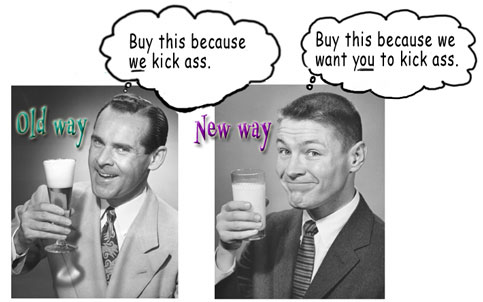

Just in case you didn't believe us...

When we say the Technology in the Arts Podcast is a great resource for a wide span of people - artists, tech geeks, technophobes - we mean it. Yea, we know what you're thinking... we're biased. But the completely impartial Colin Marshall, author of The Sound of Young America's Podthoughts blog, recently wrote a great review for the show. An excerpt:

"One of my favorite aspects of podcasting is that it allows the listener to 'meet' a wide range of new people doing neato projects who they wouldn't normally run into. Technology in the Arts serves up quite a few of those, from the founders of Artlog.com [MP3] to the president of the Association of Arts Administration Educators [MP3] to the co-director of the art-space Future Tenant [MP3]."

And we didn't even pay Colin. In fact, we've never even met him. So check out the Technology in the Arts Podcast to judge for yourself.

Also, we'd love to hear from you at podcast@technologyinthearts.org.

Like a Moth to a Podcast

I've just discovered and started listening to The Moth podcast. The Moth, for those of you who don't know, is a non-profit storytelling organization that brings in people - actors, playwrights, comedians, poets, personalities, and the average Joe - to tell a story from their own lives. No notes. Just a performer, a story, a microphone, and an audience. The Moth has several different live performance series and programs around the country. Now, The Moth has been around since 1997, but I'd never heard of them until a few days ago. Why? Because 1) I live in Pittsburgh, instead of New York or LA, 2) I'm not hip, and 3) I often struggle to get my recommended daily allowance of culture.

Point is: I found them eventually. I found The Moth through iTunes. I found them through their podcast.

And now? I know for a fact that I will continue to listen to the podcast. I've enjoyed their podcast so much, I'm considering buying CDs and other schwag through their site. I’m writing a blog about them. I’ve told two friends about them. And so on...

It is so very important to have as many points of entry into your organization and its services as possible, and a quality podcast can be one. We’ve got a podcast tutorial here on Technology in the Arts. There are tons of resources and guides out there. It is worth the effort, the equipment, the navigation of the waters of rights and copyright, and the time to create a new point of entry to your organization to gather fans you never knew you had, like moths to a flame.

Podcasting: Keep it Legal

I was recently directed to a great guide to ensuring that your podcast is legal. The Podcasting Legal Guide is hosted on the Creative Commons wiki and provides an overview of legal information every good little podcaster should know and understand. The Guide was created by the following parties:

Colette Vogele, Esq. Vogele & Associates http://www.vogelelaw.com/index.html Stanford Center for Internet And Society http://cyberlaw.stanford.edu/

Mia Garlick Creative Commons http://creativecommons.org/ Stanford Center for Internet And Society http://cyberlaw.stanford.edu/

The Berkman Center Clinical Program in Cyberlaw http://cyber.harvard.edu/

Also, remember that we have a Podcasting Fundamentals Tutorial available that will teach you the basics of creating and publishing your very own podcast.

Technology in the Arts - Now on Facebook!

When we consult with clients about social networking and other online tools, we always stress thoughtful planning and mission-driven solutions. Let me be the first to admit, though, that we didn't sit around whiteboards planning the Technology in the Arts Facebook page... we simply created it and started sending invites.

There are times when it's crucial to plan for the implementation of a new technology tool, and there are other times when it's important just to get it out into the world and allow it to take shape organically. In the case of Facebook, MySpace or any other template-based offering, it's easy to get rolling with little investment.

We invite you to become a Technology in the Arts Facebook fan and help us shape an online community dedicated to using technology to support the advancement of the arts.

Greater Pittsburgh Arts Council Presents an Arts Law Clinic

Are you a Pittsburgh-based artist or arts administrator with a legal question about your work? Take your questions to the Greater Pittsburgh Arts Council's Arts Law Clinic on Wednesday, July 30, from 3-6 PM. Attorneys from American Eagle Outfitters will be on hand to answer your arts-related legal questions in the areas including Intellectual Property, Corporate Law, Contract Law and Human Resources.

This clinic, the first in a series to be provided by AE staff, is designed for people who have specific arts law questions. Applications to Volunteer Lawyers for the Arts will be available for those who require ongoing assistance after the clinic.

Wednesday, July 30, 3-6 pm Benedum Center, 7th Floor, 719 Liberty Avenue, Downtown

Presenters: Neil Bulman, Vice President & General Counsel; Rebecca Bibbs, Chief Counsel; Luke Paglia, Associate General Counsel; Kimberly Strohm, Assistant General Counsel; American Eagle Outfitters

To register visit ProArtsTickets online or call 412.394.3353. Registration Fee: $20 ($15 members)

Of course they chose Hendrix...

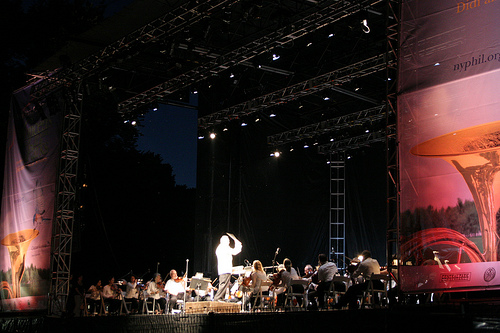
It seems the New York Philharmonic is taking a cue from American Idol. During a recent concert in Central Park, the Philharmonic asked the audience to text their votes to select the orchestra's encore piece. Naturally, the audience chose "Purple Haze." After all, what audience would prefer "Flight of the Bumblebee" over the Hendrix classic? Photo courtesy of froMJersey's Flickr photostream.

According to MobileActive.org, an online resource that examines the use of mobile technologies for social change, the Philharmonic has been using Kodime, a company based in the UK, as its mobile vendor for the past two seasons.

Community Theatre Conference - July 10-11, 2008

I will be visiting New York City later this week for the American Association of Community Theatre Conference. If you plan to attend, please visit me in exhibit hall room C. I'd be happy to spend some time chatting about your technology needs and providing a bit of free consulting.

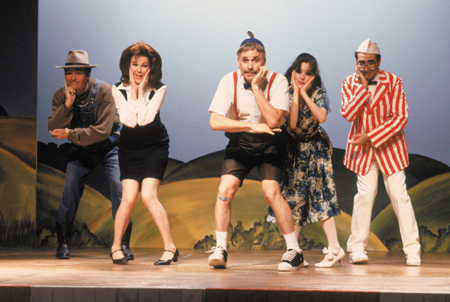
Nothing ever happens in Blaine. Nothing ever happens in Blaine.

By the way, the image above is NOT meant to be offensive. I have acted in many a community theatre production, and I love every minute of it.

If you're involved in theatre and you don't love Waiting for Guffman, then shame on you!

Better Than Handing Out Flyers?

ArtistData LogoBuilt for bands, musicians and music performing organizations, ArtistData is a site that enables you to enter upcoming performance information once and then sync it to many different social networking sites that are musician friendly or oriented. I have to say that I was impressed with the simplicity of the system, based on their demo video.  With a few minutes and clicks, performance listings were updated on the sample band's MySpace, PureVolume, Eventful, and Virb profiles.  Also, the show details were sent out to other sites such as JamBase, Last.fm, Mojam, Pollstar, and ShowClix.

A real treat is the site's ability to notify local newspapers and media about your performance directly from ArtistData.  I would assume that ArtistData keeps art & music PR contact emails for major newspapers and publishers.  I wasn't able to see how comprehensive their listings are, but, if you know of a publication that exists in the area you will be performing that is not on the list, you can notify ArtistData and they'll do what it takes to get it added for next time.  I wonder, though, if this replaces the need to send out press releases or to cozy up to your local papers' inside sources.

All in all, ArtistData seems like a very expedient way to get your performance information out there.  It would be especially useful if you, your band, or your organization already use more than 1 of the social networking tools listed above.  And, it seems like ArtistData intends to expand its offerings and resources as time goes on.  Sites such as Amie Street, BETA Records, Buzznet, FameCast, and Hooka/indie911 are on tap to be added to those sent performance info.

Oh, it's free, by the way (at least for now).

I am really interested to see if, in the near future, a similar technology is developed for visual, graphic, and illustrative artists to help them manage their profiles, exhibition information, and work sample images across the plethora of social networking sites that cater to them.

Props to Mashable! for tipping me off to ArtistData.

Free Web Sites for Artists...

I know the subject of this post sounds like a bit of spam that might roll through your inbox, but thanks to Artlog.com, artists can create Web sites that are easy to use and offer some nice features. Most importantly, the sites are free to registered Artlog.com users (for the time being). Artlog.com is designed to connect people to art and artists to other artists. Their portfolio section is particularly intriguing because it not only allows artists to create their own Web sites with gallery, blog and resume modules; it also allows artists to use their own Web domains. For instance, if I create a site on Artlog.com, it can either be bradartsite.artlog.com (in which case, I don't have to own a domain) or bradartsite.com (in which case, I do have to own a domain).

Want more info about domain names? Check out this recent blog entry.

I recently interviewed the site's creators, Manish Vora and Dylan Fareed, for the Technology in the Arts podcast. Their interview will be released in episode #45 on June 27.

Get LinkedIn to Technology in the Arts

For those of you who use LinkedIn to build your own professional network, we invite you to join our new Technology in the Arts group on the site to connect with others observing and exploring the intersection of the arts and technology. LinkedIn Groups offers extra features to networks and group-based organizations to help their members stay in touch with one another and discover powerful new business contacts within their groups and beyond.

How might LinkedIn Groups serve as a connecting tool for other professional networks and member groups with which you interact?

It always feels like somebody's watching me...

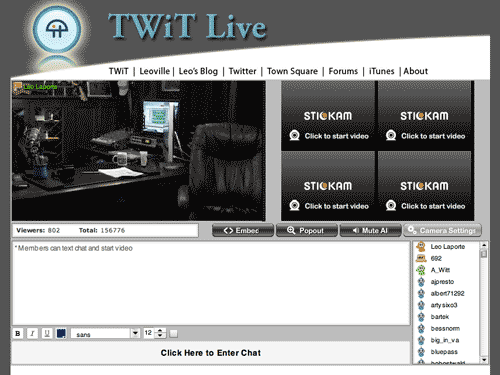
I recently interviewed podcast superstar Leo Laporte for the Technology in the Arts show, which was a great experience for a geek like me. Leo recently started broadcasting streaming video on a daily basis (about 2-7 PM Eastern, he says) at TwitLive.tv. Basically, he streams a video of his podcast studio constantly so you can catch all of his recordings live as they're being created. It's fascinating because you get to hear all the outtakes and pre- and post-recording conversations. Also, Leo's live stream features a chat window and in between shows, he responds directly to chat room messages.

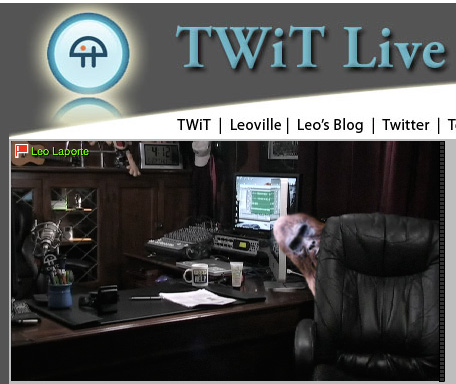
There's something artistic about an empty studio, isn't there?

The amazing thing is that you can set up something similar to Leo's studio rather inexpensively, because there are a number of free streaming video services available. Leo uses Stickam.com, and UStream.tv is another very popular service. Obviously, Leo's equipment is very expensive, but anyone can set up their own broadcast empire on the cheap and with relative ease.

CAMT is tossing around the idea of creating a Technology in the Arts membership program, and we're in the process of laying out the services that would be available to members. One thing we've discussed is creating a weekly tech Q&A show for artists and arts managers using a streaming video service.

If you have thoughts on the structure of such a show or on other services we could offer Technology in the Arts members, please feel free to comment on this entry or email us.

By the way, my favorite UStream video feed is "The Ketucky Incident," which is basically set up to track the movements of bigfoot in Kentucky. I've yet to actually see Bigfoot walk past the Web cam... surprise, surprise.

But I have seen some unexplained things on Leo's cam late at night:

Stage is set for Technology in the Arts - Canada

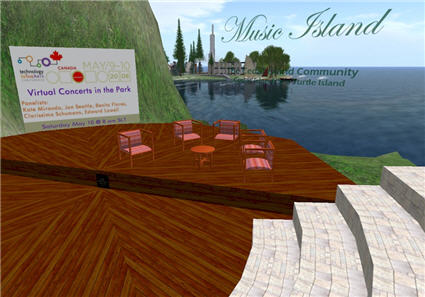
This week\'s Technology in the Arts - Canada will feature a virtual panel in Second Life on Saturday morning.

Everything is ready for tomorrow's conference.  Brad starts off the conference with his podcasting workshop in the morning; Josh teaches an afternoon session on content management systems; and I bounce around throughout the day to make sure session leaders have everything they need.

If you are not able to join us in person, perhaps you can attend a virtual panel session in Second Life.

The image above shows the set for Saturday's panel being held in Second Life on "Virtual Concerts in the Park" which you can attend in Second Life on Saturday at 8:00AM SLT (Second Life Time = Pacific Time) by going to this SLURL - http://slurl.com/secondlife/Sea%20Turtle%20Island/46/26/22/ - which will take you to the telehub behind the amphitheatre.  Hope to see you there!

Yelp for Business Owners

A few months ago, I yelped about Yelp, an online community of business reviews written by John and Jane Public.  At that time, Yelp had provided some advice for business owners on how to manage their image on Yelp.  The information was simple and didn't really provide much in the way of control or features. That advice is still there, but Yelp has just added a Yelp for Business Owners service.  It allows organizations to claim their business page and then access some extra features:  tracking the number of visitors who view your business information on Yelp, private customer messaging, and immediately business information updates, to name a few.

If your organization is aware of its presence on Yelp, and is looking for ways to get more involved, these are some fine features.  If anyone out there uses the Yelp for Business Owners service or has Yelp stories, please feel free to share them in the comments.

Who wants to be a curator?

Many arts organization Web sites offer users the opportunity to contribute to their online programming in some way, but it's typically an artificial engagement practice. Rarely do users ever offer up anything truly artistic, and it's even rarer still for the organization to showcase the work in a meaningful way. However, the Brooklyn Museum is taking the idea of "you" as the online curator to a new level and letting Web visitors select the pieces for an upcoming exhibit in its physical space. Its upcoming photography show Click! A Crowd-Curated Exhibit lets users register and adjudicate work that was accepted as part of a March 2008 open call. The submitting photographers were asked to "consider Brooklyn's transformation over the years, its past and its present, and submit a photograph that captured the 'changing face(s) of Brooklyn.'"

The Brooklym Museum\'s crowd-curated exhibit

Now that the call for submissions has closed, the Museum has launched a Web interface that walks users through the registration and evaluation process. Rather than just showing images and asking users to vote for their favorites, though, the Brooklyn Museum offers evaluation guidelines. This is a real exhibit, and the Museum wants thoughtful consideration from its curators.

The Click! curator interface presents the image, its title and a description. Clicking the "Viewing Size" functions will increase or decrease the image size for those who wish to adjust for their screen resolutions or who wish to scrutinize the photo's detail. Users can also see thumbnails of the next images to be evaluated.

When the "curator" is ready to evaluate an image, he or she needs only to adjust the evaluation slider between "Most Effective" and "Least Effective" based on two questions presented by the Museum:

  1. How well does the image illustrate or express the theme "The Changing Faces of Brooklyn"?
  2. Do you consider this an exceptional image, given the technique and aesthetics?

"Curators" have until May 23, 2008, to submit their evaluations, and the exhibit will run from June 27-August 10, 2008, at the Brooklyn Museum.

While it's true that the crowd-curated approach doesn't work for all types of exhibits, the Brooklyn Museum has chosen a medium and theme that works well with an audience evaluation process. They ask about "technique and aesthetic," but the primary question is about Brooklyn's transformation.

So I guess my questions are:

  1. Though it certainly isn't necessary to be an art expert to be qualified to evaluate the Click! submissions, should one at least be fairly familiar with Brooklyn?
  2. Is this type of non-expert evaluation - as one recent blog reader mentioned - contributing to the dumbing down of art?
  3. If enough people evaluate the work, does the group consensus validate that piece for a public show?

I'd be most interested to hear what formally educated curators have to say about the crowd-curated concept.