Review

Mobile Advocacy Resource

I've been subscribed to the blog at MobileActive.org for a while now, and a recent post that highlights the top 10 do's and don'ts for mobile advocacy made me realize that it was time to give a shout out to this great site on our blog. MobileActive.org aggregates mobile technology tools and resources for the international NGO community, and the information they offer is applicable and valuable for any non-profit arts organization considering using mobile technology as part of its marketing, development, or advocacy strategies.  You’ll find:

  • A blog with case studies and news related to the use of mobile technology.
  • A directory of projects that have utilized mobile technology.
  • A directory of mobile tools and vendors (such as consultants, SMS and MMS providers, polling tools, software and mobile content developers, and more).
  • Brief strategy guides that offer overviews of using mobile technology for fundraising and advocacy (you’ll need to register on the site to access these PDF’s).

So check it out and let us know what you think.  Also, if you know of any other useful resources, books, or sites out there that delve into the world of mobile technology, please post those in the comments.

Weekend Update (Don't Sue Me, SNL!)

Just had a couple notes I wanted to share before the weekend: Click! Exhibit Results Now Available

The online gallery for Brooklyn Museum's crowd-curated exhibit Click!, which I wrote about in a Technology in the Arts blog entry, is now available.

The exhibit asked users to register and adjudicate work that was accepted as part of a March 2008 open call. The submitting photographers were asked to “consider Brooklyn’s transformation over the years, its past and its present, and submit a photograph that captured the ‘changing face(s) of Brooklyn.’”'

The Click! online gallery with a very cool adjudication results feature is now available.

ICANN Relaxing URL Restrictions

The Internet Corporation for Assigned Names and Numbers (ICANN), which controls domain names on the Internet, has decided to relax its policy on domain naming conventions. Web site URLs will now be able to use characters other than Latin, as well as any combination of letters and numbers up to 64 characters.

Finally, I can register ethelslittleangles.sex, where my grandma plans to sell her handmade dolls. She's been bugging me about it for years. "Sex sells," she says. She's been watching too much TV.

Oh Grandma. You and your dirty mind.

Have a wonderful weekend!

YouTube Opens Screening Room for Indie Shorts

Okay, so I love short films.  In addition to appealing to ADD-afflicted by not requiring us to sit through 180 minutes to "understand the narrative," short films are more financially viable for indie filmmakers to create.  The problem with short films is that you can usually only see them at film festivals -- until now.

YouTube has set up a virtual screening room to bring the short films of independent filmmakers to a global audience.  Not only can you view top-notch shorts (curated by a YouTube editorial panel), you can also buy them to watch whenever you want on your computer or portable device.  While the majority of these films have played at international film festivals, occasionally you’ll find films that have never before screened for wide audiences.

They just launched the screening room last week and plan to add four new films every two weeks.  So, show the indie filmmakers some love and check it out!

Click here to learn more about the YouTube Screening Room.

Better Than Handing Out Flyers?

ArtistData LogoBuilt for bands, musicians and music performing organizations, ArtistData is a site that enables you to enter upcoming performance information once and then sync it to many different social networking sites that are musician friendly or oriented. I have to say that I was impressed with the simplicity of the system, based on their demo video.  With a few minutes and clicks, performance listings were updated on the sample band's MySpace, PureVolume, Eventful, and Virb profiles.  Also, the show details were sent out to other sites such as JamBase, Last.fm, Mojam, Pollstar, and ShowClix.

A real treat is the site's ability to notify local newspapers and media about your performance directly from ArtistData.  I would assume that ArtistData keeps art & music PR contact emails for major newspapers and publishers.  I wasn't able to see how comprehensive their listings are, but, if you know of a publication that exists in the area you will be performing that is not on the list, you can notify ArtistData and they'll do what it takes to get it added for next time.  I wonder, though, if this replaces the need to send out press releases or to cozy up to your local papers' inside sources.

All in all, ArtistData seems like a very expedient way to get your performance information out there.  It would be especially useful if you, your band, or your organization already use more than 1 of the social networking tools listed above.  And, it seems like ArtistData intends to expand its offerings and resources as time goes on.  Sites such as Amie Street, BETA Records, Buzznet, FameCast, and Hooka/indie911 are on tap to be added to those sent performance info.

Oh, it's free, by the way (at least for now).

I am really interested to see if, in the near future, a similar technology is developed for visual, graphic, and illustrative artists to help them manage their profiles, exhibition information, and work sample images across the plethora of social networking sites that cater to them.

Props to Mashable! for tipping me off to ArtistData.

Free Web Sites for Artists...

I know the subject of this post sounds like a bit of spam that might roll through your inbox, but thanks to Artlog.com, artists can create Web sites that are easy to use and offer some nice features. Most importantly, the sites are free to registered Artlog.com users (for the time being). Artlog.com is designed to connect people to art and artists to other artists. Their portfolio section is particularly intriguing because it not only allows artists to create their own Web sites with gallery, blog and resume modules; it also allows artists to use their own Web domains. For instance, if I create a site on Artlog.com, it can either be bradartsite.artlog.com (in which case, I don't have to own a domain) or bradartsite.com (in which case, I do have to own a domain).

Want more info about domain names? Check out this recent blog entry.

I recently interviewed the site's creators, Manish Vora and Dylan Fareed, for the Technology in the Arts podcast. Their interview will be released in episode #45 on June 27.

Get LinkedIn to Technology in the Arts

For those of you who use LinkedIn to build your own professional network, we invite you to join our new Technology in the Arts group on the site to connect with others observing and exploring the intersection of the arts and technology. LinkedIn Groups offers extra features to networks and group-based organizations to help their members stay in touch with one another and discover powerful new business contacts within their groups and beyond.

How might LinkedIn Groups serve as a connecting tool for other professional networks and member groups with which you interact?

It always feels like somebody's watching me...

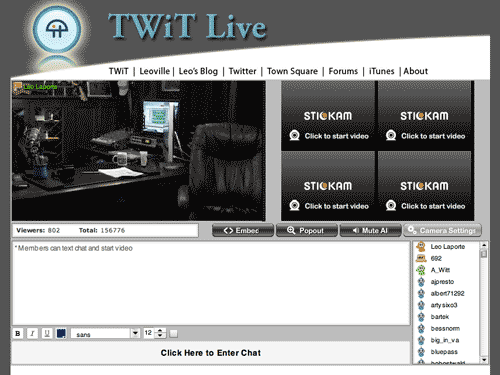
I recently interviewed podcast superstar Leo Laporte for the Technology in the Arts show, which was a great experience for a geek like me. Leo recently started broadcasting streaming video on a daily basis (about 2-7 PM Eastern, he says) at TwitLive.tv. Basically, he streams a video of his podcast studio constantly so you can catch all of his recordings live as they're being created. It's fascinating because you get to hear all the outtakes and pre- and post-recording conversations. Also, Leo's live stream features a chat window and in between shows, he responds directly to chat room messages.

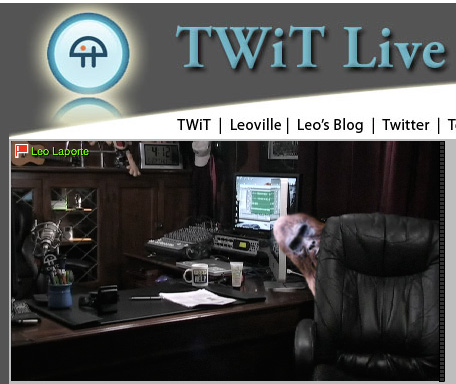
There's something artistic about an empty studio, isn't there?

The amazing thing is that you can set up something similar to Leo's studio rather inexpensively, because there are a number of free streaming video services available. Leo uses Stickam.com, and UStream.tv is another very popular service. Obviously, Leo's equipment is very expensive, but anyone can set up their own broadcast empire on the cheap and with relative ease.

CAMT is tossing around the idea of creating a Technology in the Arts membership program, and we're in the process of laying out the services that would be available to members. One thing we've discussed is creating a weekly tech Q&A show for artists and arts managers using a streaming video service.

If you have thoughts on the structure of such a show or on other services we could offer Technology in the Arts members, please feel free to comment on this entry or email us.

By the way, my favorite UStream video feed is "The Ketucky Incident," which is basically set up to track the movements of bigfoot in Kentucky. I've yet to actually see Bigfoot walk past the Web cam... surprise, surprise.

But I have seen some unexplained things on Leo's cam late at night:

Your Second Life Avatar is Killing My Planet...

It was recently determined that a Second Life avatar uses as much energy as a real-life Brazilian. So try as you might to escape your polluted first life, you're doing even more damage as a Second Life user. The following campaign has been created in order to promote a campaign on the energy-conscious site Big Green Switch that urges Second Lifers to offset their avatar's carbon footprint.

Second Life users: Give a hoot and check out Big Green Switch.

SlideShare - the largest community for sharing presentations

So after the Technology in the Arts: Canada, we were posting presentations and resources from the conference when we ran into a slight snag. A number of the PowerPoint slide presentations were too large to e-mail. At first, I recommended that the presenters use a large file transfer site, but then a colleague showed me the virtues of SlideShare. SlideShare allows you to:

  • Embed slideshows into your own blog or website.
  • Share slideshows publicly or privately.
  • Synch audio to your slides.
  • Market your your event on slideshare.
  • Join groups to connect with SlideShare members who share your interests
  • Download the original PowerPoint / Pdf file

For example, here's the embedded version of Linda Roger's presentation "Virtual Concerts in the Park" from last week's Technology in the Arts: Canada conference:

Did I mention that SlideShare is free? With all of the arts conferences and presentations I have attended over the years, it's amazing that I had not heard of this resource. I can't wait until I get to play PowerPoint Karaoke!!

AVG Free 8 Released

AVG Anti-Virus Free 8.0 was recently released, and I've been wanting to share this info for a couple weeks, but I am just now getting around to it.

AVG Free is as good as (or better than) most of the top paid anti-virus solutions, so I strongly recommend this product for Windows users.

To get AVG Free 8.0 or for more information, visit the AVG Free site.

Check out PCMag's recent review of AVG Free 8.0.

Yelp for Business Owners

A few months ago, I yelped about Yelp, an online community of business reviews written by John and Jane Public.  At that time, Yelp had provided some advice for business owners on how to manage their image on Yelp.  The information was simple and didn't really provide much in the way of control or features. That advice is still there, but Yelp has just added a Yelp for Business Owners service.  It allows organizations to claim their business page and then access some extra features:  tracking the number of visitors who view your business information on Yelp, private customer messaging, and immediately business information updates, to name a few.

If your organization is aware of its presence on Yelp, and is looking for ways to get more involved, these are some fine features.  If anyone out there uses the Yelp for Business Owners service or has Yelp stories, please feel free to share them in the comments.

"Guitar Hero" for Orchestral Music

Have you ever wondered, "Wouldn't it be great if someone created a 'Guitar Hero'-styled game for other forms of music?" Well, Immersion Music, Inc., a nonprofit arts organization located in the Boston area, has done just that with the game Virtual Maestro.

According to an April 13th article on PittsburghTrib.com, "Two 'Virtual Maestro' exhibits have been appearing in concert-hall lobbies across the [United States] since November as part of a project created by Swiss banking giant UBS, which often sponsors classical music events and organizations, to increase interest in classical music..."

Bravo!

Managing Email

I have recently become interested in - nay, obsessed with - tracking down the most effective way(s) to manage my email inbox, and I wanted to share a couple things that really work for me.

  1. Inbox Zero. Instead of letting my inbox fill up, I process everything at self-established intervals using Merlin Mann's Inbox Zero steps: Delete, Delegate, Respond, Defer and Do. Following these five rules at a regularly scheduled time will ensure a clean inbox. Keep in mind, though... When you choose to defer, you must move that email out of the inbox and create a task for yourself.
  2. Three Folders. I have set up three main email folders: Follow Up, Hold and Archive. When I choose to defer (see above), I simply place the email in the Follow Up folder and create a new task list entry. If I'm waiting on a response before I can complete an item, I place it in the Hold folder. And if I simply need to save the email for future reference, it goes in the Archive folder.
  3. Five Sentences. I try my best to keep email responses to five sentences or less, based on a Web site I discovered a few months ago. Thought I might occasionally run longer, this concept has helped me focus on the structure and purpose of my message: Who am I? What do I want? Why should I get it? When do I want it? I even put a little message about the five sentence philosophy into my email signature so people know I'm being efficient and not rude.

I also noticed recently that Getting Things Done guru David Allen offers a free document, Getting Email Under Control, on his Web site. It isn't groundbreaking, but there are several good ideas and reminders.

How do you keep your email under control?

Photoshop Express: Browser-Based Photo Manipulation

Adobe recently released a slimmed down, browser-based version of its king-of-all-photo-editing software Photoshop, so I decided to take it for a test drive. Photoshop Express features a very simple interface, and upon signing in, the user is immediately presented with a clear set of options.

Express Main Page

PS Express also provides a nice photo library so you can easily edit uploaded photos, create albums and email your best shots to friends.

PS Express Library

A very nice feature of the library (see the left column of the above screenshot) is the ability to add photos from PS Express directly to your Facebook, Photobucket and/or Picasa account(s). You can also instantly create HTML links to the images so they can be easily embedded into Web pages.

Image Options Hovering over an image displays a list of options for that photo. For instance, you can edit, rotate, email, link and download images directly from this list.One of the better aspects of PS Express is the fact that there are multiple ways to accomplish a particular task. For example, if I simply want to rotate an image, I can simply select "Rotate" from the initial drop down list of choices, and I don't have to navigate all the way into the editing area.

But the editing area is, of course, the best part of PS Express. Though the options are definitely not as robust as those in the desktop version of Photoshop, there are more than enough editing tools for novice photographers or anyone wanting to make quick touch-ups. Some of the tools include cropping, exposure adjustment, red-eye removal, saturation settings, white balance and color manipulation.

Express Editing

Yes, that is me standing beside a toilet in a prison cell. No, I did not get arrested. I was visiting the Eastern State Penitentiary in Philadelphia, PA.

Editing an image is incredible easy, and any changes you make are reversible. When you select an editing tool, you're presented with a menu of possible results. In the image below, I've selected "Saturation," and PS Express has shown me all of the variations I can achieve.

Saturation

Photoshop Express is currently in beta (public testing), and the service is completely free. I strongly recommend this online tool for both its basic photo editing and image management tools.

Check it out and let us know what you think.

Google Grants...and Google for NPO's

UPDATE: Be sure to read our most recent post on Google resources for arts organizations.

I know this makes two in a row from me on Google.  However, in my defense, I have been meaning to write this post for a few weeks now and, since I just found out (thanks to the Non-Profit Tech Blog) that Google has a launched a new non-profit portal that aggregates all of its services that apply to NPO's, I figured now is a good time to highlight one of Google's services that, I think, totally rocks:

Google Grants.

Google Sponsored LinksTo really explain Google Grants, I first need to explain Google AdWords.  You know those “Sponsored Links” that sometimes appear to the right of your search results on Google?  Those are brought to you by Google AdWords.  I’m not going to explain any more than that since Google has already done that work for me with the detailed information and demos on its site.  Suffice to say, Google AdWords can help increase traffic to your Web site.

And Google Grants is a program that Google has developed to help non-profit organizations have access to free Google AdWords advertising.  Organizations who are awarded Google grants get at least 3 months of AdWords service with cap of $10,000 worth of advertising per month.  Awesome!  Google Grants even goes beyond just giving away free advertising, by helping organizations to define and refine ad campaigns.

Click below for a Q & A with a past Google Grant recipient after the jump.

If your organization wants to learn more about Google Grants, please visit the new non-profit portal that Google has launched and click the Google Grants link.  Or, you may click here.  Google also has developed a Google Grants Blog.

One of the reasons I’m so interested in Google Grants is that one of CAMT’s clients, Art in Context, was a recipient of a Google Grant in late 2007.  I’ve interviewed Teresa Schmittroth, Program Director at Art in Context, about her organization’s experience.

JOSH:  How was the Google Grant application process?

TERESA:  The process was actually pretty easy. The grant application requires standard information about the organization such as nonprofit status, mission statement, contact information, a brief statement on how Google Adwords would contribute to the organization, and a description of the organization's target audience. In addition we were asked to submit a proposed ad campaign and a sample of key words relevant to our organization. We applied for the grant on July 12, 2007. Within 24 hours we received [a confirmation] response. By November 29, 2007 we were notified that our organization was selected for a Google Grants award and our account was activated.

JOSH:  How did you find using AdWords?

TERESA:  I was really impressed with the depth of the ad campaign that the Google Grants Team set up for Art in Context. Upon activating our account there were several 'ad groups' they had developed for us specifically addressing the type of information we provide public access to, e.g., Exhibition Listings, Artist Listings, Image Listings, etc. The ads were slightly commercial-eze for a nonprofit library, but compelling. I spent several days tweaking the language and the key words, but the structure Google set up was really good. By January, when searching for the word "artists" on Google, Art in Context was among the first results in Google's Sponsored Links.

JOSH:  Did you see an increase in your site traffic as a result of your work in AdWords?

TERESA:  We did experience a very noticeable spike in phone calls from researchers after the ad campaign began. Also, the following comparison of page views between February 2007 and February 2008 demonstrates a definite increase in information displayed, which is key to our mission:

February 2007 February 2008
Page Views 1,514,630 2,042,540
Average per Day 54,093 70,432
Average Page Views per visit 4.27 7.09

Here is a snapshot I just put together for our board:

Google Grant activity for Art in Context Dec 1, 2007 to Feb 29, 2008

  • There were 30,188 clicks to Art in Context from Google's Sponsored Links.
  • There were 2,146,880 ad impressions for Art in Context displayed in Google's Sponsored Links.
  • It would have cost us $20,510.48 for this service if this were not a grant!

JOSH:  Any other thoughts/comments about the Google Grants program and Google AdWords?

TERESA:  Thank you, Google!

And thank you to Teresa Schmittroth, Program Director at Art in Context, and Google Grants.

Creative Commons: Not perfect but it works

Thought I'd give a little teaser on our upcoming podcast interview with independent musician Jonathan Coulton, known by millions of geeks as the guy who wrote the song Still Alive for the award-winning console game Portal. Jonathan Coulton

Coulton will be featured in Technology in the Arts Podcast episode 38 (to be published Friday, March 14) talking about how he's used Creative Commons and other online practices to build a rabid and connected fan base.

Creative Commons, Coulton explains, allows an artist to apply a standard copyright and then scale back the restrictions. While many musicians and record executives are trying to find ways to lock down their songs, Coulton has found a way to make money giving his music away for free.*

Coulton, and others like him, understand that once you establish a fan community hundreds of thousands strong who are deeply connected to your work, you'll have no problem paying your bills. And Coulton certainly likes people to pay if they can... After all, he has a family to support.

Check out our upcoming podcast for the full Coulton interview, and check out Coulton's songs here.

So what do you think? Can free work for musicians? Should musicians run their own careers?

*Free is fine, but you can also support Coulton's work. Find out how.

Google Website Optimizer - A Fight to the Best

Like Caesar in the days of yore, you can host your very old gladiatorial games and pit different versions of your Web pages against each other.� With the help of Google's Website Optimizer (unfortunately, as of now, it is a free tool only available to those organizations with Google AdWords accounts), visitors are shown different versions of a particular page, and the choices they make once there are tracked.� You can then view reports detailing the results to help make decisions about your site design and strategy. More information, including walk-thru demos and guides is available at: http://services.google.com/websiteoptimizer/

Gladiator B Gladiator A

You Got Served... Digitally

We discussed DanceJam, MC Hammer's new online dance community, in episode 30 of our podcast. Well, the beta version of DanceJam is officially open, and users can start publishing videos of their killer moves.

DanceJam, which self-promotes as the "largest dance floor on the planet," allows users to seek out and learn a specific dance, share their own videos and even engage in online dance battles. Now you can make a fool of yourself to a much wider audience than just your parakeet and life-sized cutout of John Wayne.

DanceJam screenshot

While DanceJam is certainly aimed at the hip-hop dance crowd, this seems to be the first major dance community geared toward learning and sharing. This is another example of a site and concept to which arts organizations should be paying close attention.

Yes, DanceJam cost millions of dollars to design and develop, but there are affordable ways for arts organizations to collaborate, share and educate. For instance, a dance organization could offer tap lessons as an online series through YouTube and link to the videos from their Web site. Or a literary organization could offer online poetry slams and ask visitors to pick the winners, who could then be featured artists in a spotlight section of the organization's Web site. Just some thoughts...

The point is that arts organizations should continually be reviewing the online practices of for-profit ventures and creatively copying whenever possible.

The Good...& Just the Ugly

Online artist registries are ubiquitous nowadays. In lieu of or in addition to a personal web site, they are a great way to make your work as an artist available to the larger world. Some are open to all, while others are curated by discipline, geographic region, quality of work, etc. I participate in several registries as an artist, but my hands-down favorite is the Irving Sandler Artists File offered by Artists Space in NYC. Developed by artist/former staffer Letha Wilson and her colleagues, the registry went online a couple of years ago with great success. It is free, uncurated, and still fulfills its primary mission marvelously: to showcase artists, their work, and ideas. Plus, the user-friendly search interface enables you tag selected artists and add them to your online portfolio for further review.

Other registries, however, are far less successful. A perfect example of what not to do is Saatchi Online. It is poorly designed, an aesthetic disaster really, and attempts to do too many things for too many people. I question if this registry is even really for/about the artist community. Ambition can be good thing, but never mission creep.

Artists: Be selective about the context in which you show your work. Context always has a profound impact on how your work is perceived and understood. Weigh the pros and cons, and choose wisely.

Hazardous Sites

Good news: Alfred Jensen is now posted on Wikipedia. I worked on a new page for him last night. Creating a new "article", as Wikipedia terms it, however, is no easy feat. It took me a good 30 minutes just to figure out how to post new content. Wikipedia's interface could use a major ergonomic overhaul. Interface aside, I learned one critical thing from posting. It takes a lot of TLC to create an accurate, informative artist profile. After an hour, I barely had any content posted on Jensen. More work to come for sure.

Today's project of note is Superfund365, a web site conceived, designed, and produced by NYC digital media artist Brooke Singer. This project is total sensory overload, in the best possible way. Launched on September 1, 2007, it is part data mapping / part alert system and focuses on toxic sites currently active in the Superfund program run by the U.S. Environmental Protection Agency (EPA).

Superfund365 profiles one site per day and is slowly making its way across the country from NYC to Hawaii. Today, for instance, the web site profiles MRI Corp (category: industrial waste), a former tin scrap operation based in Tampa, Florida. Information provided on the site includes geographic location, hazardous ranking relative to other sites, clean-up costs when available, site description, timeline, and a kind of interactive pinwheel of contaminants. This was one of the coolest visualizations. The information is thoroughly immersive and guaranteed to send chills up your spine.

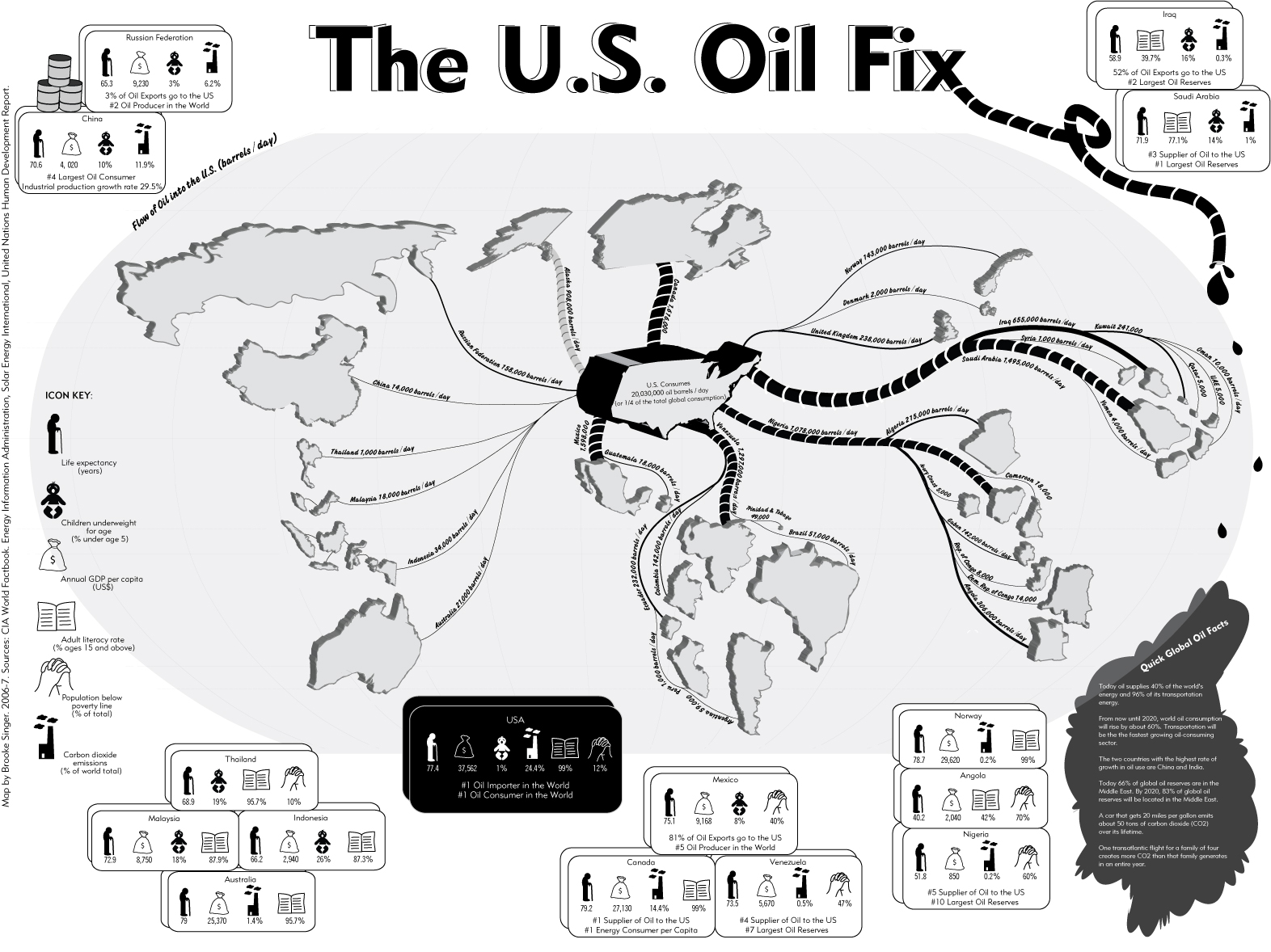
Singer has also confronted other tough issues in previous projects, including post-9/11 clean-up in Lower Manhattan, oil consumption by the United States, and camera surveillance, among others. I admire her seamless merger of the socio-political, aesthetic, and technological. We need more artists like her fighting the good fight.