


President Obama declared October 2011 National Arts and Humanities Month. With celebration events happening all month, how are you choosing to celebrate?
The Warhol: Art – An App for Droid, iPhone, and iPad
 I don’t want to shock anyone, but since my last post, another art museum has released another app. The Warhol: Art is a production of the Andy Warhol Museum and Toura, and perhaps the sarcasm was unwarranted. It shouldn’t come as a surprise to anyone that a museum dedicated to such an influential part of pop culture stays on top of the latest pop culture mediums. Andy is a Carnegie Mellon University alum, so I plopped down my three bucks on the Droid Market for this application (available on the Droid, iPhone, or iPad) and proceeded to check it out.
This is the Andy Warhol Museum’s third app, and The Warhol: Art is focused on informing the users about the life and art of Andy Warhol, as well as helpful information about the museum itself. The app is useful for those who would like obscure information about Andy’s life (such as his Carpatho-Rusyn heritage) at a moments notice, and great for art history buffs.
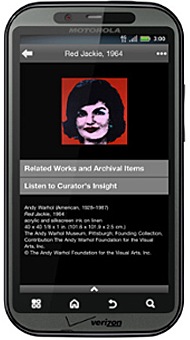
The Warhol: Art is described as a “behind-the-scenes glimpse” at some of the Warhol’s works of art, especially pieces which are lesser known. Users can explore the life and times of Andy Warhol through sections divided by years in his life. Each section comes with a selection of related art works that he created during the time period. There's a neat "Favorites" function that allows users to star the pieces they like best from these sections. The starred items list can be accessed easily from the first screen of the app, allowing users to check out their favorite pieces quickly. A few select pieces have curator commentary buttons, which I really enjoyed. The Warhol: Art commentary buttons, however, do not actually appear on the pieces that they describe. For example, while viewing Mao, 1972, I clicked on “Curator’s Insight”, only to hear a curator discussing Warhol’s Hammer and Sickle series.
I don’t want to shock anyone, but since my last post, another art museum has released another app. The Warhol: Art is a production of the Andy Warhol Museum and Toura, and perhaps the sarcasm was unwarranted. It shouldn’t come as a surprise to anyone that a museum dedicated to such an influential part of pop culture stays on top of the latest pop culture mediums. Andy is a Carnegie Mellon University alum, so I plopped down my three bucks on the Droid Market for this application (available on the Droid, iPhone, or iPad) and proceeded to check it out.
This is the Andy Warhol Museum’s third app, and The Warhol: Art is focused on informing the users about the life and art of Andy Warhol, as well as helpful information about the museum itself. The app is useful for those who would like obscure information about Andy’s life (such as his Carpatho-Rusyn heritage) at a moments notice, and great for art history buffs.
The Warhol: Art is described as a “behind-the-scenes glimpse” at some of the Warhol’s works of art, especially pieces which are lesser known. Users can explore the life and times of Andy Warhol through sections divided by years in his life. Each section comes with a selection of related art works that he created during the time period. There's a neat "Favorites" function that allows users to star the pieces they like best from these sections. The starred items list can be accessed easily from the first screen of the app, allowing users to check out their favorite pieces quickly. A few select pieces have curator commentary buttons, which I really enjoyed. The Warhol: Art commentary buttons, however, do not actually appear on the pieces that they describe. For example, while viewing Mao, 1972, I clicked on “Curator’s Insight”, only to hear a curator discussing Warhol’s Hammer and Sickle series.
Yes, I see and understand how those pieces are related. Yes, I enjoyed the commentary on the piece because I am a huge art nerd. Practically speaking, however, were I a museum patron standing in front of Mao, 1972, hoping to hear more about it, I would be disappointed and perhaps upset to receive commentary on a completely different piece.
I believe mobile applications are quickly becoming a new way to encourage museum patrons to interact with the art, and I applaud the Warhol for encouraging this effort. The Warhol: Art is an informative app chock full of information and great art, including many lesser known and not on display pieces. However, I found some features tedious (see above), while others just did not work (none of the videos would play for me, and I could not zoom in on any of the works – this is could be due to user error).
Overall, this app is great for those who’d like to learn more about Andy Warhol in an informal setting. The Andy Warhol Museum certainly is not alone is releasing an app for art history fanatics, which begs the question: is the next wave of art history coming through our smart phones? Is this the future of education? What do you think?
A Collaborative Affair: When Art Meets Business
One doesn’t often find commonalities between the world of art and luxury automobile technology. While it is common for businesses in different industries to create partnerships, joint ventures, or mergers, the idea of collaboration between businesses and art organizations was often dismissed on the grounds of artistic and monetary differences. But in a world of ever increasing intersections and interconnections, this notion is fast becoming obsolete and arts organizations are no longer insular entities that are oblivious to their formidable counterparts in the business world. The mutual desire for collaboration between the art and the business world is becoming stronger because one can provide business acumen and technical expertise while the other can leverage its strengths in creative thinking and critical analysis. Hence, when the world of art opens the doors of collaboration to different industries, the results can be unexpected, intriguing, and just plain extraordinary.
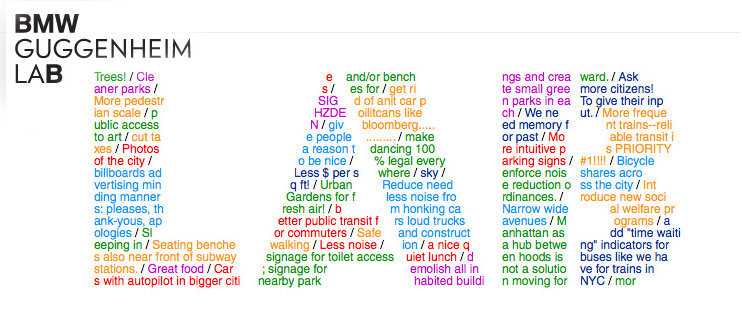
A museum that is clearly benefiting from strategic partnerships with companies in the world of business and technology is the Guggenheim. It made headlines in 2010 when it collaborated with YouTube, Intel, and Hewlett-Packard to create A Biennial of Creative Video. Essentially an homage to the world of online video, the biennial enabled Guggenheim to showcase extraordinary videos created by ordinary people in the YouTube community.
A year has passed but the Guggenheim is not one to take an innovation vacation, it has recently partnered with BMW to create the BMW Guggenheim Lab. The lab’s name may lack inspiration but the crux of its efforts will most certainly revolve around the axis of innovation. In fact, the lab is “a mobile laboratory travelling around the world to inspire innovative ideas for urban life.”
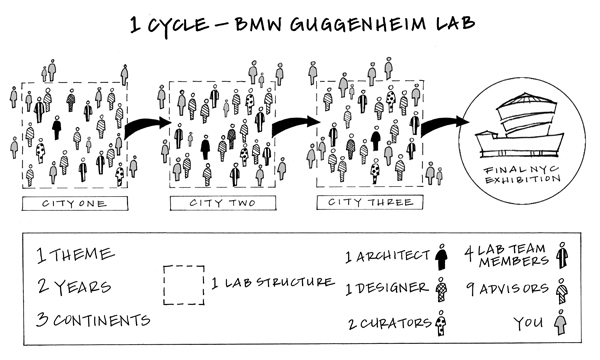
Over a period of six years, a team of interdisciplinary vanguards “in the areas of urbanism, architecture, art, design, science, technology, education, and sustainability” will travel to a total of nine cities in an effort to resolve the issues surrounding urban life. The lab will center around a specific theme for each two year cycle, the first of which is Confronting Comfort. The journey has already begun in New York City, where the lab has been hosting a series of free programs and experiments designed to help the public not only confront but also improve comfort in the quintessential metropolis. Next it will travel to Berlin and finally, Mumbai, concluding the first two year cycle with an exhibition at the Guggenheim in 2013.
If you do not happen to live in a sprawling metropolis, you can still play Urbanology; an online game that helps you ideate your dream city after asking you a series of questions that will gauge your societal, moral, and sustainable compass. You can also follow all the events on their blog and read intriguing posts such as “ten tips on using your city as an engine for joy” or “your brain on commuting.”
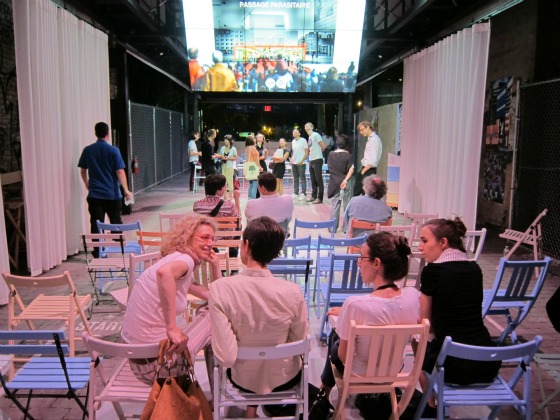
Apart from the games and interesting events, let’s hope the initiative’s denouement will result in change, both inside and outside the realm of the Guggenheim, because we all know that the power to act on issues that arise in metropolises, such as those of transportation or pollution levels, rests primarily in the hands of the government.
Doubts aside, the Guggenheim BMW lab certainly is a novel and unique project that exemplifies the synergies that arise when two unlikely organizations team up. Earlier this year, an article in the Economist argued that businesses have much to learn from the world of art and the opposite is no less true, the possibilities for mutually beneficial relationships are endless. As for the many arts organizations and corporate businesses that regard each with an air of mere acquaintanceship, it’s time they sat down to have a cup of tea.
Not Your Grandmother’s Arts Directory
Take a look at a current report on the state of your local creative economy. The research presented will without a doubt emphasize the power of leveraging  the arts on a community’s economy. Knowing this, how do we make intelligent use of the services creative individuals and organizations offer and ensure they are not wasted? How can we best connect an artist with an opportunity, the arts with our community? How do we maximize the abundance of creative talent available?
Step one of one: free and easy-to-use online directories, cultural marketplaces, creative economy databases, and yup, you guessed it, social media. Utilizing online directories, artists can expand their networks virtually to an audience within and beyond the physical boundaries of their local community. Community members and those searching for creative talent can be easily connected to a musician, visual artist, performer or arts organization. Below is a sampling of online directories and registries developed to promote the arts, build networks, and create meaningful connections between artists and arts patrons.
the arts on a community’s economy. Knowing this, how do we make intelligent use of the services creative individuals and organizations offer and ensure they are not wasted? How can we best connect an artist with an opportunity, the arts with our community? How do we maximize the abundance of creative talent available?
Step one of one: free and easy-to-use online directories, cultural marketplaces, creative economy databases, and yup, you guessed it, social media. Utilizing online directories, artists can expand their networks virtually to an audience within and beyond the physical boundaries of their local community. Community members and those searching for creative talent can be easily connected to a musician, visual artist, performer or arts organization. Below is a sampling of online directories and registries developed to promote the arts, build networks, and create meaningful connections between artists and arts patrons.
- Pittsburgh Artist Registry: Free to join and use, the Pittsburgh Artist Registry features multidisciplinary, Pittsburgh artists and organizations. Though the registry includes only artists and organizations native to Pittsburgh, its reach is far greater, exposing artists to curators, businesses, developers and organizations worldwide.
- Matchbook.org: New England’s cultural marketplace with the end goal to ‘MATCH artists with the presenters that BOOK them.’ Get it?! A platform for a creative exchange of sorts, Matchbook.org has a user-friendly interface and a growing directory cataloging New England’s performing and visual artists, organizations, and creative venues. Those doing the booking can restrict their search using such criteria as art discipline, price range, and audience type.
- 2 Degrees Portland: Moving to Portland, Maine? Relocating a creative business? Are you an artist, inventor, performer, designer? Need help securing a place? Want more information about school districts, studio availability, or local arts grants? 2 Degrees Portland, an initiative of Creative Portland, was designed to connect creators that are soon-to-be-Portland-residents with the people they need and want to know. 2 Degrees Portland utilizes Facebook and online surveying to connect and welcome new creative residents to the city. Without a doubt, a better “Welcome to the Neighborhood” gesture than a fruitcake.
- Brooklyn Arts Council Registry of Brooklyn Artists: This expansive registry organizes Brooklyn artists across disciplines, providing both artists and consumers of the arts access to unique opportunities. For artists, registering for a listing includes membership to the online discussion community and access to the bi-weekly newsletter. For community members, educators, curators, collectors, city officials, and the general public, we can search, discover, book, hire, and love that Brooklyn talent. Additionally, users can search the Brooklyn Arts Council Directory of Organizations for a listing of Brooklyn based arts organizations (galleries, presenting institutions, performing arts schools, historical societies, etc.).
- ArtsConnection Engine: A free service of IndianaArts.org, ArtsConnection Engine (ACE) is Indiana’s cultural portal connecting artists, businesses, arts organization, and arts patrons. The site allows a user to search by artist, organization, classified listing, or event. Each category is then divided by sub-categories, for a more refined and exact search.
- Americans for the Arts, Arts Services Directory: A national directory for use by both artists and patrons of the arts. Unlike local directories that match artists with those looking to be connected with their talent or service, Americans for the Arts provides a comprehensive listing of companies, organizations and resources to advance a community’s cultural and creative economy. The directory offers a range of search options, such as Program Area (i.e. cultural tourism or grantmaking) and Organization Type (Consulting or Regional Arts Agency) to facilitate your search.
From Portland, Maine to Pittsburgh, Pennsylvania and beyond, cities and towns are brimming with creative individuals and organizations that enrich our day-to-day lives, strengthen our economies, and revitalize our communities. Resources such as online directories and creative marketplaces provide a platform for artists and communities to connect- a mutually advantageous opportunity.
Plus, searching an online directory is nowhere near as cumbersome as flipping through the yellow pages, a la Grandma. And that’s the beauty of the intersection of technology and the arts.
How do you identify and connect with the artists in your community? How might technology better serve this connection?
Can the arts successfully have a game dynamic?
 A game dynamic simply put is an element of a game: levels of achievement or rewards, economic systems to exchanging rewards or credits, cooperative and/or competitive aspects, design layers that change dynamics from one episode to another, and even a series of collectibles can be represented as game dynamic. Game dynamics have recently contributed towards solving medical mysteries, namely the gene folding break-through made on the fold.it puzzle game online.
Now this remarkable game is being put to use to solve the gene folding challenges of Parkinson’s disease among others. Additionally, there have been arguments that game dynamics are what make sports sectors of the economy flourish. Sports use a game dynamic that creates cooperation through competition. It is easy to see the potential between game dynamics and the arts but adoption of this idea has yet to garner a widespread support. Check out the previous blog: Planning for Engagement for how cell phone voting is being used at the Indianapolis Symphony Orchestra. As another example, The AWARD show at the Joyce SoHo presents a level of competition driven by reward - in this case cash prizes for the winners of voting contests.Some artists have ventured, guns blazing, into game dynamics; the show Best Before by Rimini Protokoll, for instance: “Pulls the multi-player video game out of the virtual realm and rewires it for an intimate theatre setting.”
The answer to the original question posed “Can the arts have a game dynamic successfully?” is yes. Few creative artists or institutions choose to engage audiences through game dynamics whole-heartedly. Through utilizing game dynamics, the arts world can overcome certain aesthetic hurdles and adopt game dynamics for its potential for growth. The result could have an immense impact.
The tools to create these dynamics in the performing and visual arts are available at both high and low technologies, and can be relatively inexpensive. Cell phone voting systems can be purchased from vendors for under $100. At a small scale, usage of http://www.scvngr.com/ allows for a geographic based scavenger hunt and is relatively cost effective. Immediate interaction with audiences can be had by using audience response systems, which are shown to increase attentiveness in schools.
There are rewards at certain institutions for arts patrons who commit to a level of involvement. There is the relatively common backstage pass, open rehearsal, or meet the artist offerings for subscribers or high-level donors, but these rewards carry with them seemingly little appeal to younger audiences in general. (Of course this is with exceptions.) In the philanthropic world, voting contests abound to great success. In the coming months I will be using this blog to explore technological tools for implementing game layers in a variety of different ways. I look forward to the conversations that I hope to have with everyone on this topic!
The Future of Net Neutrality and What it Means for the Arts Community
 Of all the public policy issues relating to the intersection of arts and technology, arguably none is more important and vital to our continued freedom and success than net neutrality. A slew of recent changes and lawsuits have the potential to fundamentally change the way we use the internet, and the arts community stands to be greatly impacted.
The idea behind net neutrality is simple: keeping the internet open and treating all data equally. The word “neutrality” means strictly that: whether you are searching for information on Google, streaming video on Netflix or using social networking tools, all of those data “packets” are treated equally and allowed to proceed at the same speed. This is the very idea of the “open internet” that so many in the arts community advocate and support, and it has helped foster innovation and evolution in many different fields, including the arts.
Of all the public policy issues relating to the intersection of arts and technology, arguably none is more important and vital to our continued freedom and success than net neutrality. A slew of recent changes and lawsuits have the potential to fundamentally change the way we use the internet, and the arts community stands to be greatly impacted.
The idea behind net neutrality is simple: keeping the internet open and treating all data equally. The word “neutrality” means strictly that: whether you are searching for information on Google, streaming video on Netflix or using social networking tools, all of those data “packets” are treated equally and allowed to proceed at the same speed. This is the very idea of the “open internet” that so many in the arts community advocate and support, and it has helped foster innovation and evolution in many different fields, including the arts.
Many of the projects we have highlighted here on the blog in the past week, including art.sy, the Google Art Project and the Tate Trumps iPhone app, are made possible in part because of the freedom that net neutrality provides. Whether it’s an artist finding new outlets for their creativity, using the internet to connect buyers and sellers, or arts organizations using social media to find new fans, the increasing merger between the arts and technology communities is absolutely dependent on the idea that the internet should be free, open and neutral. Doing away with the concept, or diminishing that freedom, would have a severe negative impact on the arts community.
Thankfully, some recent changes have been put into place to strengthen net neutrality. Recent regulations approved by the Federal Communications Commission (FCC) are set to take effect November 20, 2011. These regulations include prohibiting broadband providers from blocking lawful web traffic, requiring a greater deal of transparency from broadband providers regarding their network practices, and, most importantly, requiring that broadband providers not discriminate in transmitting lawful network traffic over consumers’ internet service. You can read more about the new regulations on the FCC’s openinternet.gov website.
While the regulations are not perfect, and do not go as far as many open internet advocates would have liked (for example, there is still some ambiguity regarding the regulations surrounding wireless networks, which the FCC claims is a newer technology and requires more time to appropriately measure how much regulation is required), they are a welcome step in the right direction.
Before we get to November 20 however, several lawsuits have been filed in the past few months, seeking to block these regulations. And to no one’s surprise, it has been the telecommunications companies that have sought to block the regulations from being put into place, while at the same time claiming that they are the true parties interested in keeping the internet “open.”
The most recent lawsuit comes from Verizon, one of the largest telecommunications companies in the country, who are claiming that while they are committed to an open and secure internet, they object to what they call “sweeping” regulations that apply to the entire telecommunications industry. This is not the first time Verizon has filed suit against the new regulations; they also sought to remove the new regulations earlier this year, but the case was thrown out in April because the regulations were not published in the Federal Register until this past August.
The lawsuit is pending, and whatever decision is reached by the courts will have a lasting impact on the future of internet freedom. Even if the FCC and open internet advocates prevail, the fight by the telecom companies against the new regulations will surely continue, as they seek to continue their years-long crusade against the open internet and restrict whatever types of internet data they see fit.
We here at Technology for the Arts have long advocated for net neutrality and communicated why we feel the issue is of vital importance, and as the fight over the open internet heats up, it’s important that when we talk about issues of arts advocacy and what issues are at the top of our agenda, that we include net neutrality. While the recent regulations approved by the FCC are a welcome step forward, there is a still a lot of work to be done to make sure that the future of the internet remains open and neutral. You can find out more about net neutrality at openinternet.gov, and we encourage you to share the information with others in the arts community.
The arts community has long benefitted from net neutrality, and the continued innovation we have seen in recent years is dependent on it staying that way.
(Photo: CC by markrabo)
Playing with Art: Tate Trumps iPhone App
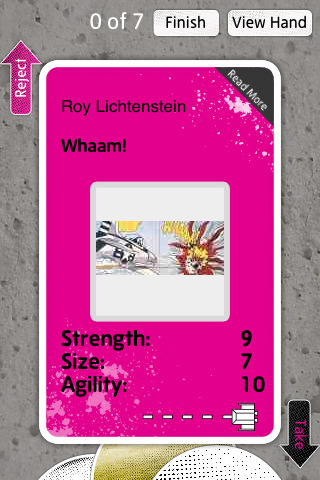 It’s no secret that there are apps for everything and art museums are no exception. The Mattress Factory lets you ask is this art and subsequently allows you to answer that question. The Andy Warhol Museum lets you put yourself into a painting with their D.I.Y. POP app. The Tate Modern has Tate Trumps to let you battle your friends with works of art.
Yes, that’s right. Released in June of 2010, Tate Trumps is an application designed to increase viewer interaction with the works within the Tate Modern with a “bloody fight to the death”. Unlike the aforementioned apps, which allow users to interact with art anywhere, Tate Trumps only works within the confines of the Tate Modern.
It’s no secret that there are apps for everything and art museums are no exception. The Mattress Factory lets you ask is this art and subsequently allows you to answer that question. The Andy Warhol Museum lets you put yourself into a painting with their D.I.Y. POP app. The Tate Modern has Tate Trumps to let you battle your friends with works of art.
Yes, that’s right. Released in June of 2010, Tate Trumps is an application designed to increase viewer interaction with the works within the Tate Modern with a “bloody fight to the death”. Unlike the aforementioned apps, which allow users to interact with art anywhere, Tate Trumps only works within the confines of the Tate Modern.
Described as a “digital card game”, Tate Trumps is a free iPhone app for up to three players, which encourages users to travel the museum and collect points by looking at works of art. Players collect seven works of art and no work of art can be collected twice. A game of Tate Trumps has a minimum time requirement of a half hour, though there is no maximum time limit. Users meet up at the end of their adventure and play a game of trumps against each other, using the works of art they’ve accumulated.
Tate Trumps includes three modes. Battle Mode has users judge how useful a work of art would be in a fight, if it were to come to life. Players search for works of art that are exhilarating, menacing, or absurd in Mood Mode. The final mode, Collector, is for players that “wish they had a gallery of their own”, as they search for pieces that are famous, recently produced, or practical to house.
The viral video for Tate Trumps promises that “galleries will never be the same again”, which incites the question, do galleries need to change? Tate Trumps is a fun, light-hearted way to look at art with the intention of increasing viewer interactivity with the pieces. Does it accomplish this, or is this application trivializing the experience of the museum?
There aren’t any easy answers, and there may not be a right answer. I feel that Tate Trumps has strong potential to accomplish its goal of connecting the viewer with the works. The time limit and inability to repeat pieces in a game means that in a full game, players will spend at least a half hour looking at a minimum of twenty-one works of art. The different modes force the player into critically analyzing the works of art, on multiple levels. The idea of this application may not be appropriate for every museum setting, but could it work for you? Would you play an app game in an art museum?
(Photo: Screenshot from Tate Trumps)
Leveraging the Virtual and the Real
The art world is experiencing a virtual boom. A boom that began with the advent of the street view technology used by Google, which has now forayed into the world of art. Within the last two years, the Google Art Project has photographed, digitized, scaled, and organized some of the most famous artworks in renowned galleries and museums such as the Tate, the Uffizi Gallery, and the Palace of Versailles. Moreover, this digitization of famous artworks is not any mere reproduction; rather it is a reproduction of the grandest or perhaps the smallest of scales: gigapixel images.

Photograph by Amantini Stefano/4Corners Images
This technology has revolutionized the way we interact with art even though it can in no way be deemed an equal alternative to the real experience. The digitization of museums and galleries has captured their tangible and physical aspects, but not their essence. A visit to the Palace of Versailles will never compare to visiting a website. So the question begs to be asked whether this virtual experience guides, develops, and enhances our real experience. Does the virtual help the real? And what can arts organizations gain from this insight?

Detail from Sandro Botticelli’s Birth of Venus (from the Uffizi Gallery, Florence)
A visitor recently set off an alarm, a really loud alarm, in a museum in Basel when she got too close to an artwork. This encounter illustrates how a public viewing experience within the confines of a gallery or a museum can act as a barrier. More often than not, we are afraid to get too close to painting, even though we want to (with the exception of the aforementioned visitor, of course). We also feel the need to constantly move from one painting to the next until we reach a point of complete and utter visual saturation, perhaps even visual exhaustion.
In the virtual confines of the Google Art Project, we can get eerily yet brilliantly close to our favorite artworks on our very own laptops. We can see details that could not have been physically possible under any circumstances in a museum setting. We can also pause for as long we please and we can leave and return as we please. On a whole, a virtual art world as powerful as that of the Google Art Project enriches and builds upon our real experiences.
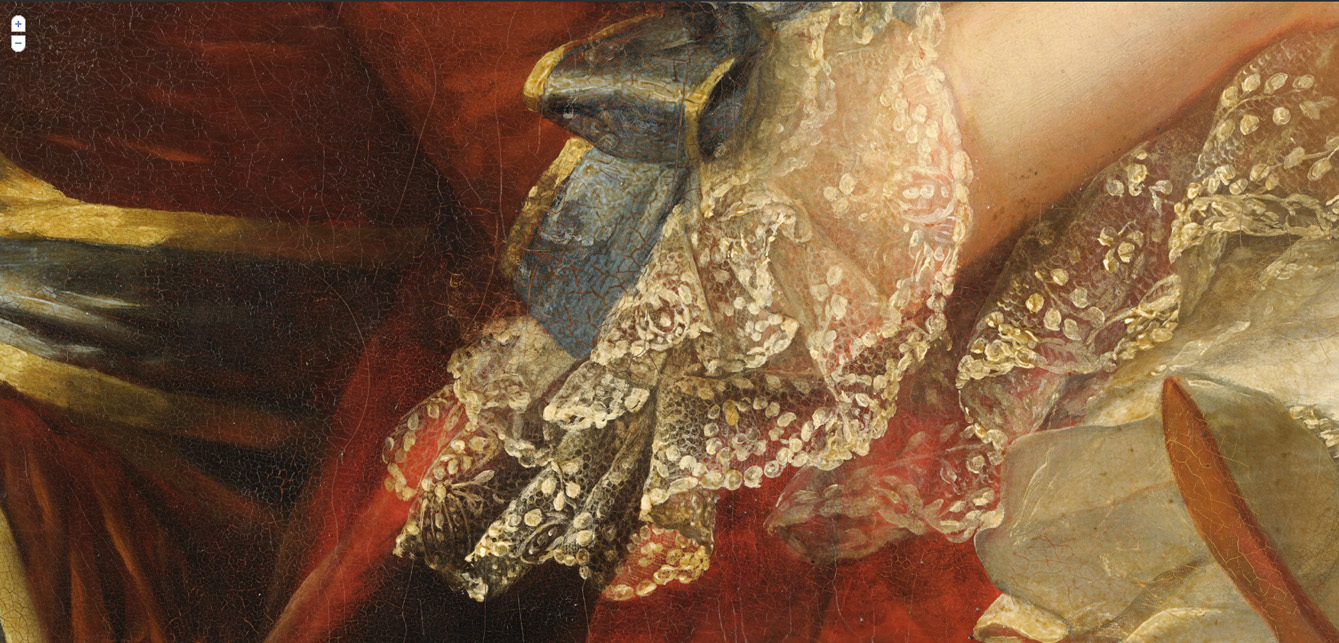
Detail from Louise Elisabeth Vigée-Lebrun’s Marie-Antoinette de Lorraine-Habsbourg, Queen of France, and her children (from the Palace of Versailles)
Yet, however exquisite and detailed the world of the Google Art Project may be, unlike the masterpieces it virtually showcases, it cannot boast of having attained perfection. An article in the Daily Beast highlights the fact that while the Google Art Project has enabled us to view artworks in a manner that is unprecedented, it is not clear whether we are seeing better.
In the same vein of thought, the author of a blog post in Freize argues that by bringing us closer to works of a bygone era, such as Caspar David Friedrich’s The Monk by the Sea, the Google Art Project has ignored the dynamism of the art world, where the concept of a masterpiece and the artist genius are constantly evolving. The post also mentions how Google is guilty of not explaining to us why certain artworks were, and still continue to be, worthy of the title of a masterpiece.
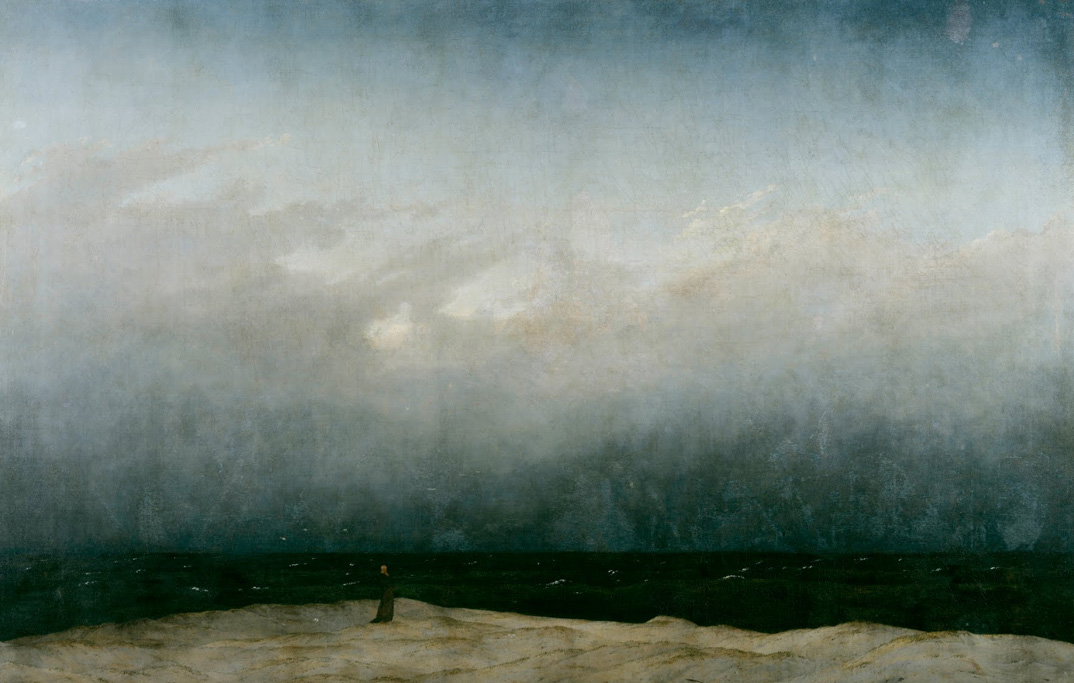
The Monk by the Sea, Caspar David Friedrich (from the Alte Nationalgalerie, Berlin)
For arts organizations looking to create a virtual experience, let’s analyze the advantages and the disadvantages. A virtual experience can create a longing and desire for a real, physical experience. The aforementioned article in the Daily Beast provides an interesting insight from the Director of MoMA about virtual outreach: the virtual presence and proliferation of art works housed at the MoMA actually compelled the true lovers of art to seek out the real. Consequently, the MoMA has had a twofold increase in attendance over the last ten years.
Another big advantage is increased accessibility to audiences around the world. But accessibility alone is not adequate and arts organizations should be wary of becoming just another collection of images on the World Wide Web. The aim is to educate people and generate interest, not pander to their aesthetic appetites. A virtual experience that is no different from a collection of images limits the potential of technology as a vehicle for education, discussion, thought, and reflection. Thus, arts organizations should look further than the potential of the online world as a visual cache because only then will they truly be able to leverage the virtual and the real.
Steve Jobs: The Epitome of the Arts and Technology Intersection
From Six Degrees of Separation to Art.sy
 Whether your goal is to start an art collection, expand your collection, discover a new artist, or simply to keep up with everything there is to know about your friends on Facebook, the soon-to-go-live startup website Art.sy is worth a look.
So you want to be an art collector? You have been thinking about purchasing your first piece of artwork (and I do not mean the Starry Night print you purchased from poster.com…), but you do not know where, when, why, how much, what, or how to proceed. Maybe you are a veteran collector, for profit or not, and are looking to expand your collection. Let Art.sy do the work for you.
Whether your goal is to start an art collection, expand your collection, discover a new artist, or simply to keep up with everything there is to know about your friends on Facebook, the soon-to-go-live startup website Art.sy is worth a look.
So you want to be an art collector? You have been thinking about purchasing your first piece of artwork (and I do not mean the Starry Night print you purchased from poster.com…), but you do not know where, when, why, how much, what, or how to proceed. Maybe you are a veteran collector, for profit or not, and are looking to expand your collection. Let Art.sy do the work for you.
Created by Carter Cleveland, a Princeton University computer science engineer, and backed by a handful of today’s most influential players in the social media, fine arts, and technology industries, Art.sy is the newest and potentially most powerful addition to a collector’s and artist’s networking toolkit. Don’t believe me? Maybe you’ll believe some of its investors and advisers including the CEO of Google, Eric Schmidt, Twitter creator, Jack Dorsey, the owner of Gagosian Gallaries, Larry Gagosian, former executive at Christie’s Auction House, Sebastian Cwilich, and the CEO of Pandora, Joe Kennedy, just to name a few. If you are a new, online startup, it is safe to say THOSE are the names you want associated with your project. So now that we have established just how popular Art.sy is among the big wigs in the industry, let’s figure out why.
If you have ever used Pandora to search for a song or musician, you are already familiar with “genome technology” and how Art.sy will perform. What differentiates Art.sy from the rest is the Art Genome Project. A simple search for a painting will return not just the desired title, but additional works of art related to the original search recommended for you by yours truly, Art.sy. Each work in the collection is classified by various characteristics such as asking price, genre, theme, colors, period and “ism” to connect it with other paintings in the database. A search for one painting will generate a list of paintings that share similar classifications, exposing users to artists and paintings they may not have been familiar with. Linking with Facebook and Twitter, Art.sy users can share their searches and discoveries with others, educating a wider audience and strengthening the presence of art online.
For example, a search for Max Ernst’s surrealist painting The Couple in Lace would return not only the painting itself, but information on Ernst, the painting, its location, paintings of other Dadaists and Surrealists, paintings of couples by other artists, and paintings whose creators were influenced by the work and style of Ernst. Note well, Art.sy is geared more toward lesser-known and on-the-rise artists (sorry, Ernst) because its users are likely to be beginner collectors with smaller price ranges.
For each work of art, Art.sy will provide the specifics for contacting the gallery or the artist (where possible) to begin a conversation and facilitate a purchase. Making collectors of those who previously could not or did not know where to begin is just the beginning of what Art.sy has to offer us.
Since its initial launch last November, hype has only grown. The collection itself is still in development and has yet to go live, but you can visit its website to register for your official invitation to join what could be the most extravagantly marketed and led, online network making fine art accessible to the masses. Will you RVSP?
Protect Your Digital Images Online: Methods for Controlling Your Intellectual Visual Property
“We Are More Often Treacherous Through Weakness Than Through Calculation.” -Francois De La Rochefoucauld
It is my intuitive belief that most theft of images happens online because it is really, really easy. Indeed, this isn’t the first and it won’t be the last article on the Internet about preventing people from stealing your visual images. The only real way of guaranteeing that no one steals the digital copies of your artwork is to not put it up. This, however, is n
ot necessarily a viable option for those interested in reaching an audience in the information age.
The following are a few simple ways to make it more difficult for others to copy your images.
1) Disable right click on images Code in commands to disable right click on images or <body oncontextmenu="return false;"> You will circumvent a good portion of casual illegal copying your images.
Pros: Easy, fast to implement Cons: Doesn’t block other common types of theft.
2) Digital watermarking Enter this term to any search engine for vendors who can help you acquire these services. They vary from simply imposing a subtle image onto your work once it is copied to embedded code that helps you track usage of your image whenever and wherever it is used.
Pros: You can embed visual trails back to your home website and boost your traffic, helps prevent people from passing off images (once they are stolen) as their own, and relatively fast to implement. Cons: The software will cost money and take time to implement. The watermarks are superimposed on your images and can detract from their impact.
3) Copy protection software Type ‘Copy Protection’ into your search engine and numerous software products will turn up for a variety of price points.
Pros: Copy protection software can be quite sophisticated and can dissuade a great majority of the population from coping your images. Cons: The software will cost money and take time to implement.
4) Adobe Flash Images in an Adobe Flash slide-show are much harder to copy.
Pros: You maintain quality, Flash is nifty Cons: Not everyone has Flash on their computer. People can still take screen shots. If you don’t know flash it will cost you money to implement through a designer.
Protecting intellectual property is also a matter of law and a serious one at that. For more information, legal information, please consult with a intellectual property attorney. Most states have pro-bono service organizations for artists. Simply enter in “lawyers for the arts <your state name>” into your search engine and you will be well on your way. For more general information about copyright law I would suggest you review a few more nifty articles about protecting your intellectual property.
(Photo: CC by Horia Varlan)
Protecting Federal Funding for the Arts
In Washington, an era of budget austerity and renewed calls for less government spending have led to increased fears that the arts, long protected from budget cuts, will see its federal funding further decreased for the coming fiscal year.

While Congress has passed several temporary budget measures this year, the most recent continuing resolution ends on November 18th, when the government is set to run out of money. Under the terms of the recent debt-ceiling deal reached by both parties, Congress has committed to cutting $21 billion in spending from the Fiscal Year 2012 budget, and it is widely expected that the bulk of these cuts will come from what’s referred to as “non-defense discretionary spending,” which includes areas such as education, infrastructure, and most pertinent to our community, the arts.
The arts community went through a similar struggle last year, when the National Endowment for the Arts saw its Fiscal Year 2011 funding reduced to $155 million, a $13 million reduction from the year before. For the upcoming fiscal year, the numbers look even worse: a bill passed by the House of Representatives in July would further cut FY2012 NEA funding to $135 million, which would represent a 13 percent decrease and the deepest cut to the agency in 16 years.
Despite the FY2012 budget being due next month, there is still a long way to go. President Obama has requested in his FY2012 budget proposal that the NEA be funded at $146 million, which represents a cut from the FY2011 figures, but is less severe than the House version that was passed in July.
With Congress returning to session this week, it’s important for us in the arts community to use technology to reach out to our members of Congress and ask them to support funding for the arts. There are a number of easy ways you can do this:
- First, contact your member of Congress, either by letter, e-mail or by phone. The easiest way to do this is through the Americans for the Arts website, where you can send a personalized letter to your Congressman and U.S. Senators that includes several talking points about the impact that arts funding has on our communities and nation as a whole.
- Second, join the Arts Action Fund, which is at the forefront of advocating and lobbying for increased funding for arts programs and education. It’s free, and is an invaluable resource providing updates on the efforts in Congress and around the country.
- Third, share the news with a friend on Facebook, Twitter or Google+. One way to do this is by following the Arts Action Fund’s Arts Vote 2012 campaign, dedicated to including arts and arts education issues in the 2012 political campaign. Search for #artsvote on Twitter for recent updates.
This isn’t the first time you’ve heard from Technology in the Arts about lobbying Congress to protect arts funding, and given the current political climate, it certainly won’t be the last. This is not a partisan issue, but is instead an issue that unites all of us who are passionate about the arts community and protecting funding for the next generation of artists and performers.
While the long-term budget deficit is something that we can all agree needs to be dealt with, doing so on the backs of such groups as the National Endowment for the Arts and the National Endowment for the Humanities will only serve to further decimate arts education programs at the state and local levels that have already endured painful budget cuts in recent years.
In the newfound era of budget austerity in Washington, any assumptions we had about federal arts funding being kept at past levels are gone. In order to protect the future of arts funding, the fight starts now.
(Photo: CC by kevin dooley)
Six Ways to Improve How Your Arts Organization Uses Google Analytics
Guest blogger Erik Gensler is the President of Capacity Interactive, a digital marketing consulting firm for performing arts orgs. This fall Capacity Interactive is hosting the inaugural Digital Marketing Boot Camp for Arts Marketers, a 2-day conference October 20-21 in NYC. Conference topics include email marketing, online advertising, fundraising, social media, and the topic of this blog post, website analytics. More information at http://www.dmbootcamp4arts.com
 If you sell tickets or accept donations on your website, you are, at least in part, an ecommerce company. And like ecommerce companies do, you must pay attention to your web analytics. This becomes even more important as the percentage of overall ticket sales and donations on your website grows, as it most likely does each year. How can you improve your website if you do not measure? Or if your measurement is not accurate or complete?
Most performing arts organizations have a Google Analytics account. For many orgs, it was probably set up by the vendor who built your website. Often the Google Analytics code was added as an afterthought to the site and not really integrated into the site build. You have a powerful tool at your fingertips, so why not make the most of it and set it up to provide you with the most useful and accurate information?
For organizations that really want to get a grip on understanding their online traffic and trends, here are six ways to improve you use Google Analytics.
1.) Configure Goals to track important pages and user behavior
What are the goals of your website? For most arts orgs, goals include: selling tickets, raising money, engaging patrons, and providing information about programming and services. You can configure Google Analytics (hereafter, “GA”) to measure these goals for you. If your goal is user engagement, for example, you can set up GA to track the percentage of visitors who spend more than a certain number of minutes on your site, or view more than a certain number of pages, or sign up for your email list. (Wouldn’t it be great to know the percentage of users that sign up for your email list? Or spend more than 3 minutes looking through your offerings? Or visit key pages?)
Technologically, goals are very easy to set up. The only tricky part is if your goals involve Flash. GA can not measure Flash actions (such as viewing a video on a Flash player) without some custom configuration.
See here for more details on setting up goals.
2.) Tag all emails and promotions with Google Analytics Tracking Code
For driving sales, email is still king. Many orgs still do not know how much money each email they send generates in sales and donations. How can you improve your emails if you can't track how successful they are in converting sales? In order for GA to track your emails you must tag each link in the email with a GA tracking code. If you do not tag the links, GA just sees each visitor that comes from an email as coming from the site where they received the email (e.g. Gmail, Hotmail, AOL). All your email traffic will be categorized by the email service provider they came from, making tracking difficult. The GA code appends the name of the email, say “October Newsletter” (source), to the fact that it came from an email (medium), with info about each particular link, say “Ticket Offer”, through a "campaign" variable.
So your email link will look like this:
http://www.MyOrganizationsSite.com/?utm_source=October_Newsletter&utm_medium=Email&utm_campaign=Ticket_Offer
You can build your links through this handy tool here.
In addition to tagging emails, you should tag all promotions and ads on third-party sites. This way, you can differentiate the traffic from the promotion versus organic traffic on that site. For example, if you are placing ads on Facebook, make sure to label the medium as “CPC.” If you don't do this, GA will not be able to differentiate your ads from organic Facebook referrals.
Finally, in order to track the dollars generated from each email you must also have ecommerce tracking set up.
3.) Set up ecommerce tracking if you accept donations or sell tickets online
The benefit of ecommerce tracking is that it ties users’ behavior to sales. Once set up, any other metric that GA measures can be tied to resulting sales, so you can see, for example, which traffic sources are sending you users that purchase tickets or donate. You can also see what pages of your site are most valuable, what geographies are most valuable, and how much money your last email, promotion, or ad generated. This will equip you to make better marketing decisions.
Setting up the tracking requires some knowledge and technical know-how. A programmer must have access to your site's "thank you" page where they can pull in the summary of any sale. This is relatively simple if the ecommerce is on your site. It gets a little trickier if your sales occur on a third- party site. See here for more details on setting up ecommerce tracking.
4.) Set up automatic reports to send to key stakeholders
If you were a large corporation you'd have the resources to have someone research and pull custom reports to share with stakeholders each week, but most arts orgs don't have the manpower to spare. Luckily you can configure GA to send custom reports to stakeholders at any duration (daily, weekly, monthly). You can send different reports to various stakeholders depending on their role within the organization and interests.
For example, the person who manages your online shop may want to see a weekly report on the keywords that are driving visits and sales to the shop. Your marketing director may want to see the dollars generated by your emails each week and the top sources driving site traffic. You can set all of these up and have them automatically send to each user. This tool can be found under "Custom Reports" on the left margin of your GA dashboard on the current version, or on the top menu of the new GA interface.
5.) Schedule regular meetings to review site performance
In order for any of your GA efforts to be successful, you should work to develop a "culture of analytics" at your organization. Create a cross-departmental committee that meets regularly to discuss your site's performance. Select one person to chair this committee. The more streamlined GA information you can provide to the committee the more useful these meetings will become. After just a few meetings, users throughout your organization will be reaching out to you to help them answer questions about website performance. As more and more sales and donations move to your site, these meetings will become even more important.
6.) Filter out your internal IP addresses
No doubt the staff of your organization visits your website many times during a typical work day. You can filter this traffic out. Within the analytics settings, go to "Filter Manager" and enter your IP address or IP range. (You can find your IP address at www.IPChicken.com). This will block all internal traffic, which would otherwise skew your data.
These six items will help you collect and share more useful website analytic data. Ultimately, you will be able to better measure how your users are interacting with your site, and use this information to improve your digital marketing efforts.
When Disaster Strikes, are you ArtsReady?
 A year ago, we told you about ArtsReady, a program sponsored by SouthArts that provides tools for organizations to create crisis management plans. Now, SouthArts has unveiled a brand-new ArtsReady site with a step-by-step readiness assessment, task manager, and “battle buddies” system that will help your organization to protect its assets and continue operations no matter what fate throws your way.
Not Just for Natural Disasters
A year ago, we told you about ArtsReady, a program sponsored by SouthArts that provides tools for organizations to create crisis management plans. Now, SouthArts has unveiled a brand-new ArtsReady site with a step-by-step readiness assessment, task manager, and “battle buddies” system that will help your organization to protect its assets and continue operations no matter what fate throws your way.
Not Just for Natural Disasters
With their work with UC Berkeley and Fractured Atlas, the ArtsReady folks learned that you can’t have a separate plan for each emergency- instead, you need a protocol for any kind of crisis (what’s called all-hazard planning). These hazards can include incapacitation of a key staff member, a financial crisis, and of course a natural disaster. Malcolm White, executive director of the Mississippi Arts Commission explained in the webcast last Thursday that “It’s like dental floss, or insurance.” It’s boring, but necessary- and you’ll regret it if you don’t have it.
ArtsReady Features
- Assessment
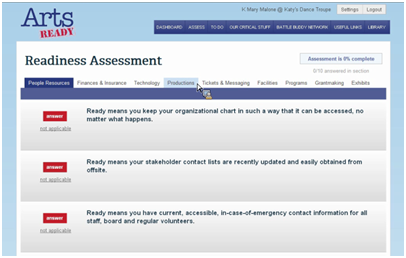
The readiness assessment quiz is designed to take less than an hour. It lets you determine which functions are most critical, and how prepared your organization is if they suddenly go offline.
- To-Do List
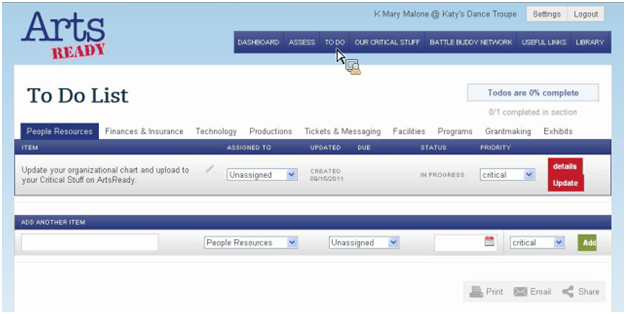
Based on the input into the readiness assessment, ArtsReady generates a list of things your organization must address to be prepared for an emergency. But it’s not just a list- you can assign tasks to staff members and track your progress. The software will send out reminders of due dates and can remind you to update your plan annually or semi-annually.
- Critical Stuff
Katy Malone, Arts Ready Project Manager, describes this feature as a “safe deposit box” for your organization. It’s cloud-based storage for your critical documents. Don’t worry- Fractured Atlas triple checked it for security and reliability.
- Battle Buddies
If it’s one thing artists and arts organizations have learned from Katrina, Hugo, the World Series Earthquake, flooding, and crazy tornadoes, it’s that disasters are bearable if you have somebody to help you out. The ArtsReady site will connect you with organizations near you so that you can build a relationship and eventually become Battle Buddies- pledging to lend a hand if the other needs help. If you do need to declare a crisis, you can choose how much information to share with whom, and you can track your progress towards gathering the needed resources online.

Membership
Anyone can sign up for a free basic membership, giving you access to the Readiness Library. It’s full of articles and step-by-step guides to help you design your all-hazard plan. (Go sign up now! You heard me say it’s free, right?) A premium membership, which gives you access to the four features mentioned above, is $300 a year ($500 for commercial organizations). Be aware, however, that if your membership lapses for more than a few months, you’ll no longer have access to the “critical stuff” you stored in the cloud.
A network like this is stronger and more useful the more users it has. Accordingly, SouthArts’ goal is to get every organization on this network. Let me repeat that- their goal is that 100% of artists and arts organizations will use this product. To that end, they are working with state and local arts agencies as well as sponsors to try to lower the cost for everyone.
If you’re not convinced it’s worth it, take a listen to our podcast with Hannah Leatherbury, former E-Services Manager for SouthArts, and check out the Green Paper on emergency preparedness published by the Craft Emergency Relief Fund and Artists’ Emergency Resources last year.
Last.fm: Translating Digital Audiences into Live Audiences
 Recently I was chatting with someone I’d just met about classical music. We exchanged favorite composers, and then I asked him about the last time he went to a symphony concert. “Actually . . . I don’t know if I’ve ever been to one. It just doesn’t occur to me to go.”
It got me thinking- how many people out there love listening Tchaikovsky or Beethoven on their mp3 players but don’t know the first thing about finding a live music concert featuring their favorite composers or pieces of music? It goes for other genres too, like jazz and folk, especially for artists and presenters that can’t afford to saturate the mass media.
Recently I was chatting with someone I’d just met about classical music. We exchanged favorite composers, and then I asked him about the last time he went to a symphony concert. “Actually . . . I don’t know if I’ve ever been to one. It just doesn’t occur to me to go.”
It got me thinking- how many people out there love listening Tchaikovsky or Beethoven on their mp3 players but don’t know the first thing about finding a live music concert featuring their favorite composers or pieces of music? It goes for other genres too, like jazz and folk, especially for artists and presenters that can’t afford to saturate the mass media.
There are a few different services that suggest live concerts based on your existing music library and listening habits, and Songkick and last.fm are the most prominent. I also just discovered GigZme, which shows you all the concerts coming up in your area on a map, separated by genre (but they leave out country, jazz, classical, and folk- what’s up with that, GigZme?).
Songkick’s database isn’t set up to handle classical music, where “artist” can refer to any number of people (Composer? Conductor? Ensemble? Soloist?) and “track” titles are either ridiculously long (String Quartet in G Minor No. 10 Op. 90, Movement 1: Anime et tres decide) or completely unhelpful (Allegro). Songkick does, however, automatically import concerts from last.fm, so you don’t have to enter concerts into Songkick if you don’t want.
Last.fm, on the other hand, is much more suited to classical music, with artist pages for composers long dead. If a composer is tagged as being an artist in a concert, however, this has the comedic effect of advertising that the he or she is “on tour”.
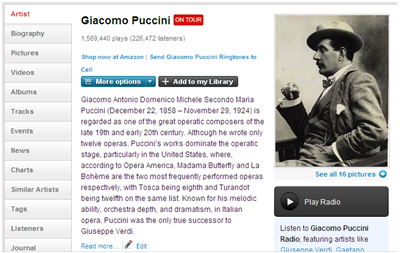
The nice thing about entering concerts into the last.fm database is that you can tag not only artists, but albums and works, and sometimes you can embed previews of the music, all within the last.fm site by using simple buttons at the bottom of the editing page. That way, if someone has Puccini in their library, or has made the track “O Mio Babbino Caro” one of their “favorites,” a concert featuring Puccini will show up on their recommended events.
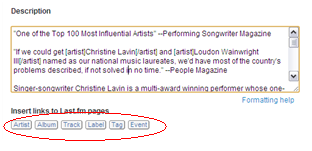
After entering both symphonic concerts and folk concerts into last.fm (anyone can add an event), I found it much easier to input the folk concerts. It’s very simple to embed previews for songs and links to albums because the names of the songs and albums don’t change. For classical music, however, it was much harder to dig through all of the tracks for a certain composer to find the right one I wanted to preview (because of the data inconsistently mentioned above). I found it easier to embed YouTube links to performances of the pieces. It was simple to tag the artists and composers, though. In the end, last.fm might be easier and more useful for orchestras’ pop concerts rather than their all-classical or “masterworks” shows, even though it’s doable for both.
No one wants one more site that they have to list all their concerts on. Believe me, I’ve spent enough time interning, I understand! But services like last.fm, unlike most events listing sites, can link your organization to existing fans of the artists you present. I think it’s worth it- why not try it out?
Remembering 9/11 in Art
 As we prepare for this memorial weekend, Tech in the Arts rounded up a few highlights of events taking place in commemoration of the September 11th attacks.
WNYC's Guide to 9/11 Arts Events
While this is an extensive and comprehensive guide to events in New York city, we pulled out a couple of particularly interesting ones relating to technology:
This exhibition space will begin with blank walls. Over the course of two weeks, six artists will fill the walls with crowdsourced images, video projections and multimedia works reflecting what they believe are today's most pressing issues. The six artists are Wafaa Bilal, Melissa Harris, Stephen Mayes, Joel Meyerowitz, Fred Ritchin and Deborah Willis. The gallery will blog and tweet what comes out of the show online (hashtag: #whatmattersnow). Opens on Sept. 7, in Manhattan.
- 9/11 Memorial
If you can't make it to the memorial, you can preview it here. On the site, there's an interactive timeline, as well as information about a "100 stories app" that uses augmented reality to superimpose the towers onto Manhattan's skyline.
The September 11 Digital Archive
This site offers stories, emails, photos, and interviews mainly from visitors to the site. Unfortunately many of the interviews are in typed form rather than video, but it offers a large repository of information about people's reactions to the attacks.
9/11 Arts Project
A collaboration of artists, social activists, non-profits and interfaith groups in the greater Washington metropolitan area that explores individual, community, and global healing ten years after 9/11.
Follow #911art to be informed of the latest events in this festival of activities that began in August and will continue to September 15. Events include the charity concert, screenings of documentaries, live theater, speakers, and more.
Shanksville and Flight 93
The National Flight 93 Memorial will be dedicated on Sunday in Shanksville, PA. Yahoo! News has published a very interesting interview with architect Paul Murdoch about the challenges of designing in a remote area and of the controversies and difficulties in designing a public art piece for a nation.
Google Resources for Arts Nonprofits
 A lot of people search for “google arts grants” and end up at our site -- in particular, this article. The problem is, Google doesn’t really do arts grants (sorry!) -- no money to mount an exhibition, produce a new work, or do an educational program. Instead, they mostly give large grants to causes in developing countries, especially when they involve improving ways to manipulate data.
What Google will give your arts organization, however, are tools to help you accomplish your mission and do your job better. Some of these tools are free, and some of them are free if you are accepted into the Google for Nonprofits program (and available for a price if you’re not). Below is a list of most of them.
A lot of people search for “google arts grants” and end up at our site -- in particular, this article. The problem is, Google doesn’t really do arts grants (sorry!) -- no money to mount an exhibition, produce a new work, or do an educational program. Instead, they mostly give large grants to causes in developing countries, especially when they involve improving ways to manipulate data.
What Google will give your arts organization, however, are tools to help you accomplish your mission and do your job better. Some of these tools are free, and some of them are free if you are accepted into the Google for Nonprofits program (and available for a price if you’re not). Below is a list of most of them.
Free Tools from Google
The first thing you should do if you’re interested in free tips from Google is to subscribe to this blog. It will keep you updated on all the new (free) Google apps and tools, as well as announcements about benchmark studies and contests that Google sponsors.
 This is where you can view a bunch of short, easy to understand video tutorials about most of the tools listed in this post. You can check out how to set up Google Alerts to track mentions of your organization on the web. There’s a whole online classroom set up for Google AdWords (learning about it is free, but unless you get a grant, you’ll be paying for your AdWords). Also don’t miss Google Analytics - a free tool to track who visits your website, how much time they spend on which pages, and how deep visitors go into your site. (You can also check out the Google Analytics Bootcamp webinar David did this past spring).
- You Tube
Everybody knows about YouTube- but did you know that Google has provided some pretty nifty tips on how to get more hits on your videos and make them work for your organization? It’s true! There's advice on how to customize your channel, what content to post, and how to distribute that content. Video is the future, you guys.
Have you ever wondered if you could increase online donations or pageviews just by tweaking your website a little? Now you can find out. Website Optimizer is a free multi-variant testing tool. It shows different versions of your site to different people in order to test which version is best. You can set up different things you want to measure (overall visits? bounce rate? pageviews? amount of donations?), the different versions of your site, and Optimizer does the rest. Testing to the rescue!
Forms is basically like a combination of Doodle and Survey Monkey. You email a group of people a form, they enter their responses, and those responses are automatically entered into a Google Docs spreadsheet. Forms also provides a template that automatically generates charts to visualize your data. Busywork of entering responses into spreadsheets, be gone!
This is a tool that would be great for larger organizations, or for anyone who collaborates remotely. It would also be useful for teaching artists who need to communicate with their students. Google Sites allows you to set up your own website where you can share information, like photos, resumes, notes, and more. Of course, you could also do this with Google Docs, but this way you can customize it more and you don’t have to constantly email people to give them access.
Fusion Tables enables you to quickly and easily share data with others and then visualize that data using charts and graphs. The coolest thing about Fusion is its mapping capabilities. If any of your data involves a location, it will put those data points on a map. You can also set up the map to give different categories of data (number of performances, amount of grant money received, etc) different colors. This would be useful for arts agencies, any kind of touring, or education programs that target rural areas.
- Google Earth & Google Maps
 More geolocation tools to tell your story online! With My Maps on Google Maps you can create a map of places important to your organization (click on “My places” and then “Create Map”). Maybe it’s a public art walking tour, or a map of where your art is being displayed. You can add pictures, links, and more to the points on your map. You can also annotate locations on Google Earth using much the same method. More customization is available with Google Earth Pro, but unless you are a Google Grants recipient, that’ll cost you.
Not much to say- a free blogging website. There are lots of other resources out there about blogging, so I’ll just leave it at- it’s free!
From the website:
"Open Data Kit (ODK) is a free and open-source set of tools which help organizations author, field, and manage mobile data collection solutions. ODK provides an out-of-the-box solution for users to:
This seems like it’s primarily for developing countries and social services, but I could see it being useful for arts agencies, like if you’re collecting data on economic impact.
Paid Tools- free if you are in the Google for Nonprofits Program
 (By the way . . . if you’re dreading a huge grant application, don’t. The application is only one page and will take you all of five minutes).
- Google AdWords (Google Grants)
If you apply and are accepted into the Google Grants/Google for Nonprofits Program, you receive up to $10,000 of free AdWords advertising each month.
From the website: "Organizations that receive a Google Grant are awarded an in-kind online advertising account which can be used it in a variety of ways, including general outreach, fundraising activities, and recruitment of volunteers."
For more information about Google Grants, as well as a testimonial from an artist who was accepted, see Josh’s article from a few years ago (still relevant!).
While it’s free to upload videos to your own YouTube channel, when you’re in the Google for Nonprofits Program, you also get (according to the website):
- Premium branding capabilities and increased uploading capacity
- The option to drive fundraising through a Google Checkout "Donate" button
- Listing on the Nonprofit channels and the Nonprofit videos pages
- Ability to add a Call-to-action overlay on your videos to drive campaigns
 When an individual signs up with Google Checkout, Google saves their credit card information, making purchasing quick and easy. For vendors and charities, enrolling with Google Checkout means that you can have a simple one-click button for patrons to donate or buy. Again, this service is free if you’re in the Google for Nonprofits program, otherwise monthly sales under $3,000 cost 2.9% + $0.30 per transaction.
That’s some of the resources that Google provides to arts nonprofits. Have you used them? What has been your experience? Are there any others that our readers should know about? Share your comments below.
Streaming Options for Jazz Heads!
Last month, after releasing our report on Developing Jazz and Classical Audiences with Technology, NPR reported on findings from the ongoing Jazz Audiences Initiative project. Both studies have suggested that social networking sites and Internet music discovery tools often play a key role in developing younger audiences for jazz. With the recent U.S. launch of streaming service, Spotify, there has been much discussion about the usefulness and economic sustainability of 'On-Demand' platforms. While streaming content can be a powerful audience development tool, many are concerned that users are becoming more and more accustomed to free content. Today, I wanted to give a quick overview of three jazz specific presenting organizations and festivals who have launched 'streaming' and 'on-demand' platforms.
Smalls is one of New York's premiere jazz clubs, boasting full line-ups just about every night of the week. The club regularly streams concerts on its webpage from 7:30-closing time.
2. Newport Jazz Festival:
The Newport Jazz Festival has always been on the forefront when it comes to jazz festivals. This past year's festival was no different, as the lineup was mainly "anti-headliners", featuring many up-and-coming musicians. While the jazz festival hasn't been as successful in the past as its sister folk festival, founder George Wein continues to experiment and push the boundaries. Both the jazz and folk festivals were live streamed and archived. The complete archive can be accessed at NPR's website.
3. The Checkout: Live from 92Y:
The Checkout is a new series created by Joshua Jackson, host of WBGO’s hour-long music magazine The Checkout, who is widely recognized as an unparalleled enthusiast for modern expressions in jazz. Curated by Jackson in conjunction with 92YTribeca, The Checkout: Live features some of the most exciting and innovative players on the NYC scene for monthly concerts that will are broadcast live on WBGO as well as streamed on WBGO.org. Portions will also be recorded for future broadcast and podcast as part of The Checkout. Performances are also archived at NPR.org/music. For a complete schedule of upcoming performances, please visit their website.
Winning Subject Lines to help Cultural Orgs Drive Up Open Rates
Guest blogger Erik Gensler is the President of Capacity Interactive, a digital marketing consulting firm for performing arts orgs. This fall Capacity Interactive is hosting the inaugural Digital Marketing Boot Camp for Arts Marketers, a 2-day conference October 20-21 in NYC. Conference topics include web analytics, online advertising, fundraising, social media, and the topic of this blog post, email marketing. More information www.dmbootcamp4arts.com.
 We've recently been doing a lot of client work around email strategy. And one topic of particular interest to clients is figuring out what types of subject lines drive users to open emails and take action.
We've looked through a lot of fundraising and ticket sales emails and found that the following factors help to increase open rates:
1.) Don't be vague
Many subject lines fail to clearly delineate what's included in the body of the email. An email must explain its contents. I often see email subject lines that are very vague like this one:
Become a member today
Most people receiving your email may not even know what a membership to your organization means. In general, unless you are writing to a select group of constituents, you should assume your readers know very little or nothing about your offerings. Here is another vague subject line:
Join the music
You may think it is cute and pithy but what does this mean to a casual user? As a fundraiser for a music org it may mean a lot to you but to most readers this is very vague and therefore not effective.
2.) Make your offer feel like it is for VIPs by highlighting special benefits
The more special and exclusive an offer sounds, the more users will be intrigued to open it. If there are special privileges in your offer, highlight them in your subject line. Things like:
Receive the best seats in the house A limited number of xxx available VIP access to a rehearsal One Night Only event
We have found that subject lines that offer VIP benefits have higher open rates.
3.) Use a deadline
Create urgency by using a deadline. Tie the special offer to the deadline.
Receive x if you act by 10/15.
Just don't overdo this or it will seem like you are crying wolf...or are narrating a TV infomercial.
4.) Make it about the user, not about your organization
Here’s a poor subject line:
Give now to help us make our end of year goal
Why? Because this subject line is all about the organization. You need to flip it to make it about the user.
Here is a much better subject line about the user:
Support XXX by 8/15 and receive a limited-edition signed cast album
Another one all about the organization:
Come to XXX performance on 10/15
Think about WHY the user should come. What will they get out of it? Also use terms like your and you, (not us and our) to be more user-centric.
5.) If relevant, mention a high-profile celebrity
Like it or not, people are mad for celebrities. If you have a high-profile celebrity involved in your event or performance mention them in your subject. If you have a high-profile director or artistic director, experiment with emailing with their name as the sender. We see that this often lifts open rates.
6.) Cut every unnecessary word
Try to make your subject lines as short as possible. There is no magic length but generally shorter is better. Take a scalpel to your subject line and cut out every unnecessary word. Think through your subject line to see if there is a better way to construct it that may use fewer words.
The Arts - Unplugged?
 It’s summer, and many people are taking the opportunity to “unplug.” Some are checking into special unplugged hotel rooms (and even getting a discount if they turned in their electronic devices at the desk). Others are paying as much as $14,500 to check in to a clinic that would help them conquer their Internet addiction. Last March, GOOD and the Sabbath Manifesto promoted the National Day of Unplugging, where participants disconnected from the internet for 24 hours. All of this “unplugged” stuff got me thinking -- is the arts sector selling itself short as an “unplugged” venue?
Let me be clear -- I’m not saying that we shouldn’t plug in along with our audiences. It’s imperative that we be able to interact with them in the same way they interact with everyone else in their life -- digitally. And technology can do amazing things in the service of art (I write about it every week). But in our rush to adopt technology as a tool for interacting with our audiences, are we forgetting that it’s not the only tool? Are we stopping to ask the right questions about how technology (especially mobile technology) affects our audience’s experience of our art, both positive and negative? When the lights go down and the curtain goes up, should cell phones be stowed away?
One of the signature aspects of art and live performance is to get lost in “flow”— being fully and actively immersed in the art. Until we started to invite audiences to keep their smartphones on during performances, the concert hall used to be one of the last bastions of a distraction-free zone. The big question in the performing arts is, does mobile technology accessed during the performance enhance “flow” or distract from it?
Last year around this time there was an article in the New York Times about a group of scientists who went on a rafting trip to discuss (and experience) the effects of “unplugging” on the brain. After three days of an all-nature, no-tech diet, even the most skeptical of the group reported that they were all “more reflective, quieter, more focused on the surroundings.” By extension, does this mean that if we ask our audiences to “put away the gadgets,” as Martha Lavey is not afraid to insist upon, that they will be more reflective on the art in front of them, more focused on it? Of course, nature and art are two different things. Nature, as viewed by the scientists on the trip, was seen as relaxing, something to soothe the mind, to minimize distractions. We like to view our art as stimulating to the mind.
I’d guess our audiences probably experience both ends of this spectrum (and all the places in between). There are probably those who would appreciate being able to view the performance without distraction -- these are the kinds of people who liked this video from the Alamo Drafthouse (be warned, the video contains obscene language from the patron calling the Drafthouse). But then there are people who expect to be able to check their email during the show. And there are yet others who want to use their cell phones to participate in the show, be it live tweeting, voting on the next piece to be performed, or just checking in. So who do we try to please? And which way leads to the most meaningful experience?
I think that experimentation in this area would remove much of the mystery. If your company believes that your shows are more meaningful with mobile interactive technology, embrace it. See what happens, and share the results. Likewise, if your organization is convinced that mobile technology detracts from the audience experience, enforce your decision and embrace it. Maybe try giving a discount, like the hotels do. Position your shows as an escape from distractions and interruptions. See what happens and share the reactions with your colleagues. While it’s foolish to pretend this technology doesn’t exist, it’s something else entirely to reject it for a reason. But either way- make a decision, commit, enforce, evaluate. Then, possibly, revise.
What have been your experiences with mobile technology and both performing and visual arts?
*Photo Credit: Christopher Chan